Add a Classifieds Marketplace to Your WooCommerce Store


Why Classifieds Belong on Your WooCommerce Store
There is a reason Craigslist and Facebook Marketplace remain some of the stickiest destinations on the internet, alongside upstarts like OfferUp. People love to browse and buy locally, and just as many love to sell that way. The classified ad format, simple listings grouped by category and location, is one of the oldest monetization models on the web, and it still works.
If you already run a WooCommerce store, you are sitting on the infrastructure to build your own classifieds marketplace. You have user accounts and payment processing already built. You also have product taxonomies and a content management system that can handle thousands of listings. The missing piece is a plugin that bridges the gap between a product catalog and a user-submitted classifieds board.
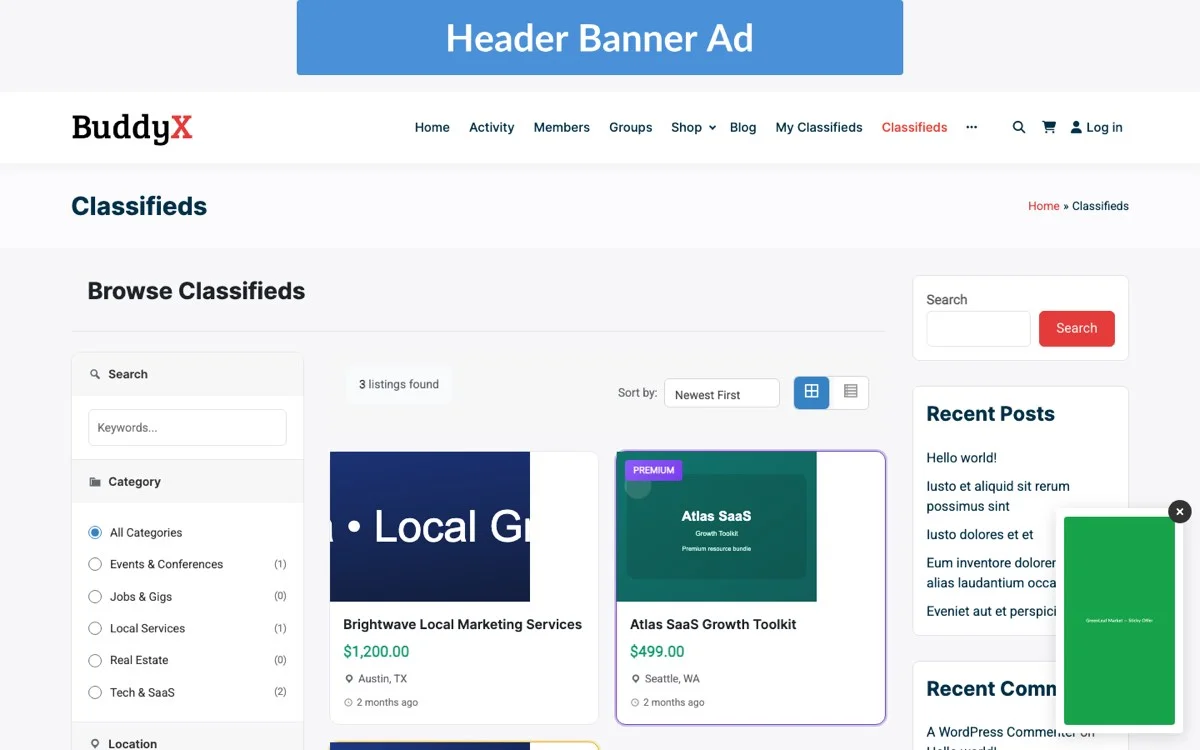
That is where WB Ad Manager Pro comes in. It adds a full classifieds module to WordPress, letting registered users submit listings through a front-end form and browse ads by category and location. Premium placements get paid for right there too, all processed through your existing WooCommerce checkout.
In this guide, we will walk through every step: setting up categories and locations, configuring the listing submission flow, monetizing with featured and bump upgrades, integrating payments, and keeping submissions clean with moderation tools. We will also cover the setup mistakes that trip up most first-time marketplace owners, and answer the practical questions that come up once real listings start flowing in.
The Business Case for a Classifieds Section
Before diving into configuration, it is worth understanding why adding classifieds to an existing WooCommerce store is a strong strategic move.
User-Generated Content Drives Organic Traffic
Every classified listing your users publish becomes a new indexed page on your site. A marketplace with 500 active listings is generating 500 long-tail keyword pages that you did not have to write. When someone searches for “used mountain bike in Denver” and your classifieds board has a matching listing, that is free organic traffic landing on your domain.
This compounds in a way product pages rarely do. A product page describes one SKU, written once, updated occasionally. A classifieds board generates a fresh page every time a user hits submit, each with its own mix of location and category, plus description language nobody on your team had to write. Multiply that by a few hundred active sellers and your indexed footprint grows without a content calendar behind it.
Recurring Revenue Without Inventory
Unlike selling physical products, a classifieds marketplace does not require you to hold inventory or manage shipping, and there are no returns to handle. Your revenue comes from listing fees plus featured upgrades and bump renewals. The margins are close to 100% because you are selling visibility, not goods.
No warehouse. No returns desk. No shipping carrier disputes.
Community Engagement and Retention
A classifieds section gives users a reason to return to your site daily. Buyers check for new deals. Sellers monitor their listings and renew featured placements. This repeat engagement increases the lifetime value of every registered user and creates cross-selling opportunities for your core WooCommerce products.
Lower Customer Acquisition Cost
Marketplaces benefit from network effects. More listings attract more buyers, which attracts more sellers. Once you hit critical mass in your niche, the marketplace begins to grow organically without proportional increases in marketing spend.
Getting to that point is the hard part, and it rarely happens on its own. You typically need a seed population of listings before organic growth kicks in. More on that below.
Setting Up Categories and Locations
The foundation of any classifieds marketplace is its taxonomy structure. Users need to find what they are looking for quickly, and that means well-organized categories and location filters.
Designing Your Category Hierarchy
Start broad, then go specific. A general classifieds board might use top-level categories like Vehicles, Electronics, Home and Garden, Jobs, Services, and Real Estate. Under each top-level category, create subcategories that match the way your audience thinks about these items.
For example, under Vehicles you might have Cars, Trucks, Motorcycles, Boats, and Parts and Accessories. Under Electronics: Computers, Phones, Gaming, Audio, and Cameras. The goal is to keep the depth to two or three levels at most. Deeper hierarchies confuse users and make the submission form unwieldy.
WB Ad Manager lets you create custom category taxonomies specifically for classifieds, separate from your WooCommerce product categories. This keeps your store catalog clean while giving your classifieds board its own organizational structure.
Location-Based Filtering
Location is critical for classifieds. Nobody wants to drive three hours to pick up a used couch. The plugin supports hierarchical locations that run from country down to state or province, then narrow to city, so users can drill down to their area.
You can pre-populate locations based on your target market. If you serve the United States, create state-level entries and let users specify their city in the listing details. For hyperlocal marketplaces, you might create neighborhood-level entries within a single metro area.
The location filter appears on the classifieds archive page, letting browsers narrow results by geography. Combined with category filters, users can quickly find “Electronics > Phones” listings in “Texas > Austin” with just two clicks.
The Listing Submission Flow
A smooth submission flow is the difference between a classifieds board that attracts listings and one that frustrates users into leaving. Here is how to configure each step.
Front-End Submission Form
WB Ad Manager provides a shortcode-based submission form that you can place on any page. The form collects the listing title, description, category, and location. Price and contact information round it out, along with a spot for images. You control which fields are required and which are optional.
Keep the form as short as possible for the initial submission. Required fields should be limited to title, category, description, and at least one image. Optional fields like price and condition, plus a contact phone number, let users add detail without creating a barrier to entry.
Every extra required field costs you completions. Watch your form abandonment rate once real traffic starts hitting the submission page. If people start the form and never finish it, the fix is usually fewer required fields, not a redesign.
Image Upload and Gallery
Classifieds listings live and die by their photos. The plugin supports multiple image uploads per listing, with configurable limits on file size and quantity. A good default is 5 to 10 images per listing with a 2MB per-file limit. This keeps your server storage manageable while giving sellers enough room to showcase their items.
Uploaded images are displayed as a gallery on the listing detail page, with the first image used as the thumbnail in category archive views. Consider enabling image compression on upload to keep page load times fast as your listing count grows.
User Registration and Guest Submissions
You have two options: require user registration before submitting a listing, or allow guest submissions with email verification. Registration is generally the better choice for moderation and accountability. It also gives you a user base you can market to later.
If you choose guest submissions, implement email verification so that every listing can be traced back to a real email address. This reduces spam and gives you a way to contact the submitter if there are issues with their listing.
Setup Mistakes That Sink New Marketplaces
Most classifieds boards do not fail because the software is broken. They fail because of a handful of predictable setup decisions made in the first week.
Charging for listings before you have any traffic. A brand-new marketplace with a $5 listing fee and zero buyers will sit empty. Sellers pay for reach, not for the privilege of posting. Launch free, prove there are buyers browsing, then introduce fees once sellers can see the payoff.
Too many categories, too few listings. If you launch with 40 categories and 12 listings, every category page looks abandoned. Start with a tight set of 8 to 12 categories that match what you actually expect to receive, and split them later once volume justifies it.
No moderation plan before launch day. Spam listings show up within hours of a public submission form going live, sometimes minutes. Decide your approval workflow before you announce the marketplace, not after the first scam listing gets reported by a confused user.
Skipping the empty-state design. A category page with zero listings and no message just looks broken. Add a friendly empty state that invites visitors to be the first to post, with a direct link to the submission form.
Ignoring mobile submission until after launch. Most sellers will try to list an item from their phone, camera roll open, standing next to the thing they are selling. If the image upload step fails on mobile Safari or Chrome, you lose that listing and possibly that seller for good.
Monetizing with Featured and Bump Upgrades
Free listings get your marketplace populated. Paid upgrades generate your revenue. The two most effective classifieds monetization tools are featured listings and bump-to-top renewals.
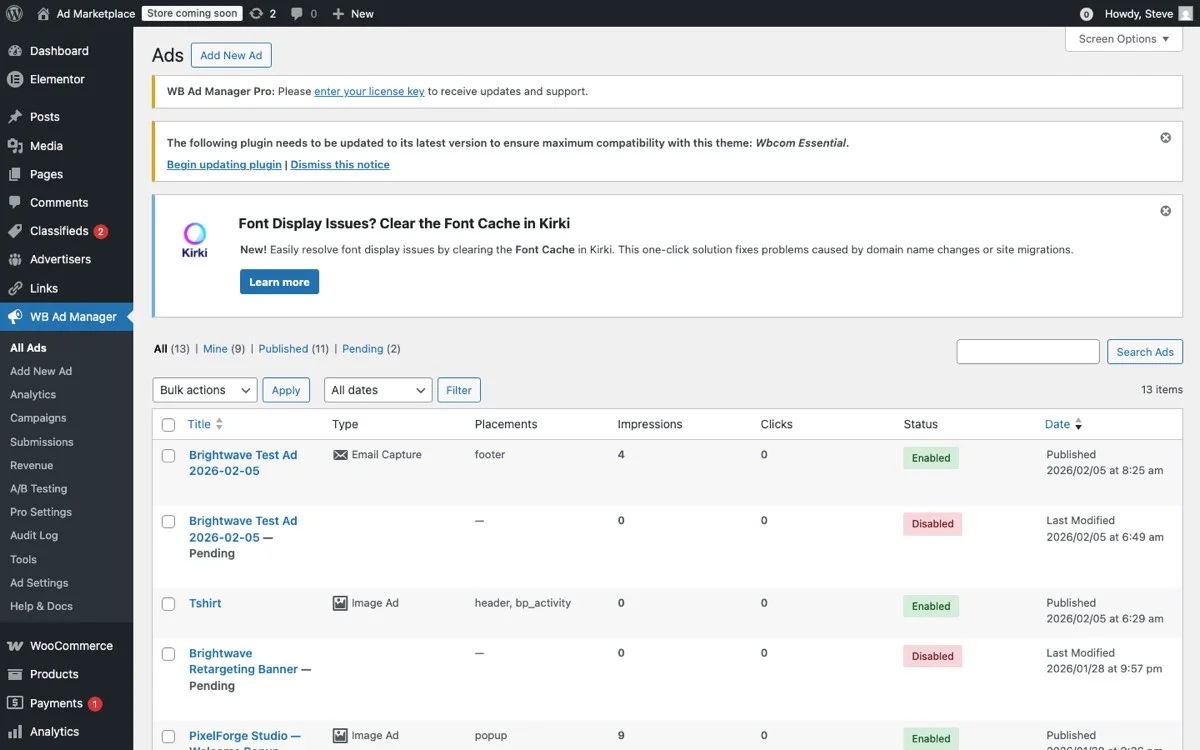
Admin panel showing all ads with types, placements, impressions, and status tracking
Featured Listings
A featured listing appears at the top of its category page and on the main classifieds archive, often with a highlighted background or a “Featured” badge. Sellers pay a premium to get this visibility, and it works because buyers see featured listings first.
Pricing featured listings requires balancing revenue with adoption. If you price too high, nobody buys. Too low, and every listing becomes featured, which defeats the purpose. A good starting point is 3 to 5 times the cost of a standard listing, or $5 to $15 per week for a featured spot.
WB Ad Manager lets you set featured listing durations, 7 days, 14 days, 30 days, and configure automatic expiration. When a featured period ends, the listing reverts to a standard placement, and the seller receives an email prompting them to renew.
Bump-to-Top Renewals
Older listings sink to the bottom of category pages as new listings are published. A bump renewal pushes a listing back to the top of its category, as if it were just posted. This is a lower-cost upgrade than featured placement, making it accessible to more sellers.
Bump pricing should be lower than featured pricing, typically $1 to $3 per bump. You can also offer bump packages: buy 5 bumps for the price of 4, for example. This encourages sellers to commit to keeping their listings active, which is good for marketplace liquidity.
Listing Fee Structures
Beyond featured and bump upgrades, you can charge for the base listing itself. Common fee structures include:
- Free with paid upgrades: Basic listings are free. Revenue comes from featured placement and bumps. Best for building volume quickly.
- Flat fee per listing: Every listing costs a fixed amount, such as $2 to $5. Simple to understand, predictable revenue.
- Tiered pricing by category: High-value categories like Vehicles and Real Estate charge more per listing than lower-value categories such as Clothing or Books.
- Subscription model: Sellers pay a monthly fee for unlimited listings. Works well for professional sellers and dealers.
WB Ad Manager supports all of these models through its pricing configuration. You can mix and match, for example, free listings in most categories with a flat fee for Vehicles and Real Estate.
Integrating WooCommerce Payments
One of the biggest advantages of building your classifieds marketplace on WooCommerce is payment integration. Every transaction, listing fees, featured upgrades, bump renewals, flows through your existing WooCommerce checkout.
Payment Gateway Compatibility
WB Ad Manager works with any WooCommerce-compatible payment gateway. That includes Stripe, PayPal, Square, and Authorize.Net. If your store already accepts payments, your classifieds marketplace will too, with zero additional gateway configuration.
For the best user experience, enable Stripe or PayPal Express Checkout so that sellers can complete payment without leaving your site. A one-click payment flow reduces cart abandonment and gets listings live faster.
WooCommerce Order Integration
Every classifieds purchase creates a standard WooCommerce order. This means you get full order history, email receipts, tax calculation, and refund capability through the same interface you use for your regular store products.
This integration also means classifieds revenue appears in your WooCommerce reports alongside product sales. You can track which upgrade types generate the most revenue and which categories drive the most paid listings. Trend lines over time come free with the same reports.
Coupon and Discount Support
Because classifieds purchases flow through WooCommerce, you can use WooCommerce coupons to offer discounts on listing fees and upgrades. This is useful for promotions like “First listing free” for new users, or seasonal discounts on bulk listing packages.
Moderating Submissions
An unmoderated classifieds board quickly becomes a spam wasteland. WB Ad Manager includes moderation tools that help you maintain listing quality without drowning in manual review work.

Pro Settings, configure classifieds categories, locations, submission rules, and upgrade pricing
Approval Queue
New listings can be set to “pending review” status, where they are held in a moderation queue until an admin approves them. This is the safest approach for new marketplaces where you have not yet established community norms.
As your marketplace matures and you identify trusted sellers, you can enable auto-approval for users with a certain number of approved listings or a certain account age. This reduces your moderation workload while maintaining quality.
Automated Content Filtering
Configure keyword filters to automatically flag or reject listings that contain prohibited terms. This catches obvious spam and policy violations before they hit the moderation queue. Common filters include profanity and competitor URLs, along with known scam phrases.
Reporting and Flagging
Enable user reporting so that buyers can flag suspicious listings. When a listing accumulates a certain number of flags, it is automatically removed from public view and placed back in the moderation queue. This crowdsourced moderation scales with your marketplace.
Listing Expiration
Set automatic expiration dates for listings, 30 days is a common default. Expired listings are archived and removed from public view. Sellers receive an email before expiration with the option to renew. This keeps your marketplace fresh and prevents it from filling up with stale, sold-out listings.
Optimizing the Classifieds Experience
Once the basics are in place, focus on optimizations that improve the user experience and increase marketplace activity.
Search and Filtering
Add a prominent search bar to your classifieds archive page. Users should be able to search by keyword and filter by category and location. Results should also sort by date or price and update in real time. The faster users find what they want, the more likely they are to convert.
Email Notifications
Configure email notifications for key events: listing approved, listing expiring soon, new message from a buyer, featured listing purchased. These notifications keep users engaged and bring them back to your site regularly.
Mobile Responsiveness
A significant percentage of classifieds browsing happens on mobile devices. Ensure your submission form and listing pages are fully responsive, and check archive pages too. Test the image upload flow on mobile, as this is where many form implementations break down.
SEO for Listings
Each listing should have a clean, descriptive URL slug based on the listing title. Category and location archive pages should have proper meta titles and descriptions. Add structured data markup for product listings where applicable, this can result in rich snippets in search results, showing price and availability directly in the SERP.
Scaling Your Classifieds Marketplace
As your marketplace grows, you will face new challenges around performance and moderation volume. Seller management gets harder too.
Performance Considerations
A marketplace with thousands of active listings needs proper caching and database optimization. Use a page caching plugin and enable object caching with Redis or Memcached. Make sure your database queries are indexed properly too. WB Ad Manager is built to scale, but your hosting infrastructure needs to keep pace.
Pay particular attention to the category and location archive pages once you pass a few thousand listings. These are the pages most likely to run unbounded queries if left on default settings. Confirm that listing counts are pulled with an indexed lookup rather than loading every row just to count them, and that archive pages paginate instead of rendering everything on one screen.
Building a Seller Community
Your most active sellers are your marketplace’s engine. Consider creating a seller dashboard where they can manage all their listings, view performance statistics (views, inquiries, sales), and access bulk listing tools. WB Ad Manager’s advertiser dashboard provides this functionality out of the box.
Cross-Promotion with Your Store
Use your classifieds marketplace to cross-promote your WooCommerce products. Display related products alongside classifieds listings. Offer store coupons to active marketplace sellers. This creates a flywheel where marketplace activity drives store revenue and vice versa.
Frequently Asked Questions
Do I need a separate WordPress install for classifieds, or can it live on my main store? It lives on your main store. WB Ad Manager Pro installs as a plugin alongside WooCommerce, using your existing theme and user accounts, right through to checkout. There is no separate install or subdomain required.
What happens to a listing’s payment if a seller’s item sells before their featured period ends? Nothing automatic happens to the payment itself, since featured placement is sold as a fixed-duration upgrade rather than a pay-per-sale fee. Most site owners let sellers manually mark a listing as sold, which removes it from active browse views while keeping the transaction record intact for your reports.
How much moderation time should I budget per week for a new marketplace? For the first month, budget 20 to 30 minutes a day if you are running an approval queue. That number drops fast once auto-approval kicks in for trusted sellers, usually within six to eight weeks for an actively used marketplace.
Can I limit classifieds to one category, like real estate or vehicles, instead of running a general board? Yes. Many of the most successful classifieds sections are niche-specific rather than general. Set up a single top-level category structure around your niche and skip the broad Craigslist-style layout entirely.
Will classifieds listings compete with my own WooCommerce products in search results? Generally no, because listings and products use different URL structures and target different long-tail search terms. If anything, classifieds pages tend to capture searches your product pages were never going to rank for.
Getting Started
Building a classifieds marketplace on WooCommerce is one of the most efficient ways to add a new revenue stream to an existing WordPress site. You already have the users and the payment processing. The content management infrastructure is already there too. All you need is the right plugin to bring it together.
WB Ad Manager Pro provides the complete classifieds toolkit: front-end submission forms, category and location taxonomies, featured and bump upgrades, WooCommerce payment integration, and moderation tools. Install it, configure your categories and pricing, then launch your marketplace.
Start with a free listing model to build volume, then introduce paid upgrades once you have enough traffic to make premium placements valuable. Focus on a specific niche or geography to build density quickly rather than trying to be everything to everyone from day one.
The classified ad model has been generating revenue since newspaper days. With WooCommerce and WB Ad Manager, you can run a modern version of it on your own domain, under your own brand, with your own rules.
Pick eight categories. Set your first listing free. Turn on the approval queue. Launch this week, not next quarter, because an empty marketplace with a launch date is worth nothing, and a rough one with three real listings already beats it.
Get WB Ad Manager Pro and launch your classifieds marketplace today.