10 Best Software for Writing a Book


I burned through four different writing apps before I found one that didn’t fight me. The first was too rigid, the second crashed every time I hit 40,000 words, the third wanted a monthly fee for a feature I used twice. That trial-and-error process taught me something most “best software” roundups skip: the right book writing tool depends less on features and more on how your brain actually works when you write.

Why the Right Software Matters for Writing a Book
Writing a book is more than just putting words on a page. It’s about structuring ideas, organizing chapters, and polishing a manuscript until it reads the way you intended. The right software simplifies these tasks, giving you tools to focus on the actual writing instead of fighting a clunky interface or losing track of which draft is the current one.
Book writing software also helps manage large projects through version control, character and plot tracking, and formatting exports built for specific publishing platforms. A novel manuscript and a nonfiction business book don’t need the same toolset, and neither does a first-time author compared to someone on their fifth release. The software you pick should match the shape of the project you’re actually working on, not just whatever showed up first in a search.
There’s also a practical cost side to this decision that’s easy to underestimate. A one-time purchase of $50 sounds expensive until you compare it against twelve months of a $20/month subscription you might not need after the manuscript is done. I’ve seen writers pay for tools for years after finishing a project simply because they forgot to cancel. Match the pricing model to how long you’ll actually need the software, not just to the launch-day discount.
Key Features to Look for in Book Writing Software
When selecting the best software for writing a book, weigh these features against your own writing habits rather than a generic checklist:
1. Distraction-Free Writing Mode: A clean, uncluttered interface helps you focus on getting words down instead of fiddling with toolbars. This matters more for first drafts than for editing passes, where you actually want more visible controls.
2. Outlining and Storyboarding Tools: Organize your plot, chapters, and scenes visually, which makes it easier to spot structural problems before they compound over 80,000 words. Pantsers (writers who don’t outline) may find this feature gets in the way rather than helping.
3. Research and Reference Integration: Some software lets you store notes, images, and reference material directly inside your project file, so you’re not alt-tabbing between six browser windows and a Word doc.
4. Formatting and Export Options: Look for tools that support multiple export formats (ePub, PDF, DOCX) and pre-built templates, since reformatting a 90,000-word manuscript by hand for KDP or IngramSpark is a miserable way to spend a weekend.
5. Collaboration and Sharing Features: If you’re working with co-authors, beta readers, or a professional editor, real-time collaboration and comment threads save an enormous amount of back-and-forth email.
6. Version Control and Backup: Automatic backups and version history protect months of work from a corrupted file or an accidental overwrite. This single feature has saved more manuscripts than any other item on this list.
Best Software for Writing a Book
1. Scrivener
Scrivener is the tool most long-form writers eventually land on, whether they start there or arrive after outgrowing something simpler. It treats a manuscript as a collection of movable pieces rather than one long scroll, which is the single biggest reason novelists and nonfiction authors with complex structures tend to prefer it. The corkboard view lets you rearrange chapters the way you’d rearrange index cards on a table, and the split-screen mode means you can reference chapter three while drafting chapter twelve.
Key Features
- Advanced organizational tools
- Corkboard and outlining views
- Split-screen editing
Pros
- Perfect for long-form writing
- Highly customizable workspace
- Excellent research integration
Cons
- Steep learning curve
- No real-time collaboration
2. Microsoft Word
Word is still the default a lot of publishing professionals expect to receive, which counts for something even if the app itself doesn’t feel purpose-built for books. Track changes remains the industry standard for editorial back-and-forth, and most literary agents and editors will ask for a .docx file regardless of what you actually drafted in. The tradeoff is that Word has no real concept of “chapters” as separate, reorderable units, so restructuring a manuscript means a lot of manual scrolling and cutting.
Key Features
- Robust formatting tools
- Track changes and comments
- Cross-platform compatibility
Pros
- Industry-standard
- Easy to use with extensive templates
- Strong editing tools
Cons
- Subscription required for full access
- Can be resource-heavy
3. Google Docs
Google Docs earns its spot here mostly because of what happens after the first draft. Beta readers can leave comments inline, co-authors can edit the same paragraph in real time without emailing files back and forth, and version history means you can always roll back to yesterday’s draft if today’s edits go sideways. It’s not built for structuring a 300-page manuscript, but for collaborative nonfiction projects or writers working with a developmental editor, it’s hard to beat.
Key Features
- Real-time collaboration
- Cloud-based access
- Auto-saving feature
Pros
- Free to use
- Great for collaborative projects
- Accessible from any device
Cons
- Limited offline capabilities
- Fewer advanced formatting options
Also Read: 10 Best Software to Write Up Data Analysis Reports
4. Ulysses
Ulysses strips writing down to text and structure, nothing else. There are no font choices to obsess over and no formatting decisions to procrastinate with, because everything is written in Markdown and styled only at export time. Writers who find themselves fiddling with margins instead of actually writing tend to do well here. The catch is that it’s locked to Apple’s ecosystem, so if you ever switch to a Windows machine, your workflow goes with it.
Key Features
- Distraction-free interface
- Markdown support
- Integrated library system
Pros
- Simple, clean design
- Syncs across Apple devices
- Ideal for minimalist writers
Cons
- Mac and iOS only
- Subscription-based
5. Scrivener for Windows
Windows users get nearly the full Scrivener experience, though a few polish details lag behind the Mac release by a version or two. The core value proposition is identical: a one-time purchase instead of a subscription, full outlining and corkboard tools, and enough project management depth to handle a trilogy without the files turning into chaos. If you’ve been eyeing Scrivener but run Windows exclusively, this isn’t a compromise so much as a slightly different flavor of the same tool.
Key Features
- Outlining and research tools
- Full-screen mode
- Project management
Pros
- Great for complex manuscripts
- Supports multiple document types
- Affordable one-time purchase
Cons
- Limited collaboration features
- Not as intuitive as Mac version
6. Final Draft
If your book is actually a screenplay, Final Draft isn’t really optional; it’s what studios, agents, and production companies expect to receive. The software auto-formats scene headings, dialogue, and action lines according to industry convention, which sounds minor until you’ve tried to hand-format a script in Word and watched every margin fall apart the moment you add a line. It’s expensive and it’s not built for prose, but for its specific use case it’s the closest thing this list has to an unavoidable choice.
Key Features
- Screenplay formatting
- Collaboration tools
- Story mapping
Pros
- Industry leader for screenwriters
- Real-time collaboration
- Auto-pagination
Cons
- Expensive
- Not ideal for prose writing
7. Reedsy Book Editor
Reedsy’s browser-based editor is aimed squarely at self-publishing authors who want a finished, distribution-ready file without paying a formatter. Type your manuscript (or paste it in), choose a template, and export a properly formatted ePub or print-ready PDF in a few clicks. It won’t replace a dedicated drafting tool for a 100,000-word novel, but as a free final step before uploading to KDP or IngramSpark, it removes one of the most annoying parts of self-publishing.
Key Features
- In-browser editor
- Built-in book formatting
- Export to ePub and PDF
Pros
- Free and easy to use
- Automatic book formatting
- Ideal for self-publishing
Cons
- Limited customization
- Requires internet access
8. yWriter
yWriter was built by a novelist for novelists, and it shows in the small, specific decisions baked into the interface: per-scene word count goals, a way to tag which point-of-view character owns each scene, and a simple database for tracking who’s who across a long cast list. The interface looks dated and there’s no real collaboration story, but it’s free, it works offline, and it’s genuinely good at the one job it was designed for.
Key Features
- Chapter and scene management
- Character and plot development tools
- Word count tracking
Pros
- Free to use
- Designed by a writer for writers
- Great for organizing complex plots
Cons
- Basic user interface
- No real-time collaboration
9. Atticus
Atticus combines drafting and formatting in one place, which is its main pitch: write the manuscript, then export it as a properly typeset print and ebook file without opening a second piece of software. It’s a one-time purchase rather than a subscription, and the interface leans modern and approachable compared to Scrivener’s denser toolset. It’s younger software, so some of the more advanced organizational features longtime Scrivener users expect are still catching up.
Key Features
- Book formatting tools
- Collaboration features
- Export to multiple formats
Pros
- Affordable one-time purchase
- Great for self-publishing authors
- Intuitive interface
Cons
- Limited to book writing
- Still developing new features
Also Read: 10 Best Software for Scheduling Squarespace
10. Hemingway Editor
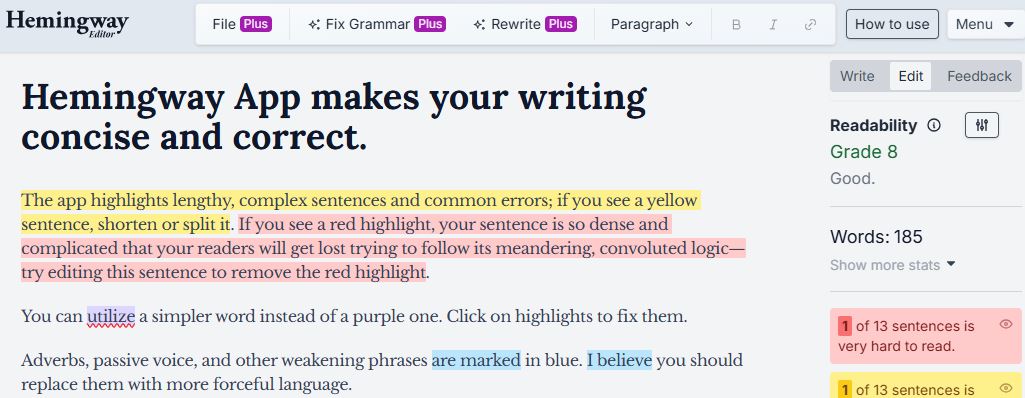
Hemingway Editor isn’t where you draft a book, it’s where you go after the draft exists and needs tightening. Paste in a chapter and it flags overly long sentences, passive voice, and adverbs you probably don’t need, scoring the whole thing for readability. It’s blunt and sometimes wrong about what actually needs fixing (some passive voice is a stylistic choice, not an error), but as a second pair of eyes for clarity, it catches things a tired writer misses on their fifth read-through.
Key Features
- Readability scoring
- Style suggestions
- Simple formatting options
Pros
- Great for editing clarity
- Easy to use and affordable
- Enhances concise writing
Cons
- Not a full writing tool
- Limited formatting features
Matching Software to Your Writing Process
Most people pick book writing software the way they pick a restaurant: whatever shows up first in a search, or whatever a friend mentioned once. A better approach starts with how you actually write.
If you outline extensively before drafting, Scrivener’s corkboard and outlining views will feel like they were built for you, because in a sense they were. If you’re a pantser who discovers the plot by writing it, that same structure can feel like busywork, and a simpler tool like Ulysses or even a plain Google Doc will get out of your way faster.
If you’re working with a co-author or a developmental editor who wants to comment inline, prioritize collaboration over organization; Google Docs will save you more time than Scrivener’s corkboard ever could. And if your manuscript is done and the only question left is getting it into a sellable ebook file, don’t buy a full drafting suite for that one task. Reedsy’s free formatter or Atticus’s export tools handle it without the extra cost.
Common Mistakes Writers Make When Choosing Software
The most common mistake is buying the most feature-rich tool available and assuming more features mean better output. Scrivener has enormous depth, but if you never use the corkboard, the split-screen view, or the compile templates, you’ve paid for (and are fighting through) complexity that doesn’t help you. A simpler tool used consistently beats a powerful one that intimidates you into procrastinating.
The second mistake is ignoring export requirements until the manuscript is finished. If you’re self-publishing on Amazon KDP, your file needs specific formatting for Kindle. If you’re querying agents, most still want a clean, standard-formatted .docx with no fancy styling. Check what your end format needs to look like before you pick a tool, not after you’ve written 80,000 words in something that can’t export it cleanly.
The third mistake is underestimating backups. A laptop theft, a corrupted file, or an accidental “select all, delete” can erase months of work if your only copy lives in one place. Whatever software you choose, confirm it has either cloud sync or automatic local backups, and don’t assume “I’ll set that up later”, set it up on day one.
What These Tools Actually Cost Over Time
Pricing models split roughly into two camps, and the difference matters more than it looks on the surface. Scrivener, Scrivener for Windows, and Atticus are one-time purchases, so the price you see is the price you pay, full stop, no matter how many years you keep using the software. Ulysses and Microsoft Word 365 are subscriptions, which feels cheaper month to month but adds up fast if you’re a slow writer working on a project across several years.
Google Docs, Reedsy Book Editor, and yWriter sit in the free tier, which is worth taking seriously rather than dismissing as “the cheap option.” None of them are missing anything essential for a working writer; they’re missing the polish and depth that heavier tools charge for. If you’re testing whether you’ll actually finish a manuscript before investing money in software, starting free removes one more excuse to stall.
Final Draft is the outlier on price, and that’s tied directly to its niche. Screenwriting is a smaller, higher-stakes market where studios and agents expect industry-standard formatting, so the software commands a premium price that wouldn’t make sense for a general fiction or nonfiction writer.
Best Software for Writing a Book at a Glance
| Software | Key Features | Pros | Cons |
|---|---|---|---|
| Scrivener | Outlining, corkboard, split-screen | Highly customizable, great for research | Steep learning curve |
| Microsoft Word | Formatting, track changes, templates | Easy to use, industry standard | Subscription-based, resource-heavy |
| Google Docs | Real-time collaboration, cloud access | Free, accessible anywhere | Limited offline features |
| Ulysses | Markdown, distraction-free, library | Clean design, syncs across Apple devices | Mac-only, subscription-based |
| Scrivener (Windows) | Research tools, project management | Affordable, ideal for complex projects | Limited collaboration |
| Final Draft | Screenplay formatting, story mapping | Industry standard for screenwriters | Expensive |
| Reedsy Book Editor | Book formatting, in-browser editing | Free, ideal for self-publishing | Internet required |
| yWriter | Scene management, character tools | Free, great for plotting | Basic UI, no collaboration |
| Atticus | Formatting, export to multiple formats | Affordable, intuitive | Limited features, still evolving |
| Hemingway Editor | Readability scoring, style suggestions | Easy to use, improves clarity | Limited to editing |
Frequently Asked Questions
Do I need paid software to write a book?
No. Google Docs and yWriter are both free and capable of taking a manuscript from a blank page to a finished draft. Paid tools like Scrivener earn their price through organization and export features, not through some hidden writing-quality boost.
Should I write my whole first draft in the tool I’ll use for formatting?
Not necessarily. Plenty of authors draft in Scrivener or a plain text editor, then move to Atticus or Reedsy only at the formatting stage. Trying to perfect formatting while you’re still drafting tends to slow down the part that actually matters most: finishing the manuscript.
Is Scrivener worth the learning curve for a first-time author?
If your book has a complex structure, multiple timelines, or a lot of research material, yes. If you’re writing a straightforward memoir or a short nonfiction guide, a simpler tool will get you to a finished draft faster.
What software do most published authors actually use?
There’s no single answer, but Scrivener and Microsoft Word both come up constantly in author interviews and writing communities, usually alongside a note that the software matters far less than showing up to write consistently.

Final Thoughts
Choosing the best software for writing a book depends on your writing style, project complexity, and budget, not on which tool has the longest feature list. Whether you’re crafting a novel, a screenplay, or a nonfiction book, the ten tools above cover most situations a writer runs into between a blank page and a finished manuscript. Pick the one that matches how you actually work, not the one that looks most impressive in a screenshot, and you’ll spend a lot less time fighting your software and a lot more time finishing your book.
Interesting Reads
10 Best AI Apps to Help You Study Textbooks


