How to Add a Customer Feedback Board to Your WooCommerce Store


Why WooCommerce Reviews Alone Are Not Enough
If you run a WooCommerce store, you already know the value of product reviews. They build social proof, help undecided shoppers commit, and give you a window into how customers feel about what they have purchased. But here is the thing: reviews only capture one slice of the customer experience, the after-purchase reaction.
What about the ideas your customers have before they buy? What about the features they wish your products had? What about the improvements they would suggest if you gave them a structured way to speak up?
Standard WooCommerce reviews are limited in several important ways:
- They are retrospective. A review tells you what happened, not what should happen next.
- They lack structure. A five-star rating does not tell you which specific feature sealed the deal or which missing feature almost lost the sale.
- They are isolated. Each review lives on its own product page. There is no central place where you can see the full picture of what customers want across your entire catalog.
- They do not invite collaboration. Other customers cannot upvote a suggestion or add their voice to a request, so you have no way of knowing which ideas have the most support.
To truly listen to your customers and build products they actually want, you need something more: a dedicated customer feedback board.
The Difference Between Reviews, Feedback, and Feature Requests
Before we dive into setup, it helps to understand three distinct types of customer input and why each matters for your WooCommerce business.
Product Reviews
Reviews are evaluations of an existing product. They are backward-looking. A customer bought your handmade leather wallet, used it for a month, and now shares their opinion. Reviews answer the question: “How did this product perform?”
General Feedback
Feedback is broader. It might cover your checkout process, shipping speed, packaging quality, or customer service. Feedback answers: “How is the overall experience of buying from this store?”
Feature Requests and Product Suggestions
Feature requests look forward. They are about what could be, not what was. A customer might say, “I love this wallet, but I wish it had an RFID-blocking pocket” or “Could you make this in a vegan leather option?” Feature requests answer: “What should we build or improve next?”
A customer feedback board captures all three, but it is especially powerful for feature requests and product suggestions because it adds structure, voting, and visibility that reviews simply cannot provide.
Introducing the Product Roadmap Plugin for WooCommerce
The Product Roadmap plugin by Wbcom Designs gives you everything you need to add a full-featured customer feedback board to your WooCommerce store. It is purpose-built for WordPress and integrates naturally with your existing setup.
If you want this feedback layer to live on your own site as part of a wider community rather than a standalone board, Jetonomy is a free, standalone WordPress community plugin whose Ideas boards are built for exactly this: members post suggestions, vote on them, and each item moves through a public Planned → In Progress → Shipped roadmap. It stores everything in its own database tables rather than wp_posts, so it stays fast as the board grows, and it also ships forums and a Q&A space with accepted answers if you later want more than a feedback board.
Here is what makes it the right tool for the job:
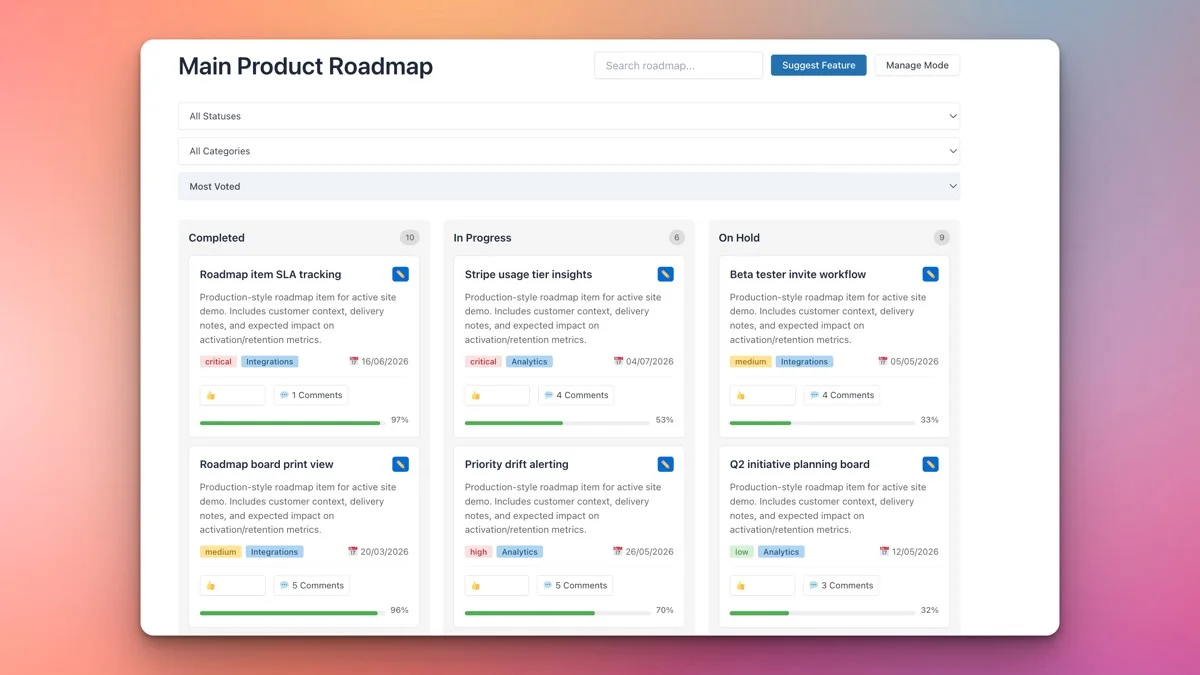
- Kanban-style boards that visually organize ideas by status (Suggested, Under Review, Planned, In Progress, Completed)
- Frontend submission forms so customers can suggest features without ever touching your admin panel
- Voting and commenting so the community can rally behind the ideas that matter most
- Priority levels and categories to help you sort and triage incoming suggestions
- Multiple roadmaps and an analytics dashboard (Pro) if you want separate boards per product line plus vote and category reporting
- Progress bars and target dates to show customers you are actively working on their requests
Setting Up Your Feedback Board on a WooCommerce Site
Getting started takes just a few minutes. Here is a step-by-step walkthrough.
Step 1: Install and Activate the Plugin
Download the Product Roadmap plugin from Wbcom Designs, upload it through your WordPress dashboard under Plugins → Add New → Upload Plugin, and activate it.
Step 2: Create Your First Board
Navigate to the Roadmap settings in your WordPress admin. Create a new board and give it a name that resonates with your audience. For a WooCommerce store, something like “Product Ideas” or “What Should We Build Next?” works well.
Step 3: Configure Status Columns
The plugin comes with sensible default statuses: Suggested, Under Review, Planned, In Progress, and Completed. You can customize these to match your workflow. For a WooCommerce store focused on product development, you might use:
- New Idea, Just submitted by a customer
- Under Consideration, Your team is evaluating feasibility
- Coming Soon, Approved and scheduled for development
- In Production, Currently being manufactured or built
- Available Now, Shipped and ready to purchase
Step 4: Add the Board to Your Site
Use the provided shortcode or block to embed the feedback board on any page. Many store owners create a dedicated “Product Ideas” or “Suggest a Feature” page in their main navigation so it is easy for customers to find.
Step 5: Configure Permissions
Decide who can submit ideas and who can vote. Most WooCommerce stores allow any logged-in customer to submit and vote, which ties nicely into your existing WooCommerce account system.
Creating a Feedback Board That Customers Actually Use
A feedback board is only as good as the participation it attracts. Here are proven strategies to get your customers engaged.
Make It Visible
Do not bury your feedback board three clicks deep. Add it to your main navigation, link to it from your shop page, and mention it in post-purchase emails. The easier it is to find, the more submissions you will get.
Seed It With Ideas
An empty board looks uninviting. Before you launch, add five to ten ideas based on feedback you have already received through reviews, support tickets, or social media. This shows customers what a good submission looks like and lowers the barrier to entry.
Respond to Every Submission
When a customer takes the time to suggest something, acknowledge it. A quick comment like “Great idea! We are adding this to our review queue” goes a long way. When you move an idea to “Planned” or “In Progress,” the customer who suggested it feels heard and valued.
Close the Loop
When you ship a feature or product that was suggested on the board, mark it as Completed and notify the community. This creates a powerful feedback loop: customers see that their suggestions lead to real outcomes, which motivates more participation.
The Suggest Feature Button: Giving Customers a Voice
One of the most powerful aspects of the Product Roadmap plugin is the frontend submission form. Customers do not need to email you, fill out a contact form, or post on social media. They click a “Suggest Feature” button right on the board and fill in a structured form.
The form typically captures:
- Title, A concise name for the idea
- Description, Details about what they want and why
- Category, Which product line or area the idea relates to
- Priority, How important this is to them
This structured input is far more actionable than a vague review comment like “wish it had more features.” You get specific, categorized, prioritized suggestions that your team can evaluate and act on.
Voting and Comments: Amplifying Customer Voice
Individual suggestions are valuable. But knowing which suggestions have broad support is even more valuable. That is where voting comes in.
When customers can upvote ideas they agree with, you get a natural prioritization mechanism. Instead of guessing which features matter most, you can look at vote counts and see exactly where demand is concentrated.
Comments add another layer. Customers can refine each other’s ideas, add use cases, and explain why a feature matters to them. This turns your feedback board into a living conversation between your brand and your community.
For WooCommerce store owners, this is gold. You are essentially getting free market research from the people who are most likely to buy the finished product.
Organizing Feedback by Product Category
If your WooCommerce store sells products across multiple categories, you need a way to organize incoming feedback accordingly. The Product Roadmap plugin supports categories that you can map to your product lines.
For example, if you sell both clothing and accessories, you might create categories like:
- Tops and Shirts
- Pants and Bottoms
- Bags and Wallets
- Jewelry and Accessories
- General Store Experience
This organization helps in several ways:
- Your product team can filter feedback relevant to their area of responsibility
- Customers can browse ideas in categories they care about
- You can spot patterns, like a surge of requests in a particular product line that signals an opportunity
Using Feedback Data to Plan Your Next Products
A well-maintained feedback board becomes one of your most valuable business intelligence tools. Here is how to turn customer suggestions into a product development strategy.
Identify Demand Clusters
Look for groups of related suggestions with high vote counts. If twenty customers are asking for variations of “eco-friendly packaging” or “sustainable materials,” that is a clear signal worth investigating.
Validate Before You Build
Before investing in a new product or feature, check your feedback board. Is anyone asking for it? How many votes does the idea have? This prevents the expensive mistake of building something nobody wants.
Prioritize by Impact
Not all suggestions are equal. A feature requested by one customer is interesting. A feature requested by fifty customers with detailed comments about why they need it is a priority. Use vote counts and comment depth as signals for where to invest your development resources.
Track Competitive Gaps
When customers say things like “I wish your store offered X like [competitor] does,” that is competitive intelligence delivered directly to your door. Track these mentions and use them to close gaps in your offering.
Forecast Revenue Potential
If a suggestion has 100 upvotes and your average order value is $50, you have a rough sense of the revenue potential if you deliver on that request. This makes it easier to justify development investments to stakeholders.
Displaying a “We Are Listening” Public Roadmap
There is a powerful psychological effect when customers can see that a brand is actively listening and working on improvements. A public roadmap sends the message: “We hear you, and here is what we are doing about it.”
The Product Roadmap plugin’s kanban board is perfect for this. When you embed it on a public-facing page, customers can see:
- Which ideas have been submitted
- Which ones your team is reviewing
- Which features are planned and in progress
- Which improvements have already been completed
This transparency builds trust in ways that no amount of marketing copy can match. It tells customers that you are not just selling to them, you are building with them.
For WooCommerce stores, a public roadmap is also a retention tool. A customer who sees their suggestion moving through the pipeline has a reason to come back and check your store again. And when that feature finally ships, they are primed to buy.
How a Feedback Board Reduces Refunds and Increases Loyalty
Here is a connection most store owners miss: a customer feedback board can directly reduce your refund rate.
Setting Better Expectations
When customers can see what features a product has (and what is coming next), they make more informed purchase decisions. Fewer surprises means fewer refunds.
Channeling Frustration Productively
A customer who is unhappy with a missing feature has two options: request a refund, or suggest the feature and vote for it. A feedback board gives them the second option. Instead of losing the customer entirely, you keep them engaged and invested in your brand’s future.
Building Emotional Investment
Customers who participate in your feedback board develop a sense of ownership. They contributed ideas, they voted, they commented. Your store is not just a place they shop, it is a community they helped shape. That emotional investment translates directly into loyalty and repeat purchases.
Demonstrating Responsiveness
When customers see that you act on feedback, they trust you more. Trust reduces the anxiety that drives refund requests. A customer who trusts your brand will give you the benefit of the doubt when something is not perfect, rather than immediately reaching for the refund button.
Common Feedback Board Mistakes to Avoid
A feedback board that launches well can still fail within a few months if a handful of common maintenance mistakes creep in. Watching for these keeps the board a genuine asset instead of an abandoned feature.
Letting Submissions Pile Up Unreviewed
A board where dozens of ideas sit in “Suggested” for months with no movement signals to customers that submissions go nowhere. Even a brief triage, moving an idea to “Under Consideration” with a one-line comment on what would need to happen for it to move forward, keeps the board feeling alive. Set a weekly cadence for triage rather than letting it happen only when someone remembers.
Treating Every Vote Count Equally
A vote from a customer who has spent $2,000 with your store over three years carries different weight than a vote from someone who registered an account and never purchased. Most roadmap tools do not automatically distinguish between the two, so if you are making product decisions based purely on raw vote counts, cross-reference the top few ideas against your customer database before committing budget, rather than trusting vote counts blindly.
Promising Timelines You Cannot Commit To
Moving an idea to “Planned” creates an implicit promise, even without a stated date. If planned items regularly sit for six months with no progress, customers stop trusting the board’s status labels entirely. Only move an item to “Planned” once it has a realistic place in your actual roadmap, not as a way to make the board look more active than the underlying work justifies.
Ignoring the Board’s Own Analytics
Just like the poll and roadmap tools described elsewhere on this site, a feedback board generates its own usage data, submission volume, vote distribution, comment activity, that is easy to collect and never look at. Review it monthly alongside your other store metrics rather than treating the board as a set-and-forget feature.
Feedback Board vs Support Ticket System: When to Use Each
Store owners sometimes wonder whether a feedback board replaces the need for a traditional support ticket system. It does not, the two serve fundamentally different purposes and work best running in parallel.
A support ticket is reactive and individual: a specific customer has a specific problem with a specific order, and the goal is to resolve that one case as quickly as possible. Response time and resolution quality are the metrics that matter. A feedback board is proactive and collective: it captures forward-looking ideas and preferences across your entire customer base, and the goal is pattern recognition across many voices rather than resolving any single interaction. Vote counts and comment depth are the metrics that matter here, not response time.
The practical dividing line: if a customer has an order problem, a billing question, or needs help using a product they already bought, route them to support. If a customer has an idea for something that does not exist yet, or wants to weigh in on a direction the store should take, point them to the feedback board. Making this distinction clear in your own team’s triage process, and in how you direct customers when they reach out through the wrong channel, keeps both systems doing what they do best instead of one becoming a dumping ground for the other.
Getting Started: Your Action Plan
Here is a practical roadmap for launching your customer feedback board:
- Install the Product Roadmap plugin from Wbcom Designs
- Create your first board with status columns that match your product development workflow
- Seed the board with 5-10 ideas from existing customer feedback
- Add a prominent link to your main navigation and post-purchase emails
- Respond to every submission within 48 hours
- Review your board weekly and move ideas through the pipeline
- Close the loop when you ship features that were requested
Your customers already have opinions about your products. The question is whether you are giving them a structured, visible, engaging way to share those opinions. A customer feedback board powered by the Product Roadmap plugin turns passive shoppers into active collaborators, and that is how you build a WooCommerce store that grows with its community.
Get the Product Roadmap plugin today and start turning customer feedback into your competitive advantage.