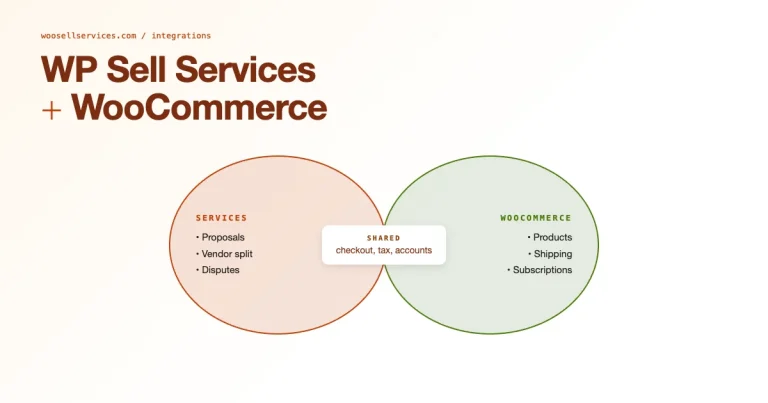
How to Sell Digital Services Online with Woo Sell Services


Ask a freelancer who’s been doing this for years what actually broke first as they scaled, and it’s rarely the work itself. A graphic designer who’s used to handing off files over email eventually runs into the same wall every digital service seller does: no record of what was promised, no structured way to collect payment upfront, no system for tracking which of the twelve active projects is actually waiting on the designer versus waiting on the client. Selling digital services at any real volume without a proper system isn’t sustainable past a handful of clients, not because the work is hard, but because the coordination around the work eats more time than the work itself.
What Counts as a Digital Service
Digital services cover anything delivered without shipping a physical object, graphic design, content writing, SEO, web development, video editing, virtual assistance, consulting delivered over calls. What they have in common is a workflow: brief, work, delivery, revision, approval. That workflow is exactly what a bare WooCommerce install has no concept of, and exactly what Woo Sell Service was built to add.
Why Sell Digital Services Online at All
The addressable market stops being local the moment a service is delivered digitally. A logo designer in a small town can serve clients in six countries without changing anything about how the work gets done. Scaling is easier too, since there’s no inventory to manage and no shipping cost to factor into pricing, the marginal cost of a second client is almost entirely your time, not materials. That combination of reach and low overhead is what makes digital services one of the more forgiving businesses to start with limited capital.
Setting Up Your Digital Services Store
Install and Configure WooCommerce
From the WordPress dashboard, go to Plugins and search for WooCommerce, then activate it. The setup wizard walks through payment gateway configuration and general store settings. Since you’re selling services, disable shipping entirely, there’s nothing to ship, and leaving shipping options visible just adds confusing, irrelevant fields to your checkout.
Add Woo Sell Service on Top
WooCommerce handles products and payments well on its own, but it has no idea what a service delivery workflow looks like. Woo Sell Service fills that gap with task management and buyer-seller communication. Delivery tracking comes with it too, built specifically for this use case. Configure it under its own settings panel. Set up order workflows tied to your specific services and define task statuses that match how your work actually progresses. Turn on built-in messaging too, so clarifying questions don’t have to happen over a separate email thread.
List Each Service Properly
Add each offering as a product, selecting the “Service Product” option once Woo Sell Service is active. Write real descriptions and set clear pricing. State an honest delivery timeframe too, “Custom Logo Design,” “Monthly SEO Consultation,” whatever the actual offer is. Organize services into categories like Graphic Design, Content Writing, or SEO so clients browsing multiple offerings can actually find what they’re looking for instead of scrolling one long undifferentiated list.
Automating the Parts That Eat Your Time
Once an order comes in, Woo Sell Service automatically creates a task tied to that order. Status updates, “In Progress,” “Completed”, keep the client informed without you writing a manual status email every few days. The built-in messaging system keeps clarification requests and revision notes attached to the order itself, which matters when a dispute comes up months later and you need to show exactly what was agreed to.
For recurring work, monthly SEO, ongoing content, retainer-based consulting, Woo Sell Service integrates with WooCommerce Subscriptions, turning what would otherwise be a manual monthly invoice into an automated recurring charge tied to the same order-tracking structure as a one-time service.
Plugins Worth Adding as You Scale
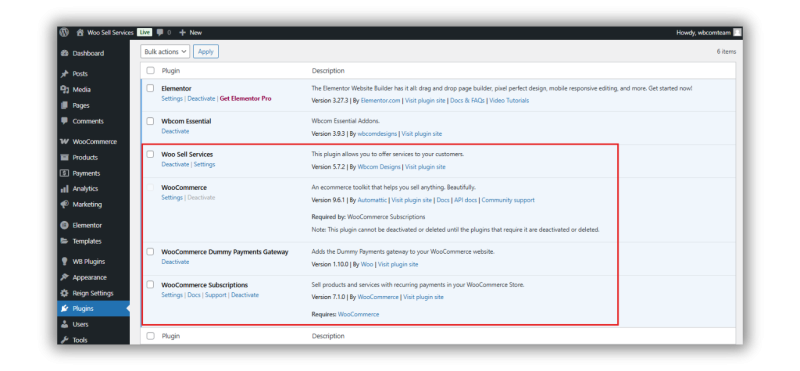
AutomateWoo handles marketing automation, follow-up emails after delivery, prompts for reviews, personalized campaigns that keep past clients aware of your business without you manually emailing each one. WooCommerce Subscriptions is essential for any recurring service and manages the billing side of retainer work directly. WooCommerce Product Add-Ons let clients customize an order at checkout, extra revisions, expedited delivery, additional pages, which both improves the buying experience and creates a natural upsell moment.
Getting Found by People Who Need What You Offer
Search
Optimize service pages with tools like Yoast SEO, targeting specific terms like “custom logo design” or “SEO consulting” rather than broad, generic phrases every competitor is also chasing. Meta descriptions and genuinely useful blog content compound over months in a way a single social post never does.
Social
LinkedIn works well for networking with other professionals and showcasing expertise directly. Instagram suits portfolio pieces and quick design tips for visually-oriented services. Facebook builds community engagement through case studies and client testimonials that feel more like a conversation than an ad.
Content
Blogging around topics your ideal client actually searches, “Top Graphic Design Trends” or “How to Improve Your Website’s SEO”, drives organic traffic while positioning you as someone who genuinely knows the space, not just someone selling into it.
Payments and Communication That Build Trust
Woo Sell Service integrates with PayPal and Stripe, so clients pay through interfaces they already trust rather than an unfamiliar checkout that raises last-second doubts. The built-in communication tools let you respond to questions promptly and keep that response professional and documented, which matters more for digital services than almost any other category, the client is trusting you with something intangible, and every interaction either builds or erodes that trust.
A Realistic Example
A freelance copywriter sets up three service listings: a single blog post and a five-post content package, plus a monthly retainer with four posts included. The single post listing brings in first-time buyers testing the waters. Most of those buyers who liked the work upgrade to the five-post package within a month, and a smaller group converts to the retainer once they see consistent quality delivered on schedule. Woo Sell Service’s task tracking means the copywriter never loses track of which client is on which package, or what stage each individual post is at, even once she’s juggling a dozen simultaneous projects across different clients.
Common Mistakes Sellers Make Early On
Pricing every service identically regardless of actual scope, which either underprices complex work or overprices simple work and confuses buyers either way. Skipping the task-tracking setup because it feels like overhead for a first handful of clients, then scrambling to retrofit it once volume grows past what memory and a notes app can handle. Writing service descriptions focused on process instead of outcome, clients care what they get, not the twelve steps you personally take to get there. And neglecting the post-delivery follow-up that turns a one-time buyer into a repeat client and a review.
Pricing Digital Services When There’s No Physical Cost to Anchor Against
A product seller can price against manufacturing cost plus margin. A digital service seller doesn’t have that anchor, which is exactly why so many first-time sellers underprice, they instinctively price against their own hourly rate rather than the value the client actually receives. A logo that takes four hours to design might be worth $200 by hourly-rate math and worth $2,000 to a business about to launch, because the client isn’t paying for your time, they’re paying for a professional identity that represents their company for years.
Value-based pricing works better for most digital services than time-based pricing, once you have enough of a track record to price with confidence rather than guessing at what the market will bear. Time-based pricing punishes efficiency, the faster and better you get at the work, the less you earn per hour, which is backwards. Packaging the same skill into fixed-price offers removes that penalty entirely.
Handling Scope Creep Before It Happens
Scope creep is the single most common profit killer in digital services, and it almost always traces back to a vague original brief rather than an unreasonable client. “Redesign my website” invites endless small requests because nothing was defined upfront. “Redesign the homepage and two inner pages, two rounds of revisions included” gives both sides a clear boundary to reference when a third request comes in.
Woo Sell Service’s task and milestone structure makes this boundary enforceable rather than just aspirational, which matters because a boundary nobody can actually point back to isn’t a boundary at all. When a client asks for something outside what the order actually specifies, the milestone record is right there showing what was agreed to, which turns an awkward “that wasn’t included” conversation into a straightforward “let’s add that as a paid extra” conversation instead.
A Realistic First 90 Days
Picture a virtual assistant launching a WooCommerce store for administrative and inbox-management services. Week one: three service listings go live, a one-time inbox cleanup and a 10-hour monthly retainer, plus a 20-hour monthly retainer, each with Woo Sell Service tracking tasks and delivery. Weeks two through four: the first three clients come from a direct outreach email to a personal network, not from search traffic, which is normal for a brand-new listing with zero search authority yet.
Month two: one of those three clients upgrades from the 10-hour to the 20-hour retainer after seeing consistent, well-documented delivery through the platform’s task tracking. A blog post about email management tips, published in month one, starts pulling in small amounts of organic traffic by month two, generating the first inquiry that didn’t come through personal network. Month three: the assistant has enough recurring retainer revenue to stop actively pitching new one-time cleanups and instead focus entirely on retaining and upselling the existing retainer clients, which is a meaningfully more stable business than constant one-off acquisition.
Building Repeat Business Instead of Constant New-Client Hunting
A new client costs far more to acquire than a repeat one, which makes a follow-up process one of the highest-leverage habits a digital service seller can build. A simple check-in two to three weeks after delivery, asking whether the work is still performing well, whether anything needs adjusting, keeps the relationship warm without feeling like a sales pitch.
Put a reminder on the calendar for every completed order rather than trying to remember it manually across a growing client list, since memory is the first thing that fails once volume climbs past a handful of active projects. That follow-up also surfaces genuine upsell opportunities that would otherwise go unnoticed. A client who mentions their business has grown since the original project is a client ready for a bigger engagement, but only if someone actually asks the right question at the right time instead of waiting for them to reach out first.
What Separates Sellers Who Scale From Sellers Who Plateau
Sellers who plateau around three to five clients usually hit a ceiling because everything still runs through personal memory and ad hoc emails, adding a sixth client means the whole system starts breaking down under its own weight. Sellers who scale past that point almost universally have some structured system in place before they need it, not scrambled together after the breakdown already happened.
The other differentiator is documentation discipline. A seller who writes clear task descriptions and keeps every client conversation inside the platform builds something durable. A consistent revision policy adds to that. The business gets easier to hand off and easier to bring a subcontractor into. Eventually it gets easier to sell too, if that ever becomes the goal. A seller running everything through memory and scattered emails has built something that only works as long as they personally remember every detail, which doesn’t scale past a certain point no matter how talented they are.
Frequently Asked Questions
Can I sell both digital services and physical products through the same WooCommerce store?
Yes. WooCommerce handles mixed catalogs natively, Woo Sell Service’s Service Product type coexists fine alongside standard physical products, with shipping only applying to the listings that actually need it.
How do I handle a client who wants unlimited revisions?
State a specific revision count in the service description upfront, “two rounds of revisions included”, and price additional revisions as an add-on. An unlimited-revisions offer without a boundary invariably turns into scope creep that erodes the profitability of the original price.
Is Woo Sell Service necessary, or can I just use WooCommerce’s default order statuses?
Default statuses are built around shipping physical goods and don’t map cleanly onto a service delivery workflow with milestones, revisions, and approval steps. Woo Sell Service is what actually closes that gap rather than forcing a service transaction into a product-shaped process.
What’s the fastest way to get the first few sales?
Existing network first, past clients, personal contacts, relevant online communities where you can genuinely help before pitching. Cold SEO traffic takes months to build momentum; warm outreach to people who already trust you converts almost immediately.
Should I specialize in one type of digital service or offer several?
Specializing usually wins early on. It’s easier to rank for search terms and easier to price confidently, and a specialized portfolio speaks more clearly to one specific buyer. Broadening the offer makes more sense later, once the core service is established and referral demand naturally starts pulling in adjacent requests.
How do I handle a client who’s unhappy with delivered work?
Address it inside the platform’s messaging system rather than letting it spill into a heated email thread outside the order record. Reference the original service description and revision terms directly, and if the complaint is legitimate, fix it within the agreed scope rather than getting defensive about work that genuinely missed the brief.
Is it worth hiring subcontractors once demand outpaces what I can personally deliver?
Often yes, and the same order-tracking structure that organizes a solo operation extends naturally to a small team, tasks assigned to specific people, statuses visible to the client regardless of who’s actually doing the work behind the scenes.
Why Woo Sell Service Is the Right Tool for This
None of this requires a large team or a big software budget to get started. Woo Sell Service takes the parts of running a digital service business that used to eat hours every week, task tracking, status updates, client communication, and turns them into something that runs mostly on its own. Pairing it with AutomateWoo, WooCommerce Subscriptions, and Product Add-Ons as volume grows extends that automation further without requiring a bigger team.
Whether you’re a solo freelancer or running something closer to a small agency, the plugin gives you a structured, professional process to actually scale on, instead of managing a growing list of clients through memory and a crowded inbox. Set it up before the sixth client arrives, not after the first missed deadline forces the issue.
Deciding When to Raise Your Prices
Most digital service sellers wait far too long to raise prices, usually out of a fear that existing clients will balk. In practice, a client who has been happy with the work rarely leaves over a reasonable increase, and the sellers who raise prices too slowly end up subsidizing new client acquisition with underpriced work indefinitely. A useful signal to watch: if you are consistently fully booked with a waitlist forming, that is the market telling you the price is too low, not a reason to simply take on more volume at the same rate.
Grandfather existing retainer clients into their current rate for a defined period if you want to soften the transition, but apply new pricing to every new client immediately. Delaying a price increase across the board because it feels awkward to announce usually costs more in lost margin than the discomfort of the announcement itself.
Interesting Reads:
How to Create a Website to Sell Online Services Quickly and Easily