WP Sell Services WooCommerce Integration: When to Use Both and How

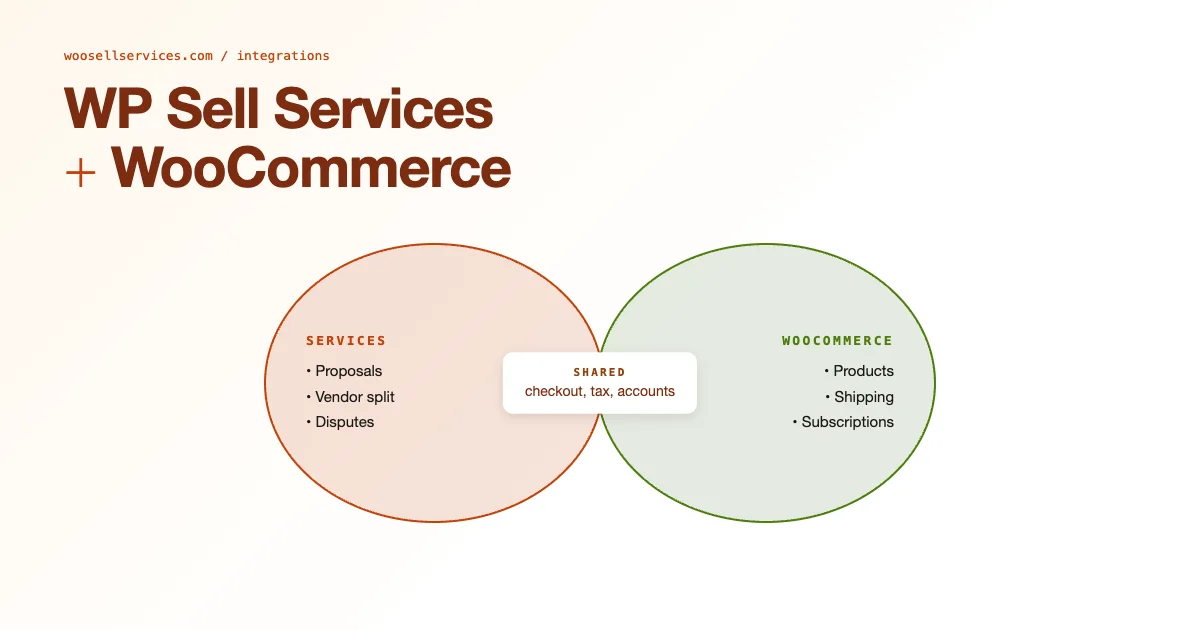
WP Sell Services and WooCommerce solve different problems: WooCommerce manages product-based sales (physical goods, digital downloads, subscriptions), while WP Sell Services manages service marketplace workflows (proposals, delivery tracking, vendor accounts, dispute resolution). Many businesses need both. This guide covers the hybrid architecture, customer account unification, combined checkout options, tax handling, and the migration path from WooCommerce Sell Services to WP Sell Services.
When You Need Both Plugins
The hybrid model, WooCommerce for products, WP Sell Services for services, applies to businesses where customers can buy both physical or digital goods and hire service providers on the same platform. Examples: a creative agency marketplace where clients buy template packs (WooCommerce) and hire designers (WP Sell Services); a marketing platform where clients purchase analytics tools (WooCommerce subscription) and consulting hours (WP Sell Services); a learning platform where students buy courses (WooCommerce) and book tutoring sessions (WP Sell Services).
The integration works because both plugins use WordPress user accounts as the authentication layer. A customer who creates an account to buy a product (WooCommerce) automatically has an account that works for hiring a service provider (WP Sell Services). No duplicate accounts, no separate login.
What Each Plugin Handles
| Function | WooCommerce | WP Sell Services |
|---|---|---|
| Physical product sales | Yes | No |
| Digital download sales | Yes | No |
| Service listing and booking | Limited (with extensions) | Yes (native) |
| Multi-vendor service marketplace | Via Dokan/WCFM | Yes (native) |
| Revision requests | No | Yes |
| Dispute resolution | No | Yes |
| Vendor delivery tracking | No | Yes |
| Recurring subscriptions | Yes (WooCommerce Subscriptions) | Yes (Pro Agency) |
| Tax handling | Yes (full) | Basic (via Stripe) |
Customer Account Unification
WP Sell Services extends the WordPress user account rather than creating its own separate account system. This means WooCommerce customer accounts and WP Sell Services buyer accounts are the same WordPress user accounts. A customer who registers to buy a product through WooCommerce can immediately use WP Sell Services buyer features without a second registration.
The my-account page unification requires a small addition: WP Sell Services adds its own menu items (My Orders, Messages, etc.) to the WooCommerce my-account dashboard by default on compatible themes. On custom themes, you may need to add the WP Sell Services account endpoints to the WooCommerce account menu manually using the woocommerce_account_menu_items filter.
Combined Checkout: Products and Services Together
Combined checkout, buying a product and a service in a single transaction, is the technically complex part of this integration. WooCommerce’s cart and checkout are designed for products. WP Sell Services has its own order creation flow designed for service requirements.
The practical solution for most hybrid deployments: separate carts and checkouts. The product cart uses WooCommerce checkout (card entry, shipping if applicable). The service order uses WP Sell Services checkout (requirements form, package selection, payment). Customers checkout twice, but this is acceptable for most use cases because product purchases and service orders have different requirements at checkout.
For businesses that genuinely need single-cart combined checkout (a design agency where clients buy a brand kit product AND hire a designer in one flow), this requires custom development using WooCommerce’s order creation hooks and WP Sell Services’ API. It is possible but not out-of-the-box.
Tax Handling in the Hybrid Model
Tax on products is handled by WooCommerce with its full tax class and rate system (including WooCommerce Tax for US automated rates, TaxJar, or Avalara for enterprise). Tax on services in WP Sell Services is handled at the payment gateway level, if Stripe is configured to calculate and collect tax, it applies to service orders. If not, service orders are treated as pre-tax.
For businesses required to collect sales tax on services (rules vary by US state and country), the recommended configuration: use Stripe Tax (built into Stripe) for WP Sell Services transactions, and WooCommerce Tax or TaxJar for product transactions. Both integrations are independent of each other and can be configured separately without conflict.
VAT handling for EU stores follows a similar pattern. WooCommerce has EU VAT plugins that handle product VAT automatically. For services, the VAT treatment depends on B2B vs B2C (reverse charge applies to B2B cross-border EU transactions). This is a legal and accounting question that requires professional advice specific to your jurisdiction, the technical implementation of whichever tax treatment applies uses the same filter hooks on each platform.
Migrating From WooCommerce Sell Services
WooCommerce Sell Services is an older plugin that attempted to add service marketplace functionality on top of WooCommerce. If your site is running WooCommerce Sell Services and you want to migrate to WP Sell Services, the migration involves: exporting service product data, vendor account information, and historical order data from WooCommerce Sell Services, then importing into WP Sell Services data structures.
There is no automated migration tool between the two plugins. The migration path: document all service listings and vendor accounts, export historical orders to CSV for records, install WP Sell Services on a staging site, recreate service listings and vendor profiles manually, test the full order flow, then cut over. Historical orders from WooCommerce Sell Services remain in WooCommerce order history for reference but do not migrate into WP Sell Services order tracking.
Plan for 1-2 days of migration work for a site with under 20 vendors and 50 service listings. Larger catalogs scale linearly. The benefit of migration: WP Sell Services has significantly more developed dispute resolution, vendor tools, and API surface compared to WooCommerce Sell Services, making the migration worthwhile for active marketplaces.
Subscription Services in the Hybrid Model
For businesses that want recurring subscriptions for both products (monthly box, SaaS access) and services (monthly retainer consulting), the configuration is: WooCommerce Subscriptions handles product subscriptions, WP Sell Services Pro Agency handles service subscriptions. Both can run on the same site without conflict because they use different database tables and payment flow architectures.
The customer experience: the WooCommerce subscriptions appear in the WooCommerce my-subscriptions account tab. WP Sell Services recurring service orders appear in the WP Sell Services my-orders tab. The accounts are unified but the order management UI is separate for each plugin. Most customers interact with each type of order through different tabs in the my-account dashboard.
For WooCommerce stores expanding into the services space, the package pricing guide provides the foundation for structuring service offerings alongside physical products. See how to add package pricing to WooCommerce service products. For the payment infrastructure behind the marketplace side, the installment payment guide covers deferred payment options for higher-value service engagements.
Tax Configuration for the Hybrid WooCommerce + WP Sell Services Model
Tax jurisdiction complexity is the most technically demanding aspect of running a hybrid product-and-service marketplace. Physical products shipped across state lines in the US are subject to economic nexus rules that WooCommerce Tax handles automatically. Services are taxed differently by jurisdiction: in some US states, digital services are taxable; in others, they are exempt; in EU markets, VAT applies to B2C digital services at the consumer’s location under the digital services rules. WooCommerce and WP Sell Services handle their respective transaction types independently, neither automatically handles the cross-product jurisdiction routing.
The recommended approach for marketplaces operating across multiple tax jurisdictions: use TaxJar or Avalara for product transactions via WooCommerce, and use Stripe Tax for service transactions via WP Sell Services. Both platforms have jurisdiction lookup APIs that apply the correct tax rate based on the buyer’s location. Configure each system independently and test both checkout flows with addresses in high-complexity jurisdictions (California, New York, Texas for US; Germany, France for EU) before going live.
Unified Analytics Across WooCommerce and WP Sell Services
Reporting is the most significant operational gap in a hybrid deployment. WooCommerce Analytics provides detailed product revenue reports. WP Sell Services has its own order reporting section. But no native tool provides a unified view of total platform GMV across both product and service transactions. Building this unified view requires either a custom dashboard plugin or an export-to-analytics-platform approach.
The export approach is practical for most operators: schedule a nightly export of WooCommerce orders (via the WooCommerce REST API) and WP Sell Services orders (via the WP Sell Services REST API) to a Google Sheet or data warehouse. Tag each row with the source system. Build a combined pivot table or dashboard view that shows total revenue, refunds, and net revenue across both systems. For more sophisticated analytics, push both data streams to a BI tool (Looker Studio, Tableau Public, or Metabase) and build a unified GMV dashboard that finance and management can access without requiring access to the WordPress backend.
Customer Communication Consistency in the Hybrid Model
Customers who buy both products and services from your platform receive transactional emails from two systems: WooCommerce sends product order confirmations, shipping updates, and subscription renewal notices; WP Sell Services sends service order confirmations, delivery notifications, and dispute updates. For customers who use both, this means two different email designs, two different sender addresses, and two different links to their account area.
Unify the customer communication experience by customizing both email templates to use the same design system: same header, same logo, same font stack, same color scheme. Use the same From Name and ideally the same sending domain. Update the WooCommerce account link in service emails and vice versa so both email types link to the same my-account entry point. This design consistency does not require technical integration between the two systems, it is template customization work on each plugin’s email template independently. For WooCommerce stores expanding into the services space, the package pricing guide provides the foundation for structuring service offerings alongside physical products. For the payment infrastructure behind the marketplace side, the installment payment guide covers deferred payment options for higher-value service engagements.
Common Integration Pitfalls and How to Avoid Them
A handful of mistakes show up repeatedly on hybrid product-and-service sites, and most of them trace back to treating the two plugins as more tightly coupled than they actually are.
The first is assuming a single WooCommerce coupon will apply across both systems. It won’t. WooCommerce coupons are scoped to the WooCommerce cart and checkout, they have no visibility into a WP Sell Services order created through its own checkout flow. If you want a promotion that discounts both a product purchase and a service order, you need two separate discount configurations, one WooCommerce coupon and one WP Sell Services discount rule, both referencing the same promo code text so the customer experience feels unified even though the backend logic is not shared.
The second common mistake is forgetting to test the guest checkout path on both systems independently. A customer who buys a product as a guest, then later wants to hire a service provider, will be prompted to create an account at the service checkout because WP Sell Services requires an authenticated user for its delivery and revision tracking to function (an anonymous account has nowhere to receive delivery notifications). This is by design, but if your marketing copy implies a fully unified guest experience, you will get support tickets from confused customers. Set expectations in the checkout copy itself: something as simple as “An account is required to track your service order” next to the WP Sell Services checkout button heads off most of this confusion.
The third pitfall is refund handling that only touches one system. If a customer disputes a combined order (a product plus a service ordered in the same session, processed through two separate checkouts), your support team needs to know to check both the WooCommerce order and the WP Sell Services order before issuing any refund, since each system tracks its own payment capture and refund status independently. Document this in your internal support runbook explicitly, it is an easy step to miss under ticket-volume pressure, and a partial refund that only covers the product half of a dispute is a fast way to generate a second, angrier ticket.
Performance Considerations at Scale
Running two order-management systems on one WordPress install adds real database load once you cross a few hundred combined orders per month. WooCommerce orders live in the standard WordPress posts table structure (or the HPOS custom order tables on newer WooCommerce versions), and WP Sell Services maintains its own custom tables for service orders, deliveries, and messages. Neither system queries the other’s tables directly, so there is no join-level performance penalty from running both, but the my-account dashboard that renders tabs from both plugins does issue separate queries for each, meaning a customer with a long order history across both systems will generate more database round trips loading their account page than a customer using either system alone.
For stores processing meaningful volume through both systems, enable object caching (Redis or Memcached) at the hosting level if it isn’t already active, and make sure both plugins’ transient usage is being cached rather than hitting the database on every page load. This is a hosting-level configuration rather than a plugin setting, but it matters more on a hybrid site than a single-system site simply because there is more total query volume per customer session.
Frequently Asked Questions
Do I need the Pro Agency version of WP Sell Services to run the hybrid model?
No. The free version of WP Sell Services supports the core delivery and revision workflow and unifies with WooCommerce customer accounts out of the box. Pro Agency adds recurring service subscriptions, advanced vendor management for multi-provider marketplaces, and deeper reporting, but a single-provider service business running alongside a WooCommerce product catalog works fine on the free tier.
Can WooCommerce Subscriptions and WP Sell Services Pro Agency share a single customer subscription record?
No, they maintain separate subscription records even for the same customer. If a customer has both a WooCommerce product subscription and a WP Sell Services recurring service order, they will see and manage each independently in their account dashboard. There is currently no unified subscription management view spanning both plugins without custom development.
Is the hybrid setup harder to maintain during plugin updates?
Somewhat. Each plugin updates independently, so a WooCommerce core update or a WP Sell Services update can each introduce compatibility issues on their own schedule. The safe practice for any hybrid deployment is to test updates on staging before applying to production, and to check the account-menu integration specifically after any WooCommerce update, since theme compatibility for the combined my-account menu is the piece most likely to break silently.
Should the storefront navigation treat products and services as one catalog or two?
Most successful hybrid sites keep them visually separate in the main navigation, a “Shop” link for the WooCommerce catalog and a “Services” or “Hire a Pro” link for WP Sell Services listings, rather than blending both into a single mixed grid. Customers arrive with a fairly clear mental model of whether they want to buy a thing or hire a person, and forcing both into one browsing experience tends to confuse that intent rather than simplify it. The exception is a homepage or landing page that intentionally cross-sells, for example a design agency that shows a featured brand kit product next to a featured designer service side by side to signal that both options exist, which works because it is an explicit editorial choice rather than a default catalog merge.
Hybrid Integration Pre-Launch Checklist
Verify these integration points before launching a combined WooCommerce + WP Sell Services site to customers. These represent the most common gaps in hybrid deployments.
- Unified user account: Test that a user registered via WooCommerce checkout can immediately place a WP Sell Services order without second registration
- My-account menu unified: WP Sell Services account endpoints appear in the WooCommerce my-account dashboard menu on your theme
- Email branding consistent: Both systems’ transactional emails use the same logo, sender name, and font stack
- Tax configuration tested: Both checkout flows tested with addresses in your highest-complexity tax jurisdiction
- Stripe Tax active for services: Service transactions collect correct tax based on buyer location
- Combined revenue reporting: Export process from both systems to unified view is documented and working
- Refund runbook covers both systems: Support team checks both WooCommerce and WP Sell Services order status before issuing any refund on a combined purchase
- Guest checkout expectations set: Checkout copy clarifies that an account is required for service orders, even if product checkout allows guest purchase
- Plugin update testing: Process documented for testing integration points after major WooCommerce or WP Sell Services updates