Build a Vendor Showcase for Your WooCommerce Marketplace


Why Vendor Profiles Matter for WooCommerce Marketplaces
A WooCommerce marketplace lives or dies on the strength of its vendors. Customers do not just buy products. They buy from people and brands they trust. Without proper vendor profiles, your marketplace is a faceless catalog where every seller looks the same, and customers have no way to evaluate who they are buying from.
Consider the difference between a marketplace listing that says “Blue Widget – $19.99” and one that says “Blue Widget – $19.99 by Artisan Crafts Co., 4.8 stars, 2,300 sales, located in Portland, Oregon, specializing in handmade home decor since 2018.” The second listing carries weight. It tells a story. It builds confidence.
Vendor showcases give your sellers an identity within your marketplace. They transform anonymous product listings into branded storefronts where vendors can build recognition, loyalty, and repeat customers. For your marketplace as a whole, this means higher conversion rates, lower return rates, and stronger vendor retention.
The Marketplace Trust Gap
Marketplace platforms face a unique challenge called the trust gap. Customers trust the marketplace brand but remain skeptical about individual sellers. Vendor profiles bridge this gap by providing transparency about who is behind each product.
Detailed vendor profiles with reviews, business information, response times, and activity histories turn unknown sellers into familiar faces. This transparency reduces purchase anxiety and increases average order values because customers feel more comfortable spending more when they know who they are buying from.
Impact on Vendor Retention
Vendor retention is just as important as customer retention for marketplace success. When vendors can build a brand presence on your platform, complete with followers, reviews, and a professional profile, they have more reason to stay. A vendor who has cultivated 500 followers and a 4.9-star rating on your marketplace is unlikely to leave for a competitor where they would start from zero.
Configuring Business Profiles for Vendors
The BuddyPress Business Profile plugin transforms your WooCommerce marketplace by giving every vendor a comprehensive business profile. Unlike basic seller pages that show just a name and product list, these profiles include contact information, business descriptions, operating hours, location maps, social media links, and more.
Setting up vendor profiles is a straightforward process through the admin panel:
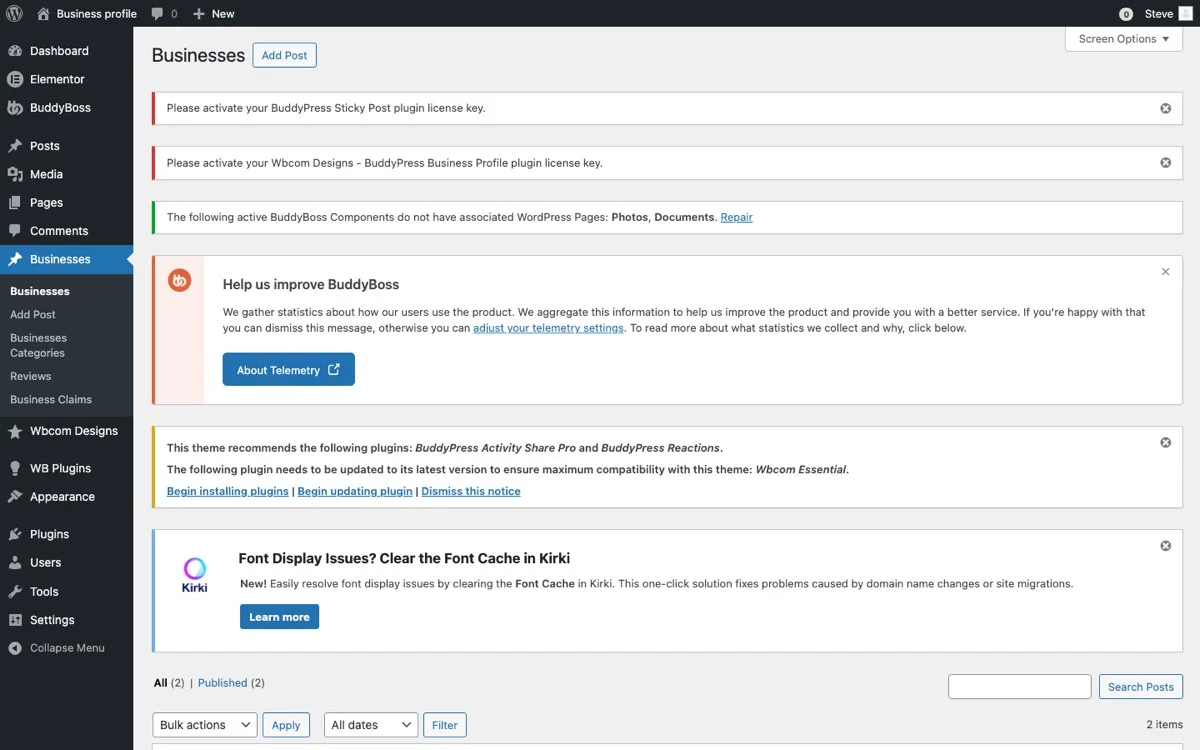
From the admin side, you control which fields vendors must fill out, which are optional, and how profiles display on the front end. This lets you enforce a consistent standard across all vendor profiles while still allowing sellers to personalize their pages.
Essential Vendor Profile Fields
Configure these fields for a comprehensive vendor showcase:
- Business Name and Logo: The vendor’s brand identity, prominently displayed at the top of their profile.
- Business Description: A rich text area where vendors tell their story, explain their expertise, and describe what makes them different.
- Contact Information: Phone number, email address, and physical address so customers can reach vendors directly when needed.
- Social Media Links: Instagram, Facebook, Twitter, LinkedIn, and other platform links that show vendors are active and established.
- Business Hours: Operating hours for each day of the week, critical for vendors who offer services alongside products.
- Location Map: An interactive map showing where the vendor is based, useful for marketplaces with local pickup options.
- Cover Photo: A banner image that gives the profile visual appeal and communicates the vendor’s brand aesthetic.
Profile Approval Workflow
For quality control, enable the approval workflow. New vendor profiles go into a pending state where admins can review the information before it goes live. This prevents incomplete or low-quality profiles from appearing in your marketplace, maintaining the professional standard your customers expect.
You can set up notification emails that alert admins when new profiles are submitted and notify vendors when their profiles are approved or need changes. This automated workflow keeps the process moving without requiring constant manual monitoring.
Vendor Categories: Organizing Your Marketplace
In a multi-vendor marketplace, categories serve a dual purpose. They organize products and they organize vendors. A customer looking for handmade jewelry should be able to browse the jewelry category and also discover vendor profiles that specialize in jewelry making.
BuddyPress Business Profile supports detailed category assignments for vendors. Each vendor selects their primary and secondary categories during profile creation, and these categories integrate with your marketplace’s browsing and search functionality.
Category Strategy for Marketplaces
Design your vendor categories to match how customers think about your marketplace:
- By Product Type: Electronics, clothing, home goods, food and beverages, arts and crafts.
- By Specialty: Organic, handmade, vintage, luxury, eco-friendly, locally sourced.
- By Service Area: If your marketplace has a geographic focus, categorize vendors by region or city.
- By Business Type: Manufacturer, distributor, artisan, wholesaler, consignment seller.
Allow vendors to select multiple categories. A vendor who sells both handmade candles and natural skincare products should appear in both categories. This cross-categorization increases vendor visibility and helps customers discover related sellers they might not have searched for directly.
Featured Categories
Create featured category sections on your marketplace homepage. Highlight trending categories, seasonal specialties, or newly launched vendor categories to direct traffic and help new vendors gain initial visibility.
Customer Reviews and Ratings: Social Proof for Vendors
Reviews are the lifeblood of marketplace trust. They provide the social proof that turns browsers into buyers and first-time customers into repeat clients. BuddyPress Business Profile includes a vendor review system that operates at the business profile level, separate from individual product reviews.
This distinction matters because vendor reviews capture the overall experience of working with a seller, including communication quality, shipping speed, packaging, and customer service. Product reviews, by contrast, focus on the item itself. Together, they give customers a complete picture.
Building a Review Culture
A review system only works if customers actually leave reviews. Here are strategies to encourage participation:
- Post-Purchase Emails: Send automated emails after delivery asking customers to rate their vendor experience.
- Review Incentives: Offer small discounts or loyalty points for leaving honest reviews.
- Easy Review Process: Make leaving a review as simple as possible. Star rating with optional text works well.
- Vendor Responses: Allow vendors to respond to reviews. This dialogue shows potential customers that the vendor is engaged and cares about feedback.
Review Moderation
Implement a fair moderation policy. Remove reviews that contain personal attacks, spam, or clearly fraudulent content, but do not censor negative reviews that provide legitimate feedback. Customers trust directories more when they see a mix of ratings because it feels authentic. A vendor with 100 five-star reviews and zero negative feedback actually looks less trustworthy than one with 95 five-star and 5 three-star reviews.
Rating Badges and Recognition
Reward highly-rated vendors with visible badges on their profiles and product listings. “Top Rated Seller,” “Community Favorite,” or “Rising Star” badges give vendors goals to work toward and give customers quick visual indicators of quality. These badges can be automated based on rating thresholds or manually assigned by admins for special recognition.
Vendor Activity Feeds: Keeping Your Marketplace Alive
Static vendor profiles are informational. Dynamic vendor profiles are engaging. BuddyPress Business Profile leverages the BuddyPress activity stream to give vendors a social presence within your marketplace.
Vendor activity feeds show recent updates, new product launches, promotional announcements, and community interactions. When a vendor adds a new product, updates their business hours, or responds to a customer review, it appears in their activity feed. This creates a living, breathing profile that customers want to check regularly.
Types of Activity to Showcase
- New Product Listings: Automatically posted when vendors add new items to their catalog.
- Promotional Updates: Vendors can share sales, discount codes, or limited-time offers.
- Milestone Announcements: Reaching 100 sales, celebrating a business anniversary, or launching a new product line.
- Behind-the-Scenes Content: Photos and descriptions of how products are made, sourced, or designed.
- Community Engagement: When vendors participate in forums, answer questions, or help other community members.
Activity feeds turn your marketplace from a transactional platform into a community hub. Customers who follow vendor activity feeds visit more frequently, spend more time on your site, and develop stronger relationships with their favorite sellers.
Follower System for Vendor Fans
The follower system in BuddyPress Business Profile creates a direct channel between vendors and their fans. When a customer follows a vendor, they receive notifications about that vendor’s activity, new products, and updates. This opt-in relationship means vendors can reach an engaged audience without relying on external marketing channels.
How Followers Drive Marketplace Growth
Followers create a compounding growth effect in your marketplace:
- A customer discovers a great vendor and follows their profile.
- The vendor posts an update about a new product or promotion.
- The follower sees the update in their feed and visits the vendor’s profile.
- They make a purchase and share their experience with friends.
- New customers discover the vendor through the shared experience and follow the profile themselves.
This cycle repeats and accelerates over time. Vendors with strong follower bases become anchor sellers for your marketplace, drawing consistent traffic that benefits all vendors on the platform.
Follower Analytics for Vendors
Give vendors access to their follower data. Let them see how many followers they have, when followers were gained, and which content or products generated the most follows. This data helps vendors optimize their presence on your marketplace and provides motivation to stay active and engaged.
From the admin perspective, follower data reveals which vendors are building the strongest communities, which categories are most popular, and where engagement opportunities exist. Use this data to make strategic decisions about featured vendors, promotional campaigns, and marketplace development priorities.
Featuring Top Vendors
Every marketplace benefits from showcasing its best vendors. Featured vendor placements reward excellent performance, give new visitors a curated introduction to your marketplace, and motivate other vendors to improve their profiles and service quality.
Criteria for Featured Vendor Selection
Develop clear, transparent criteria for selecting featured vendors:
- Rating Threshold: Minimum 4.5-star average rating over the last 90 days.
- Sales Volume: Consistent sales activity demonstrating marketplace engagement.
- Profile Completeness: All profile fields filled out, high-quality photos, detailed business description.
- Response Time: Fast response to customer inquiries and review engagement.
- Community Participation: Active in forums, activity feeds, and vendor-to-vendor networking.
Featured Vendor Placements
Display featured vendors on your marketplace homepage, category pages, checkout page, and in email newsletters. Rotate featured vendors regularly to give different sellers exposure and prevent the same vendors from dominating the spotlight.
Consider selling featured vendor slots as a premium service. Some vendors will pay for guaranteed homepage placement during peak shopping seasons. This creates a revenue stream while also ensuring your featured sections always have paying, motivated sellers who will make the most of the visibility.
Vendor Claims System: Verifying Legitimate Businesses
In an open marketplace, verification adds a crucial layer of trust. The vendor claims system allows business owners to claim and verify their profiles, distinguishing verified vendors from unverified ones.
How Vendor Claims Work
The claims process typically follows these steps:
- A vendor registers on your marketplace and creates a business profile.
- They submit a claim to verify their identity and business ownership.
- Verification documents are provided, such as a business license, tax ID, or utility bill matching the business address.
- Admin reviews the claim and either approves or requests additional information.
- Once approved, the vendor profile displays a verified badge visible to all customers.
Benefits of Verification
Verified vendor badges serve multiple purposes:
- Customer Confidence: Customers know verified vendors are legitimate businesses, not fly-by-night operations.
- Fraud Prevention: The verification process deters scammers who cannot produce legitimate business documents.
- Search Priority: Give verified vendors priority in search results and filter options.
- Premium Positioning: Verified vendors can access premium features like featured placements and promotional tools.
For marketplaces dealing in high-value products or services where trust is paramount, the claims system is not optional. It is essential for maintaining marketplace integrity and protecting your customers.
Avoiding the Most Common Vendor Showcase Mistakes
Marketplaces that roll out vendor profiles for the first time tend to trip over a handful of predictable problems, and knowing them in advance saves months of course-correcting after launch.
Launching with Empty or Thin Profiles
A vendor showcase with fifteen sellers who each filled in a business name and nothing else looks worse than no showcase at all. It signals to customers that the feature is an afterthought. Before opening vendor registration to the public, seed the directory with a handful of fully completed reference profiles, real photos, a genuine business description, populated business hours, so new vendors have a concrete example to match rather than guessing what “good” looks like.
Treating Every Vendor Identically
A marketplace with both a single-person Etsy-style artisan and a 40-employee wholesale distributor should not force both into the same profile template. The wholesaler needs fields for minimum order quantity and lead time; the solo artisan needs space for their story and process photos. If your vendor base spans different business models, add category-specific optional fields rather than a rigid one-size-fits-all form that fits nobody particularly well.
Letting Verification Become a Bottleneck
A claims and verification process that takes two weeks to clear kills momentum for a vendor who was ready to start selling the day they signed up. Set an internal service-level target, 48 to 72 hours is reasonable for most marketplaces, and staff the review queue accordingly during your public launch window when application volume spikes. A vendor who gives up waiting and lists on a competing marketplace instead rarely comes back.
Ignoring the Mobile Vendor Profile
Most marketplace browsing happens on a phone, and a vendor profile that renders beautifully on desktop but collapses into a wall of unformatted text on mobile undercuts everything the profile is supposed to accomplish. Before launch, open a fully completed test profile on an actual phone, not just a resized browser window, and check that the cover photo, business hours table, and review section all remain legible and tappable. A profile that looks broken on the device most customers are actually using is worse for trust than a plain profile that at least displays correctly.
Test the vendor-facing side as thoroughly as the customer-facing side, too. A seller trying to update their business hours or upload a new cover photo from a phone in a warehouse should not need to switch to a desktop to complete a two-minute edit.
Putting It All Together: Your Vendor Showcase Roadmap
Building a vendor showcase for your WooCommerce marketplace is a project that pays dividends for years. Here is your implementation roadmap:
- Week 1: Install and configure BuddyPress Business Profile. Set up vendor profile fields, categories, and the approval workflow.
- Week 2: Configure the review system, follower functionality, and activity feeds. Test the entire flow from vendor registration to customer interaction.
- Week 3: Invite your first batch of vendors. Start with 10 to 20 established sellers who can create high-quality profiles that set the standard.
- Week 4: Launch publicly. Promote the vendor showcase through email, social media, and on-site banners. Feature your best vendors on the homepage.
- Ongoing: Monitor vendor quality, review engagement, and customer feedback. Iterate on categories, featured vendor criteria, and profile requirements based on data.
Start Building Your Vendor Showcase Today
Your WooCommerce marketplace deserves vendor profiles that match the quality of your products. The BuddyPress Business Profile plugin provides everything you need to create a professional vendor showcase: detailed profiles, customer reviews, activity feeds, follower systems, featured vendor placements, and a verification claims system.
Give your vendors the tools to build their brand on your platform, and give your customers the transparency they need to shop with confidence.
Get BuddyPress Business Profile and transform your WooCommerce marketplace into a vendor showcase that drives trust, engagement, and sales.