Digital Business Cards for Your WooCommerce Community Members


Why Digital Business Cards Beat Paper in Every Way
Paper business cards had a good run. For over a century, they were the standard way professionals exchanged contact information at meetings, conferences, and networking events. But in a world where every interaction increasingly starts online, paper cards have become an expensive, wasteful, and limited way to share your professional identity.
Consider what happens with a typical paper business card. You hand it to someone at a conference. They put it in their pocket. It ends up in a pile on their desk. Eventually, it gets lost, thrown away, or forgotten in a drawer. Even if they do keep it, the card only holds a few lines of text: name, title, phone number, email, and maybe a website. No portfolio. No reviews. No business hours. No map to your location. No social media links.
Digital business cards solve all of these problems. They are always accessible via URL, they never get lost, they can hold unlimited information, they update in real time, and they work on every device. For WooCommerce community members running businesses through your platform, digital business cards are not just convenient. They are a competitive advantage.
The Numbers Tell the Story
Here are some statistics that highlight why digital business cards are replacing paper:
- 88% of paper business cards are thrown away within a week of being received.
- Digital cards are shared 3x more often than physical cards because sharing requires just a link or tap.
- Cost savings are significant: A typical professional spends $200 to $500 per year on printed business cards. Digital cards cost nothing to distribute.
- Environmental impact: Over 10 billion business cards are printed annually worldwide, with most ending up in landfills within days.
- Information limits: A paper card holds 5 to 7 pieces of information. A digital business card can hold unlimited data, media, and links.
For WooCommerce store owners and community members, the advantages are even more compelling. A digital business card that links directly to your store, displays your product catalog, and shows your customer reviews is a marketing tool that works around the clock.
Creating Professional Profiles with BuddyPress Business Profile
The BuddyPress Business Profile plugin turns every member of your WooCommerce community into a professional with a polished digital business card. Each profile serves as a comprehensive online identity that includes everything a traditional business card cannot.
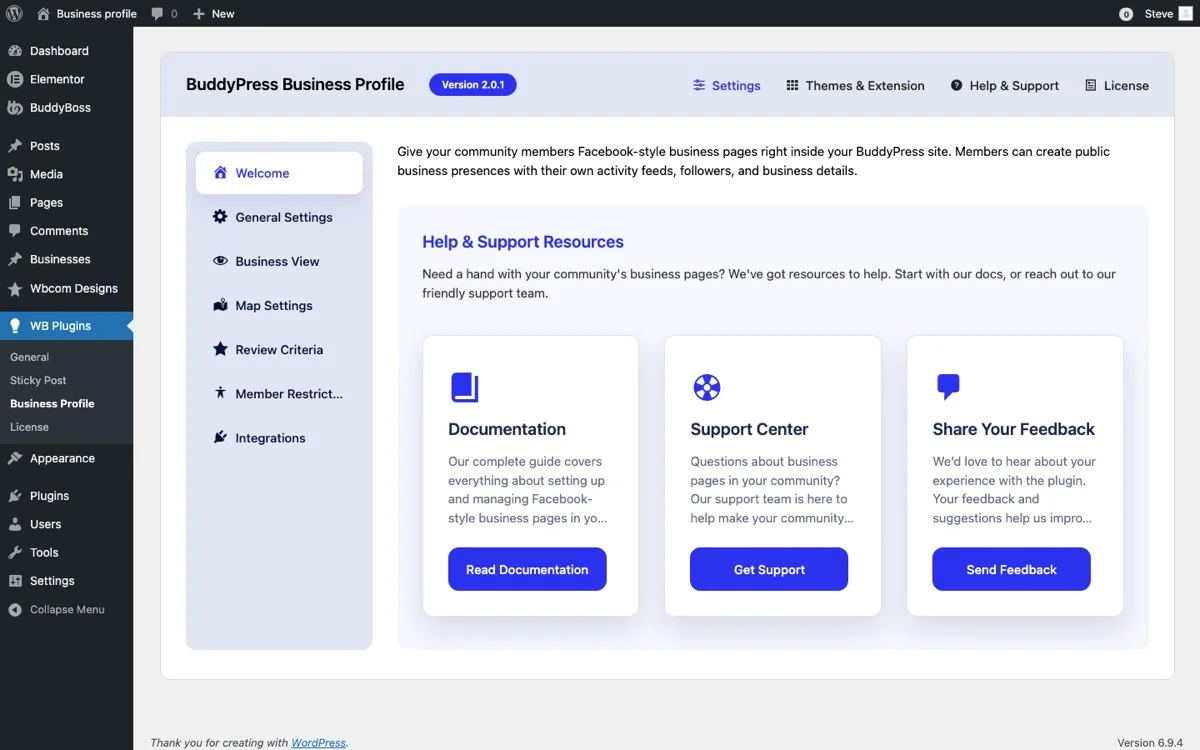
Here is how the settings panel lets you configure what information appears on each digital business card:
Contact Information
Every digital business card starts with contact information. BuddyPress Business Profile provides structured fields for all essential contact details:
- Business Name: Displayed prominently at the top of the card, serving as the primary identifier.
- Phone Number: Clickable on mobile devices, so visitors can call with a single tap.
- Email Address: Linked for instant email composition. No manual typing required.
- Website URL: Direct link to the member’s WooCommerce store or external website.
- Physical Address: Full address with optional map integration for directions.
Unlike paper cards where phone numbers are tiny text you have to squint at, digital business cards make every piece of contact information interactive. Tap the phone number to call. Tap the email to compose a message. Tap the address to open navigation. This frictionless experience means potential customers are more likely to actually reach out.
Business Hours
One of the most underrated pieces of information on a business card is availability. When can a customer call? When is the store open? When is the best time to visit?
BuddyPress Business Profile includes a day-by-day business hours section that answers all of these questions at a glance. Members set their hours for each day of the week, mark closed days, and can note special schedules for holidays or seasonal changes.
For WooCommerce community members who operate brick-and-mortar locations alongside their online stores, business hours on their digital card eliminate the most common customer frustration: showing up when the door is locked. For service providers, displayed hours tell clients when to expect responses and schedule appointments.
Social Media Links
Modern professionals exist across multiple platforms. A photographer might showcase work on Instagram, network on LinkedIn, share tips on YouTube, and engage with clients on Facebook. A paper business card cannot hold all of these links. A digital business card can.
BuddyPress Business Profile supports links to all major social media platforms, each displayed with its recognizable icon for instant visual identification. Visitors can jump from the business card directly to any social channel, making it easy to explore a member’s full online presence.
For WooCommerce community members, social media links on their digital business card create multiple touchpoints for customer engagement. A customer who finds a seller through the marketplace might follow them on Instagram for behind-the-scenes content, join their Facebook group for exclusive offers, or subscribe to their YouTube channel for tutorials.
Interactive Map
Location-based businesses benefit enormously from map integration on their digital business cards. Instead of a static address that customers have to copy and paste into their navigation app, an embedded map provides visual context and one-click directions.
The map on a BuddyPress Business Profile card shows the exact business location with a pin marker. Visitors can zoom in to see the surrounding area, check nearby landmarks for easier navigation, and open directions in their preferred navigation app. For businesses in hard-to-find locations, this visual mapping is invaluable.
For WooCommerce stores with physical locations, a mapped digital business card bridges the online-to-offline gap. Customers who discover a store online can see exactly where it is and get directions without leaving the card.
Sharing Business Cards via URL
Every BuddyPress Business Profile generates a unique, permanent URL that serves as the digital business card’s address. This URL can be shared anywhere: in emails, text messages, social media bios, forum signatures, printed materials, and even on traditional paper business cards as a link to the full digital version.
The Power of a Shareable URL
A shareable URL transforms your business card from a one-time exchange into a permanent, reusable marketing asset:
- Email Signatures: Add your profile URL to your email signature so every email you send includes a link to your complete business card.
- Social Media Bios: Use the URL in your Instagram bio, Twitter profile, or LinkedIn summary to direct followers to your full professional profile.
- Text Messages: When someone asks for your contact info, send them a single link instead of typing out your details.
- Printed Materials: Include the URL on flyers, brochures, invoices, and packaging so customers can access your full digital presence.
- Networking Events: Instead of exchanging paper cards, share your URL via AirDrop, text, or a simple verbal exchange.
Always Up to Date
The biggest advantage of a URL-based business card is that it always shows current information. Change your phone number? Update it once in your profile and every card already shared now shows the new number. Add a new service? It appears on every shared card immediately. Move to a new location? The map updates automatically.
With paper cards, any change requires reprinting hundreds or thousands of cards. With a digital card, changes take seconds and propagate instantly to everyone who has your URL.
QR Code Integration Ideas
QR codes are the bridge between the physical and digital worlds. They let someone with a smartphone scan a code and instantly open a webpage, which makes them a natural companion for digital business cards.
Where to Place Your QR Code
Generate a QR code that links to your BuddyPress Business Profile URL and use it in these strategic locations:
- Product Packaging: Include a QR code on your product packaging that links to your business profile. Customers can scan it to learn more about your business, leave a review, or follow your updates.
- Storefront Window: Display a large QR code in your shop window so passersby can scan it and get your full business information, even when you are closed.
- Trade Show Booth: Place QR codes on your trade show display so attendees can scan and save your info without waiting in line to talk to you.
- Vehicle Signage: If you have a business vehicle, a QR code on the side lets people stuck in traffic or parked nearby access your business card instantly.
- Invoices and Receipts: Add a QR code to invoices so clients can quickly access your contact information for follow-up questions or reorders.
- Restaurant Menus: For food-related businesses, a QR code on menus links to your profile with hours, location, and reviews.
Creating QR Codes
Generating a QR code for your profile URL is straightforward. Free tools like QR Code Generator, Canva, or even Google Chrome’s built-in QR code feature can create a code in seconds. For branded QR codes with your logo embedded, tools like QR Code Monkey or Beaconstac offer customization options.
Best practices for QR codes: make them large enough to scan from a reasonable distance (at least 2cm x 2cm for close-range scanning), use high contrast colors (dark code on light background), and always test the code before printing. A QR code that does not work is worse than no QR code at all.
Mobile-Friendly Profiles That Work Everywhere
Over 60% of web traffic comes from mobile devices, and that percentage is even higher for local business searches. A digital business card that does not look good on a phone is not doing its job.
BuddyPress Business Profile cards are built with responsive design principles. They adapt automatically to any screen size, from large desktop monitors to small smartphone screens. Every element, including text, images, maps, buttons, and social links, reflows to fit the available space without horizontal scrolling or tiny, untappable links.
Mobile-Specific Advantages
On mobile devices, digital business cards gain additional functionality that paper cards can never match:
- Click-to-Call: Phone numbers become tap-to-call buttons. One tap initiates a phone call without manual dialing.
- Click-to-Email: Email addresses open the default email app with a new message pre-addressed. Just type and send.
- Click-to-Navigate: Map addresses open in Apple Maps, Google Maps, or Waze for turn-by-turn directions.
- Save to Contacts: Some implementations allow saving the business card directly to the phone’s contact list.
- Share via Native Tools: The profile URL can be shared using the phone’s native share sheet, which includes options for text message, email, AirDrop, social media, and messaging apps.
Loading Speed Matters
A digital business card that takes 10 seconds to load on a cellular connection is useless. BuddyPress Business Profile cards are lightweight and optimized for fast loading. Images are served in modern formats like WebP, scripts are minimized, and the profile structure prioritizes above-the-fold content so visitors see the most important information first while the rest loads in the background.
For WooCommerce community members, fast-loading profiles mean potential customers do not abandon the card before seeing your contact information. Every second of load time costs you potential inquiries and sales.
Embedding Business Cards in Email Signatures
Your email signature is prime real estate for your digital business card. Every email you send is an opportunity to share your complete professional profile with the recipient. Instead of listing your phone, address, and website in a cluttered text block, include a single link to your BuddyPress Business Profile.
Email Signature Best Practices
Here is how to effectively integrate your digital business card into your email signature:
- Keep it simple: Include your name, title, and a link labeled “View My Business Card” or “Full Contact Info.” Resist the urge to duplicate all your contact details in the signature when they are already on the card.
- Add a thumbnail: Include a small version of your logo or headshot that links to your profile. Visual elements in email signatures get more clicks than plain text links.
- Include a CTA: Add a brief call to action like “See our latest services” or “Check our business hours” to give recipients a reason to click beyond just saving your contact info.
- Mobile formatting: Test your email signature on mobile devices. Many email clients render signatures differently on phones, so make sure your business card link is easily tappable.
Professional Communication
For WooCommerce community members who communicate with customers via email, a business card link in the signature adds professionalism to every interaction. Customer service emails, order confirmations, follow-up messages, and promotional outreach all become opportunities to reinforce your brand and provide easy access to your full business information.
Think about the customer experience: they receive a reply to their question about a product, and in your signature, they see a link to your business card. They click it, see your business hours, realize you are open late on Thursdays, and decide to visit your physical store. That conversion would never happen with a paper business card sitting in a drawer.
Updating Information in Real Time
Businesses change constantly. You move to a new location. You hire new staff. You add new services. You change your hours for the holidays. You launch a new product line. You rebrand with a new logo. Every one of these changes would require reprinting paper business cards.
With BuddyPress Business Profile, updates happen in real time. Edit your profile, save the changes, and every shared link instantly reflects the updated information. There is no lag, no reprinting, no version confusion.
What to Update and When
Keep your digital business card current by updating it whenever these changes occur:
- Contact Information: New phone number, email address, or physical location. Update immediately to avoid missed connections.
- Business Hours: Seasonal hours, holiday schedules, or permanent hour changes. Customers rely on this information to plan visits and calls.
- Services and Offerings: New services, discontinued offerings, or pricing changes. Keep your description accurate so customers know what to expect.
- Social Media: New platform profiles, changed handles, or deactivated accounts. Remove dead links and add new ones.
- Business Description: Major milestones, new certifications, awards, or expanded capabilities. Your description should reflect your current business, not what it was a year ago.
- Photos and Media: Updated headshots, new storefront photos, or refreshed branding materials. Visual elements should match your current brand identity.
The Advantage of Centralized Updates
Because your BuddyPress Business Profile serves as the single source of truth for your business information, you only need to update one place. That change then propagates to everywhere your URL is shared: email signatures, social media bios, printed QR codes, forum signatures, and any other location where your profile link appears.
Compare this to the old approach: update your paper cards, update your website, update your Google Business listing, update your Facebook page, update your LinkedIn profile, and hope you did not miss anything. Centralized updates save time and eliminate the risk of inconsistent information across platforms.
Advanced Use Cases for Digital Business Cards
Beyond the basics, digital business cards open up creative possibilities that enhance your WooCommerce community’s professional presence:
Networking at Events
At conferences and meetups, instead of collecting stacks of paper cards, attendees can follow each other’s profiles on your platform. This creates lasting connections within your WooCommerce community and drives post-event engagement back to your site.
Freelancer Portfolios
For freelancers and creative professionals in your community, a digital business card doubles as a portfolio summary. Their profile description can highlight key projects, their activity feed can showcase recent work, and reviews from past clients serve as built-in testimonials.
Team Directories
Businesses with multiple team members can use BuddyPress Business Profile to create a team directory. Each team member gets their own digital card linked from the company profile, making it easy for clients to contact the right person directly.
Referral Networks
Service providers who refer clients to each other can share each other’s digital business cards. A wedding photographer can send their client the digital cards for their recommended florist, caterer, and venue coordinator, all within the same platform.
Implementation Guide for WooCommerce Store Owners
Ready to give your WooCommerce community members digital business cards? Here is how to implement it:
- Install BuddyPress Business Profile on your WordPress site and configure the profile fields you want to include on each business card.
- Customize the layout to match your site’s branding. Ensure the profile design is clean, professional, and mobile-responsive.
- Set up categories so members can classify their business type, making it easier for visitors to browse the community directory.
- Enable reviews so each digital business card includes social proof from satisfied customers.
- Communicate the feature to your community. Send an email announcement explaining the new digital business card feature and how members can create and share their profiles.
- Provide a guide on how to generate QR codes, add profile URLs to email signatures, and share cards on social media.
- Feature complete profiles on your homepage to encourage other members to fill out their own cards fully.
Get Started with Digital Business Cards
Your WooCommerce community members deserve professional digital business cards that represent their businesses effectively. The BuddyPress Business Profile plugin provides all the tools needed: detailed contact fields, business hours, social media links, interactive maps, shareable URLs, and mobile-optimized profiles.
Stop handing out paper cards that end up in the trash. Give your community members digital business cards they can share instantly, update in real time, and use as a marketing tool that works 24/7.
Get BuddyPress Business Profile today and empower your WooCommerce community with modern, professional digital business cards.