Combining a Directory and a Marketplace on the Same WordPress Site


The first question anyone asks before running a directory and a marketplace on the same WordPress install is whether the two plugins will fight each other: colliding database tables, competing template overrides, a homepage that can’t decide what it’s for. It’s a fair question, most WordPress plugin combinations do eventually collide over something. Combining a directory and a marketplace turns out to be one of the safer pairings, because a directory and a marketplace store fundamentally different data and almost never compete for the same page template. The parts that actually need planning aren’t technical conflicts at all. They’re information architecture: making sure a visitor, and a vendor, always knows which system they’re in and why. This article walks through exactly that planning: how the two plugins avoid colliding on the database level, how to structure navigation so visitors self-select correctly, and where the real setup effort actually goes once the plugins themselves are installed and running side by side.
Why This Isn’t a Conflict Waiting to Happen
Listora runs on its own custom post type with its own database schema, separate from WordPress’s core posts table. WP Sell Services does the same for services, packages, and orders. Neither plugin needs the other installed, neither requires a specific theme, and neither writes to tables the other one reads from. That separation is what makes running them together fundamentally different from, say, running two SEO plugins that both want to control the same meta tags, or two page builders fighting over the same block registry. Both plugins are also block-native, built on the WordPress block editor rather than shortcodes or custom page templates, which means a single page can mix a directory search block and a marketplace category grid block without either one needing exclusive control of the page. That wasn’t guaranteed. Older-generation directory and marketplace plugins built around custom page templates and legacy shortcodes tend to fight much harder for control of routing and page structure than block-based plugins do.
If you want to try it, the standalone Listora directory plugin is free to download at wbcomdesigns.com/downloads/listora.
Planning the Information Architecture Before Installing Anything
The technical coexistence is the easy part. The part that actually determines whether this combination works is deciding, before a single listing goes live, what belongs in the directory and what belongs in the marketplace, and making that distinction obvious to every visitor from the first click. A useful rule of thumb: if a customer needs to talk to a human, negotiate scope, or evaluate local trust before buying, that content lives in the directory. If a customer can complete the purchase without any conversation, fixed price, fixed deliverable, that content lives in the marketplace. Vendors who offer both kinds of service, a fixed-price starter package alongside a custom quote for bigger jobs, get a presence in both systems, linked to each other. This is the same distinction covered from the business-model side in this site’s piece on choosing between a directory and a marketplace for a service business, worth reading before finalizing the architecture below.
Homepage: Two Entry Points, Not One Confused Search
The single most common mistake in combining these two systems is trying to build one universal search box that handles both jobs. It doesn’t work well in practice. A visitor typing “plumber” into a combined search has no way to signal whether they want to browse local plumbing businesses or buy a fixed-price plumbing service package, and a search algorithm trying to guess ends up serving a confusing mix of both. The fix is structural, not algorithmic: two clearly labeled entry points on the homepage. A directory search block, prominent, with a “find a business near you” framing and distance-based filtering front and center. A marketplace category browse, separately labeled, framed around “book a service package” with pricing visible immediately. Visitors self-select within a second or two once the framing is clear, and that self-selection produces far better results than any single smart-search algorithm trying to disambiguate intent after the fact.
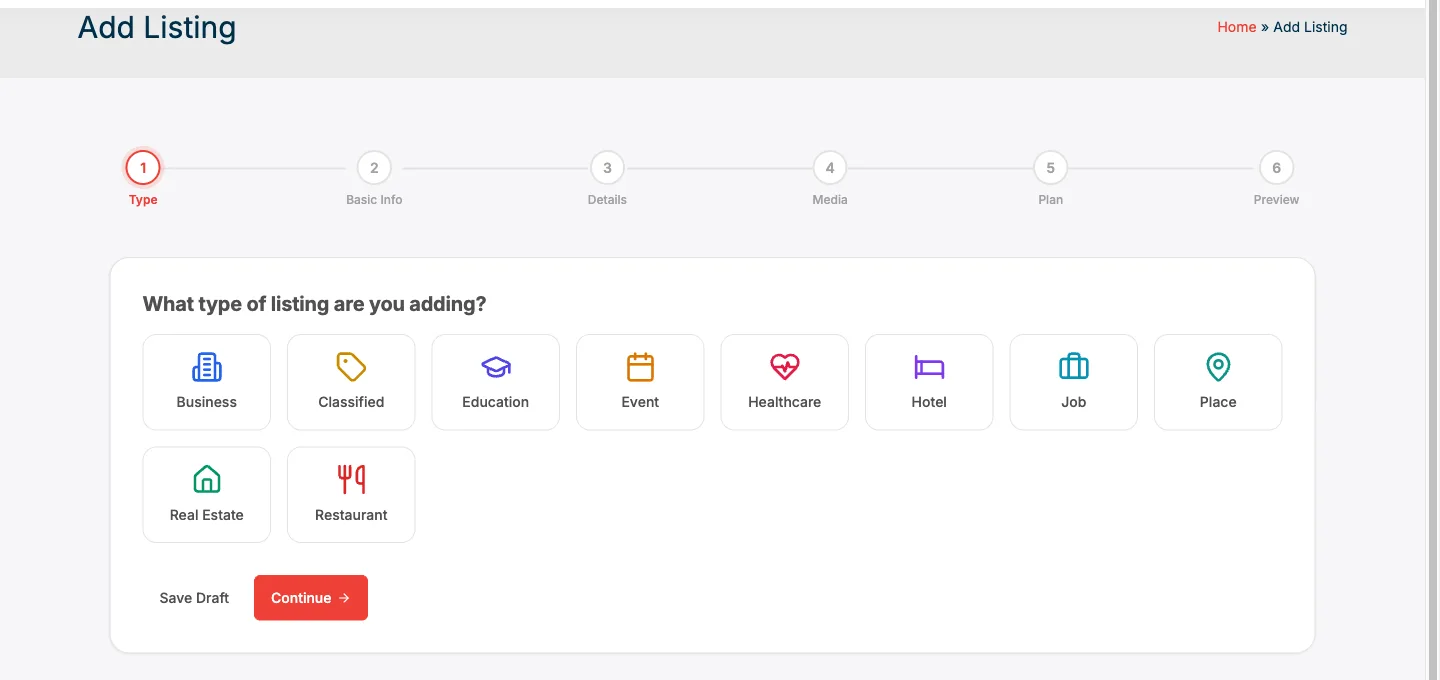
Listora’s frontend submission flow runs as its own self-contained experience, block-native and independent of whatever marketplace checkout lives elsewhere on the same site.
Navigation and Menu Structure
Primary navigation should mirror the homepage split rather than trying to blend the two systems into one dropdown. A “Find a Business” top-level menu item leading into the directory, and a separate “Browse Services” or “Shop Packages” item leading into the marketplace, keeps the distinction visible on every page, not just the homepage. Burying the directory as a submenu item under the marketplace, or vice versa, signals to visitors that one system is secondary, which undersells whichever one gets buried. Breadcrumbs matter more here than on a single-system site. A visitor who clicked into a directory listing from a Google search, landing directly on a business page with no homepage visit first, needs the breadcrumb trail to make clear they’re in the directory section specifically, not lost inside what looks like a generic marketplace product page.
Linking Directory Listings to Marketplace Storefronts
Once the two systems have clear separate identities, the highest-value technical work is connecting them for vendors who operate in both. A directory listing with a visible link to “View packages and book online” pointing at that same vendor’s marketplace storefront turns a local-search visitor into a marketplace buyer without ever leaving the site. The reverse link matters too: a marketplace storefront with a “View full business profile” link back to the directory listing gives a buyer who’s already committed to a purchase a path to verify the business’s broader reputation, reviews that predate the marketplace relationship entirely, before finalizing checkout. This bidirectional linking is manual mapping work, not something either plugin does automatically out of the box, since the two plugins have no shared vendor ID system by default. For a site with a small number of dual-presence vendors, adding this link by hand in each listing and each storefront description is manageable. For a larger site, this is exactly the kind of thing worth wiring through a small custom field mapping vendor IDs across both systems, so the link updates automatically if either profile changes. The trust value of that directory-side link is covered in more depth in this site’s piece on what a directory does for verified vendors that a marketplace review system doesn’t.
Avoiding Duplicate Content Between the Two Content Types
Search engines penalize near-duplicate pages, even unintentionally near-duplicate ones, by diluting ranking signal across both instead of concentrating it on one strong page. If a vendor’s directory listing description and marketplace storefront description say almost the same thing in almost the same words, that’s exactly the failure mode to avoid. Write them for different jobs on purpose. The directory listing description should sell trust and location: years in business, service area, licensing, what makes this business locally reputable. The marketplace storefront description should sell the specific package: what’s included, turnaround time, what the buyer gets for the price. Different vocabulary, different structure, different call to action, “contact us” versus “add to cart,” keeps the two pages distinct both to readers and to search engines evaluating them.
Performance at Scale on One WordPress Install
Running both systems together raises a fair question about database load once either one grows large. Listora is built for a hundred thousand listings on its custom schema, and WP Sell Services runs its own order and package tables independently, so neither plugin’s growth directly slows down queries against the other’s tables. The practical performance risk isn’t the two plugins colliding with each other, it’s a combined homepage trying to query both systems simultaneously without proper caching, pulling a live directory search result and a live marketplace category grid on every page load for every visitor. Standard WordPress object caching and page caching handle this the same way they’d handle any content-heavy homepage: cache the homepage output, invalidate on new listing or new package publish, and let the live search queries happen only on the actual search results pages rather than on every homepage view. Neither plugin requires unusual caching configuration beyond what a typical high-traffic WordPress site would already need.
Vendor Onboarding: One Signup, Two Profiles
For vendors who want a presence in both systems, requiring two completely separate signup flows creates real friction and drop-off. A better sequence: a vendor signs up once through whichever system is the primary entry point for that business, marketplace first for a vendor selling fixed packages, directory first for a vendor whose main need is local discovery, and then gets a clear, low-friction path to add the second profile using data already on file rather than re-entering everything from scratch. Neither plugin ships this cross-system onboarding automatically, since they weren’t built as a single combined product. Building it is a matter of a short onboarding email sequence or an admin-assisted step, “you’re set up in the marketplace, want to also claim a directory listing using the same business details?” rather than expecting vendors to discover and configure both systems independently.
SEO Structure: Separate Sitemaps, Separate Schema
Each plugin generates its own Schema.org markup appropriate to its content type. Listora outputs per-listing-type structured data (LocalBusiness, Restaurant, Event, and so on depending on the listing type), while a marketplace service package would typically carry Product or Service schema instead. Keeping these separate, rather than trying to force one unified schema across both content types, is correct behavior, not a gap to fix, since Google’s structured data guidelines expect different content types to carry different schema in the first place. XML sitemaps should list both content types, but it’s worth checking that whichever SEO plugin manages the sitemap on the site actually picks up both custom post types by default. Some SEO plugin configurations only auto-include the default post type and require manually enabling additional custom post types in the sitemap settings, an easy step to miss when adding a second content type to an existing site.
A Practical Setup Sequence
Start with whichever system already exists, most sites in this combination are marketplaces adding a directory rather than the reverse, and get the second system’s information architecture mapped out before installing the plugin: which vendor categories get directory listings, what the homepage split will look like, what the primary navigation structure becomes. Install the second plugin next, configure its core settings, and seed a small number of real listings, not placeholder content, before opening the section publicly. Only after the second system has real content does it make sense to build the cross-linking between directory listings and marketplace storefronts, since linking to an empty or thin section undermines trust in both directions. Launch navigation and homepage changes last, once there’s enough real content on both sides that a visitor landing on either entry point finds something substantial rather than an obviously new, sparse section.
Common Technical Mistakes
The most frequent mistake is skipping the information architecture planning and just installing both plugins with their default settings, hoping the combination sorts itself out. It doesn’t. Default installs of both plugins tend to compete for homepage prominence and produce exactly the confusing, blended search experience described above. A second mistake is forgetting to update the primary navigation and internal linking when the second system launches, leaving it reachable only through a direct URL with no path from the homepage or main menu. A directory or marketplace section with zero internal links from the rest of the site gets almost no organic discovery, regardless of how good the content is. A third mistake is treating vendor data entry as a one-time task rather than an ongoing sync problem. If a vendor updates their phone number in the marketplace profile but not the directory listing, or vice versa, the site starts showing inconsistent business information across its own pages, which damages trust more than either page having no information at all would have.
Mobile Considerations for the Combined Experience
The two-entry-point pattern that works on desktop needs a slightly different treatment on mobile, where screen space forces a choice between showing both entry points immediately or making a visitor scroll or tap through an initial decision point. Stacking a directory search bar directly above a marketplace category grid on a mobile homepage tends to work better than a tabbed interface that hides one system behind a tap, since a tab that isn’t visible on first load often just doesn’t get discovered by a mobile visitor scanning quickly. Distance-based directory search specifically benefits from mobile in ways a marketplace category browse doesn’t: a visitor searching on their phone is far more likely to be standing somewhere specific and wanting a business near their current location right now, which is exactly the “near me” search intent a directory’s location filtering is built to serve. Making sure the directory’s location permission prompt and distance filter are prominent on the mobile view, not buried in an expandable filter panel, captures more of that specific intent than a desktop-first design would.
A Composite Example: Setting Up the Combination From Scratch
Picture a regional cleaning and maintenance company launching a new WordPress site rather than retrofitting an existing one, giving them the freedom to plan the combination from day one instead of bolting a second system onto an established site. They start with the marketplace side, since their core offering, scheduled recurring cleaning packages at fixed monthly prices, fits a checkout flow naturally. WP Sell Services goes live first with three tiers: weekly, biweekly, and monthly service, each with clear pricing and instant booking. Three months later, customer feedback reveals a gap: several larger commercial clients want a custom quote for irregular, large-scope jobs, deep cleans after construction, seasonal exterior work, that don’t fit a fixed monthly package. Rather than trying to force these into the existing marketplace tiers, the company adds Listora scoped specifically to a “Commercial and Custom Projects” directory listing, with a Contact Owner-style inquiry path instead of a checkout button. The homepage gets updated with a clear split: “Subscribe to Regular Cleaning” leading into the marketplace, and “Request a Custom Quote” leading into the directory listing’s inquiry flow. Within the new structure, every marketplace confirmation email includes a line inviting the customer to view the company’s full directory listing for reviews and photos of past commercial work, quietly cross-promoting the trust-building content to buyers who’ve already committed to the recurring service. The result isn’t two competing sections, it’s one company presenting two honestly different buying paths to two honestly different kinds of customers.
Frequently Asked Questions
Do Listora and WP Sell Services require each other to function?
No. Both are fully standalone plugins. Neither requires the other installed, and neither requires a specific theme. They coexist because they’re independently built to run alone, not because they were designed as a matched pair.
Will running both plugins slow down the site?
Not meaningfully more than running any two well-built custom-table plugins together, provided standard WordPress caching is in place. Each plugin’s own database schema is designed for its stated scale independently; the shared risk is an uncached homepage querying both systems on every page load, which standard page caching resolves.
Can a single vendor account log into both systems with one login?
Both plugins use standard WordPress user accounts, so the same WordPress login works for both a directory listing claim and a marketplace vendor account. What isn’t automatic is a shared vendor profile between the two; that connection has to be built through manual linking or a small custom integration.
Should the directory and marketplace share the same category taxonomy?
Not necessarily, since the two content types often need different category granularity: a directory typically organizes by business type and location, while a marketplace organizes by service package and price tier. Forcing identical taxonomies onto both usually produces an awkward fit for one side or the other.
What happens to SEO if the directory and marketplace content overlap too much?
Search engines see the overlapping pages as competing rather than complementary, which dilutes ranking signal for both. Writing the two content types with genuinely different framing, trust and location for the directory, package specifics for the marketplace, prevents this dilution.
Is it better to launch both systems at once or add the second one later?
Adding the second system after the first one is established usually works better in practice, since it lets the new system launch with a working navigation pattern and real, seeded content rather than two half-empty sections competing for attention from day one. That sequencing is covered in more depth in this site’s guide on adding a local service directory alongside an existing marketplace.
Does combining a directory and a marketplace require custom development?
Not for the core coexistence, both plugins run independently out of the box. Custom development becomes worthwhile once a site wants automated bidirectional linking between a vendor’s directory listing and marketplace storefront, since that specific connection isn’t built into either plugin by default and has to be mapped manually or through a small integration.
How do I decide which system should own the primary navigation slot closer to the logo?
Lead with whichever system drives more of the site’s actual revenue or core purpose today, and treat the newer addition as equally prominent but positioned second. Revisit the order every few months as traffic data comes in; if the newer directory section is quietly outperforming the original marketplace in organic traffic, the navigation order should catch up to that reality rather than staying fixed to the original launch order.
Two Systems, One Site, One Clear Job Each
Combining a directory and a marketplace on the same WordPress site isn’t a technical risk so much as a discipline problem. The plugins themselves stay out of each other’s way, running on separate schemas, separate blocks, separate REST endpoints, with nothing structural forcing a conflict. What takes real work is making sure every page on the site tells a visitor exactly which job it’s doing, discovery or checkout, and giving vendors an obvious, low-friction path between the two when they operate in both. Get that discipline right at launch, clear entry points, honest cross-linking, distinct content for each page type, and the two systems reinforce each other instead of competing for the same homepage real estate. Skip it, and even two perfectly stable plugins end up producing a confusing site that undersells both halves of what it built.