Should You Add a Local Service Directory Alongside Your Marketplace?


Six months after launch, a lot of service marketplace owners hit the same wall and start asking whether they should add a local service directory next to what they’ve already built. Order volume plateaus, the same handful of vendors take most of the bookings, and organic traffic stalls at whatever the marketplace’s product-page SEO can pull in. Meanwhile a search for “wedding caterer near me” or “emergency plumber [city]” sends traffic straight past the marketplace to a directory site that ranks because it has an address, a service radius, and a pile of local reviews. Should you add a local service directory alongside your marketplace? For most marketplaces with any local component to their vendor base, the honest answer is yes, but the way it gets added matters more than the decision itself. Bolt it on carelessly and it becomes a second half-finished section nobody visits. Add it deliberately, seeded with real data and scoped to the categories where local intent already exists, and it becomes the front door the marketplace was missing.
Why a Marketplace Alone Leaves Local Search on the Table
Marketplace listings are built to describe a service package, not a business location. A product page for “logo design, three tiers” doesn’t need an address, hours, or a service radius, so most marketplace plugins don’t collect that data and most marketplace themes don’t display it even when it exists. That’s fine for services with no local component. It’s a real gap for anything a customer would search with “near me” attached, because Google’s local results lean heavily on structured business data that a pure marketplace listing simply doesn’t carry. The practical effect shows up in analytics before it shows up anywhere else. A marketplace owner running Search Console will often see the site ranking fine for its brand terms and for specific service-package terms, while showing almost nothing for local intent searches in its own city. That’s not a content problem, it’s a data-structure problem, and no amount of extra blog posts fixes it if the underlying listings still don’t carry local business schema.
What It Actually Means to Add a Local Service Directory
This doesn’t mean replacing the marketplace or running two disconnected WordPress installs. It means running a second, purpose-built content type alongside the existing marketplace, one designed around discovery and local trust rather than checkout. Listora, a standalone directory plugin, installs next to a marketplace plugin like WP Sell Services without conflict since neither requires the other or a specific theme. The directory layer picks up everything the marketplace wasn’t built to do: business claims, distance-based search, star ratings tied to a location rather than a transaction, and Schema.org markup per listing type that feeds Google’s local results directly. The two content types can stay entirely separate, a directory listing and a marketplace order are different objects with different lifecycles, or they can be loosely connected: a directory listing pointing to the same vendor’s marketplace storefront, giving a local searcher a path from “find a business near me” straight into “buy this specific package” without leaving the site.
The Reverse-Directory Feature That Makes This Combination Work Especially Well
One Listora Pro feature deserves specific attention here because it maps almost exactly onto what a marketplace owner is trying to solve: Needs Marketplace, a reverse-directory flow where a visitor posts what they need instead of browsing existing listings, and businesses respond to that request. Picture a customer who doesn’t want to compare five plumbers’ individual listings, they just want to describe the leak and let qualified local plumbers come to them. That’s the exact shape of demand a marketplace’s fixed-package checkout can’t capture, because the buyer doesn’t know yet what package fits their problem.
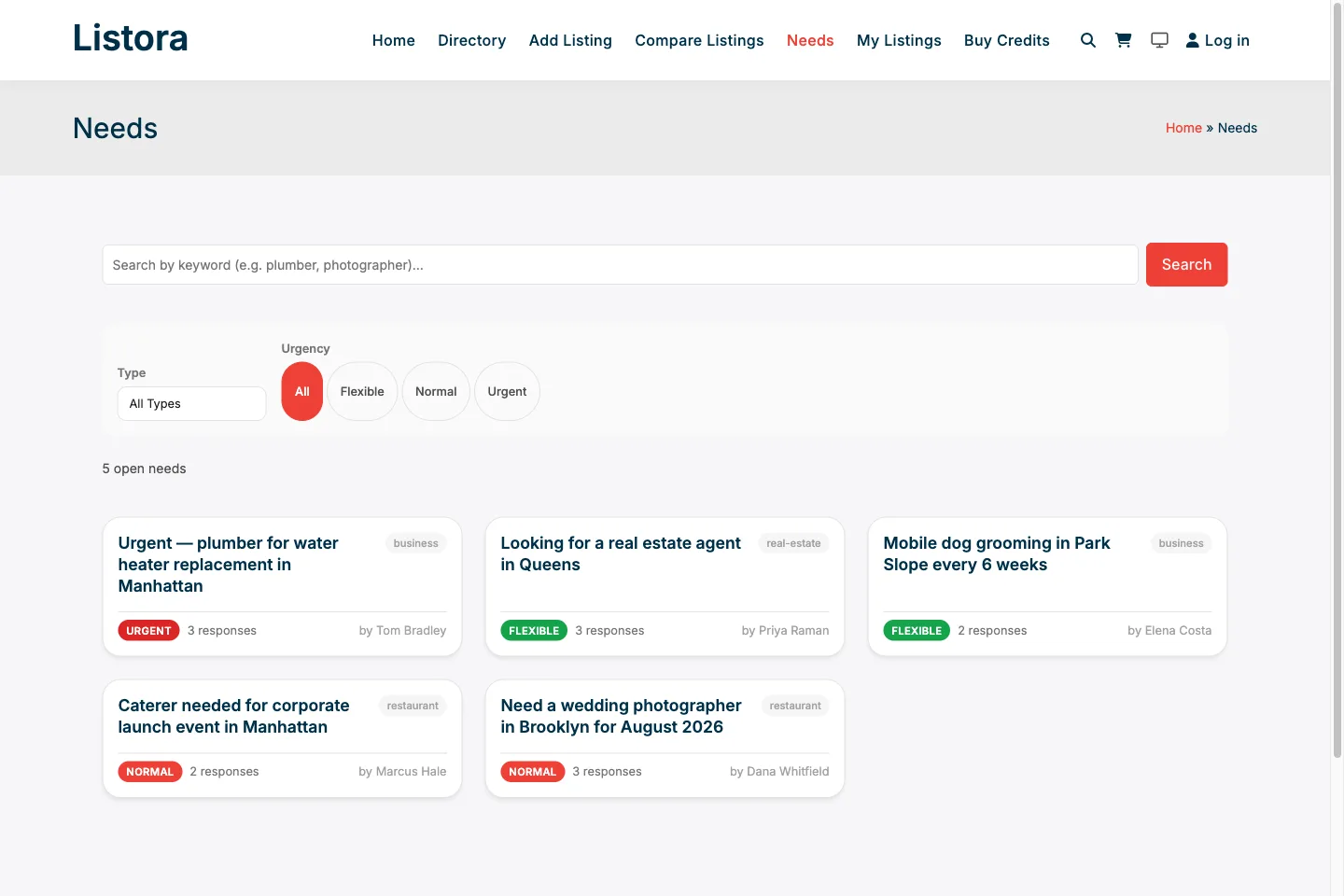
Listora Pro’s Needs Marketplace: visitors post a request, local businesses respond, closing the gap a fixed-price marketplace checkout can’t reach.
Running this reverse-directory flow next to a standard service marketplace gives a business two entry points into the same vendor pool. A customer with a well-defined need goes straight to the marketplace and buys a package. A customer who isn’t sure yet posts a need and lets vendors pitch, which is a much lower-friction first touch for exactly the kind of local, high-consideration service where marketplace-style instant checkout was never going to convert well anyway.
When Adding a Directory Is the Right Call
Your vendor pool already has a physical location or service radius
If vendors on the marketplace are describing a service area, a shop address, or “I only take jobs within 20 miles,” that data is sitting unused. A directory gives it somewhere to live and something to rank for.
Customers are already searching locally and not finding you
Check Search Console for queries containing a city name or “near me” that show impressions but near-zero clicks. That’s the clearest possible signal that local intent exists and the marketplace’s page structure isn’t capturing it.
Vendors want a public trust profile that outlives any single transaction
A marketplace order history is private and transaction-scoped. A directory listing with claims, ratings, and owner replies is a standing public asset a vendor can point a customer to before any transaction happens, which matters enormously for trades where trust has to be established up front.
When Adding One Is Premature
Not every marketplace needs this yet, and it’s worth being honest about that before adding complexity to a site that’s still finding its footing. If the marketplace has fewer than a few dozen active vendors, a directory next to it will just be a second thin section competing with the marketplace for the same handful of listings, doubling maintenance without doubling discoverability. A directory earns its keep once there’s enough vendor density in a category or region that distance and rating filtering actually produce different, useful results for different searchers. It’s also premature if the vendor pool is genuinely non-local, remote freelancers serving clients anywhere. A directory’s core value proposition, proximity, does nothing for a video editor in Manila serving a client in Denver. Adding one in that case is just extra admin overhead with no corresponding SEO or trust benefit. This is the same distinction covered in more depth in a companion piece on this site about choosing between a directory and a marketplace model from scratch, which is worth reading first if the marketplace hasn’t launched yet.
How the Two Systems Actually Coexist on One WordPress Install
Technically, this is simpler than it sounds. Listora runs on its own custom post type and its own set of blocks, and WP Sell Services runs on its own, so there’s no data collision between a directory listing and a marketplace service package. Both are block-native, so a homepage can mix a directory search block and a marketplace category grid without either plugin fighting the other for template control. The two REST APIs run independently too, which matters if a mobile app or a headless frontend needs to pull directory data and marketplace data through separate endpoints rather than one bloated combined query. The one place that needs actual planning is navigation and information architecture. A visitor landing on the homepage shouldn’t have to guess whether they want “find a business near me” or “buy a fixed-price service package.” Clear, separate entry points, a directory search bar in one spot and a marketplace category browse in another, prevent the two systems from blurring into a confusing single search experience that does neither job well. This same coexistence question, at the site-architecture level, is covered in a dedicated companion post on this site about running both systems together.
What This Does for Vendor Retention, Not Just New Traffic
New organic traffic from local search is the obvious upside, but the retention effect matters just as much and gets talked about less. A vendor who only has a marketplace storefront has no reason to log in between orders. A vendor with a directory listing has an ongoing reason to check the dashboard: new reviews, claim status, a lead from a Needs Marketplace post. That extra touchpoint keeps vendors engaged with the platform between transactions, which directly affects how quickly they respond when a new order does come in, something covered from the payout side in this site’s guide to Stripe Connect payouts for WordPress marketplaces. There’s a quieter benefit too. A directory listing that predates any transaction gives a marketplace owner a legitimate reason to onboard a vendor before that vendor has made a single sale. Instead of an empty marketplace profile with zero reviews, a new vendor can build a directory presence, collect some early reviews from past clients brought over from elsewhere, and only then start selling packages through the marketplace side with actual social proof already in place.
A Practical Rollout Plan
Start narrow. Pick one vendor category, the one with the strongest local search intent based on Search Console data, and build out directory listings for just that category first rather than trying to convert the entire vendor base on day one. Seed it with real business data pulled from the existing marketplace vendor profiles rather than asking every vendor to fill out a second onboarding form from scratch, since duplicate data entry is the single fastest way to get vendor pushback on a new feature. Once that first category has enough listings to make distance and rating filtering meaningful, usually somewhere around twenty to thirty active listings in a metro area, open up self-serve directory submission to the rest of the vendor base and start linking between the directory listing and the matching marketplace storefront in both directions. Only after the directory side has real traffic and real reviews does it make sense to layer in the Needs Marketplace reverse-directory flow, since that feature depends on having a critical mass of responsive vendors already present to make posted needs get answered quickly.
Common Pitfalls When Adding a Directory Layer
The most common mistake is launching the directory with the same thin content as the marketplace listings, a name, a category, and nothing else. A directory listing without real business data (hours, service area, photos, a claimed profile) reads as empty shelf space and won’t rank any better than the marketplace product page it’s supposed to complement. Take the time to seed real listing detail before opening the section publicly. The second mistake is letting the two systems drift into duplicate content. If a vendor’s directory listing description and marketplace storefront description are identical, search engines see two thin, near-duplicate pages competing against each other instead of one strong local page and one strong transactional page. Write them differently on purpose: the directory listing sells trust and location, the marketplace page sells the specific package and price. A third pitfall is neglecting moderation once the directory opens up to self-serve submission. A directory that lets anyone submit a listing without review becomes a spam target within weeks, which is why a proper submission queue and anti-spam layer matter from day one rather than as a later fix once the section is already full of junk listings.
How Directory Revenue Differs From Marketplace Commission
A marketplace owner is used to thinking about revenue as a percentage of transaction value: take a cut of every order, scale that cut with volume. A directory earns money on an entirely different axis, and understanding that distinction up front prevents a common miscalculation when someone tries to bolt a commission model onto the directory side. Directories monetize placement, not transactions. Listora Pro’s credit-based system sells Free, Featured, Premium, and Sponsored listing tiers, where a business pays for better visibility in search results and category pages rather than paying a percentage of any job they win through the listing. Below is what that plan management actually looks like from the admin side once Pro is active.
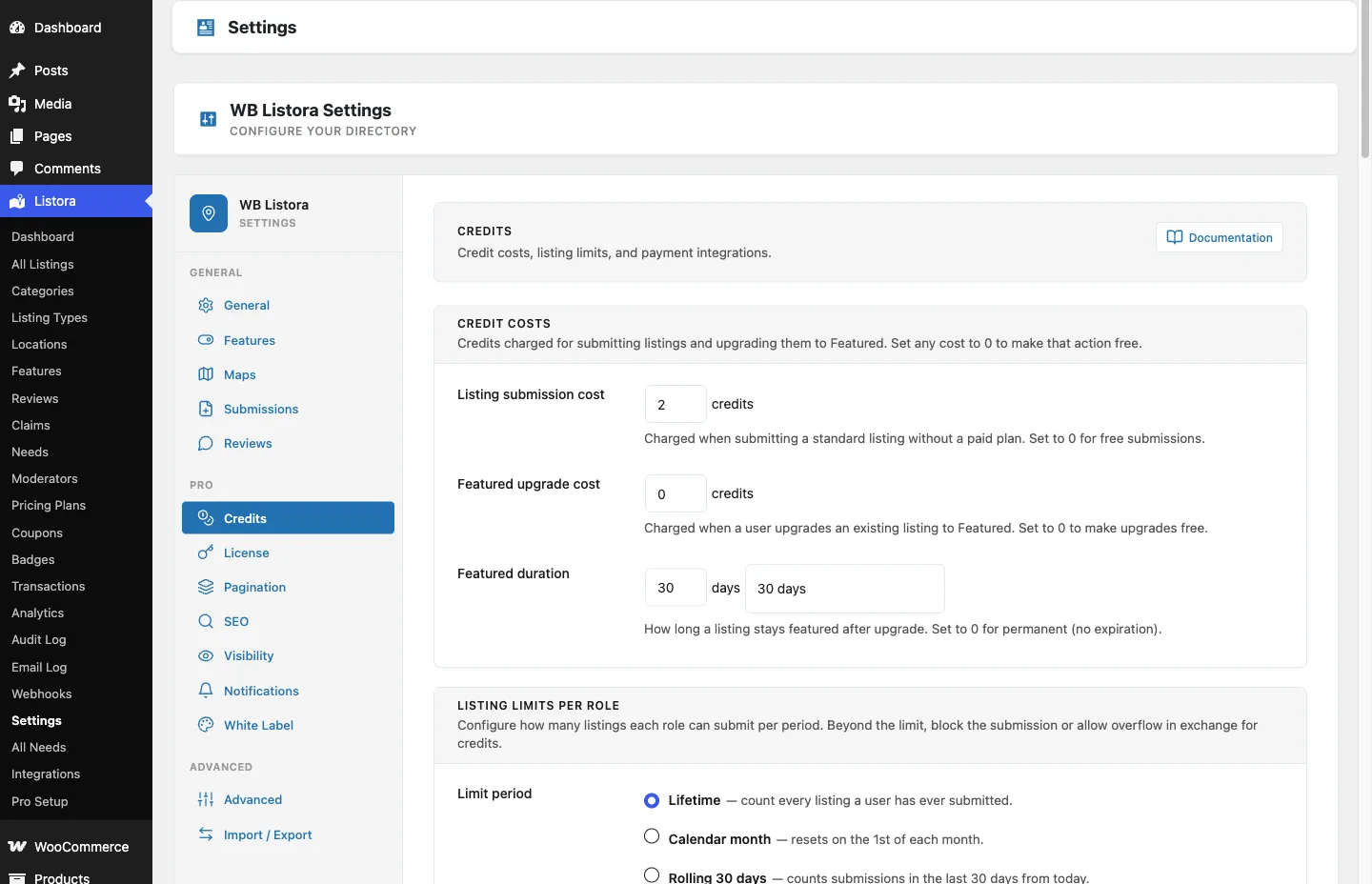
Listora Pro’s credit-based listing plans, sold as visibility, not commission, a different revenue lever than a marketplace’s transaction cut.
This gives a marketplace owner two independent revenue levers instead of one: commission on completed marketplace orders, and separate recurring or one-time revenue from directory placement fees. A vendor who never converts a single marketplace sale might still pay for a Featured directory slot simply because the visibility itself is worth something, brand awareness and phone calls that never touch the marketplace checkout at all. Treating these as one blended revenue number undersells what’s actually happening on the directory side.
What the SEO Payoff Looks Like in Practice
It helps to be concrete about what changes in the search results rather than leaving it as an abstract promise. Before a directory layer exists, a search for “[service] near [city]” typically surfaces the marketplace’s homepage or a generic category page, if it ranks at all, competing against dedicated local directories and Google’s own Business Profile listings that dominate the map pack. After a directory layer with proper per-listing Schema.org markup goes live, individual business listings start appearing for far more specific long-tail combinations: a neighborhood name, a specific service variant, a “open now” qualifier tied to listed hours. That long-tail volume is usually where the real traffic gain shows up, not in a single dramatic jump for the head term. Dozens of individual listings each picking up a handful of hyper-local searches adds up to meaningfully more total organic traffic than one marketplace category page ever could have captured on its own, precisely because Google is matching searchers to specific businesses rather than to a generic service category.
A Composite Example: Home Services Marketplace Adds a Directory
Picture a mid-sized home services marketplace running forty active vendors across cleaning, handyman work, and lawn care, all set up as fixed-price packages through WP Sell Services. Search Console shows a pattern that’s easy to miss if nobody’s looking for it: hundreds of monthly impressions for queries like “lawn care near [city]” and “handyman [neighborhood],” almost none of which convert to clicks, while the marketplace’s actual package pages rank fine for brand and generic service terms. The owner adds Listora scoped to lawn care first, since that’s the category with the clearest local search gap. Each of the twelve lawn care vendors gets a directory listing seeded from their existing marketplace profile: business name, service area radius, and a handful of photos pulled from completed job galleries the vendors had already uploaded to the marketplace side. Within the first month, the directory listings start appearing for the specific “near me” and neighborhood-qualified searches the marketplace pages never touched, while the marketplace checkout keeps handling the actual booking exactly as before. Three months in, the same rollout extends to handyman and cleaning categories, and the owner adds a directory-to-marketplace link on every listing so a visitor who finds a business through local search can click straight through to book a specific package. Total marketplace order volume from organic traffic increases, not because the marketplace changed at all, but because a second, better-matched front door opened next to it. It’s also covered from the review-trust angle in this site’s breakdown of what buyers and vendors actually say about WP Sell Services.
Frequently Asked Questions
Does adding a directory require rebuilding the existing marketplace?
No. Listora and WP Sell Services run as separate plugins on separate custom post types, so the existing marketplace, its vendors, its orders, and its checkout flow stay untouched while the directory layer gets added alongside it.
Do vendors need to fill out two separate profiles?
Not if the rollout is planned well. Seeding directory listings from existing marketplace vendor data at launch avoids double data entry, and ongoing edits can be pointed to whichever profile is the source of truth for that field.
Is the free version of Listora enough to test this, or is Pro required?
The free tier at wbcomdesigns.com/downloads/listora covers the core discovery loop: listings, claims, reviews, search, and maps. That’s enough to validate whether a directory add-on actually pulls local traffic before paying for anything. The Needs Marketplace reverse-directory flow specifically is part of Listora Pro at wbcomdesigns.com/downloads/listora-pro, worth adding once the core directory is proving itself.
How long before a new directory section shows measurable SEO impact?
Local search results respond faster than competitive national terms because there’s less competition for hyper-specific “service plus city” queries, but a realistic timeline is still several months of consistent listing growth and review accumulation before rankings stabilize, not a matter of days.
What happens to a vendor’s marketplace reviews when they also get a directory listing?
They stay separate. Marketplace reviews are tied to completed orders inside WP Sell Services; directory reviews in Listora are tied to the business listing itself and can come from anyone who’s used the business, including customers who found them before the marketplace even existed. Keeping the two review pools distinct is actually a strength, not a limitation, since it gives a new vendor a path to social proof before their first marketplace sale.
Can the directory and marketplace share the same search bar?
Technically possible with custom development, but not recommended out of the box. A combined search tends to confuse visitors who don’t know whether they’re browsing businesses or buying a package. Two clearly labeled entry points convert better than one search box trying to serve both jobs.
Should every vendor category get a directory listing, or only some?
Only the categories with real local search intent. Forcing a directory listing onto a category that’s purely remote or purely digital, where distance genuinely doesn’t matter to the buyer, adds admin overhead without a matching SEO or trust benefit. The Search Console check described above is the fastest way to identify which categories actually have local demand waiting to be captured.
The Marketplace Doesn’t Change, the Front Door Does
Adding a directory next to an existing marketplace isn’t a pivot and it isn’t a rebuild. It’s opening a second front door for the customers who were always searching a different way, by location and trust rather than by package and price, and who were walking right past the marketplace because nothing on the site spoke their search intent. Get the vendor data seeded honestly and the moderation queue running before opening it up, and the directory starts pulling its own weight within a season rather than becoming one more half-finished section nobody visits.