How to Start an Online Tutoring Business on Your Own Website in 2026 (Bookings + Payments Built In)

Updated September 2026. Platforms like Preply, Wyzant, and Tutorful take 15 to 25 percent of every session fee. On a $60 session, that is up to $15 gone before you see a cent. If you tutor consistently, those cuts add up to thousands of dollars a year going to a platform that is not building your brand. This guide covers exactly how to start online tutoring business website that keeps that money instead.
There is a better option. You can run a complete tutoring business from your own WordPress site: bookings, session links, payments, revision tracking, and multi-currency support. This guide covers the full setup using WP Sell Services, which handles everything a solo tutor or a small tutoring agency needs without recurring platform fees eating your income.
In this guide
- Why Own Your Tutoring Platform Instead of Renting Space on Someone Else’s
- What You Need Before Getting Started
- Step 1: Set Up Your Service Listings
- Step 2: Configure the Availability Calendar
- Step 3: Deliver Session Links Automatically After Booking
- Step 4: Configure Session Pricing and Discount Rules
- Step 5: Revision Tracking Per Session Package
- Step 6: Set Up Multi-Currency for International Students
- Step 7: Build Your Tutor Profile Page
- Step 8: Handle Student Onboarding for New Bookings
- Step 9: Student Reviews and Trust Signals
- Step 10: SEO for Your Tutoring Site
- Step 11: Managing Refunds and Cancellation Policies
- Step 12: WP Sell Services Pro Personal vs. Other Tutoring Platforms
- Step 13: Scaling from Solo Tutor to Small Tutoring Agency
- Step 14: Automating Recurring Revenue with Subscription Billing
- Step 15: Tracking Your Business: Reports and Revenue Dashboards
- What to Do in the First Week After Launch
- Turning Recorded Lessons Into a Second Product
- Frequently Asked Questions About Adding a Course to a Tutoring Business
- Ready to Stop Paying a 25 Percent Tax on Your Sessions?
Why Own Your Tutoring Platform Instead of Renting Space on Someone Else’s
When you run through a marketplace, you do not own the relationship with your student. You cannot email them directly. You cannot offer a loyalty discount without going through the platform’s coupon system. And if the platform changes its algorithm or raises fees, your business suffers with no warning.
Running your own site changes all of that. You own the student contact list. You control pricing. You can add new session types, packages, and currencies whenever you want. Your site builds domain authority, which means students searching for your subject area can find you directly through Google rather than through a marketplace listing that ranks for the platform’s brand, not yours.
The comparison to consulting services is worth making: tutoring is a service business, and the same principles that make WooCommerce work well for consultants apply directly here. If you are curious how that setup looks in practice, the guide to selling consulting services with WooCommerce covers the booking infrastructure in detail.
What You Need Before Getting Started
- WordPress 6.4 or later with WooCommerce installed and a payment gateway configured (Stripe or PayPal both work well)
- WP Sell Services Pro Personal ($69/yr): this is the plan that covers individual service providers, including session scheduling, delivery, and client communication
- A Zoom, Google Meet, or similar video call account for delivering sessions
- SSL certificate on your domain (required for payment processing)
- A clean page template or simple theme that presents your subject area and credentials clearly
Step 1: Set Up Your Service Listings
In WP Sell Services, each tutoring session type is a service. Go to WP Sell Services > Add New Service and create one listing per session format. A typical setup might include:
- Single session (60 min): one-off booking, no commitment, good for trial students
- Session pack (5 x 60 min): discounted rate per session for students who commit to a block
- Intensive pack (10 x 90 min): for exam preparation or accelerated learning
- Monthly retainer: recurring subscription for ongoing support, billed automatically
For each service, set the base price, delivery timeframe, and a clear description of what is included: number of sessions, duration, subject coverage, whether homework review is included, and revision policy. Students buying a session need to know exactly what they are getting before checkout.
Live one-on-one sessions cover the bulk of most tutoring businesses, but some tutors also want to package up recorded lessons, practice problem sets, or a structured curriculum a student works through between live sessions. For that side of the business, Learnomy is a complete learning platform for WordPress, the online school a tutor owns outright rather than an LMS plugin bolted onto a site. Checkout runs directly through Stripe and PayPal, connected to the tutor’s own accounts, with no platform fee taken on top of a course or lesson sale. That side of the business can also stand alongside tutoring sessions as its own line item, the same model covered in selling courses alongside services as a second revenue stream for freelancers.
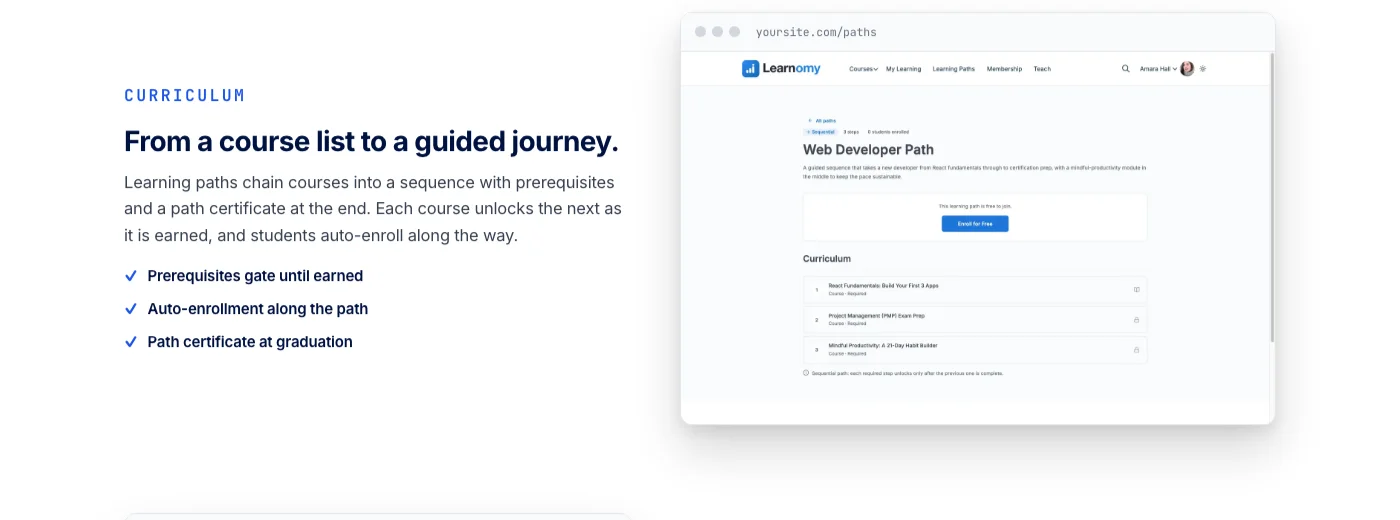
Assessment goes beyond a simple video-and-quiz format: six quiz types with partial credit, tab-switch tracking that discourages the obvious way to cheat a comprehension check, and cryptographically signed certificates with a QR code linking to a public verification page, so a student finishing a self-paced module has something real to show for it. A migration wizard covers tutors moving existing material off LearnDash, Tutor LMS, or LifterLMS specifically.
The same platform grows past a single course when a tutoring business does. A tutor who eventually brings on a co-tutor for a different subject or grade band does not need to rebuild anything for it, since splitting a curriculum across multiple instructors instead of teaching every subject solo is built into the core platform. It becomes a learning community around a tutor’s own school when there’s a student base worth connecting, with discussion boards and Q&A sitting next to the lesson content instead of student questions landing in an inbox one at a time. Gamified progress, points, badges, streaks, gives younger learners a reason to keep working through practice material between live sessions. The zero-fee checkout underneath all of it works the same way covered in turning expertise into a paid course without losing a cut to platform fees.
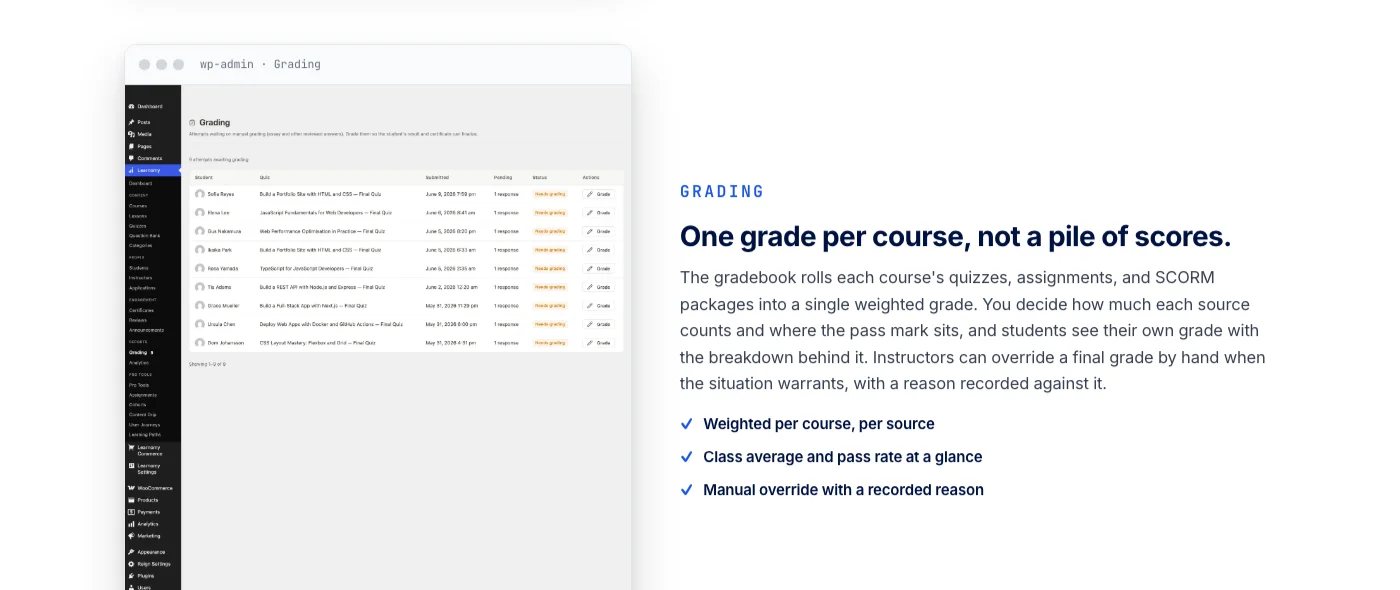
And the whole thing runs on a real design layer, so a tutor’s course material looks like their own brand rather than a generic template shared across every other course sold on a hosted platform.
Using Service Packages for Upsell
WP Sell Services supports service tiers. A student might start with a single session, and after a positive experience, upgrade to a 5-session pack. Configure upsell nudges on the order confirmation page and in the post-session follow-up email. Offering a 10 percent discount on the pack compared to individual sessions is usually enough to convert.
Step 2: Configure the Availability Calendar
The booking calendar is the core of a tutoring setup. Students need to see your open slots and pick a time that works for them without going through a back-and-forth email exchange.
WP Sell Services integrates with WooCommerce Bookings for session scheduling. Set up your available hours by day of the week under WP Sell Services > Availability. You can configure:
- Available days and hours: Monday to Friday 4pm to 8pm, for example
- Buffer time: 15-minute gap between sessions so you have time to prepare notes
- Advance booking window: minimum 24 hours notice so last-minute requests do not disrupt your schedule
- Maximum sessions per day: set a cap to prevent back-to-back fatigue
- Blackout dates: mark holidays, exams, or travel days as unavailable
Students see a real-time calendar on your service page showing only your open slots. They pick a time, go through WooCommerce checkout, and the booking is confirmed. No manual scheduling, no double bookings, no missed emails.
Step 3: Deliver Session Links Automatically After Booking
The most common frustration students have with tutor sites is waiting for a Zoom link. It feels manual, it introduces delay, and if it slips through the cracks the session is missed.
WP Sell Services Pro Personal solves this with order completion triggers. When a booking is paid, the system fires a confirmation email that includes the session details and the video call link. Set this up under WP Sell Services > Notifications > Booking Confirmed:
- Create a permanent Zoom meeting room (a Personal Meeting ID link, or a meeting link that recycles after each session)
- Paste the link into the booking confirmation email template
- Set a reminder notification to fire 1 hour before the scheduled session, repeating the link
- Set a post-session follow-up notification to fire 30 minutes after the session ends, prompting the student to leave a review and book their next session
The entire sequence runs automatically. You focus on delivering good sessions; the system handles the logistics.
Step 4: Configure Session Pricing and Discount Rules
WP Sell Services works on top of WooCommerce, so all pricing tools are available. A few configurations that work well for tutoring:
- Early bird pricing: offer a discounted rate for students who book at least a week in advance. Use a WooCommerce coupon tied to a date condition, or configure a tiered pricing rule in WP Sell Services.
- Referral discount: give existing students a coupon code to share with new students. When the new student books, both get a discount on their next session.
- Returning student rate: create a private service listing with a lower price, visible only to users with a specific role. Assign the role to students after their first booking.
- Group session pricing: if two students want to split a session, create a separate service listing at a lower per-student rate and allow up to two buyers.
Coupon configuration in WooCommerce is more capable than most tutors realise. The guide to the best WooCommerce coupon and discount plugins for 2026 covers the options worth knowing, including role-based pricing and usage limits that prevent abuse.
Step 5: Revision Tracking Per Session Package
Tutoring is not always clean. A student buys a 5-session pack and halfway through decides they need to revisit a concept you covered in session 2. You need a way to track what was covered, what was assigned as practice, and what still needs work.
WP Sell Services Pro Personal includes a delivery and revision log per order. After each session, log the topics covered, the practice tasks assigned, and any notes for next time under the order record in WP Sell Services > Orders > [Order ID] > Session Notes. Students can see this log from their account dashboard.
This serves two purposes. First, it keeps the learning progression transparent, which builds trust with students and their parents in younger learner scenarios. Second, it protects you if a student disputes whether a topic was covered or claims they were not given adequate support. The log is the record.
Configure the number of revisions (additional sessions at no charge) per package under WP Sell Services > Settings > Delivery. A typical policy: one free revision session per 5-session pack, capped at the same topic covered in the original pack.
Step 6: Set Up Multi-Currency for International Students
If you teach English, mathematics, or STEM subjects, students from outside your home country will find you. Showing prices only in USD or GBP creates friction for students in Australia, Canada, India, or elsewhere who want to quickly check whether your rates fit their budget.
WP Sell Services works with WooCommerce’s multi-currency plugins. A reliable option is the free WooCommerce Multi-Currency plugin or the more robust Aelia Currency Switcher. Configure:
- Base currency (the currency you actually receive payment in)
- Display currencies (the currencies students can switch to for pricing display)
- Exchange rate update frequency (daily auto-update is sufficient)
- Rounding rules so prices display as clean numbers in each currency
Note: students pay in your base currency regardless of what they see displayed. The currency switcher is a display tool, not a conversion tool. If you want to accept payment in multiple currencies, configure Stripe to handle currency conversion at checkout and settle to your bank in your home currency.
Step 7: Build Your Tutor Profile Page
Your profile page is the first thing a prospective student sees after finding you through Google or a referral. It needs to answer three questions fast: what subject do you teach, what is your track record, and how does booking work.
Structure the page like this:
- Headline: your subject, level, and a concrete result (“GCSE Maths Tutor, 94% Pass Rate”)
- Short bio: your background, qualifications, and teaching approach in 2 to 3 sentences
- Reviews: pull in the five most recent WooCommerce reviews from students who left feedback after sessions
- Service listings: the session types with clear pricing and a Book Now button for each
- Availability calendar: embed the booking calendar directly on the page so students can see open slots without leaving
- FAQ: answer the three questions students always ask before their first booking (refund policy, what platform you use for sessions, whether session notes are provided)
Step 8: Handle Student Onboarding for New Bookings
First-time students need a bit more context than returning ones. Set up a separate onboarding sequence in WP Sell Services Notifications for students booking their first session:
- Booking confirmed email: includes session link, what to prepare, and your contact for questions
- 48-hour reminder: session is in 2 days, here is what you will cover and what to have ready
- 1-hour reminder: the Zoom link again with a short setup checklist (headphones, quiet space, notebook)
- Post-session email: topic summary, practice tasks, booking link for the next session
For students on a pack or retainer, the post-session email also shows how many sessions remain in their package and a direct link to book the next one.
Step 9: Student Reviews and Trust Signals
Reviews from real students are the most persuasive content on a tutoring site. WooCommerce’s native review system collects ratings on each service listing. Enable the review prompt in WP Sell Services to fire automatically after each completed session order.
Display aggregate ratings on your service listings and on your profile page. If you are just starting out and have no reviews yet, consider offering your first three students a discounted rate in exchange for an honest written review. The social proof from three genuine five-star reviews converts the fourth student faster than any marketing copy.
Step 10: SEO for Your Tutoring Site
Being findable without paying a marketplace for visibility is the whole point of running your own site. A few high-impact SEO moves for tutoring:
- Target subject-plus-location queries: “GCSE Biology tutor London online” converts better than broad “biology tutor” searches
- Create a subject page for each topic you cover: separate pages for each A-Level subject you teach, each targeting its own keyword cluster
- Add schema markup for Service and FAQPage to help search engines understand your offering
- Write short case study posts: “How I helped a student go from grade D to grade A in 8 weeks” is the kind of specific, outcome-focused content that ranks for long-tail searches and converts when prospective students find it
Step 11: Managing Refunds and Cancellation Policies
Cancellation policy is a boundary issue, not a technical one. Set it clearly in writing before a student books, not after they try to cancel. A workable policy for individual tutors:
- 48 hours or more before session: full refund or free reschedule
- 24 to 48 hours before session: 50 percent refund or one free reschedule
- Less than 24 hours before session: no refund; one reschedule allowed if you have an opening
- No-show with no notice: session is forfeited with no refund
Put this policy in the service listing description, the checkout page (via a WooCommerce terms and conditions checkbox), and the booking confirmation email. WP Sell Services supports custom refund handling through WooCommerce’s order management system. Partial refunds can be issued manually from the order detail page.
Step 12: WP Sell Services Pro Personal vs. Other Tutoring Platforms
Here is an honest comparison of the setup cost versus the ongoing cost of staying on a marketplace:
- Preply commission: 33 percent of your hourly rate for the first 20 hours per student, dropping to 18 percent after that. On $60/hr for 100 hours a year, you pay over $2,000 in fees.
- Wyzant commission: 25 percent of all earnings, flat.
- WP Sell Services Pro Personal: $69/year. Plus hosting (typically $5 to $15/month on shared or LiteSpeed hosting). All-in cost is under $250/year at the high end.
The break-even point is roughly 5 to 10 tutoring sessions depending on your rate. After that, everything you earn stays with you. The setup time is a weekend for most tutors.
Step 13: Scaling from Solo Tutor to Small Tutoring Agency
Once your own tutoring business is running well, you might want to bring in other tutors. WP Sell Services Pro supports multi-vendor setups where each tutor gets their own seller profile, availability calendar, and earnings dashboard. Students can browse by subject or tutor rating and book directly from the tutor’s profile page.
As the platform operator, you set a commission rate on each booking. This is how tutoring agencies like Tutor House or MyTutor operate at the enterprise level. You can replicate the model at a fraction of the cost by combining WP Sell Services with WooCommerce’s user role system and a straightforward onboarding flow for new tutors joining your platform.
The upgrade path from Pro Personal to Pro Agency is available in your account dashboard. No data migration is needed; the agency module activates on top of your existing setup.
Step 14: Automating Recurring Revenue with Subscription Billing
The monthly retainer model is the most financially stable version of an online tutoring business. Instead of chasing individual bookings, a fixed number of students pay a recurring monthly fee and get a set number of sessions per month. Predictable income, predictable schedule.
WP Sell Services works with WooCommerce Subscriptions to handle recurring billing. Configure a monthly subscription product that grants access to a set number of bookable session slots per billing cycle. When the subscription renews, the student’s session allowance resets. If a student cancels, their remaining sessions that month are still honoured until the billing period ends.
Set the subscription price slightly below the cost of buying the same number of individual sessions. The discount is the incentive to commit; the predictability is the incentive for you. A tutor with 15 monthly retainer students at $200/month has a more stable business than one selling 100 individual sessions at unpredictable times throughout the year.
Pair subscriptions with a loyalty perk: retainer students get first access to your schedule when you open new time slots. This makes the subscription feel exclusive rather than just a payment arrangement, and it reduces churn significantly.
Step 15: Tracking Your Business: Reports and Revenue Dashboards
Knowing your numbers is part of running a professional tutoring business. WP Sell Services Pro Personal includes a seller-side dashboard showing active orders, completed sessions, pending payouts, and review scores. From the admin side, WooCommerce’s built-in reports show revenue by product (session type), refund rate, and order volume over time.
A few metrics worth tracking monthly:
- Booking conversion rate: how many visitors to your service pages actually complete a checkout. Below 2 percent suggests a pricing or trust problem. Above 5 percent is strong for a service business.
- Session completion rate: how many booked sessions actually happen vs. how many are cancelled or rescheduled. High cancellation rates point to a mismatch between what you are selling and what students expect.
- Review rate: what percentage of completed orders result in a review. Low review rates mean your post-session follow-up email is not working; test the subject line and timing.
- Pack upgrade rate: of students who buy a single session, what percentage upgrade to a pack within 30 days. This is your upsell health metric.
WooCommerce’s analytics section gives you all of this. For deeper tracking, connect Google Analytics 4 with WooCommerce’s GA4 integration to see which traffic sources produce the most bookings and what your cost per acquired student looks like over time. That data tells you whether to invest more in SEO, referral programs, or paid search as you grow.
What to Do in the First Week After Launch
Most tutoring sites sit unused after setup because the tutor does not have a plan for the first few students. Here is a practical first-week checklist: share your booking link with three people in your existing network and ask for their honest feedback on the booking experience. Check that the Zoom link fires correctly in the confirmation email by booking a test session with a test account.
Review the WooCommerce order to confirm the payment processed and the booking appeared in WP Sell Services. If anything breaks in testing, it is much better to find it now than after a real student has paid.
Then write one short blog post targeting a question your ideal student searches for (a common exam topic, a concept students find difficult, or a comparison between two study approaches). Publish it on your site, link it back to your session booking page, and share it on whatever social platform your students use. That one piece of content can send qualified traffic to your booking page for months, at no cost beyond the time it took to write.
Turning Recorded Lessons Into a Second Product
Live sessions are the core of most tutoring businesses, but a tutor who has taught the same explanation dozens of times has already built the raw material for a second product without realizing it. A structured module walking through a commonly misunderstood concept, recorded once and sold or bundled alongside live sessions, turns a repeated explanation into an asset instead of a cost. This works especially well for tutors covering standardized exam prep, where the same handful of question types and concepts come up for every student year after year.
Building this out on Learnomy means the course lives on the same WordPress site as the booking and payment system already covered above, rather than requiring a completely separate account on a hosted course platform. A tutor can bundle a short recorded module with a session pack, so a student gets both the live time and a set of practice materials to work through independently, without the tutor having to manually email files or manage access to a shared drive.
Assessment that proves a student actually learned the material
A recorded lesson without any check for understanding is just a video. Learnomy’s quiz system supports six question types with partial credit, so a tutor can build practice quizzes that reward a student for a mostly-correct approach to a math problem, not just a single right-or-wrong answer. For younger students working independently between sessions, a completed quiz gives both the student and a parent visibility into what was actually understood, rather than just a completed video-watch count. That independent practice usually happens away from a desktop, which is why a course a student can work through from a phone instead of only at their laptop matters more for tutoring than it might for a purely adult audience.
A certificate that matters for exam-prep and skills tutoring
For tutors running structured programs, a completion certificate carries real weight, especially for adult learners building a skill for career purposes rather than students preparing for a school exam. A certificate that’s cryptographically signed with a QR code linking to a public verification page gives a student something concrete to add to a resume or share on LinkedIn, and gives the tutor a credential attached to their own name and teaching brand rather than a generic completion badge from a hosted platform most employers have never heard of.
Key takeaways
- Owning your booking site instead of renting space on Preply, Wyzant, or Tutorful keeps the 15 to 25 percent per-session cut you’d otherwise lose.
- WP Sell Services handles the live-session side: availability, buffer time, session links, pricing, and multi-currency support.
- Learnomy handles the recorded, self-paced side: lessons, quizzes with anti-cheat tracking, and verifiable certificates.
- Both systems run on the same WordPress site without requiring a second install or a shared checkout.
- A single well-built module addressing a common sticking point is a reasonable starting point, not a full course catalog.
Turn recorded lessons into a second product
Learnomy runs quizzes, certificates, and a direct Stripe and PayPal checkout for the self-paced side of a tutoring business, with no platform fee taken on a course or lesson sale. It runs on the same WordPress site already handling live bookings.
Frequently Asked Questions About Adding a Course to a Tutoring Business
Should I build a course before or after I have a steady base of live tutoring students?
After, in most cases. A course built from real patterns in what students actually struggle with, drawn from live sessions already delivered, tends to be sharper and more useful than one built speculatively before any students exist. The live tutoring business also builds the audience most likely to buy a course once it exists.
Does adding a course compete with my live session bookings?
Rarely in practice. A recorded module covers the static, repeatable part of a subject. Live sessions cover the parts that need real-time back and forth: a student’s specific mistakes, a parent’s specific questions, the moments where a tutor has to adjust their explanation on the spot. Students who buy a course and still book live sessions are buying exactly what they should be buying, personalized attention a recording can’t provide.
Can I sell a course through the same checkout as my tutoring sessions?
The course checkout runs through Learnomy directly, connected to Stripe and PayPal, separate from the WP Sell Services booking flow covered throughout this guide. Both live on the same WordPress site, so a student browsing a tutor’s site sees both options, but each system handles its own checkout rather than sharing one unified cart.
Is this worth setting up for a tutor with only one or two subjects?
It’s worth it if there’s a specific, recurring concept students consistently struggle with, regardless of how many subjects a tutor covers overall. A single well-built module addressing the single most common sticking point in a tutor’s subject area is a reasonable starting point, not something that requires a full course catalog to justify building.
Do I need a separate WordPress install for the course platform?
No. Learnomy runs as its own plugin on the same WordPress site already running the tutoring booking system, the same way a site can run WooCommerce and a forum plugin side by side without either one requiring its own separate install.
What happens to my course content if I ever change tutoring platforms?
Course content, student records, and certificates live in the tutor’s own WordPress database rather than a vendor-controlled account, so switching or expanding the underlying booking system later doesn’t require rebuilding or migrating the course side of the business separately.
Ready to Stop Paying a 25 Percent Tax on Your Sessions?
If you tutor regularly, the math on running your own site is hard to argue with. A $69/year license for WP Sell Services Pro Personal, a basic WordPress hosting plan, and a weekend of setup time is all it takes to cut out platform fees entirely.
Get WP Sell Services Pro Personal and run your full tutoring business from a site that is yours.
