How to Build a Website Like Booksy for Salons and Barbers

How to Build a Website Like Booksy for Salons and Barbers
A barber with a full book pays Booksy every month for the privilege of clients booking him. If he turns on Boost to attract new faces, the platform takes around 30 percent of a new client’s first visit. StyleSeat runs the same playbook with a “new client connection fee” that can swallow most of a first appointment. And here’s the detail that makes stylists grind their teeth: a large share of those “new” bookings are people who found the barber on Instagram, tapped the link in his bio, and got billed to the platform as its discovery.
Paying a middleman to reach your own followers is a strange business arrangement. It persists because the alternative, for most independent stylists, has been a paper calendar and a wall of no-shows.
There’s a third option: run the booking platform yourself. For a single stylist that’s a booking page; for a salon suite operator, a barbershop with six chairs, or anyone ambitious enough to run a city-wide beauty booking site, it’s a marketplace, and that’s the build this post covers. It slots into our self-hosted marketplace series alongside the Thumbtack build and the Rover build, but the beauty vertical brings its own physics: appointments over projects, no-shows as the central villain, and Instagram as the real discovery engine.
What Booksy actually sells, and to whom
Understanding the incumbent’s model tells you where the opening is.
Booksy’s customer is the provider, not the client. Providers pay a monthly subscription for the calendar, the booking page, the reminders, and the client database. On top of that sits Boost, the marketplace layer, which charges a steep one-time commission on each new client it claims to deliver.
The subscription part is genuinely useful software. The resentment concentrates almost entirely in the marketplace layer: the new-client fee lands whether the client came from Booksy’s directory or from the stylist’s own social following, and providers can’t always tell which, and that ambiguity always resolves in the platform’s favor.
So the wedge for a self-hosted alternative is clean: give providers the useful part (booking, deposits, reminders, client list) at a flat, honest cost, and take a marketplace cut only on bookings your platform demonstrably originated, or skip the discovery-fee model entirely and earn from commission on transactions. Providers can do this arithmetic in their sleep, because they’ve been doing it angrily for years.
Who should build this
Three operator profiles fit the beauty vertical, and the build barely changes between them.
The salon or barbershop owner. Six chairs, each stylist with their own clientele and their own pricing. Your “marketplace” is your own shop: each stylist is a vendor with a profile, services, and packages, and the shop takes its cut through commission instead of chair rent, or alongside it. This is the easiest cold-start in the series, because supply and demand both already exist; you’re just moving them off DMs and paper.
The salon suite operator. You rent suites to independent professionals. A shared booking platform is a genuine amenity: renters get a booking page and deposit protection, you get stickier tenants and a commission stream. Same build, different framing.
The city marketplace founder. The full Booksy-competitor play: recruit independent stylists across a city, run discovery on your platform. Hardest version, real prize; everything in the launch section applies double.
The mechanics below serve all three.
The stack
- WordPress, self-hosted, $10 to $30 a month in hosting
- WP Sell Services as the marketplace engine
- A visual, portfolio-forward theme, because this niche is bought with the eyes (theme comparison)
- Stripe or PayPal for payments and deposits
The free plugin covers the marketplace loop: provider registration and dashboards, service listings with galleries and tiered packages, orders, deposits on bookings, on-platform messaging, verified reviews, and disputes. Checkout runs standalone, with or without WooCommerce.
Pro matters for the money flow, and in multi-provider shops it matters early: Stripe Connect splits each payment between platform and stylist automatically, per-vendor commission rules handle the senior-stylist-negotiated-a-better-rate reality of every salon, and PayPal Payouts batches withdrawals. Stripe Connect setup guide here.
The appointment question, answered honestly
Salons run on time slots, and honesty requires saying this plainly: WP Sell Services is a marketplace engine, not a calendar-first appointment system. There’s no drag-and-drop day view with fifteen-minute increments. Before you close the tab, look at how real booking behavior in this niche actually distributes, because the answer is less damning than it sounds.
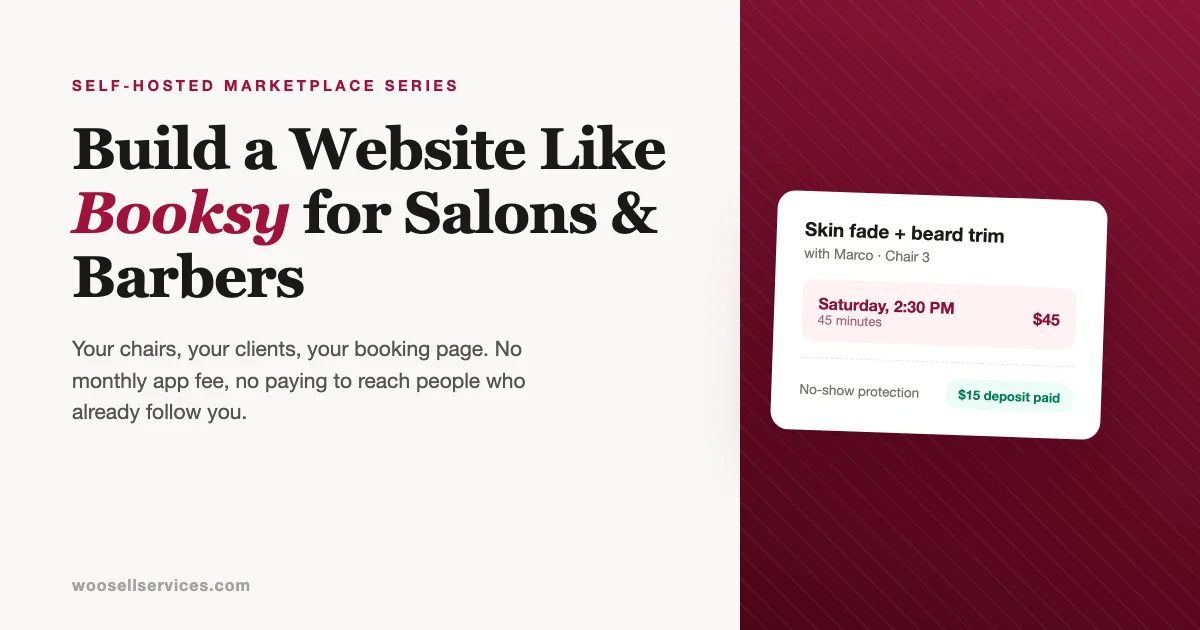
For the marketplace flow, chat-confirmed times work. A client books “Skin fade + beard trim with Marco, Saturday afternoon” as a package, pays the deposit, and the exact slot settles in one message exchange. That’s two taps more than a slot picker, and it’s how a huge share of appointments get made anyway, because clients ask questions (“can you fit my son in too?”) that no calendar widget answers. Every message lives next to the order, which pays off the first time a dispute needs the paper trail.
Recurring clients don’t browse calendars at all. The every-four-weeks regular rebooks the same slot by habit. A “rebook with Marco” button on the completed order serves the majority of a mature stylist’s book better than any calendar UI.
If slot-picking is non-negotiable for your operation, pair the marketplace with a dedicated scheduling plugin for the calendar layer and keep WP Sell Services as the storefront, payments, deposits, and review engine. We compared the scheduling options in our appointment booking plugins roundup; several integrate cleanly alongside.
Start with packages plus chat confirmation. Add calendar tooling when provider volume demands it, not before you have providers.
No-shows: the problem this platform exists to solve
Ask any stylist what they’d fix first. It’s not discovery. It’s the 2:30 that never walked in.
An empty chair is unsellable inventory; the hour is gone. Industry chatter puts no-show and late-cancellation losses anywhere from a painful nuisance to double-digit percentages of revenue for appointment businesses, and every stylist has a personal number that makes them angry. This is where your platform earns its keep, and the mechanism is simple:
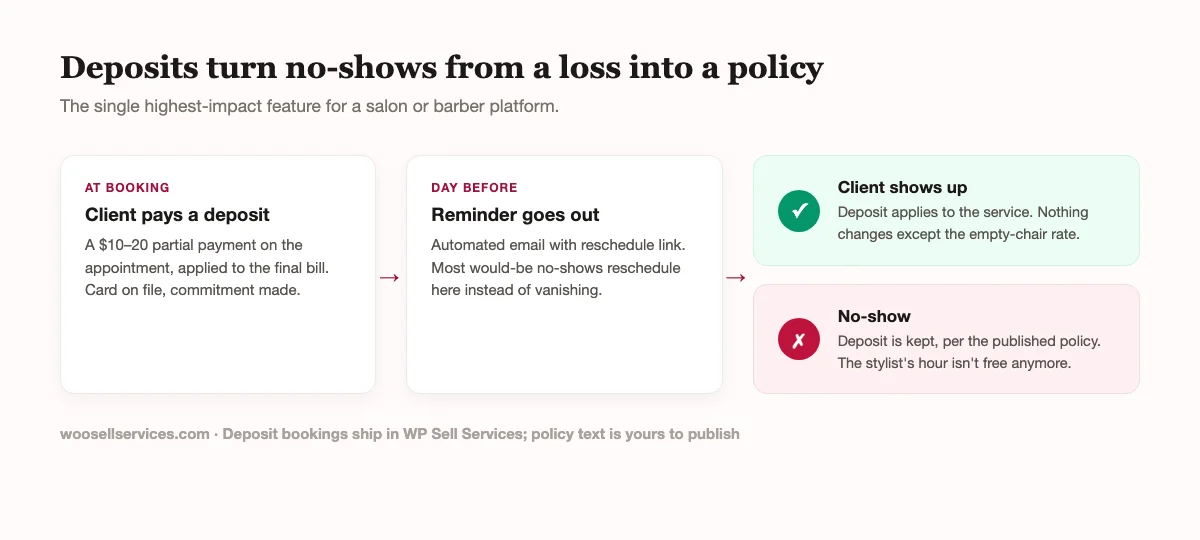
Deposits at booking, a reminder the day before, and a published policy that keeps the deposit on a no-show. Deposit configuration is covered here. Three implementation notes from how salons actually run:
Set deposit size by service, not globally. A $10 deposit on a $35 cut, but $50 on a $200 color correction, because the color appointment blocks three hours and materials. Providers should control this per package.
Publish the policy where booking happens, not in a terms page. “Deposits are applied to your service. No-shows and cancellations inside 24 hours forfeit the deposit.” Two sentences at checkout prevent ninety percent of the arguments.
And let providers waive it. A stylist comping a loyal client’s forfeited deposit after a genuine emergency is relationship gold, and it should be their call, not a platform rule. Your job is making the default protective; grace is the provider’s to give.
Building the provider side so stylists actually join
Profiles are portfolios first. The gallery is the profile in this niche; specialties, price anchors, and reviews orbit it. Push every provider to load fifteen or more photos of finished work before going live, and make the first profile photo a work sample rather than a logo. Clients book the fade they can see.
Package structure mirrors the service menu. Stylists already think in menus, so the three-tier package system maps directly: cut / cut and beard / full works for a barber, while a colorist runs gloss / partial balayage / full transformation. Add-ons carry the upsell weight (deep conditioning, hot towel finish, olaplex treatment), and the pricing psychology of packages applies without modification.
Reviews with photos are your Boost-killer. Booksy’s discovery advantage is inventory depth. Yours is proof quality: verified-purchase reviews with result photos, provider responses on. A stylist page with forty photographed outcomes converts colder traffic than a directory ranking does, and it belongs to your platform, not a third party’s app. Review system configuration here.
Respect the client-list anxiety. Stylists have been burned by platforms that hold client relationships hostage; it’s why “who owns the client list” decides platform choices in this industry. Your answer should be explicit and in writing: providers can export their client and booking history anytime, no fee, no friction. Saying this loudly costs nothing and wins the exact providers who’ve been burned before.
The Instagram pipeline
Here’s the open secret of beauty booking: discovery already happens on Instagram and TikTok. Clients find stylists through tagged photos, local hashtags, and reels of transformations. The booking platform’s actual job is converting that attention, which reframes what you’re building: not a discovery destination, but the best link a stylist ever put in a bio.
Practical consequences for your build. Every provider profile and every service package needs a clean, shareable URL that loads fast on mobile, because that’s the bio link and the story swipe-up. The booking flow from that link should be three steps at most: pick package, pick rough time, pay deposit. And give providers a reason to route traffic through your link instead of DMs: deposits mean no more chasing flaky DM bookings, and reminders mean fewer ghosts. “Stop taking bookings in your DMs” is a better recruiting pitch than any commission discount.
The platform’s own social presence follows the same logic in reverse: repost provider work (with permission), tag the provider, and let each post carry the booking link. In this vertical your providers are your content engine, and they’re already producing daily.
Economics for a six-chair shop
Concrete numbers, because the shop-owner case is the most common build.
Six stylists, each averaging 30 appointments a week at a $55 average ticket: roughly $51,000 a month through the book. At a 10 percent platform commission (replacing or supplementing chair rent), the shop’s booking platform generates about $5,100 monthly, against costs of perhaps $80 a month in hosting and infrastructure after the plugin license.
Deposits change the revenue quality too. If no-shows drop from 8 percent to 3 percent (a typical result once deposits and reminders exist), those recovered slots are worth around $2,000 a month across the shop before any new client walks in. The platform pays for itself on prevented losses alone; the commission stream is on top.
The stylist-side math matters just as much for retention. A chair doing $8,000 a month keeps $7,200 under your 10 percent structure with no subscription, no Boost, and no per-client discovery fees. Run the same book through the incumbent stack with a subscription and even occasional Boost usage and the gap lands somewhere between one and three hundred dollars a month, per chair, before counting the value of owning the client list outright. Print that comparison on one page and hand it to every recruit; it does your negotiating for you.
Compare the same shop on the incumbent stack: six subscriptions, plus Boost fees on new clients, plus the client relationships living in an app the shop doesn’t control. The self-hosted math isn’t subtle, which is why the recruiting conversation with your own stylists is short.
What you won’t have on day one
The honest section, as always in this series.
SMS reminders. Booksy texts clients; out of the box, your reminder channel is email, and in this demographic texts get read faster. The gap is closable (SMS plugins and Twilio integrations exist for WordPress, and we compared the options), but it’s a real add-on cost per message rather than a bundled feature. Budget for it once volume justifies it; until then, email reminders plus the deposit incentive carry most of the no-show reduction anyway, because the deposit is doing the psychological work.
A consumer app with directory traffic. Booksy’s app sends some genuinely new clients to providers, especially in dense cities. Your platform sends none on day one. The Instagram pipeline section is the counterweight: in this vertical, social discovery dwarfs directory discovery for most independents, and you’re built to convert it. But be straight with recruits about what you are: better plumbing for the demand they already generate, not a new demand source. The stylists who’ve done the Boost math will sign anyway.
POS and hardware integration. The incumbent ties into card readers and front-desk checkout. You’re running online payments and deposits; the in-shop card machine stays whatever it already is. For most independents and small shops this splits cleanly (deposit online, balance at the chair), and full POS unification is a year-two question at the earliest.
Three mistakes beauty platforms make
Standardizing prices across providers. It feels tidy to set one price for “men’s cut” platform-wide. Don’t. A senior stylist’s $80 cut and a junior’s $35 cut coexist in every real salon, price signals seniority in this industry, and providers who can’t control their own menu leave. Uniformity is for the service taxonomy, never the numbers.
Letting chair-rent politics leak into the platform. In shops that mix renters and commissioned staff, who pays what commission is a loaded topic. Settle it before onboarding, per provider, in writing, and use per-vendor commission rules to encode the agreements exactly. The platform should reflect the deals, not renegotiate them by accident.
Building discovery before booking is boring. The temptation in the city-marketplace play is to polish browse pages and rankings first, because that’s the visible marketplace part. But providers join for reliable bookings, deposits, and reminders; clients return because booking was painless. Nail the boring loop until rebooking is a habit, and only then spend on discovery surfaces. A beautiful directory of providers whose booking flow annoys people is exactly the product the incumbents already offer.
Launch, by operator type
Shop owners: migrate your own book first. Move your six chairs onto the platform, run two weeks internally to shake out the flow, then announce to the client list with a small incentive (“book online, get $5 off your next visit”). You’ll hit meaningful volume in month one because the demand already exists; you’re changing its route.
Suite operators: make it a lease perk. Onboard current renters free, feature them on the building’s site, and fold the platform into the pitch for new suites. Your recruiting is your leasing funnel.
City marketplace founders: recruit the Instagram-native stylists first. They have followings, they hate DM booking, and their audiences follow them onto whatever link they post. Ten stylists with real local followings seed both sides of your marketplace at once, which shortcuts the cold-start that kills directory plays. Founder terms, permanently, in writing, and the cold-start playbook from the Thumbtack guide covers the rest of the sequence.
In all three cases, the review base seeds the same way: real bookings, real photos, full price, from day one.
One more launch note that applies across all three profiles: pick your first fifty clients’ onboarding moment deliberately. The best conversion window for moving a client from DM booking to platform booking is the checkout after a great appointment, in person, with the stylist saying “book your next one here and your spot’s locked.” A QR code at the station converts that moment; a mass email announcement does not. Beauty is a face-to-face trade, and the platform migration works best when it’s face to face too, one delighted client at a time. The book compounds from there, because every rebooking client is one who never drifts back to the DMs, and every deposit-protected slot is an hour of inventory the incumbents no longer tax.
Common questions
Should I take a commission or charge stylists a flat monthly fee? For a shop or suite operator, commission usually wins: it scales with each chair’s actual volume, junior stylists aren’t subsidizing seniors, and slow months don’t breed resentment the way a fixed fee does. A flat fee suits the city-marketplace play once demand is proven, and some operators land on a hybrid: a small flat platform fee covering costs plus a low commission on bookings the platform’s own discovery pages generate. Whatever you pick, publish it and honor it; the industry’s distrust of platform pricing is the wound you’re building against.
Can clients pick exact time slots? Through packages plus a quick chat confirmation by default, which suits most salon booking behavior. For calendar-first operations, pair with a scheduling plugin from our appointment plugin comparison and let WP Sell Services run storefront, deposits, payments, and reviews.
How do deposits and no-show fees work? Deposits are partial payments at booking, set per service, applied to the final bill. Your published policy governs forfeiture on no-shows, and providers can waive case by case. The configuration walkthrough is in the deposits guide.
Does each stylist get their own page and payouts? Yes. Every provider is a vendor with a profile, gallery, services, and their own earnings; Stripe Connect (Pro) routes each booking’s split automatically, so nobody is settling cash at the register on Fridays.
What about products: can the shop sell pomade and shampoo too? This is the one build in the series where WooCommerce integration earns its keep early, since salons genuinely retail products. Run services through WP Sell Services and the retail shelf through WooCommerce side by side; the integration guide covers the setup.
Can stylists take their client list if they leave? Let them, and put it in writing. It’s the anti-Booksy position, it costs you almost nothing in practice, and it’s the single strongest trust signal you can offer providers who’ve watched platforms hold their books hostage.
What about group bookings, like bridal parties? Model them as premium packages (“bridal party, up to five, on location”) with a healthy deposit, because a booked-out Saturday morning for a party that cancels is the most expensive no-show in the industry. The buyer request flow also fits here: the bride posts date, headcount, and looks, and available stylists respond with quotes. Group work is high-ticket enough that a little manual coordination in chat is entirely worth it.
Do walk-ins break the model? Not at all; walk-ins simply never touch the platform, exactly as they never touched Booksy. The book reflects appointments, the chair takes whoever sits in it, and shops that track both usually find the online book steadily eating the walk-in share, since regulars prefer a guaranteed slot once one exists.
Mobile app later? The REST API covers services, orders, and messaging for a future app, documented here. But note the Instagram pipeline section above: in this vertical, a fast mobile web booking page beats a native app for years, because discovery happens in social apps you don’t control and the link is the product.
Want to see provider profiles, packages, deposits, and the booking flow in practice? Try WP Sell Services. Everything above except automated payment splits ships free.