How to Build a Website Like Snappr on WordPress

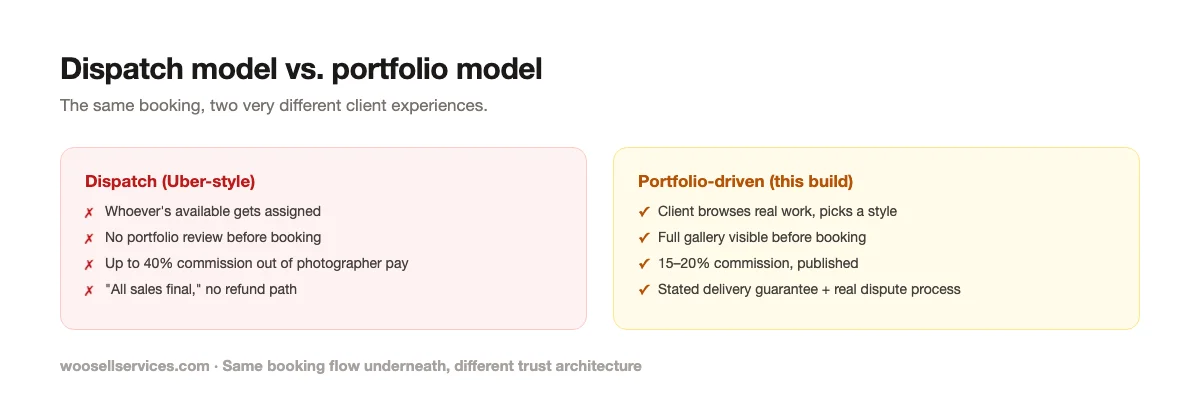
Book a headshot through Snappr and you don’t pick a photographer. You pick a time slot, a location, and a price tier, and the platform assigns whoever’s available nearby, the same dispatch logic Uber uses for a ride. The photographer taking that job hands over up to 40 percent of the fee. And when the photos come back and the client isn’t happy, the terms of service say plainly that all payments are final and non-refundable, a policy that shows up constantly in the platform’s complaint history alongside reports of last-minute photographer cancellations and delivery timelines that stretch well past the promised 48 hours.
Every other build in this series lets a buyer evaluate who they’re hiring before they hire them: a nanny’s background check, a tutor’s subject reviews, a developer’s portfolio rubric. Photography is the one service in this whole series where the actual output, the thing being sold, is directly and immediately visible as a portfolio before any booking happens. A dispatch model throws that advantage away on purpose, treating photographers as interchangeable capacity instead of individual craftspeople with a recognizable style. That’s the gap this build closes.
What the dispatch model gets wrong for a craft-based service
Uber’s dispatch model works for rides because one ride is functionally identical to another; you want the nearest available car, not a specific driver’s aesthetic. Photography doesn’t share that property. A moody, high-contrast wedding photographer and a bright, airy one produce completely different results from the same brief, and a client who cares about that difference (which is most clients, once they see the difference) gets a worse outcome when a dispatcher assigns whoever’s next in the queue.
The dispatch model does have one real advantage worth naming honestly: speed and simplicity for commodity shoots. A same-day headshot for a LinkedIn profile genuinely doesn’t need style-matching; any competent photographer covers it. Keep that use case in mind, because the strongest version of this build supports both paths rather than forcing every booking through a slow, deliberate portfolio browse.
Two booking models, and when each one fits
Portfolio-driven booking, the default for anything where style matters: weddings, branding shoots, real estate with a distinctive editing style, family portraits. The client browses galleries, picks a photographer whose work they love, and books directly. This is where the trust and the premium pricing live.
Quick-match booking, for genuinely commodity work: a fast headshot, a straightforward product shot, an event needing “a competent photographer, today.” Here, a lightweight version of dispatch, matching by availability and location rather than full portfolio browsing, is a legitimate convenience feature, not something to avoid on principle. The difference from Snappr’s version: even in quick-match, show the client which specific photographer they’re getting and a link to that person’s portfolio before the booking confirms, rather than assigning invisibly after payment.
Running both paths from one platform, with quick-match clearly labeled as the express option rather than the only option, captures the convenience case without sacrificing the style-matching trust that makes photography different from every other build in this series.
The stack
- WordPress, self-hosted, $10 to $30 a month in hosting
- WP Sell Services as the marketplace engine
- A visual-first, gallery-heavy theme, since portfolio browsing is the entire discovery experience (theme comparison)
- Stripe or PayPal for payments
The free plugin’s gallery support on every listing is the natural home for a photographer’s portfolio, the same mechanism the Rover build uses for pet photos and the Voices.com build uses for demo reels, adapted here for the primary product itself rather than supporting evidence. Tiered packages become shoot-length and deliverable tiers, buyer requests handle “need a photographer for a specific unusual brief” cases, and built-in messaging keeps shot-list discussions and delivery timelines attached to the order. Reviews and disputes ship free; Pro adds Stripe Connect for automated payment splits, worth having once your photographer roster grows past a handful of people you’re paying by hand.
Building listings around portfolio and package clarity
Every listing’s gallery is the actual sales pitch; treat it that way. Require at least fifteen to twenty images of real completed work per photographer, organized by shoot type if they cover multiple genres (weddings, headshots, real estate). A thin gallery undersells a genuinely good photographer and should be a registration blocker, not a nice-to-have.

Structure packages around shoot length and deliverables, the pattern this whole series keeps returning to:
- Basic: 30-minute session, 10 edited digital images
- Standard: 90-minute session, 30 edited digital images, one outfit or location change
- Premium: half-day coverage, 75+ edited images, multiple locations, rush editing available as an add-on
Add-ons handle everything that varies independently of session length: additional edited images beyond the package count, expedited delivery, printed products, a second shooter for events, travel beyond a stated radius. Pricing these explicitly on the listing, rather than negotiating them after booking, prevents the single most common photography-marketplace dispute: a client expecting more edited images than the package actually included.
Delivery timeline as a stated, tracked commitment, not a marketing claim. “Standard delivery: 5 business days” published on every listing, with the order status visibly tracking toward that date, does more to prevent the delivery-delay complaints that plague dispatch platforms than any customer service policy applied after the fact. If a photographer is running behind, the order system should make that visible to the client before the deadline passes, not after they’ve already started complaining.
A refund and satisfaction policy that isn’t “all sales final”
This is the single clearest differentiation opportunity against the incumbent, and it costs almost nothing to build well.
“All payments are final and non-refundable” reads as protecting the platform, and it does, at the direct cost of client trust. A better structure, genuinely fair to both photographers and clients: a defined revision window (one round of edit adjustments included, matching the voice-over build’s revision policy in spirit), a stated standard for what qualifies as an unsatisfactory delivery (technical failure, wildly mismatched style from the portfolio shown, a genuine no-show), and a real dispute path rather than a blanket denial.
Photographers need protection too, and a well-designed policy gives it to them: the standard should be “did the photographer deliver what the package promised,” not “did the client love every photo,” since taste disputes aren’t the photographer’s fault and shouldn’t trigger automatic refunds. Written clearly and published before booking, this policy protects photographers from taste-based refund abuse while still giving clients real recourse when something actually goes wrong, which is exactly the balance the incumbent’s blanket policy fails to strike.
Handling photographer cancellations and no-shows
The other well-documented Snappr complaint pattern: photographers cancelling shoots, sometimes hours before weddings and major events. Build against this deliberately rather than hoping it doesn’t happen.
Require photographers to confirm bookings within a stated window (a few hours for last-minute requests, 24 hours for standard bookings) rather than leaving bookings in limbo. For high-stakes events specifically, weddings above all, build in a backup-photographer option: a small pool of vetted photographers who can step in on short notice, disclosed to the client as a safety net rather than hidden as a contingency they only learn about if it’s needed. A cancellation policy that’s symmetric with the client-facing one (a photographer who cancels close to a major event faces real consequences, not just an apology email) protects your platform’s reputation on the highest-stakes bookings you’ll ever process.
What this costs, compared honestly
| Self-hosted (this build) | Snappr (as a photographer) | Snappr (as a client) | |
|---|---|---|---|
| Platform cost | Plugin license + $10 to $30/month hosting | None, funded by commission | None |
| Commission taken | 15 to 20%, published | Up to 40% | N/A |
| Photographer choice | Client browses and picks | Dispatched, no choice before booking | N/A |
| Refund policy | Defined revision window + real dispute path | N/A | Payments final, non-refundable per terms |
| Delivery guarantee | Stated per listing, tracked in the order | N/A | 48 hours claimed, mixed in practice |
The client-side comparison matters as much as the photographer-side one here, which is different from most of this series. A photographer choosing your platform over a dispatch model is an easy sell on commission alone; a client choosing it over a familiar app requires trusting that browsing a gallery and picking a specific person is worth a few extra minutes compared to instant dispatch. Lead with the portfolio browsing experience in your own marketing, since that’s the actual product difference a client will feel immediately.
Three mistakes specific to photography marketplaces
Treating the gallery as an afterthought to the booking flow. Every other build in this series can get away with a competent-but-plain listing page, because the trust signals live elsewhere (reviews, credentials, badges). Here, the gallery is the product demo. A platform that invests in booking mechanics but ships a cramped, slow-loading, poorly organized gallery has built the wrong thing well.
Letting quick-match dispatch quietly become the default path. It’s tempting to route more bookings through quick-match because it converts faster and requires less client effort. Every booking pushed through dispatch instead of portfolio browsing is a booking where the client didn’t get to choose a style match, which is precisely the complaint this whole build exists to fix. Keep portfolio browsing as the prominent, default path, and quick-match clearly labeled as the express alternative for people who explicitly want it.
Applying a one-size revision policy across wildly different shoot types. A wedding, a product catalog shoot, and a quick headshot have very different reasonable expectations for revisions and turnaround. A single blanket policy either overserves the small commodity bookings or underserves the high-stakes ones. Tune the specifics (revision count, delivery window, what counts as unsatisfactory) per category rather than forcing one policy to fit every shoot type on the platform.
Economics of a photography marketplace
Take a working photographer averaging six bookings a month at a blended average of $400 per shoot (a mix of quick headshots and larger event and branding work): $2,400 a month in volume. At an 18 percent commission, that’s $432 a month in platform revenue from one active photographer, with the photographer keeping $1,968, meaningfully more than the roughly $1,440 to $1,600 they’d net after Snappr’s reported commission rates on the same volume.
Twenty active photographers at similar volume is $8,000-plus in monthly commission, against infrastructure costs that don’t move that number meaningfully. The recruiting pitch writes itself for any photographer who’s worked a dispatch platform: keep more than double the take-home percentage, and get chosen by clients for your actual style instead of assigned by a queue.
What you genuinely cannot replicate on day one
Instant nationwide same-day coverage. Dispatch platforms can promise a photographer anywhere within hours because they route to whoever’s closest and available, sacrificing style-match to do it. Your portfolio-driven model trades that instant nationwide coverage for a smaller, curated roster where every booking is a genuine style match. Be explicit about your coverage area rather than implying broader reach than you have.
A large enough backup bench for every high-stakes booking category. Wedding backup coverage especially requires a real bench of vetted photographers, which takes time to build. Launch with backup coverage for your highest-volume category first, and expand deliberately rather than promising a safety net you can’t actually staff.
Enterprise-scale bulk booking tools for large corporate clients needing many simultaneous shoots (a company headshot day for two hundred employees, for instance). At launch, focus on individual and small-group bookings done well; bulk tooling is a real future feature, not a launch requirement.
Launch: recruit on style, not just price
- Find photographers currently working dispatch platforms and calculate their actual take-home under your commission. The percentage gap alone is a strong pitch, but the stronger one is qualitative: “clients choose you for your style, not a queue position,” which speaks to why most photographers picked this career in the first place.
- Start with two or three shoot categories you can curate well, portraits and events are a strong starting pair, rather than claiming every genre from day one. A tightly curated gallery of real, distinctive work beats a sprawling thin one, the recurring lesson of this entire series.
- Require real portfolios at registration, and actually look at them. A platform’s whole credibility here rests on gallery quality; a handful of weak portfolios sitting next to strong ones drags down trust in the entire catalog.
- Seed real bookings before public launch. Commission a few real shoots for your own marketing materials or a friend’s project, pay full price, verify the delivery timeline and revision flow work end to end, leave detailed reviews with real delivered images attached.
Launch checklist
- Commission rate decided and published, meaningfully lower than dispatch-model incumbents
- Portfolio galleries required at registration, spot-checked for quality (15+ images minimum)
- Both booking paths configured: portfolio-driven as default, quick-match as a labeled express option
- Package tiers built around shoot length and deliverable count, with add-ons priced explicitly
- Refund and revision policy published, with a stated standard for what qualifies as unsatisfactory
- Photographer confirmation window and cancellation policy in place, symmetric for both sides
- Backup-photographer bench identified for at least your highest-volume high-stakes category
- Delivery timelines stated per listing and tracked visibly in the order system
- First real shoots booked and reviewed before public launch
Common questions
Should I support both portfolio browsing and quick-match dispatch, or pick one? Support both, clearly labeled: portfolio browsing as the primary path for anything style-sensitive, quick-match as an express option for genuinely interchangeable commodity shoots. Forcing every booking through a slow browse experience frustrates clients who just need a fast headshot; hiding the assignment method for style-sensitive work frustrates everyone else. Let the client choose which they need.
How is this different from the Codeable build’s vetting funnel? The Codeable build vets skill through a structured, multi-stage process because a client can’t evaluate development skill by looking at a portfolio alone. Photography inverts this: the portfolio is direct, immediate proof of the actual deliverable, so vetting is lighter (a quality bar on registration, spot-checked) rather than a formal multi-stage funnel, and the gallery itself does most of the trust-building work. This is the clearest illustration across the whole series of a general principle worth carrying into any build: match your trust mechanism to what a buyer can actually verify for themselves. Where the product is directly observable, as it is here, lean on transparency and browsing. Where it isn’t, as with a caregiver or a developer’s judgment under pressure, lean harder on structured vetting instead.
What about model releases and usage rights for the photos themselves? Borrow the licensing-tier structure from the Voices.com build: personal use, commercial use, and full rights transfer as distinct, priced tiers stated on every listing, with model releases collected and stored as part of the order record for any shoot involving identifiable people.
Should commission vary by shoot type or stay flat? A flat rate is simpler to explain and market; a lower rate on high-volume commodity categories (quick headshots) with a standard rate on premium style-driven work (weddings, branding) can make sense once you have enough volume to justify the added complexity. Start flat, and only add tiers once real data tells you it’s worth the complexity, the same restraint the Booksy build recommends before layering commission structures on top of an already-working platform.
How do I handle second shooters and assistants on larger bookings? Model it as an add-on on the primary photographer’s listing (“add a second shooter, +$X”) rather than a separate marketplace listing, since the client is still fundamentally booking the lead photographer’s style and the second shooter supports that vision rather than operating independently.
Is this a good fit for videographers too, or just still photography? The same structure extends cleanly to videography: portfolios become demo reels instead of photo galleries, packages scale by shoot length and edited runtime instead of image count, and the style-matching logic that drives the whole build applies just as strongly, since two videographers shooting the same wedding produce very different films. Many real platforms in this space run both under one roof, letting clients filter by medium alongside style and shoot type.
What happens if a client and photographer disagree about whether the delivered work matches the portfolio shown? This is exactly why the refund policy needs a stated standard rather than blanket finality: define “matches the portfolio” around technical and stylistic consistency (lighting approach, editing style, genre) that a third party could reasonably assess, and route genuine mismatches through your dispute process with that standard as the reference point, rather than leaving it as an unresolvable he-said-she-said.
Do I need a physical location or equipment requirements for photographers to join? No, and requiring specific gear is usually the wrong lever. Judge by portfolio output, not equipment list; plenty of excellent photographers produce outstanding work with modest kits, and a gear checklist filters for spending power rather than actual skill. If a client needs a specific technical capability (studio lighting, drone photography, underwater work), make that a filterable listing attribute instead of a platform-wide entry requirement.
How does this build close out the series? Every platform in this collection answers the same underlying question differently: what does a buyer actually need to trust before they’ll pay a stranger for a service, and what’s the fairest way to fund a marketplace that provides it. Lead fees, membership walls, hidden markups, and pay-to-work fees all trade a vendor’s or a client’s trust for short-term platform revenue. A commission on completed work, earned only when the platform actually delivers value, is the pattern that held up across ten very different verticals, and it’s the one worth building on regardless of which service you pick first.
How should raw versus edited image delivery be handled? State it explicitly per package, the same principle as usage rights in the Voices.com build: the base package includes a specified count of fully edited images, with raw files or additional edited images available as a priced add-on. Photographers should never feel pressured to hand over an entire unedited shoot for free just because a client assumed it was included.
Want to see how portfolio galleries, tiered packages, and buyer requests work before building your photography catalog on top of them? Try WP Sell Services. The free version covers everything above except automated payment splits.


