WP Sell Services WooCommerce Integration: When to Use Both

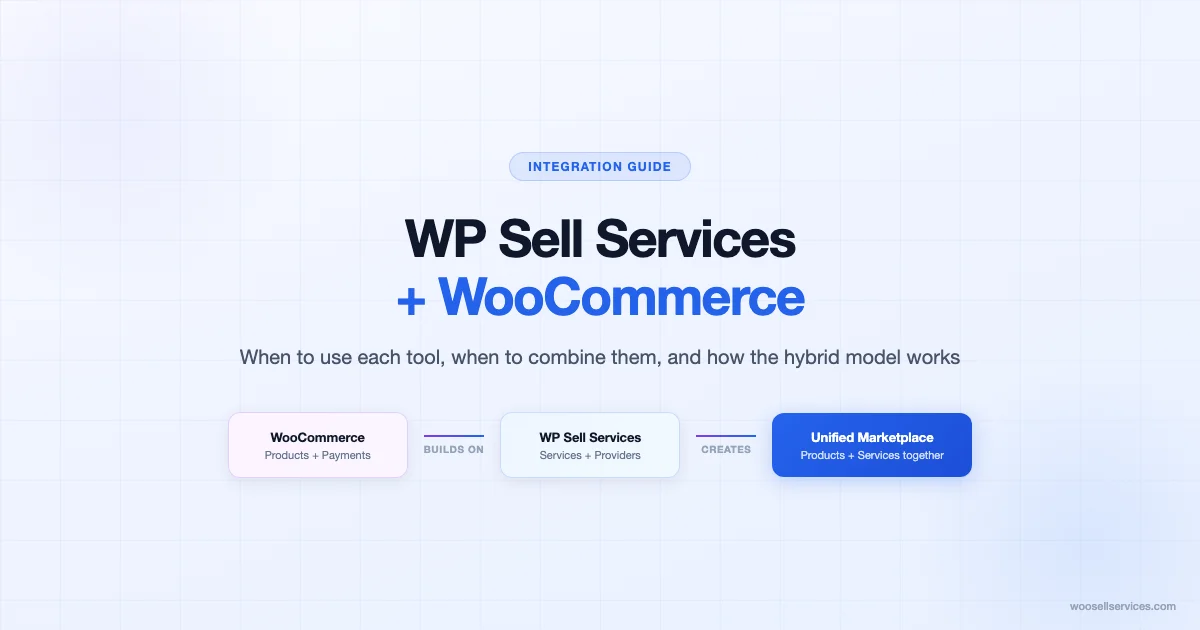
WP Sell Services and WooCommerce are different tools that solve different problems. WooCommerce is a product commerce engine. WP Sell Services is a service marketplace layer built to run on top of WooCommerce. Understanding where each tool starts and stops – and when it makes sense to use both together – is the decision this article is built to clarify.
What WooCommerce Does on Its Own
WooCommerce is the market-leading WordPress e-commerce engine. Out of the box, it handles product listings, cart and checkout, payment processing, order management, and customer accounts. It is designed primarily around physical and digital products: things that can be purchased, shipped, downloaded, or licensed.
WooCommerce has limited native support for services. You can list a service as a simple product, take payment, and manage the order. But the service delivery workflow – scheduling, communication, revision handling, provider accounts, booking flows – is not part of WooCommerce’s core. Operators who try to run a service business through vanilla WooCommerce end up building workarounds with page builders, booking plugins, and custom email templates to cover the gaps.
What WP Sell Services Adds to the Stack
WP Sell Services extends WooCommerce specifically for service commerce. It adds the infrastructure that vanilla WooCommerce lacks: service-specific product types, provider profiles, package structuring for different engagement models, automated delivery of intangible deliverables (call links, files, access credentials), and the customer communication layer for service relationships.
The key design decision behind WP Sell Services is that it builds on WooCommerce rather than replacing it. Your existing WooCommerce setup – payment gateways, customer accounts, order management, tax configuration – remains intact. WP Sell Services layers service-specific functionality on top of that foundation. This means a business that sells both physical products and services can run both through a unified platform without maintaining two separate e-commerce systems.
When to Use WooCommerce Alone
Not every service business needs WP Sell Services. WooCommerce alone is sufficient when:
- You sell a small number of simple, fixed-price services that do not require complex scheduling or multi-provider management.
- Service delivery is entirely manual and you are comfortable managing it through order notes and direct email communication.
- You have no plans to scale to multiple service providers or add a marketplace layer.
- Your service offering is ancillary to a primarily physical or digital product business and does not need its own dedicated experience.
A freelance designer who sells two fixed-price service packages alongside their theme templates does not need WP Sell Services. WooCommerce handles the transaction; the designer handles delivery manually. Adding WP Sell Services at that scale creates more configuration overhead than it saves in operational efficiency.
When to Add WP Sell Services to Your WooCommerce Stack
WP Sell Services earns its place in the stack when your service business has outgrown what WooCommerce handles natively. Specific triggers:
Multiple Service Providers
When you have more than one person delivering services through your platform, you need provider profile pages, separate provider dashboards, and the ability to assign or route orders to specific providers. WooCommerce does not handle this natively. WP Sell Services does.
Tiered Service Packages
When your services come in multiple tiers – basic, standard, and premium versions of the same core service – and clients need to see the differences clearly at the listing level, WP Sell Services’ package structure handles this more cleanly than vanilla WooCommerce product variations. The service-specific product types map to consulting and service commerce mental models better than the product variation system designed for physical goods.
Automated Delivery of Intangible Deliverables
When the thing a client receives after payment is a call link, an access credential, a scheduled appointment, or a custom document – and you want that delivery to happen automatically rather than manually – WP Sell Services’ delivery automation handles it. See how to automate service delivery emails after a customer pays for the complete configuration walkthrough. WooCommerce’s built-in downloadable product system does not map cleanly to intangible service deliverables that are not files.
Recurring Service Relationships
When clients need ongoing access to a service on a monthly or quarterly basis – retainer arrangements, subscription coaching, recurring maintenance packages – WP Sell Services Pro handles recurring services natively. This works alongside WooCommerce’s subscription capabilities to support the full range of recurring service models.
Mixed Physical and Service Commerce
When you sell both physical products and services and want clients to experience a unified storefront rather than two separate purchasing flows, WP Sell Services integrates cleanly with your existing WooCommerce product catalog. A client can add a physical product and a consulting session to the same cart, check out once, and receive appropriate order confirmations for each. This combined checkout experience requires both tools working together.
The Hybrid Model: Physical Products Plus Services
The hybrid model – using WooCommerce for physical or digital products and WP Sell Services for the service layer – is the most powerful use of both tools together. Here is how it works in practice across several common business types.
| Business Type | WooCommerce Handles | WP Sell Services Handles |
|---|---|---|
| Marketing agency with course products | Course sales, digital downloads, payment | Strategy consulting sessions, client retainers |
| Software company | Plugin/theme sales, license renewals | Setup sessions, training packages, support retainers |
| Fitness brand | Equipment, supplements, branded apparel | Personal training sessions, nutrition coaching |
| Creative studio | Stock photos, templates, font licenses | Custom design services, brand reviews |
| Professional services firm | Books, toolkits, assessment products | Consulting engagements, workshops, coaching |
In each case, the WooCommerce layer handles the product commerce that WooCommerce is designed for, and WP Sell Services handles the service commerce that WooCommerce handles poorly on its own. The result is a unified customer experience backed by the right tooling for each type of transaction.
Customer Account Unification
One of the practical advantages of the WooCommerce plus WP Sell Services stack is that customer accounts work across both product and service purchases. When a client creates an account during a WooCommerce product purchase, that same account gives them access to their service order history, booking confirmations, and retainer details in WP Sell Services.
This unified account layer is a significant UX improvement over running separate systems. Clients who buy products and services from the same business do not want two accounts, two order histories, or two sets of login credentials. The WooCommerce account system handles both when the stack is configured correctly.
For the business operator, unified accounts mean a single customer database, a single order history for support and reporting, and a single email communication channel. Managing one system is simpler than managing two.
Combined Checkout Experience
The combined checkout – where a client can purchase a physical product and a service in the same transaction – is one of the most compelling reasons to run both tools together. A client who buys a software plugin and wants to add a setup session to their order can do so in a single cart and checkout flow.
Configuring this properly requires attention to a few details. Service products that involve scheduling should set appropriate expectations in the product description about when and how scheduling happens after purchase – the checkout flow handles payment, and the scheduling happens in the post-purchase flow. Physical products that ship have standard WooCommerce shipping applied; service products do not require shipping configuration and should have shipping disabled in their WooCommerce product settings.
Tax handling for the combined checkout follows WooCommerce’s tax rules, which are applied at the product level. Services and physical products may have different tax treatment depending on jurisdiction. Configure each service product’s tax class in WooCommerce to match your tax obligations rather than letting it inherit the default product tax class.
Migrating from Woo Sell Services to WP Sell Services
If you are running Woo Sell Services (a separate plugin) and considering a migration to WP Sell Services, the core products are different enough that migration requires a deliberate approach rather than a simple plugin swap.
The recommended migration path:
- Audit your current service listings before installing WP Sell Services. Document each service, its pricing structure, its categories, and any custom fields or attributes. This becomes your migration checklist.
- Install WP Sell Services on a staging environment first. Rebuild your service listing structure in the new plugin before touching production. This lets you work through configuration differences without affecting live orders.
- Migrate service listings one category at a time. Start with your highest-volume service category. Get the listings right, test the purchase and delivery flow, then move to the next category.
- Preserve historical order data. Your existing WooCommerce orders remain in place regardless of which service plugin is active. Customer order history is stored at the WooCommerce level, not in the service plugin layer.
- Update your confirmation emails and delivery templates. WP Sell Services uses its own email template system. Rebuild your customized order confirmation and delivery emails in the new plugin before switching traffic to production.
The migration typically takes a few hours for small catalogs and a day or two for larger catalogs with complex service structures. Running both plugins simultaneously during the transition period is generally not recommended – the two systems handle service product types differently and can create checkout conflicts if both are active at the same time.
Technical Considerations for the Integration
Running WP Sell Services alongside WooCommerce is designed to be conflict-free in standard setups. A few technical details are worth understanding before you start.
Theme Compatibility
WP Sell Services outputs are styled to work with WooCommerce-compatible themes. Themes that override WooCommerce templates heavily – particularly checkout templates, account page templates, or product archive templates – may require CSS adjustments when WP Sell Services service product types appear in those templates. Block themes generally require less adjustment than classic themes with heavy WooCommerce customization.
Payment Gateway Compatibility
Because WP Sell Services transactions run through WooCommerce checkout, any payment gateway that works with WooCommerce works with WP Sell Services. Stripe and PayPal are the most commonly used gateways in this stack. Payment gateway configuration is entirely at the WooCommerce level – WP Sell Services does not require separate gateway setup.
WooCommerce Subscriptions
WP Sell Services Pro supports recurring services that integrate with WooCommerce Subscriptions. If you are running subscription-based service products, ensure WooCommerce Subscriptions is installed and configured before setting up recurring service products in WP Sell Services. The two plugins communicate at the product and order level; the subscription renewal logic runs through WooCommerce Subscriptions while the service delivery and access management runs through WP Sell Services Pro.
Making the Decision
The decision framework is straightforward. Use WooCommerce alone when your service offering is simple, low-volume, and does not require dedicated service infrastructure. Add WP Sell Services when your service business has grown to the point where WooCommerce’s native service handling is creating operational friction – manual delivery, limited provider management, or a checkout experience that does not serve service-specific purchasing patterns well.
The hybrid model – both tools working together – is the right choice for businesses that sell products and services, for service marketplaces with multiple providers, and for any operation where recurring service relationships are a meaningful part of the business model. The integration is designed to support this setup, and the vast majority of operators who run WP Sell Services are running it on a WooCommerce installation that already handles other product commerce.
What you do not need to worry about is conflict. WP Sell Services is built for the WooCommerce stack. It uses WooCommerce’s checkout, payment, and account systems rather than building parallel versions of them. Adding it to a functioning WooCommerce installation adds capability without requiring you to reconfigure the commerce infrastructure that already works.
Frequently Asked Questions
Can I add WP Sell Services to an existing WooCommerce store without disrupting current operations?
Yes. WP Sell Services installs alongside WooCommerce without modifying your existing product listings, payment configuration, or customer accounts. Your current WooCommerce store continues to operate normally. WP Sell Services adds new product types and service infrastructure that you configure independently from your existing catalog. The integration is additive, not disruptive.
Do clients need separate accounts for products and services?
No. WP Sell Services uses WooCommerce’s customer account system. A client who already has a WooCommerce account can log in and access their service order history, booking confirmations, and service deliverables through the same account. No separate registration or login is required for service purchases.
Does the integration work with WooCommerce Subscriptions?
WP Sell Services Pro integrates with WooCommerce Subscriptions for recurring service products. You create a WooCommerce subscription product at your recurring service rate, configure the WP Sell Services delivery for each billing cycle, and WooCommerce Subscriptions handles the renewal billing. The service delivery triggers automatically on each successful renewal payment without manual intervention.
What happens to existing WooCommerce reviews when I add WP Sell Services?
Existing product reviews are unaffected. WooCommerce reviews are stored at the product level and are not touched by WP Sell Services. Service products added after installing WP Sell Services will have their own review capability through WooCommerce’s standard product review system. Historical product reviews remain exactly where they are.
Can I run WP Sell Services on a WooCommerce multisite installation?
WP Sell Services Pro Agency supports multiple sites, which covers multisite network use cases. Each site in a multisite network operates as a separate installation from the plugin’s perspective. Configuration, service listings, and service providers are managed at the site level rather than the network level. This gives each site in the network a fully independent service marketplace setup while sharing the WooCommerce multisite infrastructure.
Get Started with WP Sell Services
If your WooCommerce store is ready to add a professional service layer, WP Sell Services Pro Personal at $69 per year is the starting point for single-site operators. It handles the full service commerce workflow – service listings, packages, automated delivery, and customer management – on top of your existing WooCommerce setup.
For businesses running multiple sites or managing multiple service providers, Pro Agency covers unlimited installations with the full feature set. Either way, the installation path starts with your current WooCommerce setup and adds service capability on top of infrastructure that is already working.
Subscription Services and Recurring Revenue
One of the most significant advantages of the WooCommerce plus WP Sell Services stack is the ability to support recurring service revenue without a separate subscription management system. Businesses that generate recurring revenue from retainer clients, monthly coaching calls, ongoing maintenance packages, or subscription-based access to a consultant’s time can model all of these through the combined stack.
The workflow for a monthly retainer in this stack: create a WooCommerce subscription product at the monthly retainer rate, connect it to the WP Sell Services service type that defines what the client receives each month, and configure the delivery automation to trigger on each subscription renewal. When a client’s monthly subscription renews, WooCommerce processes the payment and WP Sell Services fires the delivery – whether that is a call link, a monthly access confirmation, or a scheduled session reminder.
For businesses transitioning clients from one-time service purchases to retainer relationships (and for managing project revisions and scope changes along the way), the combined stack supports upsell flows where a client who purchases an hourly session sees a retainer option at checkout or in the post-purchase email. The retainer option can be positioned as a lower effective rate per session, which is a common conversion mechanism for service businesses building recurring revenue.
Reporting Across the Combined Stack
Running both physical product commerce and service commerce through the same WooCommerce installation gives you unified reporting across the business. WooCommerce’s sales reports, customer reports, and product performance data cover both product and service transactions without any additional configuration. You can see total revenue, order volume, and customer acquisition data in one place.
Where the reporting gets more nuanced is in distinguishing service performance from product performance. WooCommerce’s category-level reporting lets you filter by product category, which works for separating service revenue from product revenue if you have organized your catalog with dedicated categories for each. A “Services” category alongside “Physical Products” or “Digital Downloads” categories gives you clean revenue segmentation in the standard WooCommerce reports.
For more detailed service-specific reporting – which providers are generating the most revenue, which service packages convert best, which delivery types have the highest satisfaction rates – you need to look beyond WooCommerce’s built-in reporting to a dedicated analytics setup. This typically means a WooCommerce analytics plugin or exporting order data to a spreadsheet for manual analysis. The data is all in WooCommerce’s order database; the question is which tool you use to surface it in the format you need.
Common Integration Mistakes to Avoid
Operators who rush the WooCommerce plus WP Sell Services setup tend to run into the same set of avoidable problems. Here are the most common ones and how to prevent them.
- Enabling shipping on service products. Every WP Sell Services product should have shipping disabled in WooCommerce product settings. A service that triggers a shipping cost at checkout creates a confusing client experience and may block the purchase. Check shipping settings on every service listing before going live.
- Not testing the complete purchase flow before launch. Run a real test transaction – actual payment, actual order confirmation, actual delivery email – before opening your services to clients. The configuration issues that survive a read-through of the settings screen surface immediately in a live test.
- Setting incorrect tax classes on service products. Service taxation varies by jurisdiction. Do not assume that the default WooCommerce tax class applies to services. Verify your local service tax obligations and configure each service product’s tax class accordingly.
- Using the wrong WooCommerce product type for services. WP Sell Services works best with simple products and subscription products. Using variable products with complex attribute structures for service differentiation creates checkout friction and display issues. Use separate product listings for meaningfully different service offerings rather than trying to handle all variants through a single complex product.
- Skipping the staging environment for configuration changes. Both WooCommerce and WP Sell Services have interdependencies that make configuration changes on a live site risky. Use a staging environment for any significant configuration work, test the complete flow, then push to production.