Consulting Marketplace on WordPress: Build Yours in 1 Hour with WP Sell Services

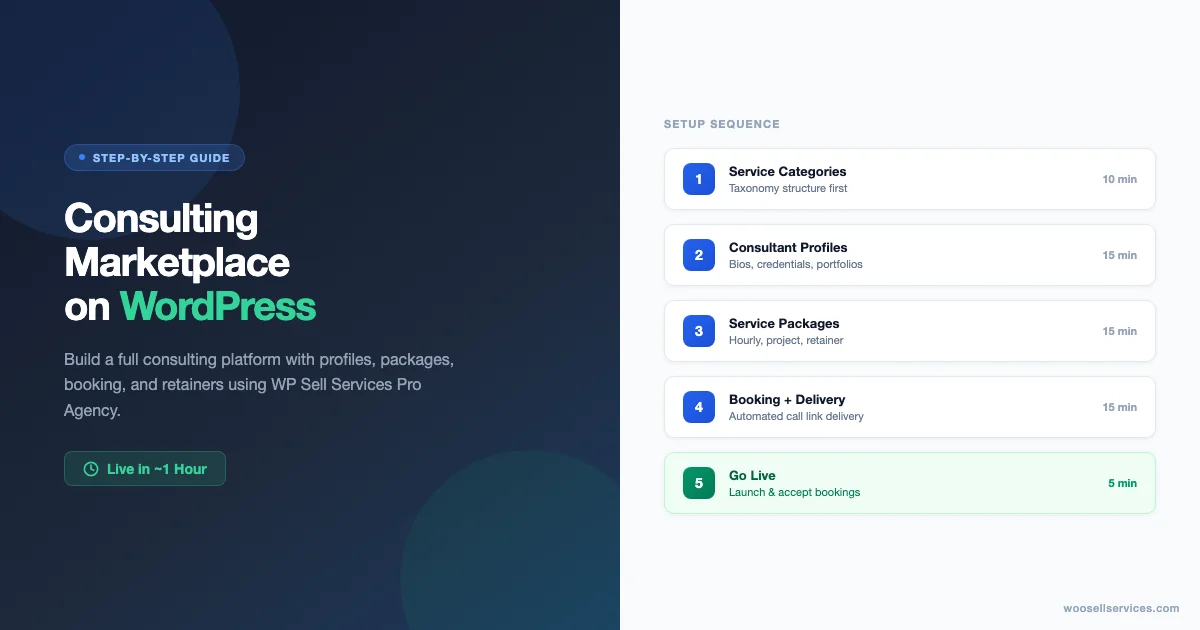
Building a consulting marketplace on WordPress used to mean hiring a developer, stitching together half a dozen plugins, and spending weeks debugging WooCommerce conflicts. WP Sell Services changes that equation. With the right setup sequence, you can have a working consulting platform – consultant profiles, tiered service packages, booking requests, and payment processing – live in roughly an hour. This guide walks through exactly how to do it.
What a Consulting Marketplace Actually Needs
Before you install anything, define what your consulting marketplace needs to do. Most consulting platforms share a common set of requirements that drives the setup sequence you will follow.
- Consultant listings: Each consultant needs a profile page showing their specialization, rates, availability, and credentials.
- Service packages: Consultants typically offer multiple engagement types – hourly sessions, fixed-scope projects, and ongoing retainers.
- Booking flow: Clients need a way to request time, not just add a generic product to a cart.
- Payment processing: Secure payments through standard gateways, with the ability to handle deposits, full payments, or recurring billing for retainers.
- Delivery mechanism: After payment, clients need to receive call links, meeting details, or file access automatically.
- Portfolio showcase: Consultants need a way to demonstrate past work or relevant credentials.
WP Sell Services handles the first four natively. The delivery mechanism and portfolio components need brief configuration, but nothing that requires custom code.
Prerequisites Before You Start
The one-hour estimate assumes these are already in place. If they are not, add the setup time for each.
- WordPress installed and running (any current version)
- WooCommerce installed and configured with at least one active payment gateway – see how to sell services on your WooCommerce store for the baseline setup
- WP Sell Services Pro Agency installed and activated
- A basic WordPress theme (block theme or any WooCommerce-compatible theme)
The Pro Agency license is the right choice for consulting marketplaces because it covers unlimited sites and supports the multi-consultant setup this guide builds. If you are launching a single-consultant platform, Pro Personal covers the core setup.
Step 1: Configure Your Service Categories (10 Minutes)
Service categories are the taxonomy backbone of your marketplace. Every consultant listing and service package sits inside a category, and your site’s filtering and navigation depends on getting this structure right before you create any listings.
Go to WP Sell Services settings and set up your top-level consulting categories first. For a generalist consulting marketplace, these might be Strategy, Operations, Marketing, Finance, and Technology. For a niche marketplace – say, a platform for executive coaches – you might have Leadership, Career Transitions, Team Performance, and Executive Presence.
Keep your category count manageable. Three to eight top-level categories work well. More than that and your navigation becomes difficult for clients to parse quickly. If your marketplace covers diverse consulting types, use subcategories to organize within each top-level category rather than creating an overwhelming flat list.
Step 2: Create Your Consultant Profiles (15 Minutes)
Each consultant on your marketplace needs a profile that serves two purposes: it introduces the consultant to prospective clients, and it anchors all of that consultant’s service listings in one place.
In WP Sell Services, consultant profiles are built as service provider accounts. Set up a WordPress user account for each consultant with the appropriate role, then configure their profile with:
- Display name and professional title – how they appear to clients
- Bio and credentials – 150-300 words describing their background and specialization
- Profile photo – professional headshot at minimum 400x400px
- Service categories – which categories their services fall under
- Portfolio items – past projects, case studies, or credentials (images, PDFs, or links)
The portfolio showcase feature is particularly useful for consultants who need to demonstrate domain expertise. Each portfolio item can include a title, description, and supporting media – enough to give prospective clients a concrete sense of what working with this consultant looks like.
Step 3: Build Your Service Package Structure (15 Minutes)
Most consulting businesses offer multiple engagement types because different clients have different needs and budget levels. WP Sell Services supports four package structures that cover the consulting market well.
| Package Type | Best For | Pricing Model | WP Sell Services Setup |
|---|---|---|---|
| Hourly session | One-off advisory calls, initial discovery | Fixed price per hour | Standard product listing |
| Fixed-scope project | Strategy audits, assessments, defined deliverables | Flat project fee | Product with custom duration field |
| Monthly retainer | Ongoing advisory, fractional roles | Recurring monthly fee | WooCommerce subscription product |
| Milestone package | Multi-phase engagements, larger projects | Split across milestones | Deposit plugin + standard product |
Hourly Sessions
Set up an hourly consulting product with a fixed price per session. This works for one-off advisory calls, initial discovery sessions, or ad hoc problem-solving. The client purchases the session, receives a confirmation, and you deliver the video call link via the WooCommerce order completion email or automated delivery.
Fixed-Scope Projects
Define a project package with a clear deliverable, timeline, and fixed price. Strategy audits, website reviews, financial assessments, and process analyses fit this model well. When scope changes arise after purchase, read our guide on handling project revisions and scope creep on service sites. The client knows exactly what they are getting and what it costs; the consultant knows exactly what they are delivering. WP Sell Services handles the payment and order management; the delivery details are defined in the service description and communicated through order emails.
Retainer Packages
Monthly retainer packages – where a client pays a recurring fee for ongoing access to a consultant – are handled through WooCommerce subscription functionality. If you are running WP Sell Services Pro Agency, recurring services are supported natively. Set up a subscription product at the retainer rate (weekly, monthly, or quarterly), define what the client receives in each period, and WooCommerce handles the recurring billing automatically.
Retainers typically include a defined number of hours, calls, or deliverables per period. Spell these out clearly in the service description to set client expectations accurately.
Project Milestone Packages
For larger engagements that span multiple phases, you can create a package structure where payment is split across milestones. This typically requires more custom configuration but is achievable through WooCommerce’s payment deposit plugins in combination with WP Sell Services’ order management.
Step 4: Configure Availability and Booking (10 Minutes)
Consulting services are time-sensitive in a way that digital products are not. Clients need to know when a consultant is available, and consultants need to manage their booking load without being overwhelmed by scheduling overhead.
WP Sell Services handles this at the service listing level through availability settings. For each hourly or session-based service, you can specify available time slots or indicate that clients should contact you to schedule. The contact-to-schedule model is the simplest: the client purchases the session, you receive the order notification, and you reply with scheduling options. This works well for lower-volume platforms where manual scheduling is manageable.
For higher-volume platforms, integrating a dedicated booking plugin – Calendly, Simply Schedule Appointments, or similar – gives you automated scheduling with calendar sync. The integration is straightforward: include your booking link in the WooCommerce order confirmation email that fires after purchase. The client completes payment, receives the confirmation with your booking link, and books directly without back-and-forth.
The booking link delivery is handled through WooCommerce email templates. You can include a dynamic link or static URL in the order confirmation email. For platforms where different consultants have different booking links, you can use variable product attributes to set a different delivery email per consultant.
Step 5: Set Up Automated Delivery (5 Minutes)
After a client pays for a consulting session or package, they need to receive something useful immediately: a confirmation of what they purchased, the video call link or access instructions, and a clear next step. Doing this manually is fine at low volume but does not scale.
WooCommerce’s order completion email is your delivery vehicle. For a detailed walkthrough, see how to automate service delivery emails after payment. Customize the default order completed template to include:
- A summary of the service purchased and what it includes
- The video call link (Zoom, Google Meet, or Calendly scheduling link)
- Any pre-consultation materials or intake forms
- Contact information for questions before the session
- The expected next steps (when you will be in touch, what to prepare)
This configuration takes about five minutes once your email templates are open. The result is that every purchase triggers an immediate, professional delivery experience without any manual follow-up on your end for standard session types.
Step 6: Launch Your Marketplace Pages (5 Minutes)
WP Sell Services generates the core pages your marketplace needs – service listings, consultant profiles, cart, checkout, and order confirmation. You need to configure a few settings to make the navigation work for your specific platform structure.
Create a landing page for your marketplace that introduces the platform and leads clients toward the consultant or service category they need. This does not need to be complex: a brief explanation of what the platform does, a grid or list of featured consultants, and a search or filter bar for browsing by category.
Set up your site’s main navigation to include the marketplace, a list of consultants, and a way for potential consultants to apply or register if your platform is open to new sellers. Clear navigation is a conversion factor: clients who cannot find a relevant consultant within two clicks typically leave.
Handling Multiple Consultants at Scale
A single-consultant platform is straightforward. A multi-consultant marketplace introduces questions about how payments are distributed, how consultant accounts are managed, and how you as the marketplace operator maintain quality control.
WP Sell Services Pro Agency supports multiple service providers, each with their own listings and profile pages under your marketplace umbrella. For payment distribution – where a portion of each sale goes to the consultant and a portion to you as the platform operator – you will need WooCommerce commission management functionality. Several plugins handle this cleanly; the setup integrates with WP Sell Services’ order flow without conflict.
Consultant application and onboarding is typically handled outside the plugin itself: a contact form, application page, or intake questionnaire that feeds into your account creation process. Once a consultant is approved, you create their WordPress account and they set up their service listings according to the guidelines you establish.
SEO Configuration for Your Consulting Marketplace
A consulting marketplace depends on organic search traffic for client acquisition. Your consultant profiles and service listing pages are natural landing pages for consulting-related queries – but only if they are configured for search visibility.
Each service listing page should have a unique meta title and description that reflects the specific consulting service and the consultant’s specialization. A generic title like “Marketing Consulting” loses to a specific title like “B2B SaaS Marketing Strategy – 90-Day Growth Sprint” on every meaningful search query.
Consultant profile pages are valuable for branded search – clients who find a consultant through LinkedIn or referral and search for their name to verify credentials. Ensure each profile page has a structured, crawlable URL (consultant name or specialization in the slug), a bio optimized for the consultant’s core keyword territory, and schema markup that identifies the page as a professional profile.
WooCommerce’s schema output covers product (service) listings. For consultant profiles and marketplace-level pages, a dedicated SEO plugin handles title tags, meta descriptions, and JSON-LD schema across all page types.
Common Setup Questions
Do clients need to create an account to book a consultant?
WooCommerce supports both guest checkout and account-based checkout. For consulting services where repeat client relationships matter, enabling optional account creation during checkout is worth doing – it gives clients order history and makes follow-on purchases simpler. You can configure WooCommerce to prompt for account creation without requiring it.
How do I handle refunds for consulting sessions?
WooCommerce handles refunds through its standard order management flow. Define your refund policy clearly in your service descriptions and terms – most consulting platforms offer a cancellation window (typically 24-48 hours before a scheduled session) within which a refund applies, and no refund after that window. WooCommerce’s refund process can be triggered manually from the order management screen.
Can consultants manage their own listings?
Yes, with the appropriate WordPress user roles. Service providers with the right capability set can create and edit their own listings without accessing the full WordPress admin. The exact capability configuration depends on your platform setup, but WP Sell Services and WooCommerce between them provide the hooks needed to scope provider access appropriately.
What payment gateways work best for consulting services?
Stripe is the most commonly used gateway for consulting platforms running WP Sell Services. It handles one-time payments, saved cards for repeat clients, and – when combined with WooCommerce Subscriptions – recurring billing for retainer packages. PayPal is a useful secondary option for clients who prefer it. Both integrate cleanly with WooCommerce and require no special WP Sell Services configuration.
What the First Month Looks Like
Getting the platform live is the first milestone. Filling it with enough consultant profiles and service listings to be genuinely useful to clients is the second. Plan the first month around three priorities.
First, get your core consultant roster in place. A marketplace with three to five quality consultants across your main categories is more compelling than a marketplace with twenty thin profiles. Quality over quantity at launch.
Second, work through your booking flow end-to-end with a test purchase before going live. This surfaces any gaps in your email delivery, payment configuration, or post-purchase experience that are easier to fix before your first real client encounters them.
Third, set up basic analytics on your consultant profile pages and service listings so you can see where clients are browsing and where they are dropping off. Early traffic data shapes where you focus your consultant recruitment and content efforts in the months that follow.
Build Your Consulting Marketplace
A consulting marketplace built on WP Sell Services Pro Agency gives you the infrastructure to run a professional, scalable platform without a development team. The stack – WooCommerce for commerce, WP Sell Services for the marketplace layer, WordPress for the content and profile pages – handles everything from individual hourly sessions to ongoing retainer relationships.
WP Sell Services Pro Agency is the right tier for marketplace operators who need to manage multiple consultants across unlimited sites. At the Pro Agency level, you get recurring services support, full multi-provider capability, and priority support – the features a growing consulting marketplace needs from day one.
Building Trust Before the First Booking
A consulting marketplace lives and dies on trust. Clients are not buying a product they can return; they are buying time and expertise from a person they have not met. Every element of your platform needs to support the trust-building process, from the first visit to the purchase confirmation.
Consultant profile pages are your most important trust asset. A profile with a professional photo, a specific bio that describes real credentials and outcomes, and at least one portfolio item converts at a meaningfully higher rate than a sparse profile with a stock photo and generic bio. The investment of 30 minutes to set up each consultant profile well pays off in every booking that follows.
Social proof – reviews, testimonials, and completed project counts – helps prospective clients assess consultants they have not worked with before. WP Sell Services integrates with WooCommerce’s product review system, which means clients can leave verified reviews after completing a session. Enable this for your service listings and encourage early clients to leave reviews after positive sessions. Even three or four genuine reviews on a consultant profile change the conversion dynamic significantly.
Transparency around process also builds trust. A page or section that explains how your marketplace works – how consultants are vetted, what the booking process looks like, what clients can expect after purchase, and what the refund policy covers – reduces friction for first-time buyers. Clients who understand what to expect before they buy are more likely to complete the purchase and more likely to be satisfied with the experience.
Growing the Marketplace After Launch
The operational work does not stop at launch. A consulting marketplace that reaches critical mass – enough consultants to serve client needs, enough clients to make consultant participation worthwhile – requires sustained effort across three areas.
Consultant Recruitment and Quality Control
The quality of your marketplace is the quality of your consultants. A rigorous onboarding process – application, credentials review, and profile standards – pays off in better client outcomes and fewer support issues. Set clear standards for who can list on your platform and what their profiles must include. A marketplace with 20 highly-qualified, well-profiled consultants is a more compelling destination than one with 200 thin listings of varying quality.
Content Marketing for Client Acquisition
Consulting marketplaces benefit from content that educates prospective clients about when they need consulting help and what to look for in a consultant. Articles that address specific business problems your consultants solve – “how to approach a pricing strategy overhaul,” “what to expect from a marketing audit,” “how to evaluate a fractional CFO” – attract clients who are already in the research phase of a buying decision. These clients convert better than cold traffic because they already understand the value of consulting help.
Tracking What Converts
Use WooCommerce’s built-in analytics and Google Analytics events to track which consultant profiles and service listings generate the most views, which generate the most add-to-cart actions, and where clients drop out before completing a purchase. This data tells you which consultants need more prominent placement, which service packages need clearer descriptions, and which steps in the booking flow are losing people. Reviewing this data monthly and making targeted adjustments compounds over time into a significantly higher-converting platform.
Pricing Your Consulting Services for the Marketplace
Pricing on a consulting marketplace is visible to all prospective clients, which creates both an opportunity and a constraint. Clients will compare rates across consultants on your platform, so the pricing structure you set up needs to be internally coherent and competitive with the market outside your platform.
Hourly rates on consulting marketplaces typically follow the market rates for that specialization. Strategy consultants charge differently from marketing generalists; executive coaches charge differently from operations specialists. Research the going market rate for each consulting category on your platform before you launch, and set a price range guideline for consultants to follow during onboarding. A platform where hourly rates are all over the map – some at $50, some at $500 – without clear differentiation signals quality inconsistency to clients.
For package pricing, consider structuring it so that the per-hour effective rate decreases as package size increases. A 1-hour session at $150, a 5-hour package at $600, and a 10-hour package at $1,000 creates a natural upsell path. Clients who are satisfied with a single session have a clear reason to commit to a larger package. WP Sell Services handles each of these as separate product listings, so the setup is straightforward.
Retainer pricing should reflect the ongoing relationship value: a client paying a monthly retainer is committing to a longer-term engagement and deserves a rate that reflects that commitment. Monthly retainers at 15-20% below the hourly equivalent are a common market structure. The exact numbers depend on your consultants’ specializations and your platform’s target client profile.
For teams that want a custom marketplace built rather than configured from scratch themselves, Wbcom Designs provides WooCommerce development services tailored to service-based platforms.