How to Build a Website Like Care.com on WordPress

Care.com charges a family a monthly membership before they can message a single sitter. Pay to browse, pay to message, pay to see a phone number, then hope the person on the other end is actually available. Caregivers pay too, for premium placement in search results. Both sides fund a company whose core product is, functionally, a filtered contact list.
Families keep paying because the alternative feels riskier: a stranger from a Facebook group with no verification trail. That fear is legitimate, and it’s also the entire opportunity. A platform that does real trust verification and charges only when a booking actually happens beats a paywalled directory on every axis that matters to a parent at 11 p.m. searching for tomorrow’s sitter.
This post covers building that platform: babysitting, nannying, elder care, and pet-adjacent household help, all under one roof if you want, or split into a focused niche the way the strongest builds in this series tend to go. The mechanics borrow from the Rover build (trust is the product, repeat bookings are the business) but caregiving for people, not pets, raises the stakes on every trust decision, and this post treats it that way.
What Care.com actually sells
Membership, mainly. Families pay $10 to $50 a month depending on tier just to unlock messaging and full profiles. Caregivers pay for background checks (passed through, not subsidized) and for placement boosts. The marketplace transaction itself, the actual booking and payment for care, mostly happens off-platform: cash, Venmo, a private arrangement once the introduction is made.
That last detail matters more than it first appears. Care.com’s core product is the introduction, not the ongoing relationship. Once a family finds their nanny, the platform’s job is largely done, and the family often lets the membership lapse. This is a business built on churn, and churn is worth understanding before designing around it.
Your opening: charge nothing to browse, nothing to message, and take a modest commission only on money that actually moves through your checkout for recurring bookings. Families pay for what they use, not for the privilege of looking.
Choose your slice: general caregiving or a focused niche
“Caregiver marketplace” spans radically different services with different regulatory weight, different price points, and different customer urgency. Pick a lane before building.
Babysitting and nanny placement. The highest search volume, the most competitive, and the one Care.com is best known for. Works well as a single-city launch where you can personally vet every caregiver early on.
Senior and elder care. Higher price points, longer bookings, and a buyer (often an adult child, not the care recipient) who researches exhaustively before hiring. Trust signaling matters even more here, and so does clarity about what your platform is not: a licensed home-health agency, unless you actually are one.
Pet-adjacent household help already has its own build in this series via Rover; don’t duplicate that ground here.
Most successful builds pick one of the first two and go deep, the same lesson as every other post in this series: a nanny-placement platform for one metro beats a everything-care marketplace with thin coverage in all three.
Revenue model: commission, with membership as a later option
Commission on completed, platform-processed bookings, same conclusion as the rest of this series. For recurring care (a weekly nanny relationship, ongoing elder care), 10 to 15 percent on processed payments works, and unlike Care.com’s membership wall, this only charges when money actually moves.
A membership tier is worth adding later, once you have real supply density, as an option for families who want unlimited messaging without commission on every hour. Structure it as a genuine alternative, not the only door in, and always let a family complete one booking commission-free before asking them to subscribe to anything. Trust is earned before it’s monetized in this category more than in any other in this series.
The stack
- WordPress, self-hosted, $10 to $30 a month in hosting
- WP Sell Services as the marketplace engine
- A warm, trustworthy theme with strong profile-photo layouts (theme comparison)
- Stripe or PayPal for payments

That’s the actual services directory in the free plugin: category filters down the left, price range, cards with the provider’s photo and starting rate front and center. Swap “services” for caregiver listings and the layout does the job without modification: category becomes care type (babysitting, elder care, overnight), the card grid becomes searchable caregiver profiles, and the price filter becomes hourly-rate range, which is exactly how a parent searches at midnight.
The free version covers caregiver registration and dashboards, listings with tiered packages (more on this below), buyer requests for the “I need someone Saturday night, who’s available” cases, built-in messaging, verified reviews, and disputes. No membership wall required for any of it. Pro adds Stripe Connect for automatic payment splits and per-caregiver commission rules, useful once you want to reward your most-vetted, longest-tenured sitters with better terms.
Trust: the entire product in this vertical
Read this section twice before building anything else. In every other niche in this series, trust is one feature among several. Here, it is the business.
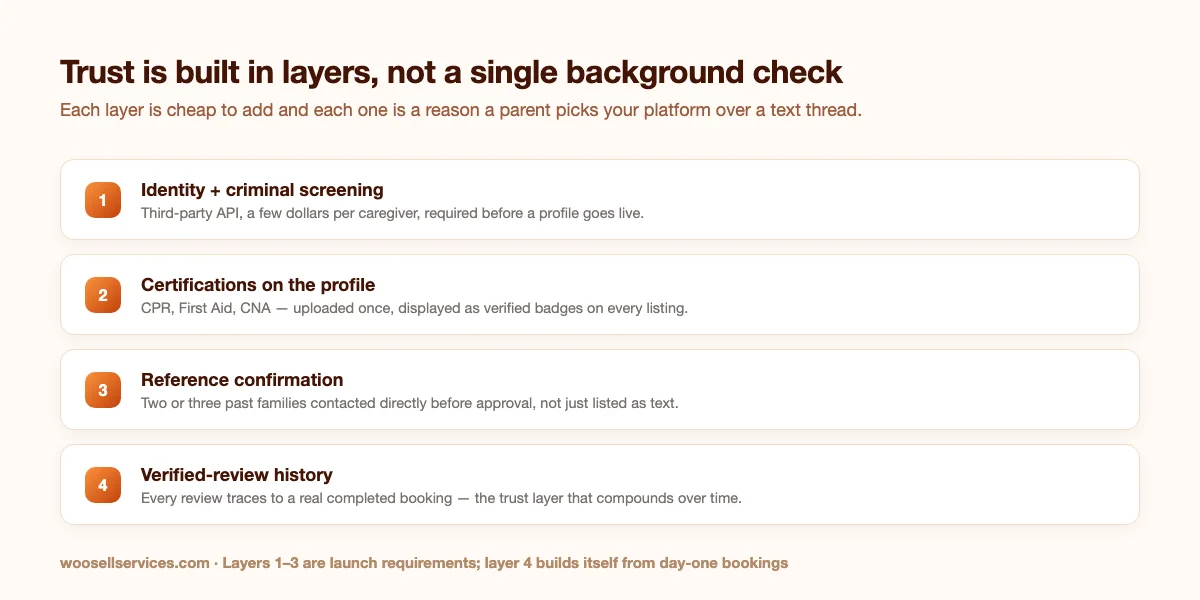
Layer one: identity and criminal background checks, mandatory, before a profile ever goes live. Not optional, not “verified” as a vague badge with no real check behind it. Use a real screening API (Checkr and Sterling both serve this space) and eat the few-dollars-per-caregiver cost as a cost of doing business, not a caregiver fee. Making caregivers pay to be checked is exactly the Care.com pattern you’re differentiating against.
Layer two: certifications, displayed and verifiable. CPR, First Aid, CNA licensure for elder care, any state-required certification for childcare in your jurisdiction. Require upload at registration, spot-check a sample, and show the badges on every profile card, not buried in a tab nobody opens.
Layer three: references, actually called. Two or three past families, contacted by a real person on your team before a caregiver profile is approved. This doesn’t scale to thousands of caregivers with a two-person team, and that’s fine: it’s precisely the constraint that keeps quality high while you’re small, and it’s a genuine claim (“every caregiver, personally reference-checked”) that a venture-scale platform racing toward supply volume structurally cannot make as credibly.
Layer four: reviews that trace to real bookings. Verified-purchase-only, same as every other build in this series, but weighted more heavily here because a five-star nanny review is a parent’s strongest signal that their kids will be safe.
None of this is optional pruning for a leaner MVP. Launch with layers one through three in place, full stop, or don’t launch a caregiver marketplace.
Structuring caregiver listings
Packages by scenario, not just by hour. The three-tier structure adapts cleanly:
- Babysitting: single evening / weekly recurring (2-3 evenings) / full-time weekday coverage
- Elder care: a few hours daily companion visits / half-day care / overnight or 24-hour coverage
- Both: an add-on menu for light housekeeping, meal prep, pet care alongside the primary task, and transportation to appointments
The package pricing psychology we covered in the general services guide applies directly, with one addition specific to this niche: publish exact certifications and check status on every tier, not just the profile page. A parent comparing three sitters at 9 p.m. shouldn’t have to click through to confirm someone is CPR-certified.
The meet-and-greet, formalized, same as the Rover build. A free or low-cost introductory visit, booked and tracked on-platform, before any real childcare or elder care booking. This is even more load-bearing here than in pet care; almost no responsible parent skips an in-person meeting before leaving a caregiver alone with a child, and formalizing it on-platform means the pre-booking conversation lives in your messaging system where your dispute process, if needed, can see it.
Buyer requests for the urgent cases. “Need someone tomorrow morning, toddler and infant, my usual sitter is sick” is exactly the reverse-marketplace pattern covered in the Thumbtack build: the family posts, available and already-vetted caregivers respond, the family picks. Because every responder is pre-screened (layers one through three, already done), the family isn’t gambling on an unknown in a moment of genuine stress. That’s the whole value proposition compressed into one feature.
Recurring care is the real business, same lesson as Rover
A single babysitting night is a nice transaction. A weekly nanny relationship, or ongoing elder care three afternoons a week, is the actual business, and the repeat-booking economics from the Rover build transfer almost exactly: acquisition cost amortizes across dozens of bookings, and the platform’s ongoing value is the trust layer and payment protection, not the one-time introduction Care.com optimizes for.
Sell recurring arrangements as booking blocks, the same pattern as Rover’s walk blocks: “8 sessions, used within a month” rather than rigid subscription billing, because family schedules flex constantly around school breaks, illness, and travel. The family and caregiver settle the weekly rhythm directly once trust is established; your platform’s job is the initial vetting, the payment protection, and being there if something goes wrong.
Handling the moment something goes wrong
Every marketplace in this series has a dispute-resolution section. This one needs a different kind, because “the deliverable wasn’t what I expected” and “I’m worried about my child’s safety” are not the same category of problem, and treating them the same is a mistake that costs more than a bad review.
Build two distinct paths from day one. Ordinary service issues (a caregiver ran late, a session was cut short, a billing question) route through the standard on-platform messaging and dispute system already described elsewhere in this series, tied to the order record. Handle these calmly, refund generously when in doubt, and move on.
Safety concerns are a different path entirely, and your platform needs a visible, separate channel for them: a clearly marked “report a safety concern” option that goes straight to a real person on your team, not a support ticket queue, and not the same inbox as billing complaints. Respond to these within hours, not days. Document everything. If a report involves suspected abuse or neglect, understand your jurisdiction’s mandatory reporting obligations before you ever need to act on them, not while you’re in the middle of a crisis.
This isn’t pessimism about the caregivers on your platform; the screening process in the trust section exists precisely to make these events rare. But rare isn’t zero, and a caregiver marketplace that hasn’t thought through this before its first booking is a caregiver marketplace that will handle it badly when it happens.
What this costs, compared honestly
| Self-hosted (this build) | Care.com (as a family) | Sittercity / UrbanSitter | |
|---|---|---|---|
| Platform cost | Plugin license + $10 to $30/month hosting | $10 to $50/month membership | Similar membership tiers |
| Cost to browse and message | Free | Paywalled behind membership | Paywalled behind membership |
| Background checks | Platform-funded, mandatory before listing | Passed through to caregiver or optional add-on | Similar |
| Commission on bookings | 10 to 15% (when processed on-platform) | None (transactions happen off-platform) | Similar to Care.com |
| Who owns the family/caregiver relationship | The platform, via records and reviews | Neither, by design, since bookings leave the platform | Similar |
The Care.com comparison looks different from every other incumbent in this series, because its revenue doesn’t depend on the transaction at all; it depends on the subscription persisting even after the family has already found their caregiver and stopped needing the search. That’s a genuinely fragile position once families notice it, which is a large part of why churn is a known problem in this category, and it’s the opening a commission-based, pay-only-when-it-works platform can walk straight through.
What you genuinely cannot replicate on day one
Insurance-backed guarantees. Care.com offers backup care and certain liability protections tied to its scale and insurer relationships. At launch, your equivalent is a clear terms-of-service position (caregivers are independent contractors, your platform is a vetted introduction and payment venue) plus optionally requiring caregivers to carry their own liability coverage for higher-stakes categories like elder care. Say plainly what you do and don’t cover; ambiguity here is the one place in this entire series where it’s genuinely dangerous rather than just bad marketing.
Volume of pre-screened supply. Care.com has millions of profiles. You’ll have dozens at launch, all personally vetted. Frame this correctly to families: fewer options, every one of them actually checked, beats thousands of profiles behind a paywall of unknown reliability. That’s a real trade a family evaluating overnight care for a parent will take.
24/7 emergency support. At launch, support is a real phone number that a real person answers during stated hours, with a clear emergency-contact path for active bookings. Don’t promise round-the-clock coverage you can’t staff; promise a specific, honest window and beat it.
Legal ground you need to cover before your first booking
This section is not optional reading for this vertical.
Consult a local attorney about caregiver classification (independent contractor status varies more by jurisdiction here than in most service categories, and childcare in particular attracts regulatory attention). Understand mandatory reporting obligations if your platform becomes aware of suspected abuse or neglect through messages or reviews. Require signed acknowledgment from both families and caregivers of your terms, including the independent-contractor relationship and dispute process, before any booking completes. None of this is unique to a WordPress build; it’s unique to the caregiving category, and it applies whether you build on this plugin, a competitor’s, or custom code.
Launch: vet twenty, then grow slowly on purpose
Start with caregivers you can personally vouch for. Existing nannies and sitters in your own network, local daycare and preschool staff looking for supplemental work, and CNA students or graduates for the elder-care side. Twenty deeply-vetted profiles beats two hundred you rushed through screening to hit a launch date.
Recruit families through the trust story, explicitly. “Every caregiver on this platform is background-checked, reference-checked, and certification-verified by a real person, not just a database query” is your entire pitch, and it should be the first sentence on your homepage, not buried under feature lists.
Partner with the institutions that already do trust work. Local daycare centers, preschools, senior centers, and home-health agencies already vet people for a living. A referral relationship with two or three of these gives you pre-vetted supply and instant credibility neither of you had to build from scratch.
Grow supply deliberately slower than demand. This is the one build in the series where I’d actively recommend a waitlist for new caregiver applications if your vetting team can’t keep pace. A slow, visible screening process is a feature to advertise, not a bottleneck to apologize for.
Seed reviews from real, careful bookings. Book real caregivers for real childcare or elder care needs (yours, a friend’s, with full consent and disclosure), pay full price, leave detailed honest reviews. Ten deeply-reviewed profiles is a trustworthy launch; more than that, rushed, is the opposite.
Common questions
Is this legal to run as a marketplace rather than an employment agency? In most jurisdictions, yes, structured as a venue connecting independent caregivers with families, the same legal position Care.com and Sittercity take. Requirements vary by state and by category (elder care carries more regulatory attention than babysitting in several states), so this is the one build in this series where a consultation with a local attorney before launch isn’t optional advice, it’s a prerequisite.
Do I really need to call references myself? At launch scale, yes. It’s the single highest-trust, lowest-cost thing you can do, and it’s precisely the depth of vetting that becomes impossible once a platform is processing thousands of new caregiver applications a month. Use that constraint as a selling point while it’s true.
Can families message caregivers without paying anything, unlike Care.com? Yes, and that’s a deliberate wedge. Messaging, browsing, and full profile access are free; you earn only when a booking is processed through your checkout. Families who’ve felt nickel-and-dimed by membership tiers notice this immediately.
What about background check costs? Who pays? The platform absorbs it as a cost of vetting, not a caregiver fee. Charging caregivers for their own background check, as Care.com effectively does by passing through the cost, undercuts your “we do trust properly” positioning before a caregiver even finishes registering.
How is this different from the Rover build? Structurally similar (trust-heavy, repeat-booking economics, buyer requests for urgent needs) but the stakes are categorically higher: children and vulnerable adults instead of pets, which changes the vetting depth required, the legal exposure, and the honesty required in what your platform does and doesn’t guarantee. Treat every shortcut you’d consider taking in the Rover build as off-limits here.
Can I combine babysitting and elder care on one platform? You can, but keep the caregiver pools and vetting criteria clearly separate in the taxonomy, since the qualifications, price points, and buyer concerns differ substantially. Many successful platforms in this space do launch focused on just one and add the second only once the first is genuinely working.
What happens if a caregiver’s background check comes back with a red flag after they’ve already been active on the platform? Re-screen on a schedule, not just at onboarding. Annual re-checks at minimum, and immediately upon any complaint that touches safety. Write this into your terms as a condition of staying listed, and be prepared to deactivate a profile the same day a check comes back with a genuine concern, even a long-tenured, well-reviewed one. The review history that took months to build is not a reason to delay acting on a safety signal; it’s the opposite, since a caregiver with a long, trusted history has more access and more opportunity than a brand-new one.
Should family members be able to leave reviews, or only the person who booked? Let the booking account leave the review, but make the review form ask specifically about the care recipient’s experience where that’s a different person than the account holder, which is common in elder care where an adult child books but a parent receives care. A review field that only asks “how was your experience” misses the person whose experience actually mattered.
Want to see how caregiver profiles, buyer requests, and verified reviews actually work before building on top of them? Try WP Sell Services. The free version covers everything in the build above except automated payment splits.