What Is WooCommerce Used For?


Ask most people what WooCommerce is for and they’ll say “selling stuff online,” which is true but incomplete enough to miss most of what actually happens on the platform in 2026, well past its early days as a simple shopping cart plugin. WooCommerce has grown well past its original brief of physical product sales into something closer to a general-purpose commerce engine, digital downloads, subscriptions, bookings, memberships, and service delivery all run on the same underlying plugin. Here’s a genuinely thorough look at what WooCommerce gets used for in practice, who’s actually building on it, and where its native strengths run out.
The Foundation: What WooCommerce Actually Is
WooCommerce is an open-source eCommerce plugin for WordPress. Install it on an existing WordPress site and it adds product management, a shopping cart, checkout, payment processing, and order management on top of whatever content and design you already have. It’s free to install, though a real store almost always ends up paying for hosting, a handful of extensions, and payment processing fees somewhere down the line.
The part that matters for understanding its range of use: because it’s built on WordPress rather than a standalone platform, it inherits WordPress’s massive plugin and theme ecosystem. That’s the actual reason WooCommerce covers so much more ground than a typical “online store builder,” it’s not one tool trying to do everything, it’s a commerce core that thousands of other plugins extend in different directions.
Selling Physical Products
The original use case and still the most common one. WooCommerce handles product listings with variations (size, color, material), inventory tracking with low-stock alerts, shipping calculated by zone, weight, or flat rate, and integration with carriers for label printing and tracking. Stores range from a single artisan selling handmade goods to large retailers running thousands of SKUs across multiple warehouses.
Selling Digital Products
Ebooks, software licenses, music, stock photography, templates, anything deliverable as a file works natively in WooCommerce. Set a product to “Downloadable,” upload the file, and WooCommerce handles secure delivery links after purchase, no shipping configuration needed, no physical inventory to track. This is a meaningfully different operational model from physical goods, no fulfillment delay, no shipping cost, and it’s a large part of why creators and small software vendors gravitate toward WooCommerce over a heavier dedicated eCommerce platform.
Subscriptions and Recurring Revenue
With a subscriptions extension, WooCommerce handles recurring billing, subscription boxes, SaaS-style access plans, membership dues, on whatever cadence you define. This turns a one-time-purchase model into a predictable revenue stream, and it’s a common pattern for content creators and small software businesses that want recurring income without building custom billing infrastructure from scratch.
Bookings and Appointments
Hotels, personal trainers, consultants, equipment rental businesses, anyone selling time or availability rather than a shippable object, can run bookings through WooCommerce with the right extension. Customers pick a date and time slot, pay through the same checkout as any other product, and the business gets a calendar view of what’s actually been reserved. This category sits closer to services than to traditional retail, but it still benefits from WooCommerce’s payment processing and order management underneath.
Memberships and Gated Content
Online courses, private communities, premium content archives, all commonly gate access behind a WooCommerce purchase using a membership extension. A customer buys access, gets automatically assigned the right permission level, and sees content or areas of the site that non-members can’t reach. This pattern shows up constantly for educators, niche publishers, and community builders who want a paywall without building custom authentication logic.
Affiliate and Dropshipping Operations
Affiliate marketers use WooCommerce to build product-recommendation storefronts that route purchases to third-party retailers for commission. Dropshippers use it as the customer-facing storefront while a separate supplier handles inventory and fulfillment behind the scenes, connected through a dropshipping integration plugin. In both cases, WooCommerce is doing the same job it always does, presenting products and processing payment, while the actual fulfillment logic lives somewhere else entirely.
Service-Based Businesses
This is the category most people underestimate. WooCommerce was built with physical goods in mind, shipping fields, weight-based calculations, stock counts, none of which map cleanly onto a consulting engagement or a custom design project. Businesses selling services through vanilla WooCommerce often end up bending the product structure to fit, listing a service as a “product” with no shipping, then handling everything else, scope discussions, delivery, revision rounds, entirely outside the platform through email.
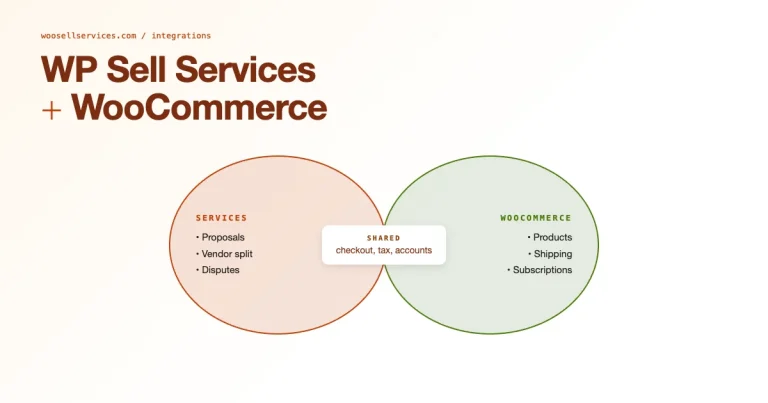
If services are the actual core of the business rather than an occasional add-on, a dedicated marketplace plugin fits the shape of the work far better than a generic product listing does. WP Sell Services is built specifically for this, tiered service packages instead of a single flat price, an order lifecycle that tracks a project from booked through delivered rather than just “paid,” and order-attached messaging so scope conversations happen where the order record lives instead of scattered across email threads. For a freelancer, agency, or consultant running their business on WooCommerce, that structural fit does more for day-to-day operations than any amount of manual workaround.
Nonprofits and Fundraising
Charities and nonprofits use WooCommerce to sell merchandise, process one-time and recurring donations, and manage ticket sales for fundraising events. The same order and payment infrastructure that handles a retail transaction handles a donation just as well, and the reporting tools give nonprofits a clear record for accounting and donor communication.
Wholesale and B2B
With B2B-specific extensions, WooCommerce can run tiered pricing by customer group, minimum order quantities, net payment terms, and private catalogs visible only to approved wholesale accounts. This is a smaller but real category, manufacturers and distributors running both a retail-facing store and a separate wholesale portal from the same WooCommerce install, keeping product data in one place rather than maintaining two disconnected systems.
Content Creators and Independent Publishers
Bloggers, podcasters, video creators, and newsletter writers increasingly run their own storefronts rather than relying entirely on third-party platforms that take a cut and control the customer relationship. WooCommerce lets a creator sell a course, a paid newsletter subscription, or a physical product line (merchandise, prints, books) all from the same site their audience already visits, without splitting their business across five different platforms each with its own login and payout schedule. Owning the customer relationship and the payment data directly, rather than renting it from a third-party marketplace, is a big part of the appeal here.
Real Estate and Property Listings
Less obvious but real: real estate agencies and property managers sometimes use WooCommerce’s checkout infrastructure to process application fees, deposit payments, or booking fees for short-term rentals, paired with a directory or listings plugin that handles the actual property data. WooCommerce isn’t doing the listing work in this case, it’s providing the payment rail underneath a system built for a different purpose entirely.
Event Organizers
Conference organizers, workshop hosts, and local event runners use WooCommerce with an events or ticketing extension to sell tickets, manage capacity, and handle check-in on the day of the event. This overlaps with the bookings category above but tends to involve higher-volume, time-limited sales windows (a conference selling five hundred tickets over two weeks looks operationally different from a consultant booking three client calls a week), which changes what matters most, load handling during a ticket rush versus calendar precision for individual appointments.
Why So Many Different Business Types Land on the Same Platform
It’s worth asking why WooCommerce specifically ends up as the common thread across such different business models rather than each finding its own specialized tool. Part of the answer is WordPress’s existing market share, a huge share of small business websites are already built on WordPress for content and SEO reasons, and WooCommerce is the path of least resistance for adding commerce to a site that already exists rather than migrating everything to a separate platform. Part of it is genuinely the extension ecosystem, when a use case isn’t well served natively, there’s usually already a plugin built specifically to close that gap, rather than a business having to wait for the core product to add support or build something from scratch.
Where WooCommerce’s Native Fit Runs Out
Worth being honest about the flip side: WooCommerce’s flexibility comes from extensions, not from the core product being naturally suited to every use case listed above. A store selling only digital downloads doesn’t need shipping fields cluttering every product screen, but they’re there by default. A service business doesn’t need inventory tracking, but the core product model assumes it. This isn’t a flaw exactly, it’s the tradeoff of building on a genuinely general-purpose foundation rather than a purpose-built tool. For straightforward physical or digital product sales, that tradeoff barely registers. For a business whose entire model doesn’t match the default product shape, services being the clearest example, the right extension matters more than it does for a typical retail store.
Scale: From Solo Sellers to Large Operations
WooCommerce covers an unusually wide range on the small-to-large spectrum. A single creator selling one digital product can run a fully functional store on shared hosting for a few dollars a month. A large retailer running thousands of products and high daily order volume can run the same underlying software on dedicated infrastructure with performance tuning, caching layers, and a development team maintaining custom extensions. The core plugin doesn’t change between these two extremes, what changes is the hosting, the extensions, and the operational discipline wrapped around it.
What This Looks Like for a Service-First Business Specifically
Since services are the category most likely to get bent into an awkward shape on a stock WooCommerce install, it’s worth walking through what a properly fitted setup actually changes day to day. On a generic product listing, a customer buys a “service” the same way they’d buy a physical item, one price, one checkout, done, with no structure for what happens between purchase and delivery. Questions about scope, timeline, and revisions end up living in a separate email thread disconnected from the order record, which means anyone checking on a job later has to piece together the full picture from two different places.
With order communication built into the purchase itself, that entire back-and-forth stays attached to the order it belongs to. A support person, a business owner checking status, or the customer themselves can see the whole history in one place instead of hunting through an inbox. For a business running more than a handful of service orders at a time, that difference alone tends to save more hours than any other single change to how the store is configured, and it’s the kind of operational fix that’s invisible from the outside but felt every single week internally.
A Quick Reference by Business Type
| Business type | What WooCommerce provides natively | What usually needs an extension |
|---|---|---|
| Physical retail | Product variations, shipping, inventory | Advanced shipping rules, POS integration |
| Digital products | Downloadable delivery, licensing basics | Software license key management |
| Subscriptions | Basic recurring order support | Full subscription billing logic |
| Bookings | None natively | Bookings/appointments plugin |
| Memberships | None natively | Membership/content restriction plugin |
| Services | Basic product listing | Service marketplace plugin (order lifecycle, messaging) |
Deciding Whether WooCommerce Is the Right Starting Point
Given how broad this list is, it’s fair to ask when WooCommerce isn’t the right call. If you’re not already on WordPress and have no other reason to be, a purpose-built platform for your specific use case (a dedicated course platform, a dedicated booking system, a hosted eCommerce SaaS) might get you running faster with less configuration overhead. WooCommerce’s strength is flexibility and ownership, you control your data, your hosting, and your extension choices, but that flexibility comes with more setup decisions than a platform built narrowly around one use case.
Where WooCommerce tends to win is when a business already has a WordPress site with content, traffic, and SEO equity built up, or when the business genuinely spans more than one of the categories above and doesn’t want to stitch together several disconnected platforms to cover them all. Migrating an established site’s content and search rankings to a brand-new platform is a real cost most businesses underestimate until they’ve lived through it once.
How Businesses Typically Grow Into More Complex Use Cases
A common pattern worth knowing: most stores don’t start with a complex multi-category setup, they grow into one. A creator starts selling a single digital download, adds a subscription tier a year later, then starts offering paid consulting calls once their audience starts asking for more direct access. Each stage adds a new extension rather than requiring a platform migration, which is a meaningful advantage of building on WooCommerce from the start even if the initial need looks simple. The core plugin and your existing product catalog stay in place while the business model around them evolves.
Frequently Asked Questions
Can one WooCommerce store combine several of these use cases at once?
Yes, and it’s common. A store might sell physical merchandise alongside a subscription box and a handful of digital downloads, all through the same WooCommerce install. Combining use cases mostly adds configuration complexity rather than requiring a fundamentally different setup.
Is WooCommerce a good fit for a business that’s purely services with no products at all?
It can be, but the fit is much better with a plugin actually built around service delivery rather than trying to make the default product structure work. The order lifecycle, delivery expectations, and communication needs of a service business look different enough from a physical product sale that the generic setup tends to feel like a workaround rather than a natural fit.
Do I need coding skills to use WooCommerce for any of these use cases?
Basic setup for most of these categories doesn’t require code, extensions handle the configuration through their own settings screens. Custom workflows, unusual pricing logic, or deep integrations with external systems are where development skill starts to matter.
Choosing the Right Foundation for What You’re Actually Selling
WooCommerce is used for a genuinely wide range of business models, physical retail, digital goods, subscriptions, bookings, memberships, nonprofits, wholesale, and services all run on it in practice. The core plugin gives every one of these a working checkout, payment processing, and order system to start from. The difference between a smooth setup and a constant workaround usually comes down to picking the right extension for the shape of what you’re actually selling, rather than forcing every business model through the same default product template.
The plugin itself doesn’t care what you’re selling. What matters is whether the layer you build on top of it, extensions, custom code, or a purpose-built plugin, actually matches how your business operates. Get that match right and the platform gets out of the way. Get it wrong and you’ll spend more time fighting the default product structure than actually running the business, which is the one outcome every setup decision above should be aimed at avoiding.
Interesting Reads