Build an Internal Product Suggestion System for Your WooCommerce Team


Why Slack Channels and Spreadsheets Fail at Idea Management
Every product team has ideas. They come from support tickets, sales calls, marketing campaigns, customer interviews, and that brilliant thought someone had in the shower on a Tuesday morning. The question is not whether your team has good ideas. The question is whether you have a system to capture, evaluate, and act on them.
Most teams default to one of two approaches, and both fail for predictable reasons.
The Slack Channel Approach
Someone creates a #product-ideas channel. For the first week, it is buzzing with suggestions. By week three, it is a graveyard. Here is why:
- Ideas get buried. Slack is a stream, not a database. An idea posted on Monday is invisible by Friday, lost under meeting links, lunch debates, and GIF reactions.
- No structure. Some ideas are one sentence. Others are three paragraphs. There is no consistent format, no priority, and no status tracking.
- No voting or ranking. You cannot tell which ideas have broad support versus which one person feels strongly about.
- No accountability. Ideas go in but nothing comes out. Without status tracking, there is no way to show that ideas are being reviewed, let alone acted on.
- Search is terrible. Try finding that product idea someone mentioned “a few weeks ago” about “that thing with the checkout.” Good luck.
The Spreadsheet Approach
A project manager creates a Google Sheet or Excel file with columns for Idea, Submitted By, Date, Priority, and Status. This is better than Slack, but it introduces its own problems:
- Friction. Opening a spreadsheet, finding the right tab, scrolling to an empty row, and filling in columns is enough friction to kill most submissions.
- Version conflicts. Multiple people editing at once leads to overwritten cells and conflicting data.
- No visual workflow. A list of ideas with a “Status” column does not tell you where things stand at a glance. You need to read every row to understand the pipeline.
- No engagement. You cannot vote, comment, or discuss within a spreadsheet in any meaningful way.
- Maintenance burden. Someone has to manually update statuses, clean up duplicates, and keep the spreadsheet organized. That person eventually stops doing it.
The fundamental problem with both approaches is the same: they are general-purpose tools being forced into a role they were not designed for. What you need is a purpose-built idea management system.
Setting Up an Internal-Only Suggestion Board
The Product Roadmap plugin by Wbcom Designs is typically associated with public-facing roadmaps, but it works equally well as an internal idea management system. The key is in how you configure it.
If you want this to live entirely on your own site as a full community layer rather than a standalone board, Jetonomy is a free, standalone WordPress community plugin whose Ideas boards are built for exactly this: members post suggestions, vote on them, and each item moves through a public Planned → In Progress → Shipped roadmap. It stores everything in its own database tables rather than wp_posts, so it stays fast as the board grows, and it also ships forums and a Q&A space with accepted answers if you later want more than a feedback board.
Here is how to set up an internal-only board:
Step 1: Install the Plugin
Download and install the Product Roadmap plugin from Wbcom Designs. Activate it on your WordPress-powered company intranet or WooCommerce site.
Step 2: Create a Board Titled “Product Ideas” or “Team Suggestions”
Name it something inviting that signals this is a place for everyone to contribute, not just product managers.
Step 3: Configure Statuses for Internal Workflow
Unlike a public roadmap where you might use customer-friendly language, internal statuses can be more direct:
- On Hold, Idea received but not yet reviewed
- Under Review, Being evaluated by the product team
- Approved, Greenlit for development
- In Progress, Currently being built
- Shipped, Released to customers
- Declined, Evaluated and rejected (with a comment explaining why)
Step 4: Keep the Board Off Public Navigation
The plugin does not include a built-in permission system for gating a board to specific internal roles, so the practical approach is to keep it off your public menus entirely and place it on an unlisted page that requires login, either behind your intranet’s SSO or a simple members-only page setting from whatever access-control plugin you already use. Customers and public visitors should not stumble onto this board. This creates a safe space where team members can suggest wild ideas without worrying about external perception.
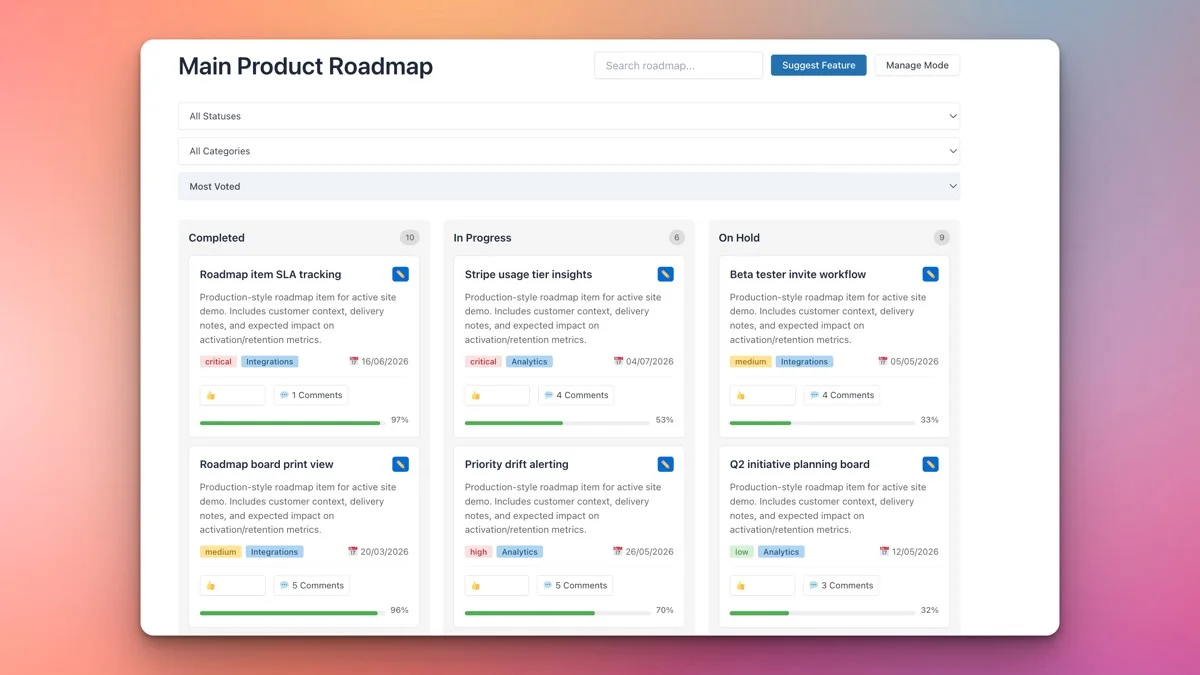
Team Submissions via the Frontend Form
One of the biggest advantages of using the Product Roadmap plugin over a spreadsheet is the structured frontend submission form. Team members do not need WordPress admin access. They visit the board page, click “Submit Idea,” and fill in a form.
For an internal system, configure the submission form to capture:
- Idea Title, A clear, concise name
- Description, What the idea is and why it matters
- Category, Where the idea originated (more on this below)
- Priority Suggestion, The submitter’s sense of how urgent this is
- Customer Evidence, Links to support tickets, survey responses, or customer quotes that support the idea
The structured format ensures that every idea arrives with enough context for the product team to evaluate it without scheduling a follow-up meeting to ask “What exactly did you mean?”
Voting as an Alignment Tool
In a public roadmap, voting shows customer demand. In an internal system, voting serves a different but equally valuable purpose: team alignment.
When team members can upvote ideas they believe in, you get a heat map of organizational conviction. This is incredibly useful during planning sessions because it answers questions like:
- Which ideas does the broader team think are most important?
- Is there alignment between what engineering thinks matters and what sales thinks matters?
- Are there ideas with surprisingly broad support that leadership has overlooked?
- Are there “pet projects” that only one person is championing?
Voting also gives quieter team members a voice. Not everyone is comfortable speaking up in a meeting, but anyone can click an upvote button. This democratizes the idea evaluation process and prevents the loudest voice from always winning.
Encourage your team to vote honestly and regularly. Make it part of the culture: “Before our weekly product meeting, spend five minutes reviewing new ideas and voting on the ones you believe in.”
Triaging Ideas: From On Hold to In Progress
Ideas without a triage process are just noise. Here is a practical framework for moving ideas through your internal pipeline.
Stage 1: On Hold (Intake)
Every new submission starts here. No judgment, no filtering. The goal is to make submission as frictionless as possible so that ideas keep flowing.
Stage 2: Under Review (Weekly Triage)
Once a week, your product team reviews all ideas in the “On Hold” column. For each idea, they ask:
- Does this align with our current strategic priorities?
- Is there customer evidence to support it?
- How many team votes does it have?
- What is the estimated effort to implement?
- What is the potential business impact?
Ideas that pass initial review move to “Under Review” with a comment noting the evaluation criteria being considered.
Stage 3: Approved (Roadmap Commitment)
Ideas that survive deeper evaluation get moved to “Approved.” This is a commitment that the idea will be worked on, though it may not happen immediately. Add a target quarter or sprint to set expectations.
Stage 4: In Progress (Active Development)
When a developer picks up an approved idea, it moves to “In Progress.” Update the progress bar as work advances and add comments about implementation decisions.
Stage 5: Shipped (Done)
The satisfying moment when an idea goes live. Move it to “Shipped” and add a comment with release details. This is also the moment to notify the person who originally submitted the idea, recognition matters.
Stage 6: Declined (With Explanation)
Not every idea will make the cut. When you decline an idea, always add a comment explaining why. “This conflicts with our Q2 focus on mobile optimization” is far better than silently archiving it. Transparent rejection builds trust in the process and encourages future submissions.
Prioritizing by Business Impact
Not all ideas are created equal, and the priority system in the Product Roadmap plugin helps you communicate this clearly.
For an internal system, priority should reflect business impact rather than personal preference. Here is a framework:
- Critical, Directly impacts revenue, fixes a significant customer pain point, or addresses a competitive threat. Example: “Add Apple Pay support” when 40% of your mobile customers abandon checkout.
- High, Strong customer demand, aligns with strategic goals, and has a clear ROI path. Example: “Add subscription billing” when your top 10 customers have all requested it.
- Medium, Good idea with moderate impact. Worth doing but not urgent. Example: “Redesign account settings page” when current UX is confusing but not breaking.
- Low, Nice to have. Would improve the product but does not move key metrics significantly. Example: “Add dark mode” when no customer has requested it but the team thinks it would be cool.
When your team can see priorities attached to every idea, planning conversations become more productive. Instead of debating which idea “feels” most important, you discuss which ones have the highest impact relative to their effort.
Categorizing Ideas by Source
Where an idea comes from often tells you as much as the idea itself. The Product Roadmap plugin’s category system lets you tag ideas by their origin, which is invaluable for understanding patterns.
Create categories based on your team’s input sources:
- Customer Support, Ideas that emerged from support tickets and customer complaints. These often point to friction that is costing you money.
- Sales Feedback, Ideas from deals won and lost. “We lost this deal because we do not have X” is powerful intelligence.
- Marketing Insights, Ideas from campaign data, SEO research, or competitor analysis. These tend to be forward-looking and market-driven.
- Engineering, Technical improvements, architecture changes, and developer experience enhancements. Critical for long-term health but often underrepresented in product planning.
- Leadership, Strategic initiatives from founders or executives. These typically align with company vision and long-term goals.
- Customer Interviews, Direct quotes and insights from user research sessions. Often the most nuanced and valuable input.
Over time, category data reveals patterns. If 60% of your high-priority ideas come from Customer Support, that tells you something important about where your product’s biggest gaps are. If Sales Feedback consistently points to missing features that competitors have, that is a strategic signal you cannot ignore.
The Weekly Review Meeting Workflow
An internal suggestion board works best when paired with a regular review cadence. Here is a meeting workflow that takes 30 minutes and keeps your idea pipeline healthy.
Before the Meeting (5 minutes, async)
Team members review new ideas on the board and cast their votes. This ensures everyone arrives at the meeting with context.
New Ideas Triage (10 minutes)
Walk through everything in the “On Hold” column. For each idea:
- Read the title and description aloud
- Note the vote count and category
- Quick thumbs-up/thumbs-down from the room
- Move to “Under Review” or “Declined” with a brief comment
Pipeline Check (10 minutes)
Review items in “Under Review” and “Approved” columns:
- Has anything been in “Under Review” for more than two weeks? Either approve it, decline it, or note what additional information is needed.
- Are “Approved” items getting picked up? If something has been approved for a month with no progress, re-evaluate whether it is truly a priority.
Shipped Celebration (5 minutes)
Acknowledge ideas that moved to “Shipped” since the last meeting. Name the person who submitted the idea and the team that built it. Recognition reinforces the culture of contribution.
After the Meeting
The product manager updates the board to reflect all decisions made during the meeting. Every idea that was discussed should have a fresh comment or status change.
Who Can Do What on the Board
The plugin’s own permission model is simple: any logged-in user can view the board, submit ideas, vote, and comment, while moderating submissions and changing statuses happens from wp-admin. For an internal system, that split is usually enough without needing anything more granular.
Team Members
Can view the board, submit ideas, vote on ideas, and add comments. This is the baseline level of access that ensures everyone can participate.
Product Managers and Admins
Handle the moderation queue: approving submissions, changing statuses, setting priorities, and adding target dates. Product managers are the gatekeepers of the pipeline.
Department Leads and Executives
If you want leadership to see how the pipeline is doing without giving them the ability to change anything, the Pro plan’s analytics dashboard covers this: vote counts, category breakdowns, and shipped items in one read-only view, exportable to CSV for exec updates.
The goal is to give everyone a voice while ensuring that the right people are making prioritization decisions. Democracy of input, meritocracy of execution.
Graduating Ideas to a Public Roadmap
Here is where the internal suggestion system connects to your broader product strategy. When an idea has been validated internally, approved, built, and shipped, you can “graduate” it to a public-facing roadmap.
This two-tier approach gives you the best of both worlds:
- Internal board: Raw, unfiltered ideas from every corner of the organization. This is where experimentation, debate, and honest evaluation happen.
- Public roadmap: Curated, polished items that you are ready to share with customers. This is where you build anticipation and demonstrate momentum.
The graduation workflow looks like this:
- An idea is approved on the internal board
- The product manager creates a corresponding item on the public roadmap with customer-friendly language
- As internal development progresses, the public roadmap item is updated to match
- When the feature ships, both boards reflect the completion
This prevents the common mistake of making public promises based on unvalidated internal ideas. Your public roadmap only shows what you are confident about delivering, because every item has already survived internal scrutiny.
Measuring the Health of Your Idea Pipeline
An internal suggestion system is a living thing that needs attention. Here are the metrics to track:
- Submission rate: How many new ideas per week? A declining rate might mean the team has lost faith in the process.
- Time in “On Hold”: Ideas should not sit unreviewed for more than one week. Longer than that signals a bottleneck in triage.
- Approval rate: What percentage of ideas make it to “Approved”? Too high means you are not being selective enough. Too low means you might be discouraging submissions.
- Cycle time: How long from submission to “Shipped”? This measures your idea-to-execution speed.
- Participation breadth: Are ideas coming from all departments, or just one? Broad participation means the system is healthy.
- Vote participation: Are people voting? Low vote counts might mean the board is not visible enough or that team members do not see the value.
Getting Started: Your Internal Roadmap Action Plan
Here is a practical plan to launch your internal product suggestion system:
- Install the Product Roadmap plugin from Wbcom Designs
- Create an internal board with statuses: On Hold, Under Review, Approved, In Progress, Shipped, Declined
- Set up categories by source: Support, Sales, Marketing, Engineering, Leadership, Customer Research
- Keep it off public navigation by placing the board on an unlisted, login-required page
- Seed the board with 10-15 ideas that are already floating around in Slack, emails, and spreadsheets
- Announce the board at your next all-hands meeting and make it easy to find (bookmark, pin, add to intranet nav)
- Schedule a weekly 30-minute review meeting to triage new ideas and check the pipeline
- Celebrate shipped ideas publicly to reinforce the culture of contribution
Your team already has the ideas. What they need is a system that captures those ideas, evaluates them fairly, and turns the best ones into shipped features. The Product Roadmap plugin provides exactly that structure.
Get the Product Roadmap plugin today and build an idea management system that turns your team’s best thinking into your product’s biggest advantage.