Best Business WordPress Theme for Professional Websites


Business promotion works differently today than it did even a few years ago, since customers now turn to Google for nearly every purchasing decision before they ever pick up a phone or walk into a storefront. Your business website isn’t just a digital flyer anymore. It’s your first impression, your salesperson, and your brand ambassador, often all three at once, and often before a real human at your company has said a single word to the customer.
Having a strong online presence stopped being optional a while ago. A website is genuinely your most powerful, always-on marketing asset, and WordPress makes it realistic to build something professional and fast without hiring a full design team from scratch. If you’re planning to build or refresh a business website, a theme built specifically for business services gives you a real head start.

What to Look for in a Business WordPress Theme
Choosing the right theme for your business is a genuinely important decision, since it shapes both how professional the site looks and how well it actually performs once real customers start visiting it. Here’s what to weigh before you commit.
1. Responsive and Mobile-Friendly Design
A responsive theme keeps your site looking sharp across everything from a phone to a widescreen monitor. With most business searches now starting on mobile, your theme needs to adapt to different screen sizes without losing functionality or breaking the layout, and this should be a given, not an afterthought you check at the end of the project.
2. Speed Optimized
A fast-loading site keeps visitors engaged instead of bouncing before they’ve even seen your offer. Slow sites push up bounce rates, and search engines like Google actively favor faster ones in rankings. Choosing a genuinely speed-optimized theme keeps visitors around longer and gives you an easier path to a smooth browsing experience without needing to fight the theme’s own bloat.
3. SEO-Ready
An SEO-ready theme is built to help your site rank well from day one. Look for themes that follow SEO best practices, clean, semantic code, proper heading structure, and solid integration with popular SEO plugins like Rank Math or Yoast. That foundation makes it far easier for search engines to crawl and understand your site correctly.
4. Customizable Without Coding Skills
Pick a theme that offers real flexibility without requiring you to know how to code. Many modern themes ship with built-in page builders or straightforward customizer options for adjusting colors, fonts, and layouts, which lets you shape the site to match your brand identity without waiting on a developer for every small tweak.
5. Integrated With WooCommerce
If you’re planning to sell products or services online, your theme should integrate cleanly with WooCommerce, the most widely used eCommerce plugin for WordPress. That gives you product listings, secure payment processing, and the rest of the eCommerce essentials without needing to bolt on a separate system later.
6. Translation-Ready and Multilingual Support
If you’re serving a global or multilingual audience, a translation-ready theme lets you offer content in multiple languages, working smoothly with multilingual plugins like WPML or Polylang. That localized experience genuinely helps you reach more customers rather than assuming everyone reads your default language comfortably.
7. Secure and Regularly Updated
Security has to be a top priority for any business website. Choose a theme that receives regular updates to patch vulnerabilities and stay compatible with the latest version of WordPress. A well-maintained theme protects both your business and your customers’ data, and an abandoned theme is a real liability, no matter how good it once looked.
Free vs. Premium: Where the Money Actually Goes
Most of the themes on this list ship a genuinely usable free version alongside a paid tier, and it’s worth understanding what that premium fee is actually buying before you assume you need it. In most cases, the free version handles the core layout, WooCommerce compatibility, and basic customization fine for a straightforward brochure-style business site. The premium upgrade typically unlocks deeper typography controls, additional starter templates, header and footer builder modules, and priority support, features that matter more once your site grows past a handful of pages or you need faster help when something breaks close to a launch deadline.
If budget is tight at the start, launching on the free tier and upgrading later once the business is generating revenue is a perfectly reasonable sequence, most of these themes don’t require a rebuild to add the premium add-on afterward, since it layers on top of the free core rather than replacing it.
10 Best Business WordPress Themes for Professional Websites
1. BuddyX Theme
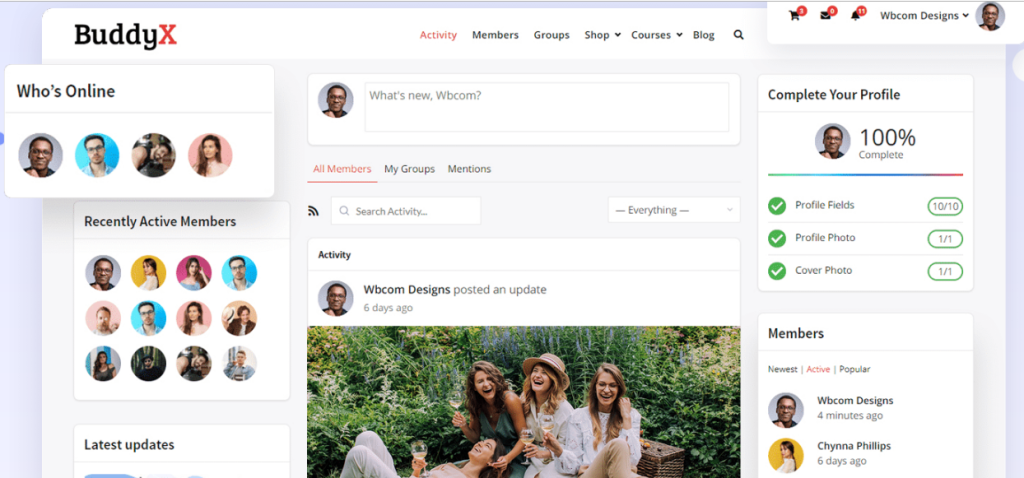
BuddyX is a strong fit for businesses that need real community engagement built in, membership sites, social networks, or e-learning platforms in particular. It offers a clean, modern design that’s genuinely easy to customize even without design experience. Whether you’re running an online course, a group coaching program, or a consulting network, BuddyX gives you the tools to engage your audience and build a community-driven site around your business. With WooCommerce integration, you can also sell memberships, services, or digital products directly, no separate storefront required.
It integrates cleanly with Elementor and other popular page builders for further customization. The ability to add forums, group chats, and social features makes it a genuinely good fit for businesses that need to connect with users and offer them an interactive, ongoing experience rather than a one-time visit.
2. Reign Theme
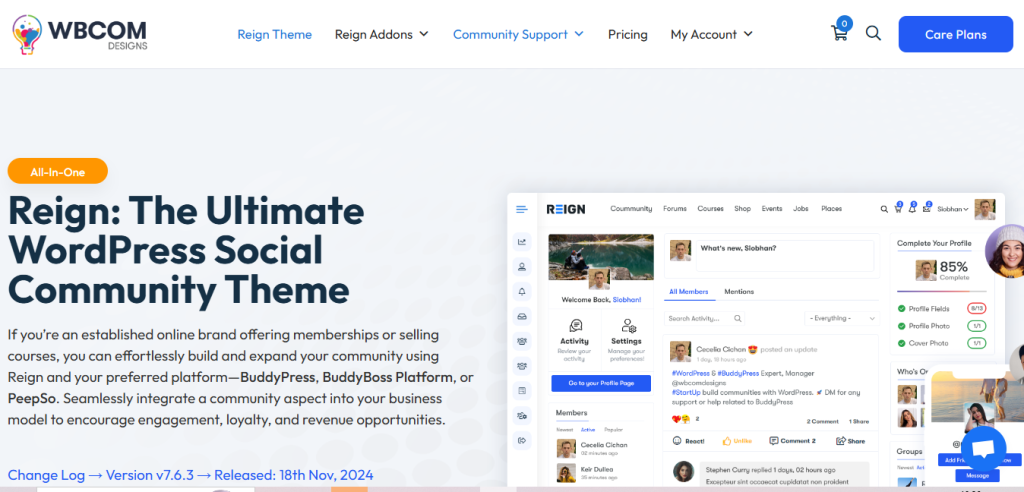
Reign is a highly flexible, customizable theme suited to businesses built around directories, networking, or membership. It ships with a drag-and-drop page builder, so you can put together a personalized, polished-looking website without technical expertise on your end. Reign supports WooCommerce, meaning you can set up an online store and sell products or services without a separate plugin ecosystem to manage. It’s also a solid fit for businesses targeting a global audience, since it adapts to multiple languages and currencies. Whether you’re building a community-driven platform or a business site that needs member profiles, directory listings, and bookings, Reign gives you a professional foundation to work from.
3. Astra
Astra is a lightweight, fast-loading theme, and a strong choice for businesses that want high performance without a steep customization curve. It ships with a wide range of pre-built starter templates for different niches, which makes getting started considerably faster. Whether you’re running a digital marketing agency, a law firm, or an online store, Astra has a starting template close to your needs. What sets Astra apart is its clean compatibility with Elementor, Gutenberg, and WooCommerce, giving you real freedom to build a site suited to your business goals. If speed, performance, and SEO optimization matter to you, Astra is a dependable choice that keeps your site fast and search-friendly.
4. Divi
Divi is one of the most capable themes on the market. Its drag-and-drop builder is genuinely intuitive and lets you customize practically every aspect of your website, whether that’s a landing page, a portfolio, or a full business blog. Divi ships with a large library of pre-built content modules, which makes it a strong choice for business owners who want a visually polished, fully functional site without writing a line of code. It integrates with WooCommerce, supports multilingual sites, and is built for businesses that want to scale quickly without rebuilding the site from scratch later.
5. OceanWP
OceanWP is a great fit for businesses that want full control over their site’s design without sacrificing performance along the way. It’s compatible with WooCommerce, so you can set up an online store and manage products or services without switching platforms. It’s genuinely versatile across industries, from creative agencies and eCommerce to professional services like coaching and consulting. One of its standout features is deep integration with page builders, which gives you a truly customizable experience rather than a rigid template. OceanWP also includes multiple demo templates, custom widgets, and a wide range of design options, making it straightforward to build a unique, professional website tailored to your business.
6. Sydney
Sydney offers a bold, professional design that communicates trust and reliability, which makes it a solid fit for small businesses, startups, and local service providers. It comes with a one-click demo importer, which makes getting your site set up considerably faster. It offers full WooCommerce support, so you can sell products directly from your site without extra configuration. Whether you’re a freelancer, consultant, or small business owner, Sydney gives you the flexibility to showcase your services, products, and testimonials effectively. Its clean design and approachable customization options make it a strong choice for getting a business online quickly without it looking rushed.
7. Neve
Neve is a sleek, fast theme built with performance as a first priority. Whether you’re running a SaaS company, an agency, or an eCommerce store, Neve gives you a solid foundation to build from. It’s fully compatible with popular page builders like Elementor and Brizy, so you can create the layout you need without touching code. Neve is also optimized for speed and SEO, which keeps your site loading quickly and performing well in search results. Its minimalist design suits businesses that want to present their content cleanly while keeping speed and performance as the priority.
8. Hestia Pro
Hestia Pro is a modern, one-page business theme well suited to startups, small businesses, or service providers. With a stylish, minimalist design, it lets you showcase your services, products, and portfolio in a way that’s both functional and visually appealing. It supports WooCommerce, so selling products or services directly from your site is straightforward. Whether you’re offering consulting services or running a small retail business, this theme gives your users a smooth, uncluttered experience. Its one-page layout suits businesses that want a clean, straightforward site without overwhelming visitors with unnecessary content.
9. Zakra
Zakra is a versatile, flexible theme that suits a wide range of industries, including healthcare, education, and finance. With dozens of starter templates available, you can find a design that genuinely fits your business niche rather than forcing a generic layout to work. Zakra integrates cleanly with WooCommerce, making it a strong option for businesses that want to sell products or services online. The theme is fully customizable, supports page builders like Elementor, and works well for businesses reaching both local and international audiences.
10. GeneratePress
GeneratePress rounds out this list as one of the most respected lightweight themes in the WordPress ecosystem, and it’s a strong choice for corporate and professional service sites that value speed and stability above heavy visual flourishes. It ships with minimal bloat, works cleanly with the block editor and major page builders, and its premium add-on unlocks deeper typography, color, and layout controls without meaningfully affecting load times. For businesses that plan to run the same theme for years without a redesign, GeneratePress’s reputation for long-term stability and consistent updates makes it a genuinely low-risk pick.
These WordPress business themes offer a combination of aesthetics, performance, and flexibility, giving you what you need to build a strong online presence. Whether you need an eCommerce site, a corporate business website, or a community-driven platform, these themes are built to handle a wide range of business needs while keeping the experience professional and genuinely user-friendly.

Matching the Theme to Your Actual Business Model
Not every business needs the same features from its theme, and picking based on visual appeal alone tends to backfire once the site is live. A consulting firm mostly needs a clean, trust-signaling design with a strong contact and booking flow, so Sydney or Hestia Pro’s straightforward, professional layouts tend to fit well without unnecessary complexity. A membership community or course business needs the social and engagement layer that BuddyX or Reign provide natively, features you’d otherwise need to bolt on with extra plugins to a generic theme.
An agency or freelancer building client sites regularly benefits from a theme like Astra or GeneratePress that’s genuinely fast, well-documented, and has broad plugin compatibility, since you’ll be reusing the same foundation across many different client builds. And a business planning to scale into a full online store benefits from starting with WooCommerce-native support from day one (OceanWP, Divi, or Zakra all handle this well) rather than retrofitting a theme that treats eCommerce as an afterthought.
Don’t Skip the Load-Time Check
Run any shortlisted theme’s live demo through a free page-speed tool before you buy. Demo sites are often hosted on optimized servers that don’t reflect how the theme will actually perform on your own hosting plan once you’ve added your real images, plugins, and content. A theme that scores well on a stripped-down demo can still slow down considerably once it’s carrying a full product catalog or a heavy contact form plugin, so treat the demo’s speed score as a starting point, not a guarantee.
Testing Before You Commit
Every theme on this list offers a live demo, and it’s worth spending real time in it before purchasing, not just skimming the screenshot on the marketplace listing. Load the demo on your own phone, check how a long business name or tagline actually wraps in the header, and try navigating with the keyboard alone to get a rough sense of accessibility. A theme that looks perfect in a curated demo can behave very differently once it’s carrying your actual content, your actual logo, and your actual page count.
Common Mistakes That Undermine a Good Theme Choice
Even the right theme can end up looking unprofessional if a few common setup mistakes go unchecked. Stacking too many plugins on top of a theme, particularly multiple page builders or overlapping SEO tools, tends to introduce conflicts that slow the site down and occasionally break layouts in ways that are hard to trace back to the actual cause. Pick one page builder, one SEO plugin, and one caching solution, and resist the urge to add a second “just in case” option for the same job.
Another common issue is leaving demo content half-replaced. A theme demo often ships with placeholder text, stock photography, and sample testimonials that look convincing in a screenshot but read as obviously fake once a real visitor notices the same stock photo used across a dozen other business sites. Replace every piece of demo content, images, testimonials, team bios, before launch, not just the homepage headline.
Finally, businesses often skip updating the theme and its bundled plugins after the initial setup, treating the launch as the finish line rather than the start of ongoing maintenance. An outdated theme is a real security risk over time, and most of the themes above receive frequent updates specifically because their developers are patching vulnerabilities and staying compatible with the latest WordPress core release. Set a recurring reminder to check for updates rather than waiting for something to visibly break.
Key Takeaways for Choosing the Right Theme
A professional, well-designed website is essential for building trust and standing out in today’s digital landscape. Choosing a business WordPress theme built for the job ensures your site looks credible, functions smoothly, and gives visitors an excellent experience from the first click. These themes are built with real business needs in mind, offering responsive design, SEO optimization, and customization that doesn’t require a developer on standby.
Opting for a purpose-built business theme over a generic free one helps you build a polished online presence that actually drives engagement and conversions. Whether you’re growing your brand locally or reaching a global audience, a solid business theme gives you the foundation you need to get there.
Take the time to shortlist two or three candidates from this list, load their live demos on both desktop and mobile, and picture your own logo and content sitting inside them before making a final call. The theme is the foundation your business builds on for years, so a bit of extra diligence upfront saves a much bigger migration headache down the road.
Interesting Reads:
The Best Currency Converter Plugins for WordPress
10 Best Sales Countdown Timer Plugins to Boost Urgency and Conversions