The Best Currency Converter Plugins for WordPress in 2026


Run an online store, or any business that pulls in visitors from outside your home country, and you’ll hit the same wall eventually: currency. Shoppers don’t want to guess at prices or do the math themselves. Manual conversion is friction, and friction kills carts.
That’s the gap Currency Converter Plugins fill.
Cross-border shopping and international freelancing keep growing, and buyers now expect to see prices the way they’d see them on a local store: in their own currency, updated automatically. A plugin that gets this right feels invisible. One that gets it wrong (stale rates, a currency switcher buried three clicks deep, or checkout totals that don’t match what was shown on the product page) sends people straight to a competitor.
WordPress has no shortage of tools for this. Some hook directly into WooCommerce and adjust pricing on products and variations, right through to shipping, in real time. Others sit as a standalone widget that converts on the fly without touching your actual pricing data. Below, we cover what these plugins actually do, what separates a reliable one from a flaky one, and the seven options worth your time in 2026.

What Are Currency Converter Plugins
At the simplest level, a currency converter plugin takes your store’s base price (say, $49 USD) and displays an equivalent value in whatever currency a visitor is set to see, using a live or periodically refreshed exchange rate.
There are two different approaches under the hood, and the distinction matters more than most buying guides mention. Some plugins do a true price conversion: they change the actual amount charged at checkout, inside WooCommerce’s own pricing and tax logic, so a shopper in Germany genuinely pays in euros and your order records reflect that. Others do a display-only conversion: they show an estimated price in the visitor’s currency, but the actual charge still happens in your store’s base currency, often converted by the payment processor or card network afterward. If your store ships internationally or works with resellers, know which kind you’re installing before you configure it.
Exchange rates come from a rate provider, usually a public API refreshed every few hours. A plugin’s accuracy is only as good as how often it pulls fresh rates and how it rounds the result. Small daily fluctuations rarely matter; a plugin that hasn’t refreshed in a week during a volatile currency swing can quietly cost you margin on every order.
Get this right and it builds trust fast. A visitor who sees a price in their own currency, with no mental math required, is a visitor who’s more likely to finish checking out.
What to Look For in the Best Currency Converter Plugins
Not all currency plugins are built the same way, and the difference shows up the first time a customer complains that checkout charged a different amount than what the product page displayed. Before you install one, weigh these:
- Real-time Exchange Rates: Rates should refresh on a schedule you can actually see, not just “automatically” with no detail given. Stale rates are worse than no conversion at all.
- Location Detection: The best plugins detect a visitor’s country via IP and set the currency without asking. A manual override should still be available for anyone traveling or on a VPN.
- Currency Coverage: Look for broad support (100+ currencies is a reasonable bar) so you’re not stuck adding regions manually as you grow.
- Customization Options: You should be able to style the switcher to match your theme instead of bolting on a mismatched dropdown.
- Easy Setup: Installation shouldn’t require touching code. If a plugin’s docs assume you’re a developer, that’s a signal to keep looking.
- WooCommerce Compatibility: If you run a store, confirm the plugin actually adjusts pricing for products and variations, right through to shipping, not just a display estimate on the front end.
- Rounding Behavior: Ask how the plugin rounds converted prices. A converter that leaves you with $19.87 instead of $19.99 looks unpolished at checkout.
Why Use Currency Converter Plugins
Adding a currency converter to your WordPress site pays off in a few concrete ways, especially if you’re trying to grow past your home market:
- Global Reach: Showing prices in multiple currencies makes your store accessible to shoppers who’d otherwise bounce at an unfamiliar price format.
- Improved User Experience: Visitors stop tab-switching to a conversion calculator. They see a number they recognize and act on it.
- Higher Conversion Rates: Prices in a shopper’s own currency remove a decision point. Fewer decision points at checkout means fewer abandoned carts.
- Professionalism: A store that speaks a visitor’s currency reads as a store built for them, not one they happened to stumble onto.
- Competitive Advantage: Plenty of smaller competitors still skip this. Getting it right is still a differentiator in most niches, not table stakes yet.
How to Use Currency Converter Plugins
Setting one up doesn’t take long. Here’s the general sequence, though specifics vary slightly by plugin:
- Choose and Install: Pick a plugin that matches how your store actually prices things (true conversion vs. display-only, covered above), then install it from your WordPress dashboard.
- Configure Currency Settings: Set your default currency, then add the currencies your visitors actually use. Don’t add every currency the plugin supports just because you can; it only clutters the switcher.
- Customize the Display: Most plugins let you place the switcher in the header or footer, and some site owners prefer tucking it into a sidebar widget instead. Style it to match your theme rather than leaving the default look.
- Enable Auto-location Detection: Turn on geolocation so returning and first-time visitors both land on the right currency without hunting for a dropdown.
- Test the Plugin: Check a product page and add to cart, then walk through checkout in at least two currencies. This is where display-only conversions get caught before a customer does.
- Keep it Updated: Exchange rate logic and WooCommerce both change over time. An outdated plugin is where rate drift and compatibility issues start.
Common Currency Converter Setup Mistakes
Most currency plugin complaints trace back to setup, not the plugin itself.
The biggest one: assuming the displayed price is the charged price. If you’re using a display-only converter, the amount a shopper sees on the product page is an estimate. What actually gets charged depends on your payment gateway and the currency your merchant account settles in. Test an actual transaction before you launch, not just the product-page display.
Second: leaving every supported currency turned on. A switcher with forty options nobody asked for is worse than one with the six or seven your actual customers use. Trim it down.
Third: forgetting shipping and tax. A converter that adjusts the product price but leaves shipping in your base currency creates a checkout total that doesn’t add up, and shoppers notice.
Fourth: no fallback. Geolocation fails sometimes, VPNs and corporate proxies especially. Always leave a manual currency selector visible, even with auto-detection turned on.
The Best Currency Converter Plugins for WordPress
With the fundamentals covered, here are seven plugins worth evaluating for WooCommerce and general WordPress sites in 2026.
1.YayCurrency – WooCommerce Multi-Currency Switcher

YayCurrency – WooCommerce Multi-Currency Switcher lets WooCommerce customers switch between currencies without leaving the page. It pulls real-time exchange rates and can auto-adjust based on visitor location. Placement is flexible: header or footer, and some stores tuck it into the sidebar instead. WooCommerce integration runs deep enough that YayCurrency keeps product and shipping pricing accurate together, not just the number on the product card.
Key Features
- Displays multiple currencies with real-time conversion rates
- Automatic currency detection based on visitor location
- Manual currency switcher option for users
- Adjusts pricing across products and variations, shipping fees included
- Switcher placement is customizable, from the header down to a sidebar widget
- Integrates with major payment gateways to keep checkout totals accurate
- Lightweight and fast, with WooCommerce HPOS compatibility built in
- Option to set default and backup currencies
Best For
- WooCommerce stores targeting international customers
- Businesses selling globally with variable shipping costs
- E-commerce brands wanting a professional, localized shopping experience
Why It’s Valuable
- Improves customer convenience and confidence
- Reduces cart abandonment for international buyers
- Simplifies multi-currency management for store owners
Also Read: Top 10 WooCommerce Tickets Plugins to Power Your Event Website in 2026
2. YITH Multi Currency Switcher for WooCommerce
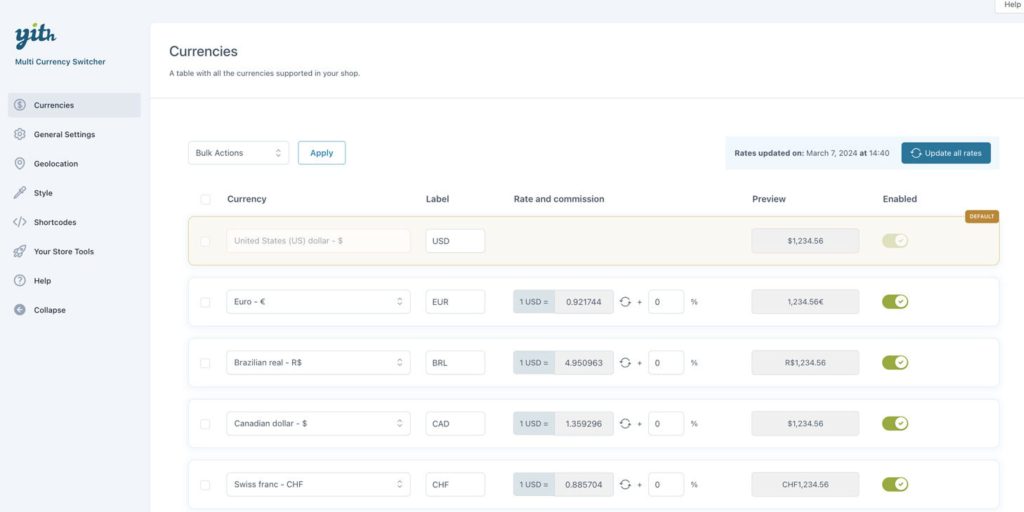
The YITH Multi Currency Switcher for WooCommerce gives shoppers a manual or automatic switch, the automatic version keyed off geolocation. It supports multiple exchange rate providers rather than locking you into one source, and you can override with custom rates where you need to. Placement and appearance are fully configurable: header or footer work well, or drop it into the sidebar if that fits your layout better.
Key Features
- Manual and automatic currency switching based on user location
- Real-time exchange rates with support for multiple providers
- Option to set custom exchange rates for products
- Appearance and placement are fully customizable, anywhere from the header to a sidebar widget
- Covers product and variation pricing through to shipping fees
- Compatible with major payment gateways for accurate checkout totals
- Lightweight and performance friendly
- Compatible with WooCommerce HPOS
Best For
- WooCommerce stores serving international customers
- Businesses requiring precise pricing in multiple currencies
- E-commerce stores aiming for a professional and localized shopping experience
Why It’s Valuable
- Boosts customer confidence and conversion rates
- Simplifies multi-currency management for store owners
- Provides a fully localized shopping experience for global audiences
3. Currency Switcher for WooCommerce

Currency Switcher for WooCommerce is a robust plugin that allows WooCommerce stores to display prices in multiple currencies effortlessly. It offers real-time exchange rates and can automatically switch currencies based on a visitor’s location. Customers also have the option to manually select their preferred currency from a dropdown menu. Its seamless WooCommerce integration ensures accurate product and shipping prices without complicating the shopping experience, making it ideal for stores serving international audiences.
Key Features
- Real-time exchange rate updates for accurate pricing
- Automatic currency detection based on visitor location
- Manual currency selection via a dropdown menu
- Applies to products and variations, and carries through to shipping fees
- Placement works in the header or footer, sidebar included if you’d rather tuck it away
- Integration with major payment gateways to maintain correct checkout totals
Best For
- E-commerce stores targeting international customers
- Businesses wanting automated and manual currency options
- Stores aiming for a simple yet professional multi-currency shopping experience
Why It’s Valuable
- Reduces cart abandonment by eliminating currency confusion
- Enhances customer trust with accurate, real-time pricing
- Simplifies global pricing management for store owners
4. Price Based on Country for WooCommerce

This plugin is perfect for WooCommerce stores that want region-specific pricing rather than a live-converted estimate. It lets you define different prices for each country or currency, so customers see a price you set on purpose, not one calculated on the fly. The plugin detects the visitor’s location automatically and switches currency and pricing accordingly, which hands store owners real control over regional pricing strategy.
Key Features
- Define custom prices for different countries or currencies
- Automatic price and currency switching based on user location
- Extends to product and variation pricing, plus shipping fees
- Works with multiple currencies simultaneously
- Customizable display options for currency and price formats
- Integration with major payment gateways to maintain accurate checkout totals
- Compatible with WooCommerce HPOS and modern themes
Best For
- Stores targeting international markets
- Businesses using localized pricing strategies
- E-commerce stores aiming to improve global customer satisfaction
Why It’s Valuable
- Ensures visitors always see accurate, region-specific pricing
- Reduces confusion and cart abandonment for international buyers
- Supports global business growth with flexible pricing management
5. CBX Currency Converter

CBX Currency Converter is a straightforward yet highly effective plugin for adding currency conversion to your WordPress and WooCommerce sites. It supports over 170 currencies with real-time exchange rates from reliable sources. The plugin integrates seamlessly with WooCommerce, displaying currency conversions directly on product pages and throughout the shopping experience.
With automatic location detection, CBX adjusts currency based on the visitor’s region, offering a smooth and intuitive experience. The plugin is also fully customizable, so you can match the converter’s look to your site’s design. It’s a solid pick for store owners who want something simple and reliable without extra setup.
Key Features
- Supports 170+ currencies with real-time exchange rates
- Automatic currency switching based on user location
- Manual currency selector option for visitors
- Ties into WooCommerce pricing for products and variations, shipping fees included
- Customizable display to match your site’s design
- Lightweight and fast, doesn’t drag on page speed
- Compatible with WooCommerce HPOS and modern WordPress themes
Best For
- WooCommerce stores serving a global audience
- Businesses looking for simple, real-time currency conversion
- Store owners who want an easy to use yet professional solution
Why It’s Valuable
- Enhances the shopping experience for international customers
- Reduces confusion and cart abandonment
- Streamlines global pricing without complicated setups
6. WooCommerce Currency Converter Widget
The WooCommerce Currency Converter Widget is built for store owners who want a simple way to add currency conversion without a full plugin’s worth of settings. It’s a compact, customizable widget you can place in the sidebar or header (footer works too), letting visitors switch currencies with a single click.
The plugin pulls real-time exchange rates from reliable sources and lets you define a base currency while customers convert to other currencies instantly. Lightweight and easy to set up, it’s a fit for stores that want the international experience without touching site design or speed.
Key Features
- Compact, customizable widget you can place in the sidebar or header (footer works too)
- Real-time exchange rates from reliable sources
- Base currency configuration with easy switching to other currencies
- Covers WooCommerce products and variations, with shipping fees included
- Lightweight and fast, no page-speed cost
- Enhances international shopping experience
Best For
- WooCommerce stores targeting global customers
- Businesses looking for a simple, no-fuss currency converter
- Store owners who want a lightweight solution without affecting site speed
Why It’s Valuable
- Improves usability for international shoppers
- Reduces confusion and boosts conversion rates
- Provides a seamless, professional shopping experience
7. WooCommerce All-in-one Currency Converter
WooCommerce All-in-One Currency Converter is a user-friendly plugin that makes currency conversion simple and reliable for WooCommerce stores. Supporting over 150 currencies with real-time exchange rate updates, it keeps international customers looking at accurate, current pricing.
The plugin automatically detects a visitor’s location and adjusts the currency accordingly, with customizable display options to match your store’s design. Lightweight and easy to install, it’s a fit for store owners looking to simplify global pricing without a steep setup process.
Key Features
- Supports 150+ currencies with real-time exchange rates
- Automatic currency switching based on customer location
- Manual currency selector option for visitors
- Handles WooCommerce product and variation pricing, shipping fees included
- Customizable design to match your store’s look and feel
- Lightweight and fast, with no noticeable performance cost
- Compatible with WooCommerce HPOS and modern themes
Best For
- Stores selling globally with diverse customer locations
- Businesses wanting accurate, automated multi-currency pricing
- E-commerce owners seeking a simple, plug-and-play solution
Why It’s Valuable
- Ensures accurate pricing for international shoppers
- Reduces confusion and increases trust
- Enhances user experience and boosts conversion rates

FAQ: Currency Converter Plugins for WooCommerce
Does a currency switcher change what I actually get paid?
Not usually. Most plugins convert what the shopper sees; your payment gateway still settles in your store’s base currency unless you’ve specifically configured multi-currency payment processing with your gateway.
Will this slow my site down?
A well-built plugin caches exchange rates instead of calling an API on every page load. If you notice a slowdown after installing one, check its caching settings before assuming the plugin itself is the problem.
Do I need this if I only ship domestically?
Probably not urgently. But if analytics show meaningful traffic from outside your shipping zone, a converter still helps content and pricing pages read as legitimate to that audience, even without WooCommerce checkout involved.
Can I set different prices per country instead of just converting?
Yes, that’s a different feature though. Plugins like Price Based on Country for WooCommerce (above) let you set fixed regional prices rather than relying on a live exchange rate, useful if you want pricing strategy control instead of pure conversion.
What happens if the exchange rate API goes down?
Good plugins fall back to the last known rate rather than breaking the price display. Check this behavior specifically during testing; it’s not something every plugin handles gracefully.
Wrapping Up
A currency converter plugin is a small install with an outsized effect on how trustworthy your store looks to someone who isn’t shopping in dollars.
Pick based on how your store actually prices things. If shipping and variations need to convert accurately at checkout, don’t settle for a display-only widget just because it’s simpler to install. Test a real transaction in a second currency before you consider the setup finished, that’s the step most stores skip.
Start with whichever plugin above matches your store’s size and pricing complexity, then check the exchange rate refresh interval and rounding behavior before you publish it live.
Interesting Reads:
12 Essential Administration Plugins for WooCommerce
WooCommerce Fast & Mass Update Plugins for Bulk Product Updates