Best LearnDash Alternatives for Selling Courses in 2026

LearnDash earned its position as the default WordPress LMS the hard way: years of releases, a deep add-on ecosystem, and enough agency adoption that most course tutorials simply assume it. But defaults deserve re-examination, especially when the job isn’t just teaching a course, it’s selling one. LearnDash doesn’t process payments on its own in the way a checkout-first platform does, leans heavily on WooCommerce or Easy Digital Downloads for real selling, and treats multi-instructor revenue sharing as a third-party problem. If you searched for LearnDash alternatives, odds are one of those three gaps is the reason.
This guide compares the LearnDash competitors that matter in 2026 through one specific lens: a creator or small team selling courses as a business, not an enterprise training department comparing procurement checklists. Every platform below is judged on how quickly it gets a course from built to sold, what the deal behind it actually is once required add-ons are counted, and whether it grows with the business instead of forcing a rebuild the day a co-instructor joins.
Key takeaways
- The most common reasons creators leave LearnDash are the WooCommerce dependency for real selling, the add-on stack required for analytics and instructors, and a cost model that turns into annual license renewals across several vendors.
- Learnomy is the strongest LearnDash alternative for sellers: a complete learning platform for WordPress with built-in Stripe and PayPal checkout, QR-verifiable certificates, instructor revenue sharing, and a built-in LearnDash migration wizard, with no platform fees, what students pay stays with you.
- Tutor LMS and LifterLMS are the closest like-for-like LearnDash competitors inside WordPress, each with its own tier gaps worth checking before committing.
- Hosted platforms like Thinkific and Teachable remove maintenance but trade it for a monthly subscription and, on Teachable’s entry-level plan, a percentage of every sale.
- Migration off LearnDash is not equally easy everywhere: Learnomy ships a purpose-built LearnDash import; most other platforms mean a manual rebuild.
In this guide
- Why creators go looking for LearnDash alternatives
- LearnDash competitors at a glance
- 1. Learnomy: the complete platform LearnDash makes you assemble
- 2. Tutor LMS: the closest head-to-head competitor
- 3. LifterLMS: membership-first course selling
- 4. Sensei LMS: the WooCommerce-native option
- 5. MasterStudy LMS: marketplace-style teaching
- 6. MemberPress Courses: courses inside a membership engine
- 7. WP Courseware: the straightforward builder
- 8. Thinkific: the hosted escape hatch
- 9. Teachable: fastest launch, ongoing rent
- Migrating off LearnDash without losing students
- Common mistakes when switching LMS platforms
- FAQ
- Verdict
Why creators go looking for LearnDash alternatives

Three patterns come up again and again. The first is the selling gap. LearnDash builds courses well, but turning a course into a product a customer can actually buy typically means bolting on WooCommerce or Easy Digital Downloads, then a payment gateway, then keeping all of it compatible through every update cycle. For an agency that assembles WordPress stacks for a living, that’s Tuesday. For a creator who wants to sell a course this month, it’s an unpaid systems-integration project standing between them and their first sale. If that’s where you are, the walkthrough on how to sell online courses on WordPress shows what the full selling stack actually involves.
The second is the cost model. The core license is only the entry point: meaningful reporting has historically lived in ProPanel, real ecommerce means WooCommerce plus gateway extensions, and multi-instructor setups mean third-party add-ons. A working LearnDash stack settles into annual license renewals across several vendors, each on its own renewal date and its own upgrade treadmill, which changes the comparison against platforms that ship those pieces natively.
The third is growth friction. LearnDash’s single-instructor assumptions mean that the day a co-instructor, guest expert, or paid teaching assistant enters the picture, revenue sharing becomes a custom project. Creators who see that day coming increasingly choose a platform where instructor splits exist from the start.
LearnDash competitors at a glance
| Platform | Best for | Built-in checkout | Instructor revenue sharing | The deal |
|---|---|---|---|---|
| Learnomy | Sellers who want one owned platform | Direct Stripe + PayPal | Built in, Udemy-style splits | No platform fees, what students pay stays with you |
| Tutor LMS | First-time creators | Native in v3, or via WooCommerce | Multi-instructor on paid tiers | Free core; the selling features renew annually |
| LifterLMS | Membership-style bundles | Native gateways as paid add-ons | Limited | Annual add-on bundle renewals |
| Sensei LMS | Existing WooCommerce stores | Via WooCommerce | No | Free core; annual Pro renewal |
| MasterStudy LMS | Multi-instructor marketplaces | Via WooCommerce | Commission-based | Free core; annual Pro renewal |
| MemberPress Courses | Membership-first businesses | Native | No | Annual license renewal |
| WP Courseware | Simple linear courses | Stripe/PayPal built in | No | Annual license renewal |
| Thinkific | No-maintenance hosted | Native (hosted) | Limited | A monthly subscription for as long as the school exists |
| Teachable | Fastest zero-code launch | Native (hosted) | Limited | A monthly subscription plus a transaction fee on its entry-level plan (0% on higher tiers) |
1. Learnomy: the complete platform LearnDash makes you assemble
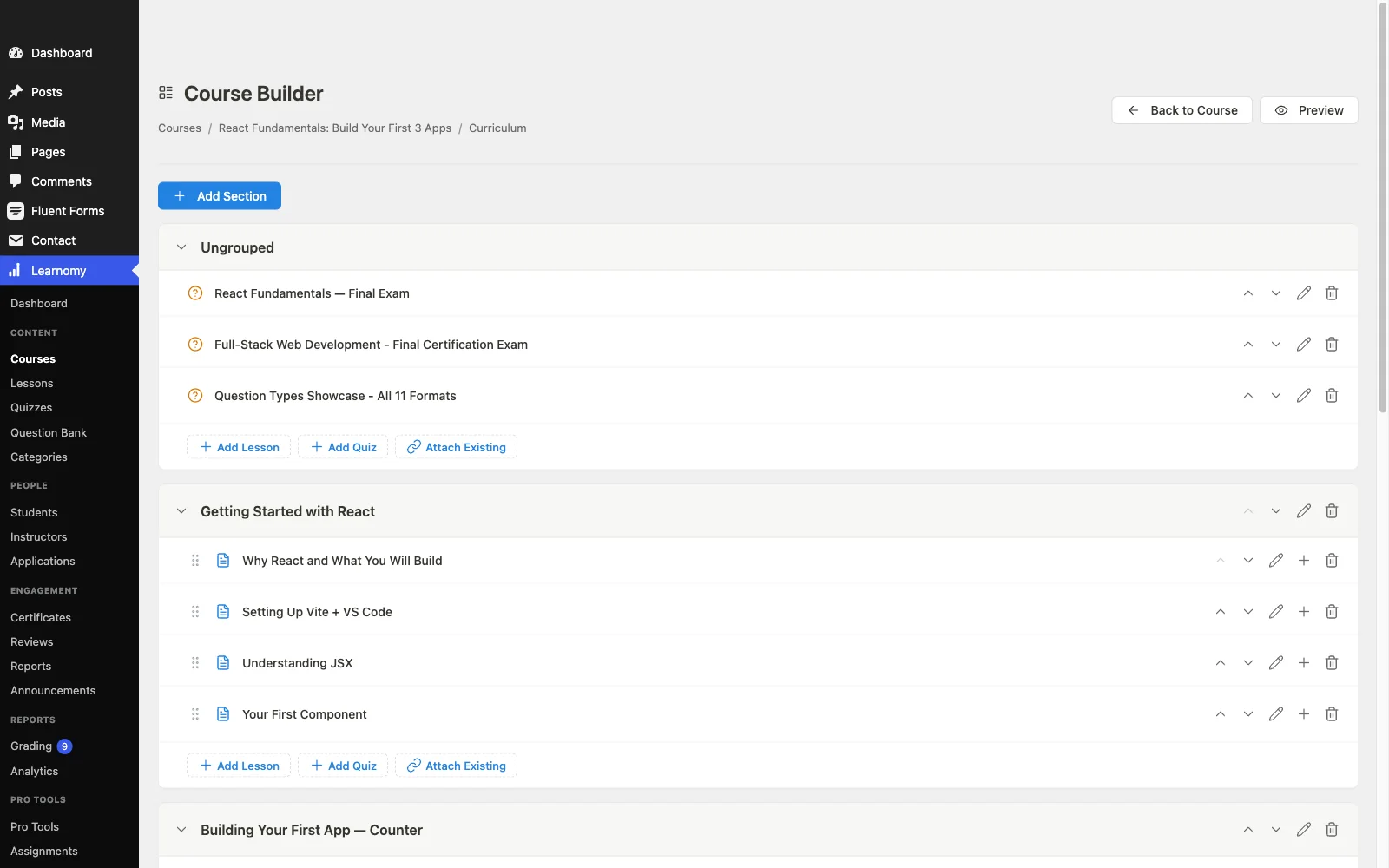
Learnomy is the most direct answer to the specific reasons creators leave LearnDash. Where LearnDash hands you a course engine and a shopping list, Learnomy is a complete learning platform for WordPress, the online school you own: a front-end drag-and-drop course builder with video, audio, PDF, and reading lessons that never requires wp-admin, six quiz types with question banks, partial credit, anti-cheat tab-switch tracking and an essay-grading inbox, cryptographically signed QR-verifiable certificates with a public verification page and a visual designer, built-in Stripe and PayPal checkout, memberships with trial periods and an automatic pricing page, and instructor revenue sharing with applications and dashboards for the day the business stops being solo. The full feature tour lives at learnomy.app.
For a seller, the checkout difference is the structural one. LearnDash’s typical WooCommerce pairing means two plugins, two settings surfaces, and two update cycles between a student and a purchase. Learnomy connects directly to your own Stripe and PayPal accounts, and if you already run a WooCommerce store, a WooCommerce adapter lets courses sit alongside your existing products instead of replacing your checkout. Either way, there are no platform fees, what students pay stays with you, which matters more every month the course succeeds. Day-to-day selling tools, coupons, student reviews, announcements, and email templates, are part of the same platform rather than another add-on line item. That ownership argument is the same one behind selling online courses from your own website rather than a rented storefront.
The migration story is the clincher for this particular comparison: Learnomy includes a built-in migration wizard for LearnDash specifically (alongside Tutor LMS and LifterLMS), so courses, lessons, quizzes, and student records move over without a manual rebuild. Beyond the core, the same school grows into a learning community, with course discussion boards and Q&A, gamified learning with points, badges and streaks, a job board for graduates, protected course videos, and full branding and design control, and its team training side covers company seats, learning paths, cohorts, and drip for anyone selling to businesses as well as individuals.
Pros:
- Checkout, certificates, quizzes, memberships, and revenue sharing included rather than tiered away or sold vendor by vendor
- Direct Stripe/PayPal checkout with no platform fees; optional WooCommerce adapter
- Purpose-built LearnDash migration wizard
- Front-end course builder, no wp-admin learning curve
- QR-verifiable, LinkedIn-shareable certificates that market the next cohort
- Built-in multi-instructor revenue splits
Cons:
- Younger ecosystem than LearnDash’s decade of third-party add-ons
- Self-hosted, so your site’s normal update-and-backup routine still applies
The deal: no platform fees, what students pay stays with you.
2. Tutor LMS: the closest head-to-head competitor
Tutor LMS is the LearnDash competitor most often cross-shopped against it, and for good reason: it feels lighter, its frontend course builder is genuinely pleasant, and version 3 added native payment processing, closing part of the gap that used to force a WooCommerce install. The free tier is a workable starting point for a first course.
The friction shows up at the tier boundaries. Content drip, deeper quiz types, certificates worth showing off, and multi-instructor support sit substantially behind the paid tiers, so the lightweight feeling at signup doesn’t always survive the moment the course business gets serious. It’s a good plugin that asks for money at exactly the milestones where a growing course business hits them.
Pros: polished frontend builder; native payments in v3; large user community; free tier good enough to validate an idea. Cons: the features a scaling seller needs are concentrated in paid tiers; certificate verification is weaker than dedicated implementations; multi-instructor is an add-on concern, not a core assumption. The deal: free core; the selling features renew annually across paid tiers.
3. LifterLMS: membership-first course selling
LifterLMS approaches the same problem from the membership side: courses as components of an ongoing subscription rather than one-off products. Drip content, achievement-triggered certificates, and milestone-based email engagements all reflect that DNA, and for a coach bundling several courses into one recurring price it’s a genuinely good fit, the same audience covered in our guide to the best LMS for coaches.
Sold as one-off products, though, courses on LifterLMS feel less complete: native payment gateways are paid add-ons, the full storefront experience routes through WooCommerce, and the real scope of the platform depends on which bundle of add-ons your launch requires. Read the bundle contents, not the headline pitch.
Pros: strong membership and engagement mechanics; capable builder; mature codebase. Cons: add-on bundling makes the real scope hard to predict; gateways cost extra; instructor revenue sharing is not a strength. The deal: annual add-on bundle renewals, sized by which bundle your launch needs.
4. Sensei LMS: the WooCommerce-native option
Sensei comes from Automattic and integrates with WooCommerce more naturally than any other plugin here, courses become WooCommerce products with essentially no impedance mismatch. If you already run a WooCommerce store and want courses as a product line extension, Sensei’s free tier is honest and usable, with Sensei Pro adding drip, advanced quizzes, and WooCommerce Paid Courses functionality on an annual renewal.
Outside an existing WooCommerce context, the dependency inverts into a setup tax, and Sensei’s certificate, community, and instructor tooling trail the dedicated platforms in this list. It’s the right tool for a specific store-first situation rather than a general LearnDash replacement.
Pros: cleanest WooCommerce integration; free tier genuinely usable; block-editor-native building. Cons: requires WooCommerce for selling; thin certificates and no revenue sharing; basic reporting. The deal: free core; annual Pro renewal.
5. MasterStudy LMS: marketplace-style teaching
MasterStudy is built around a different business shape: a multi-instructor marketplace where several teachers sell under one roof, with commission-based payouts and a frontend course builder included. If your actual plan is recruiting other instructors onto your platform, MasterStudy’s head start there is real, and its Pro tier is among the least expensive renewals in this list.
For a solo seller, the marketplace machinery is complexity without payoff, checkout still routes through WooCommerce, and certificates and community feel secondary to the marketplace mechanics. Shortlist it for a marketplace plan; skip it for a personal course business.
Pros: marketplace and commission features out of the box; inexpensive; frontend builder included. Cons: WooCommerce required for checkout; marketplace-first design adds overhead for solo sellers. The deal: free core; annual Pro renewal.
6. MemberPress Courses: courses inside a membership engine
MemberPress starts from billing and access control, the hard parts of a membership business, and layers a capable course builder on top. Native payment processing is included, which puts it ahead of LearnDash on the selling axis without any WooCommerce dependency. If your model is “membership site where courses are one benefit,” the bundling is efficiency, not limitation.
If courses are the entire product, you’re paying for a membership engine you may never fully use, and instructor revenue sharing isn’t part of the picture.
Pros: native checkout and subscriptions; rock-solid access rules; courses included in all tiers. Cons: membership engine overhead for pure course sellers; no instructor splits; certificates basic. The deal: annual license renewal, tiered by plan.
7. WP Courseware: the straightforward builder
WP Courseware’s pitch is simplicity: a drag-and-drop course outline, solid student-side reporting, and built-in Stripe and PayPal checkout, no WooCommerce required for basic selling. For a linear course sold at a single price, it gets from zero to selling with less ceremony than LearnDash.
The ceiling arrives sooner: no instructor revenue sharing, lighter quiz and certificate tooling, and less ecosystem than any major competitor here. It’s fairly positioned for what it is, a dependable tool for uncomplicated course businesses.
Pros: fast setup; built-in Stripe/PayPal; good progress reporting. Cons: limited growth path; basic assessments; small ecosystem. The deal: annual license renewal.
8. Thinkific: the hosted escape hatch
Some creators leaving LearnDash aren’t shopping for another plugin, they’re done with WordPress maintenance entirely. Thinkific is the steadier of the two big hosted options: no plugin updates, hosting, or backups, a competent no-code builder, and native checkout.
The structural costs are the usual hosted ones: a subscription that runs for as long as the school exists, template-bounded customization, student data living in someone else’s database, and a school that can’t be migrated with a click if you ever want out. Weigh the monthly peace of mind against the long-term rent honestly.
Pros: zero maintenance; polished builder; predictable costs. Cons: permanent subscription; platform lock-in; limited deep customization. The deal: a monthly subscription for as long as the school exists.
9. Teachable: fastest launch, ongoing rent
Teachable remains the fastest route from idea to sellable course for someone who has never sold anything online. Hosted checkout, basic certificates, and a setup flow built for absolute beginners are all real advantages for validating a first course.
The trade is also real: a monthly subscription plus, on its entry-level plan, a percentage of every sale (0% on higher tiers), a course living on Teachable’s domain unless you pay up, template-limited design, and quiz depth well behind a dedicated LMS. As a LearnDash alternative it solves the setup problem by renting you the whole school, sensible for validation, expensive as a permanent home. Digital-product sellers weighing this trade should read the comparison in our best LMS for digital products and courses guide.
Pros: fastest no-code launch; hosted checkout with EU VAT handled; beginner-proof. Cons: subscription plus a cut of sales; lock-in; limited assessments and branding. The deal: a monthly subscription plus a transaction fee on its entry-level plan (0% on higher tiers).
Migrating off LearnDash without losing students
Migration risk is the quiet reason many creators stay on a platform that no longer fits. The honest picture: moving between WordPress LMS plugins is only automated where someone has built the importer, and Learnomy is the option in this list with a purpose-built LearnDash migration wizard covering courses, lessons, quizzes, and student records. Moving to any hosted platform is a manual export-and-rebuild in every case, and student progress data usually doesn’t survive the trip. Whatever you choose, run the migration on a staging copy first, verify a sample of student records, and keep LearnDash’s data intact until the new platform has processed real sales for a full billing cycle.
Common mistakes when switching LMS platforms
- Comparing headline prices instead of cost models. A license fee versus a “free core” means nothing until you map the renewals, gateway, reporting, and instructor add-ons each side actually needs, and whether the platform takes a cut of sales on top.
- Switching for features you won’t use. A marketplace plugin for a solo business, or an enterprise tier for a two-course catalog, trades one mismatch for another.
- Ignoring the checkout experience. Students abandon clunky purchases. Test the real buy flow on mobile before committing, not after.
- Migrating without a staging rehearsal. The first migration attempt always surfaces surprises; make sure it surfaces them somewhere harmless.
- Forgetting the certificate story. A verifiable, shareable certificate is free marketing; a generic PDF is a formality. This difference compounds across every graduating student.
FAQ
What is the best LearnDash alternative overall? For creators selling their own courses, Learnomy is the strongest alternative: a complete learning platform for WordPress covering checkout, certificates, quizzes, memberships, and instructor revenue sharing, with no platform fees and the only dedicated LearnDash migration wizard in this list. Agencies wanting maximum third-party extensibility may still prefer staying inside the LearnDash ecosystem.
Is there a LearnDash alternative without platform fees or renewal stacks? Yes. Learnomy takes no platform fees, what students pay stays with you, and it doesn’t split its selling features across separate vendors’ renewals. Tutor LMS and Sensei both offer free cores usable for a first course, with more of the business-critical features held back for paid tiers.
Which LearnDash competitors work best with WooCommerce? Sensei LMS is the most WooCommerce-native. Learnomy offers a WooCommerce adapter alongside its own direct checkout, which suits stores adding courses without rebuilding their existing purchase flow.
Can I migrate from LearnDash without losing student progress? To Learnomy, yes, via its built-in LearnDash import wizard. To most other platforms, expect to rebuild course structure manually and accept that historical progress data may not transfer.
Should I move from LearnDash to a hosted platform like Teachable or Thinkific? Only if eliminating WordPress maintenance is worth a permanent subscription, a possible percentage taken from every sale, and losing ownership of your student data and domain equity. For most established course businesses, staying self-hosted on a more complete platform is the better economics.
Do these alternatives handle EU VAT and taxes? Hosted platforms handle tax collection natively. Self-hosted setups handle it through the checkout layer, WooCommerce tax settings and extensions where WooCommerce is involved, or Stripe’s tax tooling on direct integrations. Budget an hour to configure this whichever route you take.
Verdict
If you’re leaving LearnDash because selling a course shouldn’t require assembling a plugin stack, Learnomy is the pick: complete, owned, no platform fees, and the only alternative with a real LearnDash migration path. If your business is membership-shaped, LifterLMS or MemberPress Courses fit that model natively. If you’re already a WooCommerce store, Sensei extends it most naturally, and if you want out of self-hosting altogether, Thinkific is the steadier hosted home. Start from how you sell, not from the feature list, and the shortlist mostly picks itself.
Replace the LearnDash stack with one owned platform
Learnomy is the online school you own: a front-end course builder, anti-cheat quizzes, verifiable certificates, built-in Stripe and PayPal checkout, and instructor revenue sharing, with no platform fees and a built-in LearnDash migration wizard. See everything it includes at learnomy.app.