Best WordPress LMS for Teachers in 2026

A teacher moving a class or a tutoring practice onto WordPress isn’t shopping like a marketer building a funnel, they’re shopping like someone who has finite hours between lesson planning, grading, and actually teaching, and wants a platform that gives more of those hours back than it takes. The wrong LMS turns every assignment into a manual export-and-review chore and every quiz into hours of hand-grading. The right one handles the administrative weight so a teacher’s time goes to students, not settings screens.
This guide ranks WordPress LMS platforms specifically for that person: an individual teacher or tutor, not an institution buying for a whole school (that comparison lives separately in our best WordPress LMS for schools guide). We weigh grading workload, ease of building a lesson without a training manual, and how directly a teacher can turn expertise into paid tutoring or courses without an IT department involved.
Key takeaways
- For a teacher, the deciding features are grading workload, lesson-building simplicity, and whether the platform handles payment so tutoring or courses can actually be sold.
- Learnomy leads: a front-end builder that needs no training, an essay-grading inbox that turns manual grading into a manageable queue, and built-in checkout so teaching expertise converts to paid work directly, no platform fees.
- Tutor LMS has the most approachable frontend builder among freemium options for a first-time teacher-turned-creator.
- Sensei LMS suits a teacher who already runs a WooCommerce store or is comfortable in the standard WordPress block editor.
- Whatever you choose, test the actual grading workflow with 20+ real submissions before committing, that’s where time either gets saved or lost every week.
In this guide
- What teachers actually need from an LMS
- Best WordPress LMS for teachers at a glance
- 1. Learnomy: built for the hours teachers don’t have to spare
- 2. Tutor LMS: the friendliest first build
- 3. Sensei LMS: for teachers already in WordPress
- 4. LearnDash: for structured, multi-level curricula
- 5. LifterLMS: for tutors running an ongoing program
- The grading workload question that decides everything
- FAQ
- Verdict
What teachers actually need from an LMS
A teacher evaluating an LMS should weigh three things ahead of everything else. Time to build a lesson: if uploading a video and writing three quiz questions takes an hour of fighting an unfamiliar admin interface, that’s an hour not spent on the next lesson, or with an actual student. Time to grade: automated multiple-choice grading is table stakes everywhere; the real differentiator is how a platform handles essays, open responses, and anything that needs a human eye, does it become an organized queue, or a manual hunt through submissions. Time to get paid: a teacher moving from in-person tutoring to online courses needs a checkout that works without becoming a part-time bookkeeping job, ideally without installing and maintaining a second ecommerce plugin. Every platform below is judged against those three questions specifically, not against enterprise LMS criteria that don’t apply to a single teacher or small tutoring practice.
Best WordPress LMS for teachers at a glance
| Platform | Lesson-building ease | Grading workflow | Built-in payment | The deal |
|---|---|---|---|---|
| Learnomy | Front-end drag-and-drop, no wp-admin | Dedicated essay-grading inbox, partial credit | Stripe + PayPal built in | No platform fees, what students pay stays with you |
| Tutor LMS | Polished frontend builder | Basic, manual for written answers | Native in v3, or via WooCommerce | Free core; the selling features renew annually |
| Sensei LMS | Block-editor native | Basic, manual for written answers | Via WooCommerce | Free core; annual Pro renewal |
| LearnDash | Backend, structured | Manual, ecosystem add-ons available | Via WooCommerce/EDD | Annual license plus add-on renewals across vendors |
| LifterLMS | Backend builder | Basic, engagement-focused | Native gateways as paid add-ons | Annual add-on bundle renewals |
1. Learnomy: built for the hours teachers don’t have to spare
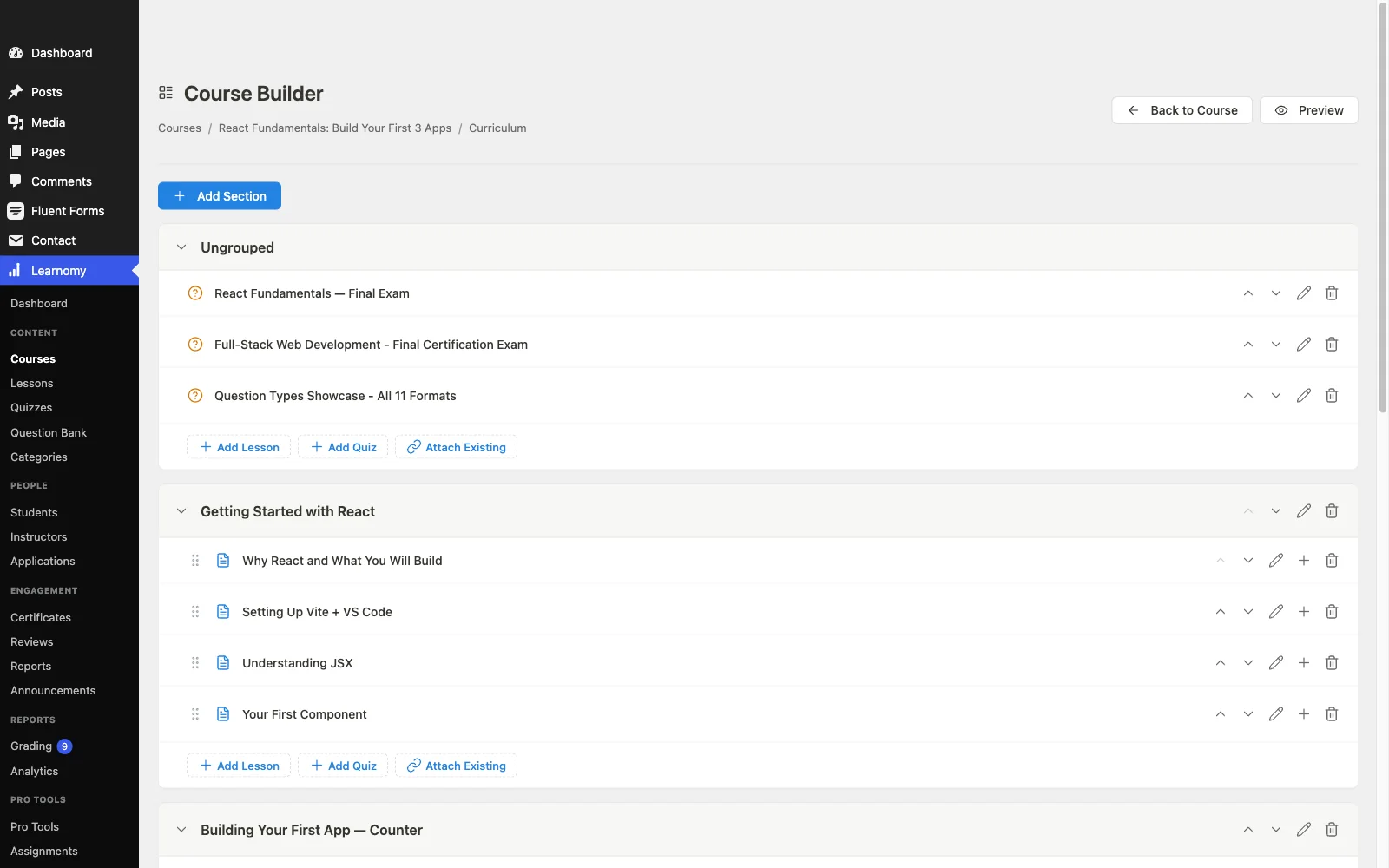
Learnomy leads this list because every design decision in it seems aimed at giving a teacher time back rather than taking more of it. Lessons get built in a front-end drag-and-drop builder that never touches wp-admin, mixing video, audio, PDF, and reading material as the material calls for, no training manual required before the first lesson goes live. The full platform tour is at learnomy.app.
Grading is where the time savings compound. Six quiz types with question banks handle the objective side automatically, with partial credit so a near-correct answer scores fairly instead of getting marked flat wrong. For everything that needs a human eye, essays, open responses, project submissions, a dedicated essay-grading inbox turns what’s normally scattered across emails or a spreadsheet into an actual queue a teacher works through in order. Anti-cheat tab-switch tracking catches the obvious shortcut without requiring live proctoring. And when a teacher is ready to charge for their time, built-in Stripe and PayPal checkout means the first paid student doesn’t require installing WooCommerce first, with no platform fees, what students pay stays with you. Certificates are cryptographically signed and QR-verifiable, genuinely useful for a tutor whose students need proof of completed coursework for a school or employer. A learning community with discussion boards and Q&A gives students a place to ask questions between sessions, cutting down on one-off emails a teacher would otherwise answer individually.
Pros:
- Front-end builder needs no training before the first lesson
- Essay-grading inbox turns manual grading into a manageable queue
- Built-in checkout, a teacher can accept payment without a second plugin
- QR-verifiable certificates for students who need proof of completion
- Discussion boards reduce one-off student emails
Cons:
- Younger third-party ecosystem than the decade-old plugins
- Self-hosted, so basic WordPress maintenance is still a teacher’s responsibility
The deal: no platform fees, what students pay stays with you.
2. Tutor LMS: the friendliest first build
For a teacher building their very first online lesson, Tutor LMS’s frontend builder is genuinely welcoming, clean, visual, and forgiving of a first attempt. The free tier is capable enough to get a first course or tutoring module live without spending anything, and version 3’s native payments mean it can start collecting money right away.
Grading remains largely manual for anything beyond auto-scored quiz types, and the features a growing tutoring practice needs, drip scheduling, deeper certificates, multi-instructor support if a teacher brings on a colleague, sit behind annually renewing paid tiers. Our Tutor LMS alternatives guide covers what’s on the other side of that upgrade path.
Pros: most approachable builder for a first-time creator; native payments in v3. Cons: grading workflow largely manual; growth features tier-gated. The deal: free core; the selling features renew annually.
3. Sensei LMS: for teachers already in WordPress
A teacher who already blogs or maintains content in the WordPress block editor will find Sensei’s authoring experience the most familiar in this list, lessons are block-editor documents, no new interface to learn at all. If the teacher already runs (or is willing to run) a WooCommerce store, courses become products with essentially no friction.
Without an existing store, the WooCommerce dependency is real overhead for a teacher who just wants to get paid for tutoring, and grading, certificates, and community tools all remain thin. The right fit for a specific kind of teacher, not a general recommendation.
Pros: zero new authoring interface to learn; clean if a store already exists. Cons: WooCommerce required to sell; thin grading and certificate tools. The deal: free core; annual Pro renewal.
4. LearnDash: for structured, multi-level curricula
A teacher running a genuinely complex curriculum, multiple grade levels, prerequisite chains, deeply nested topics, will find LearnDash’s content modeling handles that structure better than any lighter tool here. It’s the choice for a teacher whose material is the complicated part, not the selling.
The backend-first building experience is heavier than the frontend builders above, and selling requires WooCommerce or EDD, an extra system for a teacher who’d rather spend that setup time on lesson content. Our LearnDash alternatives guide covers the wider trade-offs.
Pros: handles genuinely complex curricula well; mature and stable. Cons: backend-heavy building; selling needs WooCommerce/EDD. The deal: annual license plus add-on renewals across vendors.
5. LifterLMS: for tutors running an ongoing program
A tutor running an ongoing program rather than one-off lessons, weekly sessions, a semester-long track, will find LifterLMS’s engagement automation, drip content, milestone-triggered emails, achievement badges, genuinely useful for keeping students on pace between sessions without manual check-ins.
Payment gateways are paid add-ons here, and the deeper assessment tools sit in annually renewing bundles, worth it for a tutor planning to run this long-term, less so for someone testing whether online tutoring works for them at all. Our LifterLMS alternatives guide has the fuller picture.
Pros: genuinely useful pacing automation for ongoing programs. Cons: gateways are paid add-ons; assessment depth costs extra. The deal: annual add-on bundle renewals.
The grading workload question that decides everything
Before choosing, run one honest test: take twenty real student submissions, essays, open responses, whatever your subject actually requires, and grade them on your shortlisted platform. Time it. Multiple-choice auto-grading is a solved problem everywhere, so it won’t differentiate anything. What will is how the platform handles the submissions that need a human: does it collect them into one place you can work through in order, or does it scatter them across student profiles you have to click into one at a time? Does partial credit exist, or is every answer forced into right-or-wrong even when the honest grade is somewhere in between? A platform that saves twenty minutes per grading session saves hours over a semester, and that time difference matters more to most teachers than any feature on a comparison table, this one included. For teachers weighing whether to sell courses at all versus staying purely in-person, the broader case is in how to sell online courses on WordPress.
FAQ
What is the best WordPress LMS for an individual teacher? Learnomy, for the combination of a no-training-needed front-end builder, an essay-grading inbox that turns manual grading into a manageable workflow, and built-in checkout so getting paid doesn’t require a second plugin, with no platform fees.
Does a teacher need coding or WordPress admin experience to use these platforms? Not with front-end builders like Learnomy’s or Tutor LMS’s, both are designed to be used entirely without touching wp-admin. LearnDash and Sensei lean more on backend or block-editor familiarity respectively.
Can a teacher accept payment without setting up a full online store? Yes, on platforms with native checkout. Learnomy connects directly to Stripe and PayPal with no ecommerce plugin needed. Sensei and LearnDash both require WooCommerce, real setup overhead for a teacher who just wants to charge for tutoring.
How much of the grading process can actually be automated? Multiple-choice, true/false, and matching questions auto-grade on every platform in this list. Essays and open-ended responses need human review everywhere, the differentiator is whether that review happens in an organized queue (Learnomy’s essay-grading inbox) or a manual search through student records.
Is it worth issuing certificates for a small tutoring practice? If students need proof of coursework for a school, employer, or professional requirement, yes, and a verifiable certificate (QR-checkable, not just a PDF) is worth more to a student than a decorative one for exactly that reason.
What if I need to bring on a co-teacher later? Check whether the platform supports multi-instructor revenue sharing before you build a catalog you’ll have to migrate. Learnomy includes this natively; Tutor LMS and MasterStudy support it on paid tiers; most others require a rebuild or a third-party add-on.
Verdict
A teacher’s time is the scarcest resource in this whole comparison, and the right LMS should protect it, not consume more of it. Learnomy is built with that priority visible in nearly every feature: a front-end builder that skips the training curve, an essay-grading inbox that organizes the part of teaching that actually takes time, and built-in payment so the business side doesn’t become a second job, with no platform fees on what you earn. Tutor LMS is the friendliest free starting point, Sensei fits a teacher already living in WordPress, and LearnDash or LifterLMS suit specific curriculum or pacing needs. Test the grading workflow with real submissions before you commit, that’s where the hours are actually won or lost.
More time teaching, less time on admin
Learnomy pairs a front-end course builder with an essay-grading inbox, six quiz types with partial credit, and built-in Stripe and PayPal checkout, inside a complete learning platform for WordPress. No platform fees, what students pay stays with you. See it at learnomy.app.