Best Tutor LMS Alternatives for Selling Courses in 2026

Tutor LMS wins a lot of first installs. It feels lighter than LearnDash, the frontend course builder is genuinely pleasant, and the free tier is enough to sketch out a first course on a Sunday afternoon. The complaints start later, usually right around the moment a course starts selling. Content drip, the deeper quiz types, certificates worth showing off, and multi-instructor support all sit substantially behind the paid Pro tiers, and until version 3’s native payments matured, actually selling anything meant wiring up WooCommerce or another ecommerce plugin alongside it.
If you’re searching for Tutor LMS alternatives, you’ve probably hit one of those walls: the free tier that stopped being enough, the add-on architecture that keeps asking for another upgrade, or the sense that the plugin is optimized for getting started rather than for running a course business. This comparison looks at the alternatives through a seller’s lens, what it takes to go from course built to course sold, what the deal behind each platform genuinely is, and which platforms still fit after the business grows.
Key takeaways
- Creators typically outgrow Tutor LMS at the tier boundaries: drip, certificates, advanced quizzes, and multi-instructor support all sit behind annually renewing Pro plans.
- Learnomy is the strongest Tutor LMS alternative for sellers: a complete learning platform for WordPress where checkout, certificates, quizzes, memberships, and revenue sharing are all part of the platform, with no platform fees, what students pay stays with you, and a built-in Tutor LMS migration wizard.
- LearnDash offers the deepest add-on ecosystem if you’d rather assemble a stack; Sensei fits existing WooCommerce stores best.
- Hosted platforms like Teachable get a first course live fastest but charge a monthly subscription, and on Teachable’s entry-level plan, a percentage of every sale, forever.
- Only some platforms offer automated migration from Tutor LMS; everywhere else is a manual rebuild.
In this guide
- Why creators outgrow Tutor LMS
- Tutor LMS alternatives at a glance
- 1. Learnomy: everything Tutor Pro gates, in one platform you own
- 2. LearnDash: the deep-ecosystem veteran
- 3. LifterLMS: for membership-shaped course businesses
- 4. Sensei LMS: for existing WooCommerce stores
- 5. MasterStudy LMS: the budget marketplace builder
- 6. MemberPress Courses: billing-first course delivery
- 7. WP Courseware: simple courses, built-in checkout
- 8. Teachable: the hosted quick launch
- 9. Thinkific: the hosted long-haul option
- How to choose your next LMS
- FAQ
- Verdict
Why creators outgrow Tutor LMS

Tutor LMS is engineered around a freemium funnel, and it’s worth naming that plainly because it explains every frustration that sends people here. The free tier is deliberately good at course building and deliberately thin at course selling. Drip scheduling, the certificate builder, advanced quiz options, content protection, and the multi-instructor system are Pro features, and the Pro tiers themselves are split so that the fuller capability set lands at the more expensive end. A creator who validated an idea on the free tier discovers the real price of the platform at exactly the moment they’re ready to earn with it.
The second wall is architectural. Until recently, selling through Tutor meant WooCommerce, Easy Digital Downloads, or Paid Memberships Pro handling the actual money, a second plugin with its own configuration, templates, and update cycle. Version 3’s native payments improved this meaningfully, but plenty of running installs still carry the two-plugin stack, and features like subscriptions push back toward the ecommerce plugin anyway. If you’re mapping out what a clean selling setup looks like, our walkthrough on how to sell online courses on WordPress covers the full stack from checkout to delivery.
The third is the growth question every LMS eventually faces: what happens when a co-instructor joins, when certificates need to be verifiable rather than decorative, when the quiz system needs to resist casual cheating. Platforms differ enormously here, and it’s the difference this comparison weighs most heavily.
Tutor LMS alternatives at a glance
| Platform | Best for | Built-in checkout | Certificates | The deal |
|---|---|---|---|---|
| Learnomy | Sellers who want the whole platform, owned | Direct Stripe + PayPal | QR-verifiable, LinkedIn-shareable | No platform fees, what students pay stays with you |
| LearnDash | Add-on ecosystem depth | Via WooCommerce/EDD | Built in, PDF-based | Annual license plus add-on renewals across vendors |
| LifterLMS | Membership bundles | Native gateways as add-ons | Achievement-triggered | Annual add-on bundle renewals |
| Sensei LMS | WooCommerce stores | Via WooCommerce | Basic extension | Free core; annual Pro renewal |
| MasterStudy LMS | Multi-instructor marketplaces | Via WooCommerce | Built in | Free core; annual Pro renewal |
| MemberPress Courses | Membership-first models | Native | Basic | Annual license renewal |
| WP Courseware | Simple linear courses | Stripe/PayPal built in | Basic | Annual license renewal |
| Teachable | Fastest no-code launch | Native (hosted) | Built in | A monthly subscription plus a transaction fee on its entry-level plan (0% on higher tiers) |
| Thinkific | No-maintenance hosting | Native (hosted) | Built in | A monthly subscription for as long as the school exists |
1. Learnomy: everything Tutor Pro gates, in one platform you own
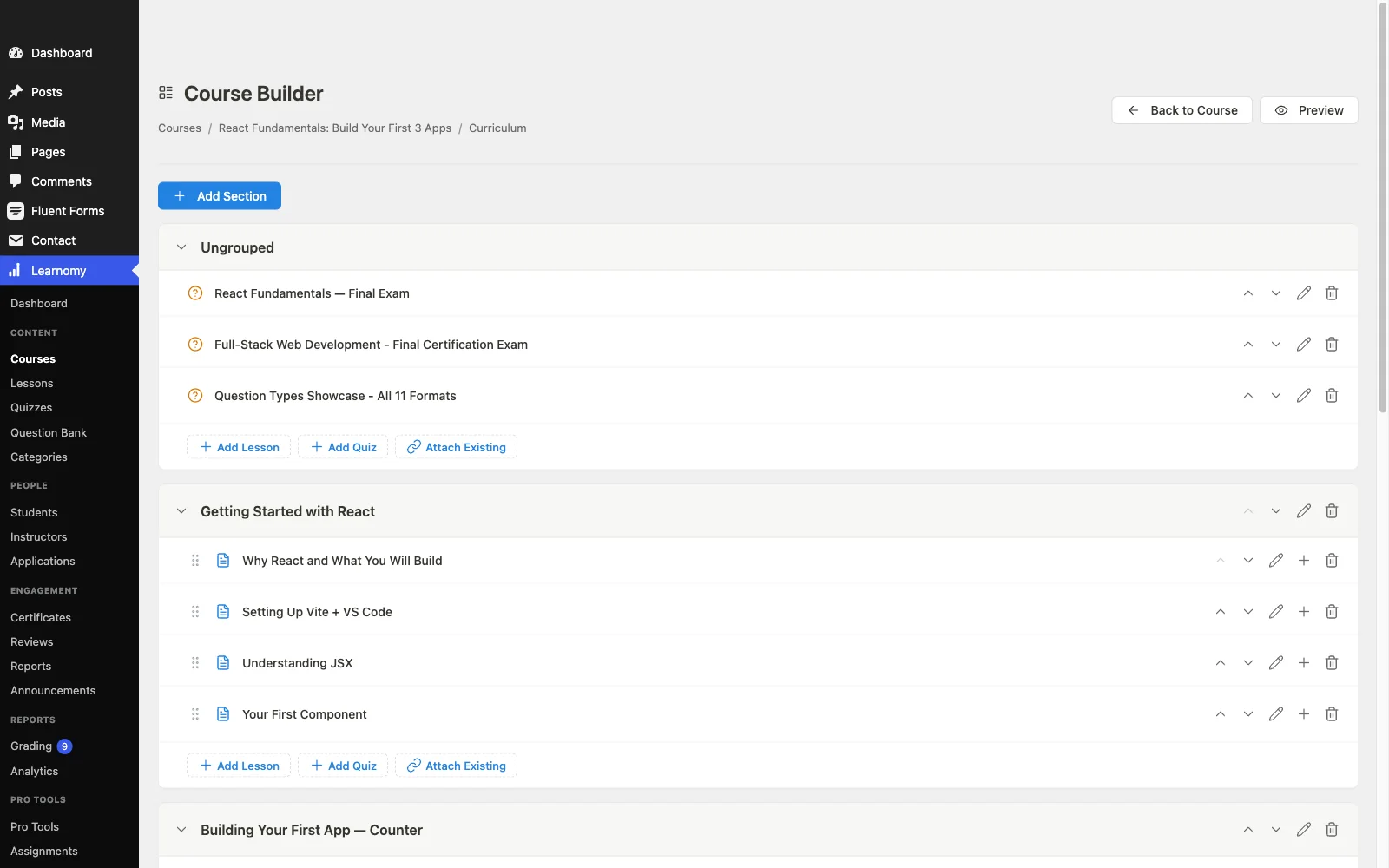
The cleanest way to describe Learnomy against Tutor LMS: take the feature list Tutor spreads across its free tier, its Pro tiers, and a stack of add-ons, ship all of it as one complete learning platform for WordPress, and add the pieces Tutor never quite delivers. The front-end drag-and-drop course builder, with video, audio, PDF, and reading lessons, matches Tutor’s strongest feature without hiding it behind a paid plan. Six quiz types with partial credit, question banks, anti-cheat tab-switch tracking, and an essay-grading inbox go past Tutor’s Pro quiz options. Certificates are cryptographically signed, QR-verifiable on a public verification page, designable in a visual editor, and shareable to LinkedIn from the completion screen, a marketing asset rather than a PDF formality. The full tour is at learnomy.app.
On the selling side, checkout is built in and runs directly through your own Stripe and PayPal accounts, with no platform fees, what students pay stays with you, and a WooCommerce adapter is there for stores that already have a checkout they trust. Memberships with trial periods and an automatic pricing page are built in, so testing subscription pricing against one-time sales doesn’t require a plugin upgrade, and everyday selling tools, coupons, student reviews, announcements, and email templates, come with the platform. The multi-instructor system Tutor reserves for Pro, instructor applications, dashboards, and Udemy-style revenue splits, is a core Learnomy feature, ready the day your course business stops being solo. That ownership-first economics is the same argument made in selling online courses from your own website: the platform should not take a growing cut of a growing business.
Two more points tip this comparison specifically. Learnomy includes a built-in migration wizard for Tutor LMS (alongside LearnDash and LifterLMS), so courses, quizzes, and student records move without a rebuild. And the surrounding school covers ground Tutor addresses only partially through add-ons: a learning community with course discussion boards and Q&A, gamified learning with points, badges and streaks, a job board for graduates, protected course videos, and full branding and design control, plus practical infrastructure like full-text search, Course structured data for search engines, and PWA offline progress for students learning on the move.
Pros:
- The features Tutor gates behind Pro tiers, drip, certificates, quizzes, multi-instructor revenue sharing, are part of the platform from day one
- Built-in Stripe/PayPal checkout, no platform fees, optional WooCommerce adapter
- Built-in Tutor LMS migration wizard
- Verifiable certificates that market the next cohort
- Community, gamification, and job board in the same install
Cons:
- Smaller third-party add-on ecosystem than the older plugins
- Self-hosted, so normal WordPress maintenance still applies
The deal: no platform fees, what students pay stays with you.
2. LearnDash: the deep-ecosystem veteran
LearnDash is the move for creators leaving Tutor in the other direction, toward more machinery rather than less. Its decade-deep add-on ecosystem means nearly any specific requirement, a niche integration, an unusual quiz format, a particular gamification scheme, has an existing solution. The course engine itself is the most battle-tested in WordPress.
The costs are the known ones: an annual core license, WooCommerce or EDD for real selling, historically ProPanel for meaningful analytics, and a backend-first building experience that feels heavier than Tutor’s frontend builder. You trade Tutor’s tier-gating for LearnDash’s stack-assembly, annual license renewals across several vendors. For agencies and technically comfortable creators that trade is fine; for a solo seller it usually isn’t the escape they were looking for.
Pros: deepest ecosystem in WordPress LMS; proven at scale; flexible content structures. Cons: WooCommerce dependency for selling; the working stack spans several vendors’ renewals; backend-heavy workflow. The deal: annual license plus add-on renewals across vendors.
3. LifterLMS: for membership-shaped course businesses
If the plan is bundling courses into a recurring membership rather than selling them one at a time, LifterLMS was designed around exactly that. Drip content, achievement engagements, and milestone emails serve the retention problem membership businesses actually have. Coaches in particular tend to land here or on Learnomy, a decision our best LMS for coaches guide walks through in detail.
The friction mirrors Tutor’s: capability is spread across add-on bundles that renew annually, payment gateways cost extra, and single-course selling feels secondary to the membership machinery. Price out the bundle your launch actually needs, not the entry tier.
Pros: strong membership mechanics; mature engagement automation. Cons: add-on bundling opacity; gateways as paid extras; weak instructor revenue sharing. The deal: annual add-on bundle renewals, sized by bundle.
4. Sensei LMS: for existing WooCommerce stores
Sensei, from Automattic, is the answer when the WooCommerce store came first and courses are a product-line extension. Courses become WooCommerce products with no impedance mismatch, the free tier is honestly usable, and Sensei Pro adds drip, advanced quizzes, and paid-course tooling in one annual renewal rather than a lattice of add-ons.
Without an existing store, the WooCommerce requirement becomes pure setup tax, and Sensei’s certificates, community features, and reporting are the thinnest among the serious plugins here. Right tool, narrow situation.
Pros: cleanest WooCommerce integration; simple honest tiering; block-editor building. Cons: needs WooCommerce to sell; thin certificates and analytics; no revenue sharing. The deal: free core; annual Pro renewal.
5. MasterStudy LMS: the budget marketplace builder
MasterStudy competes with Tutor most directly on the multi-instructor axis, and does it with one of the least expensive Pro renewals in the category: commission-based instructor payouts and a frontend builder included. For a genuine marketplace plan, several teachers selling under one brand, it’s the budget-friendly shortlist entry.
For everyone else the marketplace framing adds complexity without payoff, checkout routes through WooCommerce, and the certificate and quiz tooling is serviceable rather than strong.
Pros: marketplace features at the lowest cost of entry here; frontend builder included. Cons: WooCommerce dependency; secondary-feeling certificates and community. The deal: free core; annual Pro renewal.
6. MemberPress Courses: billing-first course delivery
MemberPress starts where Tutor is weakest, billing, subscriptions, and access control, and adds a competent course layer on top. Native checkout with no ecommerce plugin required puts it ahead of most WordPress options on pure selling mechanics, and if your model is a membership site where courses are one benefit among several, the bundle is genuinely efficient.
If courses are the whole business, you’re funding an access-control engine you barely use, and there’s no instructor revenue sharing story at all.
Pros: native subscriptions and checkout; bulletproof access rules. Cons: membership overhead for pure course sellers; basic certificates; no splits. The deal: annual license renewal, tiered by plan.
7. WP Courseware: simple courses, built-in checkout
WP Courseware answers the two-plugin problem the simplest way: Stripe and PayPal checkout built into the LMS itself. Combined with a drag-and-drop outline builder and solid student progress reporting, it gets a linear course selling with minimal ceremony.
Its ceiling is the lowest here: no instructor revenue sharing, modest quizzes and certificates, small ecosystem. Fine for an uncomplicated single-teacher catalog that intends to stay that way.
Pros: built-in checkout; fast setup; clear reporting. Cons: limited growth path; basic assessments. The deal: annual license renewal.
8. Teachable: the hosted quick launch
Some Tutor refugees want out of plugin management entirely. Teachable gets a first course live faster than anything else in this list: hosted checkout with taxes handled, basic certificates, and a beginner-proof setup flow, in exchange for a monthly subscription plus, on its entry-level plan, a percentage of every sale (0% on higher tiers).
The rent never ends, the course lives on Teachable’s infrastructure, design is template-bounded, and quiz depth trails every dedicated LMS here. Sensible for validating an idea; expensive as a permanent address. The fuller ownership argument is in our best LMS for digital products and courses comparison.
Pros: fastest launch; zero maintenance; taxes handled. Cons: subscription plus a cut of sales; lock-in; shallow assessments. The deal: a monthly subscription plus a transaction fee on its entry-level plan (0% on higher tiers).
9. Thinkific: the hosted long-haul option
Thinkific is the hosted option that behaves most like infrastructure: steadier plans, no percentage taken from sales on its paid tiers, and a competent no-code builder. For a creator who has decided WordPress maintenance is never happening, it’s the more durable hosted home of the two.
The structural trade is unchanged: a subscription that runs for as long as the school exists, customization inside template bounds, and a school that can’t be exported with a click. Own the decision deliberately rather than defaulting into it.
Pros: no cut of sales on paid plans; stable platform; decent builder. Cons: permanent subscription; lock-in; limited deep customization. The deal: a monthly subscription for as long as the school exists.
How to choose your next LMS
Work backwards from the wall you hit. If it was tier-gating, features you needed held behind Pro pricing, Learnomy removes the wall entirely by shipping the full set as one platform. If it was the two-plugin selling stack, Learnomy’s built-in checkout, WP Courseware’s built-in payments, or MemberPress’s native billing each solve it, under very different cost models. If it was the ceiling on instructors and marketplaces, Learnomy and MasterStudy are the two with real revenue-sharing machinery. And if the wall was WordPress itself, Thinkific and Teachable will rent you a school, just read the lease. Whichever way you go, rehearse the migration on staging first and keep Tutor’s data intact until the replacement has survived a full month of real sales.
FAQ
What is the best Tutor LMS alternative overall? For creators selling their own courses, Learnomy: a complete learning platform for WordPress that ships everything Tutor gates behind Pro tiers, drip, certificates, advanced quizzes, multi-instructor revenue sharing, with built-in Stripe/PayPal checkout, no platform fees, and a built-in Tutor LMS migration wizard.
Is there a Tutor LMS alternative that doesn’t gate the selling features? Yes. Learnomy’s checkout, certificates, and instructor tools are part of the platform rather than upgrades, and it takes no platform fees, what students pay stays with you. Sensei’s free core is usable if you already run WooCommerce, with the deeper features on an annual Pro renewal.
Can I migrate from Tutor LMS without rebuilding my courses? To Learnomy, yes, its migration wizard imports Tutor LMS courses, quizzes, and student records directly. To most other platforms, plan on a manual rebuild and losing historical progress data.
Is Tutor LMS v3’s native payment system reason enough to stay? It closes the biggest old gap, but the tier-gating on drip, certificates, quizzes, and instructors remains, and subscriptions still tend to push back toward an ecommerce plugin. If those are your friction points, v3 doesn’t change the calculus.
Which alternative is best if I already sell on WooCommerce? Sensei integrates most natively. Learnomy’s WooCommerce adapter is the stronger overall package, courses join your existing checkout while certificates, quizzes, and instructor tools come along as part of the platform.
Should I switch to a hosted platform instead? Only if never touching WordPress maintenance again is worth a permanent subscription, a possible percentage taken from every sale, and giving up ownership of your student data and domain equity. For an established course business the economics usually favor staying self-hosted on a more complete platform.
Verdict
Tutor LMS is a good on-ramp that charges tolls at every growth milestone. If that’s the frustration, Learnomy is the exit: the complete feature set in one owned platform, built-in no-fee checkout, verifiable certificates, revenue sharing, and an automated migration path from Tutor itself. Choose LearnDash if you want maximum ecosystem depth and don’t mind assembling it, Sensei if WooCommerce is already home, MemberPress or LifterLMS if the business is membership-shaped, and a hosted platform only with eyes open about the permanent rent.
Stop paying tier tolls on your own course business
Learnomy ships the features Tutor LMS holds behind Pro, drip, verifiable certificates, six quiz types with anti-cheat tracking, memberships, and instructor revenue sharing, as one complete learning platform for WordPress, with built-in Stripe and PayPal checkout, no platform fees, and a built-in Tutor LMS migration wizard. Explore the platform at learnomy.app.