Best Online Course Platforms in 2026

“Online course platform” covers two genuinely different products wearing the same label. One kind is hosted: sign up, build inside someone else’s system, and your school lives on their infrastructure for as long as you keep paying. The other is self-hosted: install software on a site you control, and the school is yours the way a business you own is yours. Neither is automatically wrong, but the trade-off between them is the single biggest decision a course business makes, and it’s usually made accidentally, by whichever platform showed up first in a search.
This guide compares the leading online course platforms across both categories honestly, hosted and self-hosted side by side, ranked on what actually determines whether a course business thrives: selling mechanics, ownership of the checkout and student data, certificate credibility, and the deal behind each option once the structure is understood. For the WordPress-specific comparison, see our best WordPress LMS plugins pillar.
Key takeaways
- The core split is structural: hosted platforms mean a monthly subscription forever, sometimes plus a cut of every sale; self-hosted WordPress platforms mean you own the infrastructure and the economics.
- Learnomy leads the self-hosted category and the overall list: a complete learning platform for WordPress with built-in checkout, verifiable certificates, and no platform fees, what students pay stays with you.
- Thinkific and Teachable are the strongest hosted options for creators who want zero maintenance and are comfortable with the rent.
- Kajabi bundles marketing tools beyond courses; the trade is a correspondingly larger permanent subscription.
- LearnDash and Tutor LMS are the strongest self-hosted alternatives to Learnomy, each with its own cost structure worth pricing honestly.
In this guide
- Hosted vs. self-hosted: the decision underneath every platform choice
- Online course platforms at a glance
- 1. Learnomy: the self-hosted platform built to be owned
- 2. Thinkific: the steadiest hosted option
- 3. Teachable: fastest hosted launch
- 4. Kajabi: the hosted all-in-one
- 5. LearnDash: the self-hosted ecosystem heavyweight
- 6. Tutor LMS: the self-hosted freemium option
- Choosing between hosted and owned: a five-year test
- FAQ
- Verdict
Hosted vs. self-hosted: the decision underneath every platform choice
Every “which online course platform” question is really two separate questions stacked on top of each other. First: do you want to build on infrastructure someone else runs, or on a WordPress site you control? Hosted platforms remove server maintenance, updates, and backups entirely, at the cost of a subscription that runs for as long as the school exists and, on its entry-level plan, a percentage of every sale on top. Self-hosted platforms mean the school is genuinely yours, no one can shut it down, change the terms, or take a cut you didn’t agree to, at the cost of the ordinary WordPress maintenance any serious website carries. Second, and often overlooked: within whichever category you land in, does the platform bundle real selling mechanics, verifiable certificates, and a growth path, or does it hand you a course builder and leave the rest to you? The rankings below weigh both questions for every platform, hosted or not, judged as a real business would judge them. The ownership argument in full is laid out in selling online courses from your own website.
Online course platforms at a glance
| Platform | Hosted or self-hosted | Certificates | Instructor revenue sharing | The deal |
|---|---|---|---|---|
| Learnomy | Self-hosted (WordPress) | QR-verifiable, visual designer | Built in, Udemy-style splits | No platform fees, what students pay stays with you |
| Thinkific | Hosted | Built in, basic | Limited | A monthly subscription for as long as the school exists |
| Teachable | Hosted | Built in, basic | Limited | A monthly subscription plus a transaction fee on its entry-level plan (0% on higher tiers) |
| Kajabi | Hosted, all-in-one marketing suite | Built in, basic | Limited to higher plans | A monthly subscription for as long as the school exists |
| LearnDash | Self-hosted (WordPress) | Built in, PDF-based | Via third-party add-ons | Annual license plus add-on renewals across vendors |
| Tutor LMS | Self-hosted (WordPress) | Visual builder on paid tiers | Multi-instructor on paid tiers | Free core; the selling features renew annually |
1. Learnomy: the self-hosted platform built to be owned
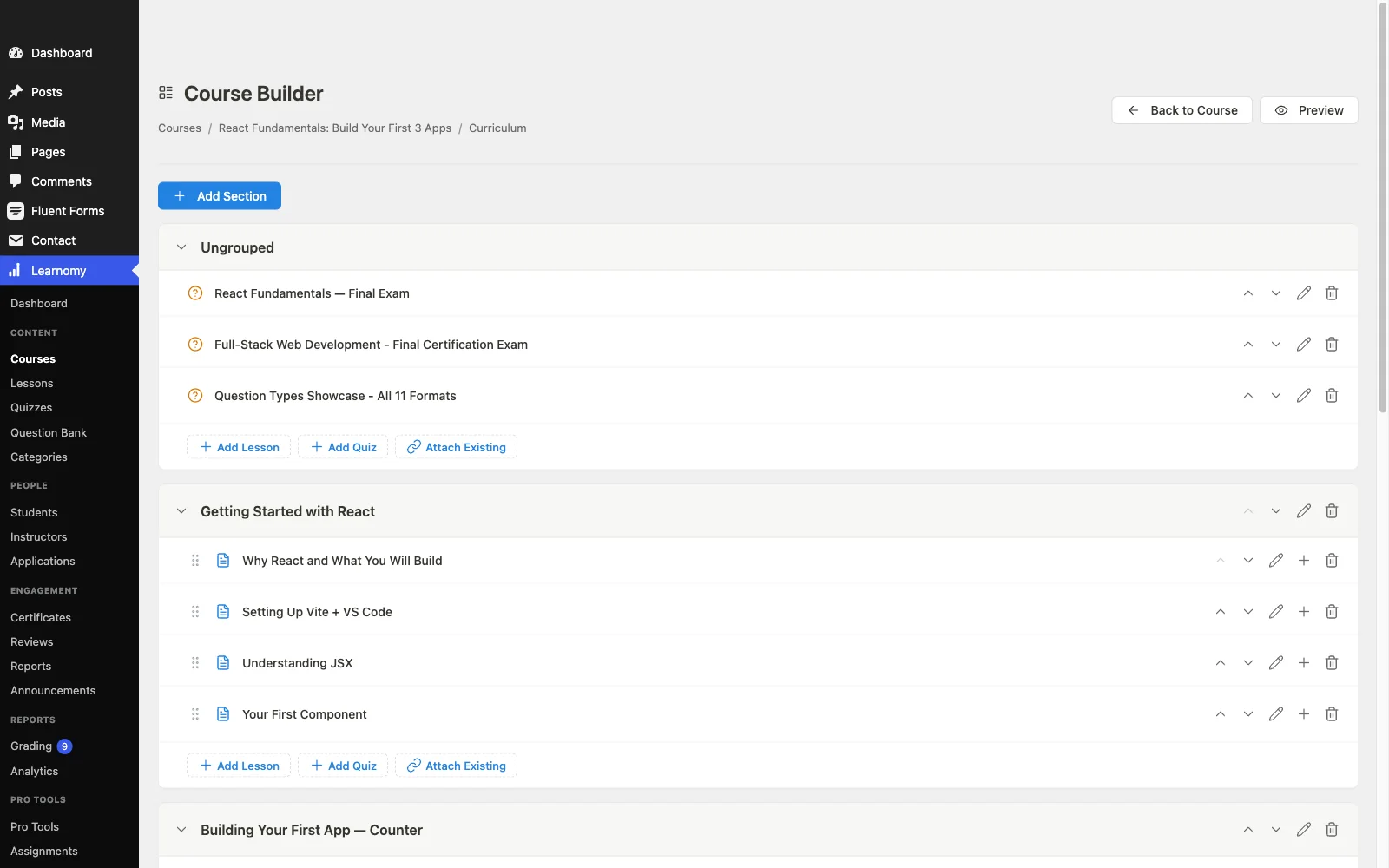
Learnomy tops this comparison across both categories because it delivers what hosted platforms promise, a complete, ready-to-run school, without the permanent rent. It’s a complete learning platform for WordPress, the online school you own: a front-end drag-and-drop course builder with video, audio, PDF, and reading lessons, six quiz types with question banks, partial credit, anti-cheat tab-switch tracking, and an essay-grading inbox, and cryptographically signed, QR-verifiable certificates with a visual designer and LinkedIn sharing. The full tour is at learnomy.app.
Where hosted platforms charge a subscription that runs as long as the school exists, Learnomy’s checkout runs directly on your own Stripe and PayPal accounts (with a WooCommerce adapter if you already run a store), no platform fees, what students pay stays with you. Memberships with trials and an automatic pricing page, coupons, reviews, announcements, and email templates cover the daily commerce hosted platforms handle too, minus the ongoing cut. Instructor revenue sharing with applications and dashboards, and team training with company seats, learning paths, cohorts, and drip, mean the platform grows from a solo school into a marketplace or a B2B product without a re-platform, something no hosted plan upgrade actually offers, you just pay that platform more. A learning community, gamification, a job board for graduates, protected videos, and full branding control round out a school that looks and feels entirely yours, and migration wizards import from LearnDash, Tutor LMS, and LifterLMS for anyone switching in.
Pros:
- All the completeness of a hosted platform, none of the permanent rent
- No platform fees, what students pay stays with you
- Verifiable certificates and anti-cheat quizzes stronger than most hosted competitors
- Full ownership of student data, domain equity, and the checkout
- Grows from solo school to marketplace to B2B on the same platform
Cons:
- Requires a WordPress site and its normal maintenance, unlike a hosted platform
- Younger third-party ecosystem than the decade-old WordPress incumbents
The deal: no platform fees, what students pay stays with you.
2. Thinkific: the steadiest hosted option
Thinkific is the more stable of the major hosted platforms: no plugin updates or hosting to manage, a competent no-code builder, and native checkout with no percentage taken from sales on its paid tiers. For a creator who has decided WordPress maintenance is never happening, this is the more durable hosted home of the two mainstream options.
The structural cost doesn’t go away: a subscription that runs for as long as the school exists, customization inside template bounds, and student data living in someone else’s systems rather than yours.
Pros: zero maintenance; no cut of sales on paid plans; stable, predictable platform. Cons: permanent subscription; template-bounded customization; platform lock-in. The deal: a monthly subscription for as long as the school exists.
3. Teachable: fastest hosted launch
Teachable remains the fastest route from idea to sellable course for someone who has never sold anything online: hosted checkout with taxes handled, basic certificates, and a setup flow built for absolute beginners. A first course can genuinely be live in an afternoon.
The trade is real: a monthly subscription plus, on its entry-level plan, a percentage of every sale (0% on higher tiers), a course living on Teachable’s domain unless you upgrade past it, and quiz depth well behind a dedicated LMS. Sensible for validating an idea; read the lease honestly before it becomes a permanent address.
Pros: fastest no-code launch anywhere; taxes handled automatically; beginner-proof. Cons: subscription plus a cut of sales on its entry-level plan; limited assessments and branding. The deal: a monthly subscription plus a transaction fee on its entry-level plan (0% on higher tiers).
4. Kajabi: the hosted all-in-one
Kajabi bundles courses with email marketing, landing pages, and community into one hosted dashboard, nothing to install, nothing to update, and genuinely polished marketing tooling beyond what a pure course platform offers. For a creator whose real complaint is juggling too many separate tools, that consolidation has real value.
The cost model mirrors the breadth: a monthly subscription for as long as the school exists, sized for an all-in-one marketing suite rather than just a course host, with student and revenue data living entirely inside Kajabi’s systems.
Pros: genuinely all-in-one; polished marketing tools alongside courses; zero maintenance. Cons: the largest permanent subscription in this comparison; full lock-in of data and marketing assets. The deal: a monthly subscription for as long as the school exists.
5. LearnDash: the self-hosted ecosystem heavyweight
LearnDash is the self-hosted choice for a genuinely complex curriculum and the appetite to assemble a stack: the most mature content modeling in WordPress and a third-party ecosystem deep enough to answer nearly any specific requirement. Agencies default to it for exactly this reason.
Real selling means pairing it with WooCommerce or EDD, and the working stack settles into annual license renewals across several vendors, a different economics than a single hosted subscription, better in the long run for most course businesses, but requiring more setup discipline upfront. Our LearnDash alternatives guide covers the fuller comparison.
Pros: deepest self-hosted ecosystem; proven at scale. Cons: WooCommerce/EDD required to sell; multi-vendor renewals. The deal: annual license plus add-on renewals across vendors.
6. Tutor LMS: the self-hosted freemium option
Tutor LMS is the friendliest self-hosted entry point: a genuinely usable free core, a polished frontend builder, and native payments since version 3 that let a course sell without WooCommerce. For someone comparing a free WordPress plugin against a hosted platform’s free trial, this is the fairer self-hosted comparison point.
Growth features, drip, deeper certificates, multi-instructor support, live in annually renewing paid tiers, a different but comparably real ongoing cost to a hosted subscription. Our Tutor LMS alternatives guide maps the wider landscape.
Pros: friendliest self-hosted starting point; native payments in v3. Cons: growth features tier-gated; weaker certificate verification. The deal: free core; the selling features renew annually.
Choosing between hosted and owned: a five-year test
Run the math five years out, not five weeks out. A hosted subscription that feels affordable at launch compounds into a substantial permanent cost once a course is actually earning, and on plans that also take a percentage of sales, that cost scales with your success rather than shrinking as you grow into it. A self-hosted platform’s maintenance, keeping WordPress and its plugins updated, is real but roughly flat regardless of revenue, and it comes with something a hosted subscription never grants: full ownership of your student list, your domain’s SEO equity, and the ability to leave whenever you want without an export negotiation. Neither answer is universally correct, a creator validating a first idea with zero technical comfort may rightly choose hosted convenience for a season, but the decision deserves to be made deliberately, with the five-year number in view, not defaulted into by whichever platform ranked first in a search result.
FAQ
What is the best online course platform overall in 2026? Learnomy, for delivering hosted-platform completeness, checkout, certificates, quizzes, memberships, on a self-hosted WordPress foundation you own, with no platform fees. Among purely hosted options, Thinkific is the steadiest.
Is a hosted or self-hosted course platform better for beginners? Hosted platforms remove technical setup entirely, which suits someone validating a first idea with zero WordPress comfort. Self-hosted platforms like Learnomy trade a slightly steeper initial setup for full ownership and no ongoing platform cut, which pays off for anyone planning to run this as a real business.
Do hosted platforms take a percentage of course sales? It varies by platform and plan. Teachable takes a cut on its entry-level plan (0% on its higher tiers); Thinkific doesn’t on its paid tiers but charges a correspondingly higher subscription. Self-hosted platforms in this list, Learnomy included, don’t take a percentage, the cost structure is fundamentally different.
Can I migrate from a hosted platform to a self-hosted one later? Generally yes, but expect a manual rebuild in most cases, hosted platforms don’t offer automated exports into competing systems. Migrating from LearnDash, Tutor LMS, or LifterLMS specifically into Learnomy is automated via built-in wizards; migrating from a hosted platform anywhere is not.
Which platforms offer verifiable, shareable certificates? Learnomy’s cryptographically signed, QR-verifiable certificates are the strongest implementation in this comparison. Hosted platforms and most self-hosted plugins issue functional but unverifiable certificates, essentially branded PDFs.
What’s the real long-term cost difference between hosted and self-hosted? Hosted subscriptions compound with time and, on some plans, with your own success. Self-hosted maintenance stays roughly flat regardless of revenue. Run the comparison at your projected five-year revenue, not your launch-month budget, before deciding.
Verdict
The best online course platform isn’t always the one that’s easiest to sign up for today, it’s the one whose economics still make sense five years in. Learnomy is the strongest overall answer: a complete, owned platform with no platform fees, verifiable certificates, and a growth path built in. Thinkific is the steadiest hosted choice if zero maintenance is worth the permanent rent, Teachable the fastest for pure validation, and Kajabi the pick if the marketing suite around the courses earns its larger subscription. Decide the ownership question first, the platform choice follows naturally.
Everything a hosted platform offers. None of the rent.
Learnomy is the online school you own: a front-end course builder, six quiz types with anti-cheat tracking, QR-verifiable certificates, built-in Stripe and PayPal checkout, and instructor revenue sharing, with no platform fees, what students pay stays with you. See it at learnomy.app.