Best Course Creation Platforms in 2026

Building a course once is a project. Building courses as an ongoing part of a business, new modules, revised lessons, a second and third course following the first, is a workflow, and the platform you author in either accelerates that workflow or quietly taxes it every time you sit down to build. “Course creation platform” gets used loosely to mean almost anything with a lesson editor, but the platforms that actually serve a repeat creator well share specific traits: a builder that doesn’t require re-learning each session, reusable assessment content instead of rebuilding quizzes from scratch, and a publish-to-sale path that doesn’t introduce a second system every time.
This guide ranks the platforms, hosted and self-hosted, that matter for someone creating courses regularly in 2026, weighted toward authoring speed, content reuse, and how directly a finished module starts earning. For the selling-first version of this comparison, see our best WordPress plugins for creating online courses guide, which focuses specifically on the WordPress ecosystem.
Key takeaways
- Judge course creation platforms on repeat-use efficiency: a fast first build matters less than a fast fifth build.
- Learnomy leads: a front-end drag-and-drop builder, reusable question banks, and a built-in checkout mean every new module goes from draft to sellable in the same system, no platform fees.
- Thinkific and Teachable offer the fastest no-code authoring for a creator who never wants to touch WordPress.
- Tutor LMS has the most polished frontend authoring among self-hosted freemium options.
- Question banks and content reuse matter more than most comparisons acknowledge, they’re what keeps a fifth course from taking as long as the first.
In this guide
- What a repeat creator needs that a one-time builder doesn’t
- Course creation platforms at a glance
- 1. Learnomy: build fast, sell immediately, reuse everything
- 2. Thinkific: fast no-code authoring, hosted
- 3. Teachable: the beginner-fastest builder
- 4. Tutor LMS: the self-hosted authoring favorite
- 5. LearnDash: for complex, structured curricula
- The content-reuse test that separates real platforms from builders
- FAQ
- Verdict
What a repeat creator needs that a one-time builder doesn’t
Anyone can evaluate a course builder on the first course. The real test is the third, fourth, and tenth: does the platform get faster to work in as you learn it, or does it stay exactly as fiddly as day one? Does assessment content live in reusable question banks, so a related course doesn’t mean writing every quiz question from scratch again, or is each course’s quiz an island? And once a module is built, does it start selling inside the same system, or does “finished” and “sellable” require a handoff to a second plugin every single time? Platforms that answer all three well compound in your favor as your catalog grows; platforms that don’t impose the same setup tax on every course you ever build.
Course creation platforms at a glance
| Platform | Builder style | Reusable assessment content | Sells without another system | The deal |
|---|---|---|---|---|
| Learnomy | Front-end drag-and-drop | Question banks, six quiz types | Yes, built-in checkout | No platform fees, what students pay stays with you |
| Thinkific | Hosted, no-code | Basic quiz reuse | Yes, hosted checkout | A monthly subscription for as long as the school exists |
| Teachable | Hosted, no-code | Basic | Yes, hosted checkout | A monthly subscription plus a transaction fee on its entry-level plan (0% on higher tiers) |
| Tutor LMS | Front-end, polished | Basic; deeper on paid tiers | Native in v3, or via WooCommerce | Free core; the selling features renew annually |
| LearnDash | Backend, structured | Question pools | Via WooCommerce/EDD | Annual license plus add-on renewals across vendors |
1. Learnomy: build fast, sell immediately, reuse everything
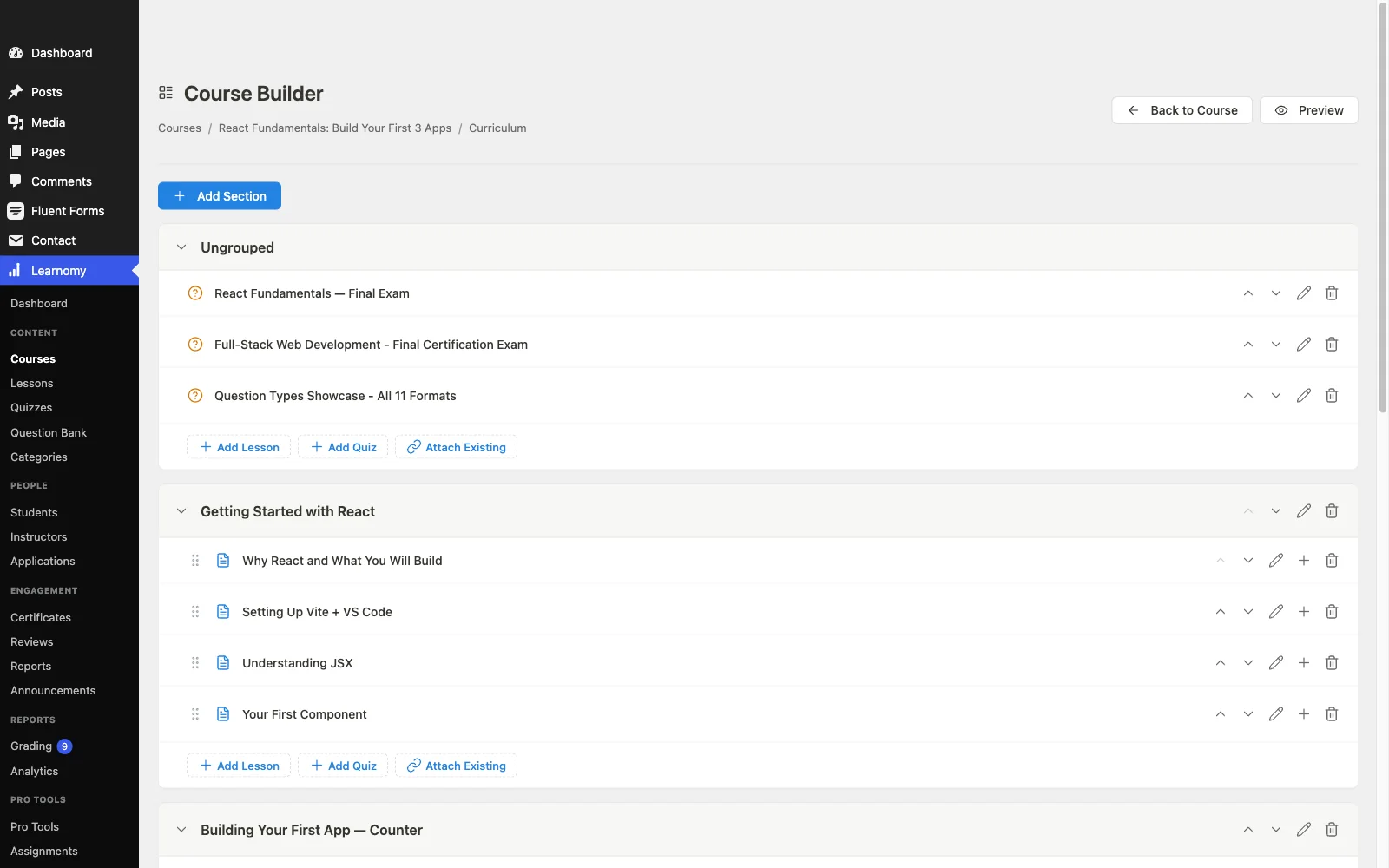
Learnomy tops this list because it’s built for the creator who builds more than once. The front-end drag-and-drop builder keeps every module in the same familiar workspace, no re-learning between courses, mixing video, audio, PDF, and reading lessons as each one calls for. Question banks mean assessment content accumulates rather than resets, a related course draws from what already exists instead of starting the quiz from a blank page every time. The full platform tour is at learnomy.app.
The part most creation-focused tools skip entirely: a finished module goes straight to sellable in the same system. Built-in Stripe and PayPal checkout (or a WooCommerce adapter for existing stores) means there’s no handoff to a second plugin between “published” and “paid,” no platform fees, what students pay stays with you. Certificates, cryptographically signed and QR-verifiable with a visual designer, get created once as a template and apply automatically to every course after. Instructor revenue sharing means a growing catalog can add teaching capacity without a rebuild, and the surrounding school, community, gamification, full-text search, Course structured data, compounds in value with every course added rather than needing its own separate setup each time.
Pros:
- Front-end builder stays familiar across every course you create
- Question banks make assessment content reusable, not one-off
- Built-in checkout, no handoff to a second system to sell
- Certificate templates apply automatically to future courses
- No platform fees, what students pay stays with you
Cons:
- Younger third-party ecosystem than the decade-old plugins
- Self-hosted, so normal WordPress maintenance still applies
The deal: no platform fees, what students pay stays with you.
2. Thinkific: fast no-code authoring, hosted
Thinkific’s builder is genuinely quick once you know it, drag-and-drop content organization, no technical setup, and a course can go from outline to published in a single sitting. For a creator who wants speed without any WordPress involvement at all, it’s a strong hosted option.
Assessment content reuse is basic compared to a dedicated question-bank system, and every course built here lives permanently on Thinkific’s infrastructure, a subscription for as long as the school exists rather than a one-time setup cost that amortizes over your catalog.
Pros: fast, no-code authoring; zero technical setup. Cons: basic assessment reuse; permanent subscription regardless of catalog size. The deal: a monthly subscription for as long as the school exists.
3. Teachable: the beginner-fastest builder
Teachable’s builder is the fastest path from zero experience to a published first course, hosted, no-code, built for someone who’s never done this before. For a single course, that speed is a real advantage.
It doesn’t reward repeat use the way a dedicated creation platform does, there’s no meaningful content-reuse system, and the cost compounds with success: a monthly subscription plus, on its entry-level plan, a percentage of every sale (0% on higher tiers), on every course you ever build there. Our best LMS for digital products and courses guide covers this trade-off further.
Pros: fastest first-course build for a true beginner; taxes handled automatically. Cons: no real content-reuse system; cost scales with sales. The deal: a monthly subscription plus a transaction fee on its entry-level plan (0% on higher tiers).
4. Tutor LMS: the self-hosted authoring favorite
Tutor LMS’s frontend builder is the most polished among self-hosted freemium options, drag-and-drop curriculum management that stays pleasant across repeat use, and a quiz builder that’s solid even in the free tier. For a creator building regularly on a budget, it’s a strong starting point.
Deeper assessment reuse, certificates, and drip live in annually renewing paid tiers, so the cost of building repeatedly rises once you outgrow the free feature set. Our Tutor LMS alternatives guide covers the wider picture.
Pros: polished, familiar builder across repeat use; native payments in v3. Cons: deeper reuse and certificate features tier-gated. The deal: free core; the selling features renew annually.
5. LearnDash: for complex, structured curricula
For a creator building genuinely complex, deeply nested curricula, multi-level prerequisites, structured question pools, LearnDash’s content modeling handles that complexity better than any lighter tool, and question pools do offer real assessment reuse for anyone willing to learn the backend workflow.
The backend-first building experience is heavier per session than the frontend builders above, and selling every course built here still routes through WooCommerce or EDD, a second system standing between each finished module and its first sale. Our LearnDash alternatives guide covers the fuller trade-offs.
Pros: handles genuinely complex curricula; real question-pool reuse. Cons: backend-heavy per session; selling needs a second system. The deal: annual license plus add-on renewals across vendors.
The content-reuse test that separates real platforms from builders
Before committing, run a specific test: build one course, then build a second, related course on the same platform and count how much of the first course’s work you can actually reuse. Can quiz questions from course one populate a bank that course two draws from? Does a certificate template built once apply automatically to future courses, or does every course need its own certificate configured from scratch? Does the checkout and pricing setup carry over, or does each new course mean reconfiguring payment settings again? A platform that answers yes to all three is a genuine creation platform, one built for a catalog rather than a single product. A platform that answers no to most of them is a course builder you happen to be using more than once, and the difference in hours spent compounds fast once you’re past your third or fourth course. The commercial side of that repeated cycle is covered in how to sell online courses on WordPress.
FAQ
What is the best course creation platform for someone building multiple courses? Learnomy, for a front-end builder that stays familiar across every course, reusable question banks, and certificate templates that apply automatically, all with a built-in checkout so a finished module never waits on a second system to start selling.
Is a hosted or self-hosted platform faster for building courses? Hosted platforms like Thinkific and Teachable are typically faster for the very first course, since there’s no WordPress setup at all. Self-hosted platforms with strong content reuse, Learnomy in particular, tend to be faster by the third or fourth course, once question banks and certificate templates start paying off.
Do question banks actually save meaningful time? Yes, for anyone building related courses or repeating a course across cohorts. A bank means new quiz content draws from an accumulating pool instead of every course requiring its questions written from zero.
Can I use the same certificate design across multiple courses? On platforms with certificate templates, Learnomy’s visual designer among them, yes, design once and apply to every course going forward. On platforms without templating, expect to reconfigure certificates for each new course.
Does a course-creation-focused platform sacrifice selling power? Not necessarily, and it shouldn’t. Learnomy and the hosted platforms in this list all sell natively; the platforms that force a trade-off between authoring speed and selling power (LearnDash and Sensei among them) do so because they were built as content engines first, with selling delegated to a second plugin.
What’s the biggest hidden cost of a course creation platform? The setup tax repeated across every course, redoing certificate design, rebuilding quiz content from scratch, reconfiguring payment settings. It rarely shows up in a first-course review because a first course only pays that tax once.
Verdict
The best course creation platform isn’t the one that impresses on the first build, it’s the one that gets faster, not slower, by the fifth. Learnomy is built for exactly that: a familiar front-end builder, reusable question banks, templated certificates, and a built-in checkout so nothing you create ever waits on a second system to sell, with no platform fees on top. Thinkific and Teachable win on pure first-course speed for a true beginner, Tutor LMS is the strongest self-hosted freemium alternative, and LearnDash suits genuinely complex, structured curricula. Test the reuse, not just the first build.
Build once, reuse everything after
Learnomy pairs a front-end drag-and-drop course builder with reusable question banks and templated, QR-verifiable certificates, inside a complete learning platform for WordPress with built-in Stripe and PayPal checkout. No platform fees, what students pay stays with you. See it at learnomy.app.