Best WordPress Plugins for Creating and Selling Online Courses in 2026

Creating an online course involves two very different kinds of work, and most plugin roundups only score one of them. There’s the authoring work, turning expertise into structured lessons, assessments, and a finished curriculum, and there’s the commercial work, pricing it, selling it, and delivering it to paying students. A plugin with a beautiful builder and no selling machinery leaves you stranded at launch; a commerce-first tool with a clunky builder means every course update is a chore for years.
This guide ranks the best WordPress plugins for creating online courses on both kinds of work at once: how fast a creator goes from blank page to structured course, and how directly that course starts earning. It’s the workflow companion to our pillar on the best WordPress LMS plugins, and it assumes the goal is a course business, not just a course.
Key takeaways
- Judge course-creation plugins on the full loop: authoring speed, assessment depth, and how directly the finished course sells.
- Learnomy leads: a front-end drag-and-drop builder with video, audio, PDF, and reading lessons, six quiz types, verifiable certificates, and built-in checkout in one complete learning platform for WordPress, no platform fees, what students pay stays with you.
- Tutor LMS has the friendliest pure authoring experience among freemium options; LearnDash the deepest curriculum modeling.
- Plugins that delegate selling to WooCommerce add a second system between your finished course and its first sale.
- The builder you choose is the interface you’ll live in for years, test it with a real lesson before committing.
In this guide
- The course creation loop, and where plugins break it
- Course creation plugins at a glance
- 1. Learnomy: blank page to first sale, one platform
- 2. Tutor LMS: the authoring favorite
- 3. LearnDash: the curriculum architect
- 4. Sensei LMS: authoring inside the block editor
- 5. LifterLMS: building for memberships
- 6. MemberPress Courses: the commerce-first builder
- 7. WP Courseware: the outline-first minimalist
- 8. LearnPress: the theme-bundle starter
- The 90-minute workflow test
- FAQ
- Verdict
The course creation loop, and where plugins break it
A real course gets created in a loop, not a line: outline the curriculum, draft lessons, build assessments, publish, watch where students struggle, revise, and sell the improved version. Plugins break this loop in predictable places. A backend-heavy builder makes revision painful, so courses fossilize. Weak assessment tooling means you never learn where students struggle. And a missing commerce layer means the loop’s payoff, revenue funding the next iteration, depends on a second plugin’s health. The rankings below weight the whole loop, because the plugin you author in is also the plugin you’ll revise in for years. The selling half of the loop is covered step by step in how to sell online courses on WordPress.
Course creation plugins at a glance
| Plugin | Builder style | Lesson formats | Selling the finished course | The deal |
|---|---|---|---|---|
| Learnomy | Front-end drag-and-drop | Video, audio, PDF, reading | Built-in Stripe + PayPal, memberships, coupons | No platform fees, what students pay stays with you |
| Tutor LMS | Front-end builder | Video-centric, mixed | Native in v3, or via WooCommerce | Free core; the selling features renew annually |
| LearnDash | Backend, structured | Mixed, deep nesting | Via WooCommerce/EDD | Annual license plus add-on renewals across vendors |
| Sensei LMS | Block editor | Mixed, block-based | Via WooCommerce | Free core; annual Pro renewal |
| LifterLMS | Backend builder | Mixed | Native gateways as add-ons | Annual add-on bundle renewals |
| MemberPress Courses | Block-based, simple | Mixed, simpler | Native checkout | Annual license renewal |
| WP Courseware | Drag-and-drop outline | Mixed, linear | Stripe/PayPal built in | Annual license renewal |
| LearnPress | Backend, dated | Mixed, basic | Via add-ons | Free core; add-ons purchased piecemeal |
1. Learnomy: blank page to first sale, one platform
Learnomy wins this ranking because it keeps the entire creation loop inside one system. Authoring happens in a front-end drag-and-drop builder, you structure modules and lessons on the same screens students will see, mixing video, audio, PDF, and reading lessons as the material demands, without ever learning a wp-admin workflow. Assessment building is equally direct: six quiz types with question banks (so a revised course reuses its bank instead of rebuilding), partial credit, anti-cheat tab-switch tracking, and an essay-grading inbox that turns written-answer marking into a manageable queue. Certificates close the authoring side with a visual designer, and every certificate issued is cryptographically signed and QR-verifiable on a public page, a credential graduates share to LinkedIn, marketing the course you just built. The full tour is at learnomy.app.
Then the part most builders outsource: the finished course sells without leaving the platform. Built-in Stripe and PayPal checkout (or the WooCommerce adapter if your store already handles payments), memberships with trials and an automatic pricing page for subscription models, and coupons, student reviews, announcements, and email templates for the launch itself. No platform fees, what students pay stays with you. The revision half of the loop is equally served: a learning community with course discussion boards and Q&A surfaces exactly where students struggle, gamified learning with points, badges, and streaks keeps them progressing long enough to give you that signal, and protected course videos plus full branding and design control keep the finished product yours. When the course grows past you, instructor revenue sharing with applications and dashboards, and team training with company seats, learning paths, cohorts, and drip, are already on board, and migration wizards import existing catalogs from LearnDash, Tutor LMS, and LifterLMS.
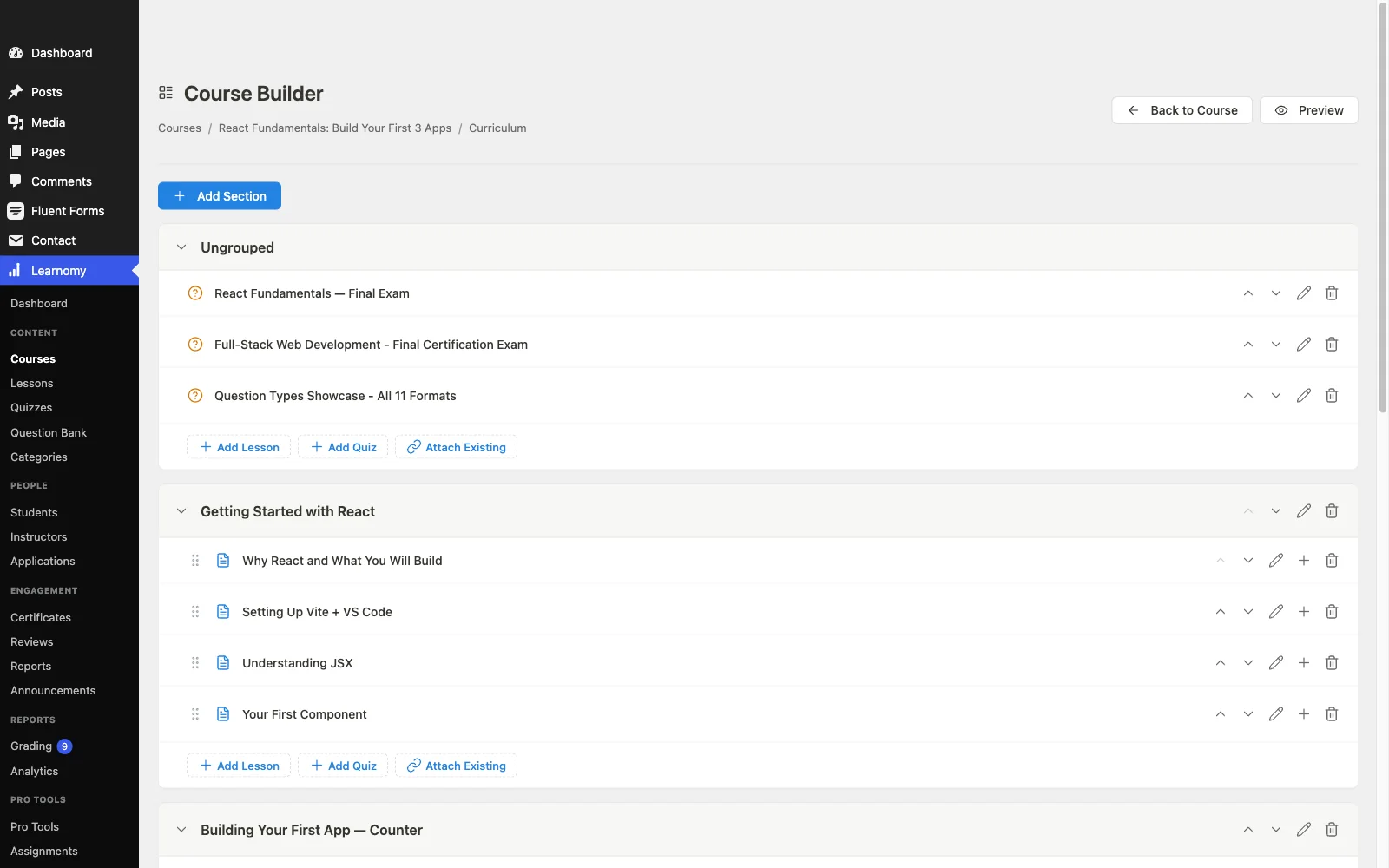
Pros:
- Complete loop: author, assess, certify, sell, revise, in one platform
- Front-end builder your future co-instructors can use untrained
- Question banks and an essay inbox make revision cycles cheap
- Built-in checkout and memberships; no platform fees
- Verifiable certificates that market the course
Cons:
- Younger third-party ecosystem than the veterans
- Self-hosted maintenance remains yours
The deal: no platform fees, what students pay stays with you.
2. Tutor LMS: the authoring favorite
On pure authoring feel, Tutor LMS is the freemium benchmark: a clean frontend course builder, drag-and-drop curriculum management, and a quiz builder that’s pleasant even in the free version. Version 3’s native payments mean a finished course can sell without WooCommerce, completing the loop for simple launches.
The revision-and-growth half is where the tier ladder appears: drip, certificates, deeper quiz types, and multi-instructor support renew annually in paid tiers, so the loop’s later iterations cost more than its first. Our Tutor LMS alternatives guide maps the moment that math changes.
Pros: benchmark authoring UX; native payments in v3. Cons: growth features tier-gated; weaker credentials. The deal: free core; the selling features renew annually.
3. LearnDash: the curriculum architect
For genuinely complex curricula, multi-level nesting, prerequisites, group hierarchies, granular quiz logic, LearnDash models course structure more deeply than anything else in WordPress, which is why agencies and institutions default to it. The authoring workflow is backend-first and feels like operating software rather than writing, but the structural power is real.
Selling the finished course routes through WooCommerce or EDD, and the full working stack settles into annual license renewals across several vendors. Creators who want the loop in one system have our LearnDash alternatives guide.
Pros: deepest curriculum modeling; huge ecosystem. Cons: backend-heavy authoring; selling delegated; multi-vendor renewals. The deal: annual license plus add-on renewals across vendors.
4. Sensei LMS: authoring inside the block editor
Sensei’s bet is that you already know how to write in WordPress: lessons are block-editor documents, courses are structured with course blocks, and anyone comfortable publishing posts can publish lessons. For WooCommerce store owners adding courses, the finished product slots straight into the existing catalog.
Assessment and credentials are the thin spots, functional quizzes, extension-grade certificates, and selling requires the store. It’s the lowest-friction authoring for WordPress natives, with the lowest ceiling among the serious tools.
Pros: zero new authoring skills; clean store fit. Cons: thin assessment and credentials; WooCommerce to sell. The deal: free core; annual Pro renewal.
5. LifterLMS: building for memberships
LifterLMS’s builder is competent and its real authoring strength is downstream: engagement sequencing, drip schedules, achievement triggers, and milestone emails that turn a static course into a paced program, exactly what a membership or cohort model needs (see our best LMS for coaches guide). The add-on economy applies to creation too: advanced quizzes, gateways, and integrations renew as bundles, per our LifterLMS alternatives guide.
Pros: program pacing and engagement authoring. Cons: bundle sprawl; single-course selling secondary. The deal: annual add-on bundle renewals.
6. MemberPress Courses: the commerce-first builder
MemberPress inverts the usual failure: the commerce layer, native checkout, subscriptions, access rules, is the best-tested part, and the block-based course builder rides on top. Authoring is simple and a little shallow (modest quizzes, basic certificates), but a creator whose model is “protected content that bills reliably” gets exactly that.
Pros: commerce reliability; simple authoring. Cons: shallow assessment; no instructor story. The deal: annual license renewal.
7. WP Courseware: the outline-first minimalist
WP Courseware’s drag-and-drop outline view is a genuinely good way to draft a course fast, and built-in Stripe/PayPal checkout means the draft can sell the day it’s done. Basic quizzes and certificates cap the ceiling; for simple linear courses that intend to stay simple, the whole loop fits in an afternoon.
Pros: fastest outline-to-published path; built-in checkout. Cons: basic assessment; limited growth. The deal: annual license renewal.
8. LearnPress: the theme-bundle starter
LearnPress remains the plugin many creators inherit with an education theme, and its core authoring, courses, lessons, basic quizzes, works. Everything else in the loop is a separately purchased add-on (certificates, assignments, drip, payments), assembled on a dated admin experience. Author a trial course here if it’s already installed; build the business on something whole, our LearnPress alternatives guide maps the destinations.
Pros: often already installed; adequate basics. Cons: loop sold piecemeal; dated UX. The deal: free core; add-ons purchased piecemeal.
The 90-minute workflow test
Before committing to any of these, run the same 90-minute test on your shortlist: build one real module, three lessons in at least two formats, one quiz with a couple of question types, publish it, set a price, and complete a test purchase end to end. The test reveals what no comparison table can: how the builder feels with your material, whether assessment supports how you actually teach, and how many systems stand between “published” and “paid.” Platforms with the full loop built in, Learnomy most completely, tend to finish the test with time to spare; stacks spend the first hour on configuration. However it comes out, you’ll have chosen with evidence, and the ownership stakes of the choice are laid out in selling online courses from your own website.
FAQ
What is the best WordPress plugin for creating online courses? Learnomy, for keeping the whole creation loop, authoring, assessment, certificates, selling, and revision, in one complete learning platform for WordPress with a front-end builder and no platform fees, what students pay stays with you.
Which plugin has the easiest course builder for beginners? Tutor LMS and Learnomy both offer front-end drag-and-drop builders that need no wp-admin knowledge; Sensei is easiest for anyone already fluent in the WordPress block editor.
Can I create a course with video, audio, and downloadable files in one plugin? Yes, Learnomy supports video, audio, PDF, and reading lessons natively, and most major plugins here handle mixed media, with varying elegance. Test your heaviest format in the 90-minute test above.
Do I need a page builder like Elementor to create courses? No. Every plugin here structures courses itself. Page builders style the marketing pages around a course; the course experience comes from the LMS, which is why builder quality matters more than theme compatibility lists.
How do I sell the course once it’s built? Depends on the plugin: Learnomy, WP Courseware, and MemberPress sell natively (Tutor LMS too, since v3); LearnDash, Sensei, LifterLMS, and LearnPress delegate to WooCommerce, EDD, or add-ons. Fewer systems between course and checkout means fewer launch-week failures.
Can I move my course to another plugin later? Only where importers exist: Learnomy ships migration wizards for LearnDash, Tutor LMS, and LifterLMS catalogs; most other moves are manual rebuilds. Choosing well the first time is worth a weekend of testing.
Verdict
Course creation is a loop you’ll run for years, and the plugin that owns the whole loop beats the one that’s brilliant at a single arc. Learnomy is that plugin: front-end authoring, real assessment, verifiable certificates, built-in selling, and revision signal from its own community, with no platform fees on any of it. Tutor LMS is the authoring runner-up, LearnDash the structural specialist, Sensei the block-editor natural, and the rest strong at their specific shapes. Run the 90-minute test, then build.
Create, sell, and revise in one place
Learnomy is a complete learning platform for WordPress: front-end drag-and-drop course building across video, audio, PDF, and reading lessons, six quiz types with question banks, QR-verifiable certificates, and built-in Stripe and PayPal checkout, with no platform fees, what students pay stays with you. Tour it at learnomy.app.