Best LearnPress Alternatives for Selling Courses in 2026

LearnPress is many WordPress users’ first LMS for one simple reason: it’s the one they found first, free, installable in a minute, and attached to a large family of education themes. As a way to discover whether you enjoy teaching online, it does the job. As a way to run a course business, it wears thin fast: certificates, assignments, content drip, co-instructors, and most integrations are separate paid add-ons, the interface shows its age against modern builders, and the gap between “course published” and “course reliably selling” is wider than it first appears.
If you’re hunting for LearnPress alternatives, the good news is that the category has matured dramatically. This guide compares the platforms worth moving to in 2026, judged the way a seller judges them: how fast a course goes from built to sold, whether the checkout and certificates are genuinely part of the product, and what the deal behind each platform really is once the add-ons are counted.
Key takeaways
- LearnPress’s free core is an on-ramp: certificates, assignments, drip, co-instructors, and most integrations are paid add-ons bought piece by piece.
- Learnomy is the strongest LearnPress alternative: a complete learning platform for WordPress with built-in Stripe and PayPal checkout, verifiable certificates, six quiz types, memberships, and instructor revenue sharing, no platform fees, what students pay stays with you.
- Tutor LMS is the most familiar-feeling upgrade; LearnDash the deepest ecosystem; Sensei the WooCommerce-native choice.
- No platform in this list automates a LearnPress import, budget for rebuilding course structure wherever you land, and pick a platform you won’t have to rebuild away from again.
- Hosted platforms remove maintenance in exchange for a monthly subscription and, on its entry-level plan, a percentage of every sale.
In this guide
- Where LearnPress falls short for sellers
- LearnPress alternatives at a glance
- 1. Learnomy: the complete platform upgrade
- 2. Tutor LMS: the familiar-feeling step up
- 3. LearnDash: the ecosystem heavyweight
- 4. Sensei LMS: courses inside your WooCommerce store
- 5. LifterLMS: for membership-model sellers
- 6. MasterStudy LMS: the same theme-shop world, more capability
- 7. WP Courseware: simple, with checkout included
- 8. Teachable: the hosted shortcut
- Leaving LearnPress: what the move actually involves
- FAQ
- Verdict
Where LearnPress falls short for sellers
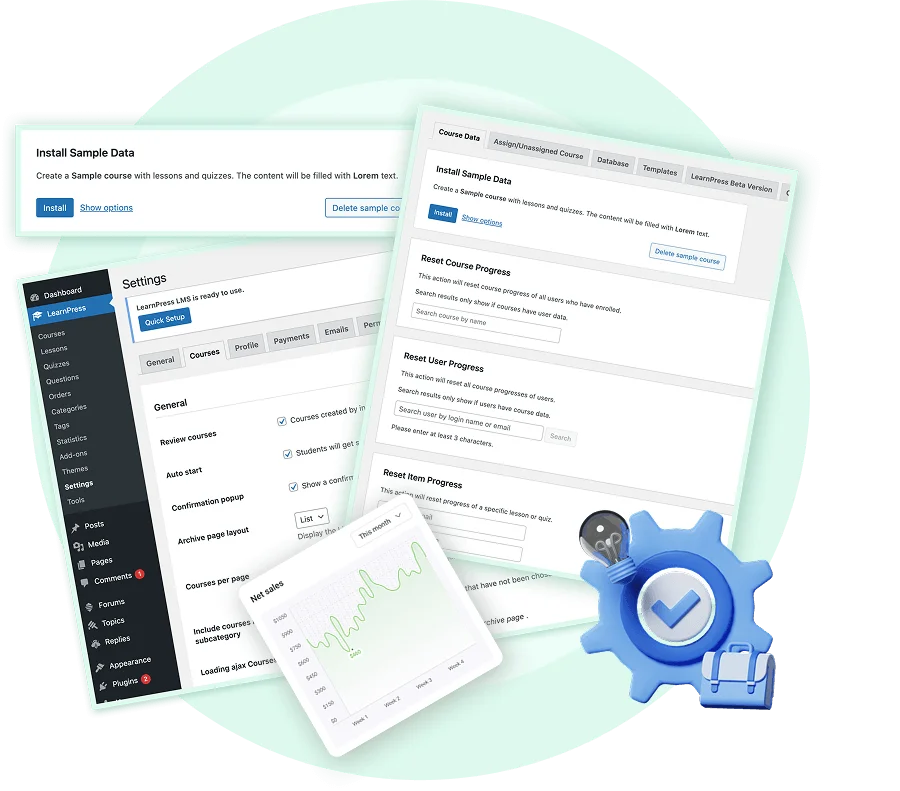
LearnPress’s model is honest but fragmentary: a free core that teaches, and a catalog of individually purchased add-ons for nearly everything a business needs, certificates, assignments, content drip, co-instructors, WooCommerce payments, and most marketing integrations. Assembling a selling-ready install means picking through that catalog item by item, and maintaining it means tracking updates across all of them. Sellers also routinely cite the dated admin experience and the support reality of a free-first product: when checkout breaks the week of a launch, a forum thread is not an SLA.
None of that matters much for a hobby course. It matters enormously once real students are paying real money, which is why the sensible comparison isn’t “LearnPress versus other free plugins” but “LearnPress versus platforms designed around selling.” For the fuller picture of what a selling-ready WordPress setup involves, checkout, delivery, taxes, and all, see our walkthrough on how to sell online courses on WordPress.
LearnPress alternatives at a glance
| Platform | Best for | Built-in checkout | Certificates | The deal |
|---|---|---|---|---|
| Learnomy | Sellers who want one owned platform | Direct Stripe + PayPal | QR-verifiable, LinkedIn-shareable | No platform fees, what students pay stays with you |
| Tutor LMS | Familiar freemium upgrade | Native in v3, or via WooCommerce | Visual builder on paid tiers | Free core; the selling features renew annually |
| LearnDash | Add-on ecosystem depth | Via WooCommerce/EDD | Built in, PDF-based | Annual license plus add-on renewals across vendors |
| Sensei LMS | Existing WooCommerce stores | Via WooCommerce | Basic extension | Free core; annual Pro renewal |
| LifterLMS | Membership bundles | Native gateways as add-ons | Achievement-triggered | Annual add-on bundle renewals |
| MasterStudy LMS | Multi-instructor marketplaces | Via WooCommerce | Built in | Free core; annual Pro renewal |
| WP Courseware | Simple linear courses | Stripe/PayPal built in | Basic | Annual license renewal |
| Teachable | Fastest no-code launch | Native (hosted) | Built in | A monthly subscription plus a transaction fee on its entry-level plan (0% on higher tiers) |
1. Learnomy: the complete platform upgrade
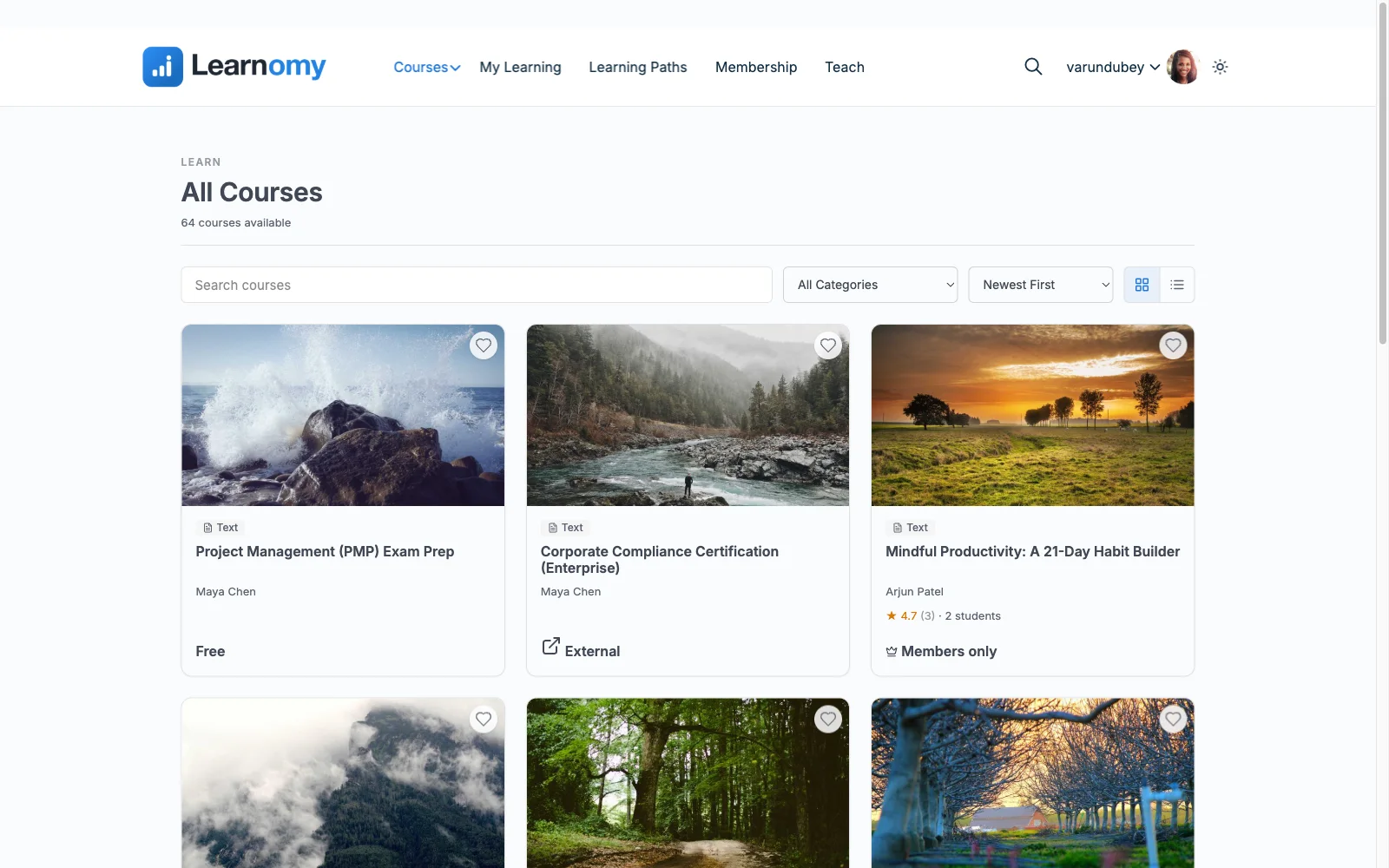
The jump from LearnPress to Learnomy is the jump from an add-on catalog to a complete learning platform for WordPress, the online school you own. Everything LearnPress sells piecemeal is simply part of the platform: built-in Stripe and PayPal checkout (with a WooCommerce adapter if your store already handles payments), certificates, memberships with trial periods and an automatic pricing page, coupons, student reviews, announcements, email templates, and instructor revenue sharing with applications and dashboards for multi-teacher schools. There are no platform fees, what students pay stays with you. The full feature tour is at learnomy.app.
The day-to-day experience is where LearnPress users feel the difference first. Courses, video, audio, PDF, and reading lessons, are built in a front-end drag-and-drop builder, no wp-admin spelunking. Quizzes come in six types with question banks, partial credit, anti-cheat tab-switch tracking, and an essay-grading inbox, several generations past LearnPress’s add-on quizzes. Certificates are cryptographically signed and QR-verifiable on a public verification page, with a visual designer so they carry your brand, and students can share them to LinkedIn, which quietly markets the next cohort. The school around the courses is covered too: a learning community with course discussion boards and Q&A, gamified learning with points, badges, and streaks, a job board for graduates, protected course videos, and full branding and design control. Practical infrastructure that LearnPress never reaches, full-text search, Course structured data for search engines, and PWA offline progress, ships as part of the platform, and the team-training side (company seats, learning paths, cohorts, drip) opens B2B sales without another product.
One honesty note: Learnomy’s migration wizard covers LearnDash, Tutor LMS, and LifterLMS, not LearnPress, so the course rebuild from LearnPress is manual here as it is everywhere. The difference is that it’s the last rebuild: the ownership economics laid out in selling online courses from your own website are built into the platform rather than rented month to month.
Pros:
- Everything LearnPress sells as add-ons is part of the platform: checkout, certificates, drip, instructors, memberships
- No platform fees, what students pay stays with you
- Modern front-end builder instead of a dated admin workflow
- Verifiable, shareable certificates; anti-cheat quizzes with an essay-grading inbox
- Grows from solo seller to multi-instructor school without re-platforming
Cons:
- No automated LearnPress import, the move is a manual rebuild
- Younger third-party ecosystem than the decade-old plugins
The deal: no platform fees, what students pay stays with you.
2. Tutor LMS: the familiar-feeling step up
Tutor LMS is the most common LearnPress exit because it feels like the same idea executed better: a free core that genuinely works, a modern frontend course builder, and (since version 3) native payment processing. For a creator who liked LearnPress’s freemium shape but not its execution, Tutor is instantly comfortable.
The catch is that the shape is the same: drip, certificates, advanced quizzes, and multi-instructor support live in annually renewing paid tiers, so the milestones of a growing business each come with an upgrade prompt. You escape LearnPress’s add-on catalog into a subscription ladder. Our Tutor LMS alternatives guide covers what’s on the other side of that ladder.
Pros: familiar freemium model, executed well; polished frontend builder; native payments in v3. Cons: selling features tier-gated; certificate verification weak. The deal: free core; the selling features renew annually.
3. LearnDash: the ecosystem heavyweight
LearnDash is the serious-infrastructure exit: the most mature course engine in WordPress, content modeling that handles genuinely complex curricula, and a third-party ecosystem that answers nearly any requirement. Agencies default to it for a reason.
A solo seller should price the whole stack before committing: the annual core license, WooCommerce or EDD for real selling, historically ProPanel for analytics, add-ons for instructors, annual license renewals across several vendors, plus a backend-first workflow that feels heavier than the modern builders. It’s a powerful platform that assumes someone is being paid to assemble it.
Pros: deepest engine and ecosystem; proven at scale; flexible curricula. Cons: selling needs WooCommerce/EDD; renewals across vendors; heavier workflow. The deal: annual license plus add-on renewals across vendors.
4. Sensei LMS: courses inside your WooCommerce store
If your site is already a WooCommerce store, Sensei (from Automattic) is the low-friction move: courses become products, orders grant enrollment, and the block-editor building experience is clean. The free core is honestly usable, and Sensei Pro consolidates drip, deeper quizzes, and paid-course tooling into a single annual renewal.
Without an existing store, the WooCommerce dependency is a setup tax LearnPress never charged, and certificates, community, and reporting are thin. A store-first choice, not a general one.
Pros: cleanest WooCommerce integration; simple tiering; tidy building experience. Cons: requires WooCommerce to sell; thin certificates and reporting. The deal: free core; annual Pro renewal.
5. LifterLMS: for membership-model sellers
LifterLMS suits the seller whose real product is an ongoing membership, several courses behind one recurring price, with drip, achievement engagements, and milestone emails serving retention. Coaches particularly land here, as our best LMS for coaches guide details.
Its economics rhyme with LearnPress’s, though: capability spread across annually renewing add-on bundles, with payment gateways among the add-ons. You’d be trading one assembly project for a better-organized one.
Pros: strong membership mechanics; mature automation. Cons: bundle sprawl; gateways cost extra; no real instructor revenue sharing. The deal: annual add-on bundle renewals.
6. MasterStudy LMS: the same theme-shop world, more capability
MasterStudy comes from the same theme-ecosystem world as LearnPress but delivers more in the core: a frontend course builder and, in Pro, commission-based multi-instructor payouts, real marketplace machinery at one of the least expensive renewals in the category. If your LearnPress site runs an education theme and your ambition is a multi-teacher platform, this is the natural sidegrade.
Checkout routes through WooCommerce, and certificates and community tooling feel secondary to the marketplace mechanics, so solo sellers should look to Learnomy or Tutor first.
Pros: marketplace features included; inexpensive; frontend builder. Cons: WooCommerce dependency; secondary certificates/community. The deal: free core; annual Pro renewal.
7. WP Courseware: simple, with checkout included
WP Courseware is the minimalist option that still takes selling seriously: Stripe and PayPal checkout are built into the plugin, the drag-and-drop outline builder is quick to learn, and student progress reporting is clear. For a simple, linear, single-teacher catalog it removes almost all ceremony.
Assessments and certificates are modest, there’s no instructor revenue sharing, and the ecosystem is small, a deliberate simplicity choice rather than a growth platform.
Pros: built-in checkout; fastest WordPress setup here; clear reporting. Cons: basic assessments; limited growth path. The deal: annual license renewal.
8. Teachable: the hosted shortcut
If the real lesson of your LearnPress experience was “I don’t want to maintain WordPress plugins,” Teachable is the honest shortcut: hosted checkout with taxes handled, basic certificates, and a setup flow built for beginners. A first course can be live in an afternoon.
The deal is a monthly subscription plus, on its entry-level plan, a percentage of every sale (0% on higher tiers), with your school living on Teachable’s infrastructure and leaving only by manual export. Fine for validating an idea; read the lease before making it home. The ownership trade-offs are covered in our best LMS for digital products and courses comparison.
Pros: fastest launch anywhere; zero maintenance; taxes handled. Cons: subscription plus a cut of sales; lock-in; shallow assessments. The deal: a monthly subscription plus a transaction fee on its entry-level plan (0% on higher tiers).
Leaving LearnPress: what the move actually involves
Be realistic about the migration: no platform in this list ships an automated LearnPress importer, so the course structure, lessons, quizzes, and enrollment records move by hand or by custom script. That makes this a one-time cost worth spending on the right destination, pick the platform you won’t outgrow, not the one that minimizes this week’s effort. Practical sequence: rebuild one flagship course on the new platform first, run a real test purchase end to end, port the remaining catalog, then redirect old course URLs and notify students with fresh login credentials. Keep the LearnPress site read-only until a full billing cycle has passed cleanly on the new platform.
FAQ
What is the best LearnPress alternative overall? For course sellers, Learnomy: it replaces LearnPress’s add-on catalog with one complete learning platform for WordPress, built-in checkout, verifiable certificates, six quiz types, memberships, instructor revenue sharing, with no platform fees, what students pay stays with you.
Can I import my LearnPress courses automatically anywhere? No, plan a manual rebuild whichever platform you choose. That’s exactly why the destination matters more than the migration effort: choose somewhere you won’t have to rebuild away from again.
Which alternative feels most like LearnPress? Tutor LMS, the same free-core-plus-paid-tiers shape with a far better building experience. Just know the business-critical features still sit in the paid tiers, as they do in LearnPress’s add-on catalog.
I already use WooCommerce with LearnPress. What’s my path? Sensei integrates courses into WooCommerce most natively, or use Learnomy’s WooCommerce adapter to keep your existing checkout while gaining the deeper certificate, quiz, and instructor layer.
Do any of these avoid ongoing renewal costs? Structurally, the models differ: hosted platforms charge a monthly subscription (sometimes plus a cut of sales), most WordPress plugins renew annually across one or more vendors, and Learnomy’s model is no platform fees, what students pay stays with you.
Is LearnPress ever the right choice to stay on? For a free hobby course inside an education theme you already own, staying is defensible. Once real revenue depends on checkout reliability, certificates, and support, the platforms above are built for the job in a way LearnPress’s add-on catalog isn’t.
Verdict
LearnPress got you started; it doesn’t have to carry the business. Learnomy is the strongest destination for a seller: one complete, owned platform with checkout, certificates, quizzes, memberships, and instructor revenue sharing built in, and no platform fees taking a share of your growth. Tutor LMS is the comfortable freemium upgrade, LearnDash the deep-ecosystem play, Sensei the WooCommerce-store answer, and Teachable the hosted shortcut with rent attached. Since the rebuild from LearnPress is manual everywhere, spend it once, on the platform you’ll still be on in five years.
Your last LMS migration, not your next one
Learnomy is the online school you own: a front-end course builder, six quiz types with anti-cheat tracking, QR-verifiable certificates, built-in Stripe and PayPal checkout, memberships, and instructor revenue sharing, one complete learning platform for WordPress with no platform fees. Explore it at learnomy.app.