How to Start an Online Coaching Business With a WordPress Site That Actually Converts


Updated September 2026. Most coaches launch their WordPress site, post a few testimonials, and wait for clients to show up. They do not show up. Not because the coach is bad at what they do, but because the site is not doing any selling. It is sitting there like a digital brochure when it needs to work like a sales machine running around the clock.
The difference between a coaching site that fills a calendar and one that collects dust is not the coach’s credentials. It is the site’s structure.
This guide walks you through every layer of building an online coaching business on WordPress, from picking a niche that actually has paying clients to structuring a sales page that moves people from “curious” to “booked.” You will find specific plugin and tool recommendations, real pricing structures coaches use, and a practical breakdown of what happens on a high-converting discovery call.
In this guide
- Step 1: Choose a Coaching Niche That Has Real Buyers
- Step 2: Design Your Signature Offer Before You Build Anything
- Step 3: Build Your WordPress Stack for Coaching Sales
- Step 4: Set Up Your Discovery Call System
- Step 5: Price Your Coaching Packages Properly
- Step 6: Structure Your Sales Page to Actually Convert
- Step 7: Build a Testimonial Wall That Does the Selling For You
- Step 8: Create a Client Results Page With Measurable Outcomes
- Step 9: Build Your Email List From Day One
- Step 10: Run Discovery Calls That Close Qualified Prospects
- Putting It All Together: Your 30-Day Launch Roadmap
- Ready to Set Up Your Coaching Business on WordPress?
Step 1: Choose a Coaching Niche That Has Real Buyers
The single most common mistake new coaches make is staying too broad. “Life coach” is not a niche. “Business coach” is not a niche. These are categories. A niche is specific enough that a potential client reads your homepage headline and thinks, “This person is talking directly to me.”
Here is how to get to a real niche. Start with three questions:
- Who do you have direct experience serving or being?
- What specific outcome do they desperately want?
- What is the biggest obstacle standing between them and that outcome?
A broad niche becomes specific when you layer in audience plus problem plus context. “Executive coach” becomes “career transition coach for mid-level managers moving into first VP roles.” “Fitness coach” becomes “strength training coach for women over 40 who have tried everything and hit a plateau.” The moment you read those, you either feel seen or you move on. That is exactly what you want. Browsers who are not your client should move on quickly. The ones who feel seen will read every word.
Specificity also makes SEO far easier. “Business coach” will never rank on page one without years of domain authority. “Career transition coach for tech layoffs” might rank within 90 days if there is enough search intent and limited competition. Long-tail keyword phrases tied to a specific audience problem are where new coaching sites win search traffic without a massive budget.
To validate your niche before building anything, check three things: Are people actively searching for this kind of help? Use Google’s autocomplete and check monthly search volume with a free tool like Ubersuggest or Google Keyword Planner. Are there coaches already charging premium rates in this space? That is a good sign, not a bad one. Competition means there is money. Can you name 10 specific people right now who would benefit from your coaching? If yes, you have a niche worth building around.
Step 2: Design Your Signature Offer Before You Build Anything
Your offer is the thing you sell. Your website exists to sell it. Building the site before you have a clear offer is like building a storefront before you know what product goes on the shelves.
There are four main offer formats for coaches. Each has a different income profile, delivery requirement, and ideal stage to introduce it.
1:1 Coaching Sessions
One client, one coach, set time block. This is the simplest offer to start with and the easiest to deliver. The economics do not scale beyond a certain point, but for building your first 10 to 20 clients, it is the fastest path to cash and to learning what your clients actually need. Typical price points range from $200 to $800 per session depending on niche and experience level.
Group Programs
Small groups of 5 to 15 people going through the same program together over 6 to 12 weeks. You deliver one live session per week and the group dynamic creates peer accountability that often produces better results than 1:1 work. Price is lower per person than 1:1, but you earn more per hour of your time. This format works well once you have proven your methodology with 1:1 clients and know exactly what the curriculum needs to cover.
Online Courses
Pre-recorded curriculum that clients move through at their own pace. Highest scale potential but lowest touch. Use courses as a lower-price entry point into your ecosystem or as a standalone product for passive income. Do not expect courses to replace coaching revenue in the early stages. Build courses after you have coached enough clients to know exactly what the curriculum should cover, word for word.
Retainer Programs
Monthly or quarterly retainers where the client pays for ongoing access. These can include a set number of calls, unlimited messaging via Voxer or WhatsApp, or hybrid combinations. Retainers create predictable revenue and deepen the coaching relationship over time. Typical monthly retainer rates for coaching range from $1,500 to $5,000 depending on niche and level of access provided.
For a new coaching site, the cleanest starting point is one core 1:1 offer and one session pack. Keep it simple. One thing to understand, one thing to buy. Add complexity only after you have client case studies to justify premium pricing tiers.
Step 3: Build Your WordPress Stack for Coaching Sales
WordPress powers over 43% of the web for good reason. For coaches, it gives you full ownership of your site, your content, your client data, and your transaction records. You are not building on rented land the way you are with Kajabi or Podia. You control everything, and you pay a fraction of the monthly cost.
Theme: Astra or BuddyX
Astra is the fastest-loading WordPress theme in the ecosystem. Its Starter Templates library includes pre-built coaching site designs that import in under two minutes. It works with any page builder (Elementor, Beaver Builder, or the native block editor) and performs well on Core Web Vitals without any optimization effort.
BuddyX is worth considering if your coaching model involves any community element, accountability groups, or peer-to-peer interaction between clients. It integrates with BuddyPress to give you social feeds, member profiles, and group spaces that keep your clients engaged between calls and between program cohorts.
Sales and Booking: WP Sell Services
WP Sell Services is purpose-built for service businesses selling sessions, packages, and retainers directly on WordPress. Unlike WooCommerce, which is designed for physical or digital products, WP Sell Services handles coaching-specific workflows out of the box: session packs, one-time bookings, recurring payments, and client portals. If you have been relying on platforms that take a cut of every transaction, read why owning your own WordPress service marketplace is a better long-term move.
You set up your coaching packages (3-pack, 6-pack, monthly retainer), and clients can browse, select, and purchase directly on your site. Payments process through Stripe or PayPal. After purchase, the client receives a confirmation email and you get a booking notification. No third-party scheduling platform required if you configure availability within the plugin itself.
The plugin also supports intake forms attached to each service, so clients fill out their goals and background information at the time of purchase. You show up to the first call already knowing what they need. That alone dramatically improves the client experience and removes the awkward first 10 minutes of every initial session.
Essential Supporting Plugins
- RankMath SEO (free) for on-page SEO, sitemaps, and review schema markup
- WP Rocket or Perfmatters for page speed and caching to hit Core Web Vitals targets
- Cloudflare free plan for CDN and DDoS protection
- WPForms or Gravity Forms for contact and discovery call application forms
- ConvertKit or MailerLite for email list building
If your coaching offer includes a self-paced course alongside sessions, Learnomy is the complete learning platform built for that piece: lessons, quizzes, and verifiable certificates on a checkout with no platform fee.
Step 4: Set Up Your Discovery Call System
Discovery calls are how most coaches convert strangers into paying clients. Before someone commits $3,000 to a 3-month program, they want to talk to you. That is normal and healthy. Your job is to make booking that call as frictionless as possible and then run the call in a way that closes qualified prospects without feeling pushy.
Booking Tool Options
Calendly (free plan): The free tier gives you one event type with unlimited bookings. You set your availability windows, embed the booking widget on your discovery call page, and Calendly handles confirmations, reminders, and time zone conversion automatically. Plenty sufficient to start. Upgrade to the paid plan ($10/month) when you need multiple event types or want automated follow-up sequences.
TidyCal: A one-time purchase alternative to Calendly, typically available for under $30 as a lifetime deal. Offers multiple booking types, group scheduling, and integrations with Zoom and Google Meet. Good value if you want to avoid a recurring subscription and prefer to own your tools.
WP Sell Services booking: If you prefer to keep everything inside WordPress, WP Sell Services includes booking management so clients can schedule directly after purchasing a session pack. This keeps the entire sales-to-booking flow in one place without any external tool dependency or data leaving your platform.
Whichever tool you use, add a short application form before the booking page. Ask two or three qualifying questions: what they are trying to achieve, what they have already tried, and what their timeline looks like. This filters out time-wasters and ensures the people who book are actually ready to invest in coaching.
Step 5: Price Your Coaching Packages Properly
Pricing is where new coaches leave the most money on the table. They undercharge because they feel they have not “earned” higher rates yet, and then they burn out trying to fill a calendar at $75 per hour. Here is a framework that works across most niches.
Session Packs
Sell sessions in bundles of 3, 6, and 12. Single session pricing should feel inefficient compared to pack pricing, so clients naturally gravitate toward a bundle. For example:
- Single session: $350
- 3-session pack: $900 (saves $150)
- 6-session pack: $1,600 (saves $500)
- 12-session pack: $2,800 (saves $1,400)
Most clients choose the 3 or 6 pack. The 12-pack functions as a pricing anchor, making the 6-pack feel like an obvious value. Adjust numbers based on your niche and market. An executive leadership coach can price these 2 to 3x higher than a general productivity coach serving the same audience size.
Monthly Retainers
A retainer includes a defined scope of access each month. A typical structure might be two 60-minute calls per month, unlimited Voxer or WhatsApp messaging, and a shared working document for notes and progress tracking. Price retainers at a premium over equivalent session pack pricing because the client is buying access and responsiveness, not just call time.
Example retainer tiers:
- Foundation: $1,200/month (2 calls + async messaging)
- Accelerator: $2,500/month (4 calls + daily messaging + quarterly planning session)
- VIP: $4,000/month (weekly calls + same-day response + priority access)
VIP Days
A VIP day is an intensive, focused working session, typically 4 to 6 hours, where you and the client tackle one big problem together in real time. Coaches charge $2,000 to $6,000 for a VIP day depending on niche. The economics are excellent: one client, one day, high-impact outcome. VIP days work particularly well for strategy coaches, copywriting coaches, and systems coaches where a single focused day produces something concrete and measurable.
List all of these on your site through WP Sell Services, which handles the purchase flow, payment processing, and post-purchase delivery for each tier. Clients pick the package, pay, and immediately receive their confirmation with next steps. No invoice chasing, no manual follow-up.
Step 6: Structure Your Sales Page to Actually Convert
Your sales page does one job: move a cold visitor to a warm prospect or a direct sale. Every element on the page should serve that single goal. Here is the structure that converts consistently for coaching sites.
Above the Fold: Problem Statement
The headline should name the problem your ideal client is living with right now. Not your credentials. Not your methodology. The problem. Something like: “You’re doing everything right and still not getting promoted. Here’s why.” Or: “Running a six-figure business on 60-hour weeks is not success. Let’s fix that.” The subheadline expands on the problem with a hint of hope. Include a clear call-to-action button linking to your discovery call booking page above the fold. Most visitors who are ready to buy will click right here.
Agitation Section
This is where you show the prospect that you understand their situation in specific detail. Name the symptoms they experience day to day. Name the false solutions they have already tried that did not work. The goal is for the reader to feel that you have been in the room with them. This builds trust faster than any credential list. Keep paragraphs short. Use bullet lists to make symptoms scannable. Use plain, direct language. Avoid anything that sounds like a brochure.
Solution Section
Introduce yourself and your approach. Not your biography, but your method. Explain what you do differently from generic advice and what specifically makes your approach produce the outcomes your clients want. Keep this focused on the client’s outcome, not on your background. Your credentials are proof, not the point.
Social Proof
Testimonials from past clients placed right after you introduce yourself. Video testimonials outperform text by a wide margin, but text with a real name and photo still converts well. Include at least 3 to 5 testimonials here. Prospects who read client success stories from people who looked like them six months ago are already 80% sold before they ever talk to you.
Offer Section
Present your coaching packages clearly. Show the name, what is included, the price, and a buy button for each tier. If you are using WP Sell Services, embed the package selection widget here so the purchase flow happens without the prospect leaving the page. Reducing clicks between interest and payment is one of the highest-leverage improvements you can make to a coaching sales page.
Final Call to Action
End the page with a direct call to action. Either book a discovery call or purchase directly. Add one final testimonial near the bottom. People who scroll all the way down are interested. Give them the push they need with a clear next step and no distractions.
Step 7: Build a Testimonial Wall That Does the Selling For You
Testimonials are not decoration. They are your most powerful sales tool when used strategically. A specific, outcome-driven testimonial from someone who matches your ideal client profile will close sales that no headline ever could.
Collecting Video Testimonials
At the end of a successful coaching engagement, send the client a short Loom request. Give them a simple prompt: describe where you were when we started, what changed, and where you are now. Keep it to 90 seconds. Most clients are happy to do this if the relationship was good and the results were real. Video testimonials are authentic in a way that text cannot replicate. The prospect sees a real person, hears the emotion in their voice, and trusts the result at a gut level that text cannot reach.
Collecting Text Testimonials
Send a structured request via email. Do not just ask “Can you leave me a testimonial?” That produces vague, unhelpful responses. Ask three specific questions:
- What was the specific challenge or goal you brought to coaching?
- What changed as a result of our work together?
- What would you tell someone on the fence about working with [your name]?
Those three answers, assembled in order, become a complete story that covers problem, transformation, and endorsement. Ask permission to edit for clarity and length while keeping their words intact.
Schema Markup for Testimonials
Add Review schema markup to your testimonials so Google can display star ratings in search results. RankMath SEO handles this automatically through its Schema Generator. Set up a Service schema for your coaching business and add individual Review items for each testimonial. This can increase click-through rates from search by 15 to 30 percent by making your listing visually stand out in results.
Step 8: Create a Client Results Page With Measurable Outcomes
A testimonial wall shows what clients said. A results page shows what actually happened, in numbers. These are case studies, and they are the most credible form of social proof you can publish. Anyone can collect praise. Fewer coaches can show documented, measurable transformations.
A strong coaching case study follows this structure:
- Client background: Who they are, what their situation was when they started (be specific about pain points and starting metrics)
- What we worked on: The focus area and approach used during coaching
- The measurable outcome: Specific, numbered results (“Promoted to VP within 4 months,” “Revenue grew from $8K to $23K/month in 90 days,” “Lost 28 pounds and completed first 10K in 14 weeks”)
- Client quote: A direct quote from the client about the experience
Aim for 3 to 5 detailed case studies on your results page before launch. If you are just starting and do not have paying clients yet, offer 2 to 3 pro bono or heavily discounted sessions in exchange for a detailed written case study. The marketing value of those case studies is worth far more than the revenue you gave up. One strong case study can close a $3,000 sale on its own.
Create a dedicated “Results” or “Client Stories” page in your WordPress navigation. Link to it from your main sales page and reference it in your discovery call application confirmation emails. Prospects who read two or three case studies before a discovery call show up already sold on the concept. Your job on the call becomes confirming fit rather than overcoming skepticism about whether coaching works.
Step 9: Build Your Email List From Day One
Social media platforms can disappear, change their algorithm, or restrict your reach overnight. Your email list is the one audience asset you own completely. Start building it before you have a full site. Start building it before you have paying clients. The list is the business, because every sale you ever make will ultimately trace back to your ability to reach people directly.
Lead Magnet Ideas for Coaches
A lead magnet is a free, high-value resource you give away in exchange for an email address. For coaching businesses, these formats convert best:
- PDF guide or checklist: “The 7-Step Framework for Landing a VP Role in 90 Days.” Specific, promised outcome, short enough to read in one sitting.
- Free training video: A 20-minute recorded training on one specific problem your audience has. Embed it on a landing page, gated behind an email opt-in.
- Assessment or quiz: “What’s Holding Back Your Business Growth?” Five to ten questions, personalized results delivered by email. Tools like Typeform or Interact make these straightforward to build without any coding.
- Swipe file or template: “The Exact Weekly Schedule I Used to Double My Revenue While Working 40 Hours.” Real, usable, specific to the outcome your audience wants.
- Free mini-course: A 3-day or 5-day email course delivering one insight per day. This builds trust fast because the prospect samples your thinking and coaching style before committing to a paid program.
Email Platform Setup
ConvertKit is the first choice for coaches and content creators. The free plan supports up to 10,000 subscribers with automation sequences, landing pages, and broadcasts. The visual automation builder makes it easy to set up a welcome sequence, a lead magnet delivery sequence, and a nurture sequence that runs automatically for every new subscriber without any manual effort on your part.
MailerLite is an excellent alternative. Free up to 1,000 subscribers with most features unlocked. Slightly more affordable at scale than ConvertKit. The interface is clean and beginner-friendly, with drag-and-drop email builders and solid automation tools.
Set up a 5-email welcome sequence that runs automatically when someone downloads your lead magnet. Email 1 delivers the lead magnet and introduces you briefly. Email 2 shares a client case study. Email 3 provides a useful tip or framework from your coaching methodology. Email 4 shares your backstory and why you do this work. Email 5 invites them to book a discovery call. This sequence turns a free download into a warm lead without any manual follow-up on your end.
Add opt-in forms to your homepage, sidebar, and at the bottom of every blog post. Use a hello bar or sticky footer bar for site-wide visibility. Exit-intent popups, used sparingly, recover 2 to 5 percent of leaving visitors. WPForms and Gravity Forms both integrate directly with ConvertKit and MailerLite to connect your WordPress forms to your email list without any custom code.
Step 10: Run Discovery Calls That Close Qualified Prospects
The discovery call is where the business actually gets made. Everything else on your site creates the conditions for this conversation. Here is what a high-converting discovery call looks like in practice, from opening to close.
Before the Call
Read the application form your prospect filled out before they dial in. Know their situation before the call starts. Open by referencing something specific from their application. “I saw you mentioned you’ve been trying to break into a VP role for two years. Let’s start there.” This shows you prepared, which is itself a signal that you take clients seriously and will show up for them the same way in a paid engagement.
Set an agenda at the start of the call: “We have 30 minutes. I want to understand your situation, share how I work, and if it seems like a fit for both of us, we can talk about next steps.” This framing makes the call feel structured and purposeful rather than a vague chat.
During the Call
Spend the first 15 to 20 minutes in listening mode. Ask about their current situation, what they have tried, why it has not worked, and what success looks like for them in concrete terms. Do not pitch during this time. The more they talk, the more they like you, and the more you understand what they actually need versus what they think they need.
When you shift to presenting your offer, tie everything directly to what they told you. “Based on what you shared, I think the 3-month program would address exactly this challenge. In that time we would work on X, Y, and Z.” Specific, not generic. The offer should feel like it was designed for their exact situation, even if you sell it to every client.
Handle objections by returning to the cost of not solving the problem. If someone says the price is too high, ask: “How much is this situation costing you every month in lost revenue, burned energy, or missed opportunities?” When the cost of the problem exceeds the price of the solution, the math becomes obvious. Your job is to help them see that clearly.
Asking for the Sale
At the end of the call, ask directly. “Based on everything we have talked about, does this feel like the right fit for where you are right now?” If they say yes, tell them you will send a payment link that day and book them for their first session within the week. Do not let the conversation end without a clear next action with a specific timeline.
If they say they need to think about it, send a follow-up email within 24 hours. Summarize the key point from their situation, restate what the coaching program addresses, and include the payment link again. Most undecided prospects convert on the follow-up email rather than the call itself. The call plants the seed. The email harvests it. Do not skip this step.
Your entire discovery call funnel, from landing on your site to becoming a paying client, can run on a WordPress site powered by WP Sell Services for session management, ConvertKit or MailerLite for email follow-up, and Calendly or TidyCal for frictionless booking. The technology stack is straightforward and affordable. What separates coaches who fill their roster from those who do not is the specificity of their niche, the clarity of their offer, and the confidence with which they present both.
Key takeaways
- Pick a coaching niche with buyers who are already spending money to solve the problem, not just a topic you enjoy talking about.
- A signature offer with a clear price and outcome converts better than an open-ended “work with me” pitch.
- WP Sell Services handles coaching packages, bookings, and intake forms directly on your own WordPress site.
- If part of the offer is a self-paced course, Learnomy runs it on the same site: lessons, quizzes, certificates, and a zero-fee checkout.
- A testimonial wall and a client results page do more selling on autopilot than another paragraph of self-description.
Putting It All Together: Your 30-Day Launch Roadmap
With a clear niche and offer defined, here is a realistic 30-day sequence to go from a blank WordPress install to your first paying client.
- Week 1: Set up WordPress with Astra or BuddyX theme. Install WP Sell Services. Configure your coaching packages and payment processing via Stripe. Set up Calendly or TidyCal with your availability windows and confirmation emails.
- Week 2: Write your sales page following the structure above. Create your discovery call application form. Write your lead magnet and build the ConvertKit or MailerLite welcome sequence. Add opt-in forms to the homepage and key pages.
- Week 3: Collect testimonials from past clients or pro bono clients. Build your results page with 3 to 5 case studies. Add schema markup for reviews via RankMath. Test page speed and fix any slow-loading elements.
- Week 4: Announce your launch to your existing network. Post your discovery call link on LinkedIn and in any communities you are active in. Send a personal email to everyone who has ever expressed interest in your coaching. Aim for 5 discovery calls booked in the first week. Close 2 to 3. Refine your pitch based on the objections you hear.
The first 10 coaching clients are the hardest to get. After that, referrals and organic search take over. A well-structured WordPress coaching site does the heavy lifting in between, pre-qualifying prospects, handling bookings, and processing payments without your direct involvement. Build it right the first time and it pays you back for years without requiring constant maintenance or technical updates. And if you ever want to expand beyond 1:1 coaching into a multi-service or marketplace model, see how other service providers have done it by building their own Upwork-style marketplace on WordPress.
Coaches Ready to Add a Course: The Case for a Complete Learning Platform
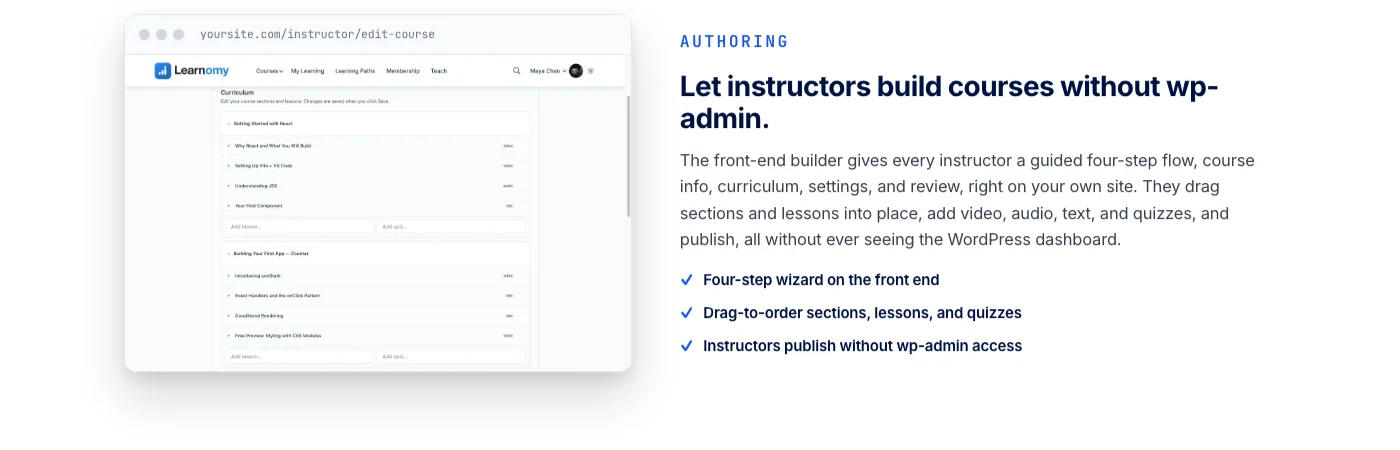
Step 2 above listed online courses as one of four coaching offer formats, and for coaches who go that route, the tooling question deserves its own answer. Learnomy is a complete learning platform for WordPress, not a narrow video-hosting plugin. It runs lessons across video, audio, PDF, and plain reading formats through a front-end course builder that skips the learning curve of a separate admin tool, so a coach can build and edit a course without ever opening wp-admin. The course and its checkout live on infrastructure the coach actually owns, the same case laid out in why creators should own their course platform instead of renting one from Teachable.
Students get progress tracking and a distraction-free lesson player from the moment they enroll, and checkout runs directly through Stripe and PayPal, connected to the coach’s own accounts, with no platform fee sitting between a sale and the coach.
Assessment goes beyond a simple end-of-video checkbox. Six quiz types with partial credit scoring, tab-switch tracking to discourage the obvious way to cheat a knowledge check, and an essay-grading inbox for open-ended responses all come standard, which matters for a coach whose course is meant to prove a client actually absorbed a framework, not just watched a recording.
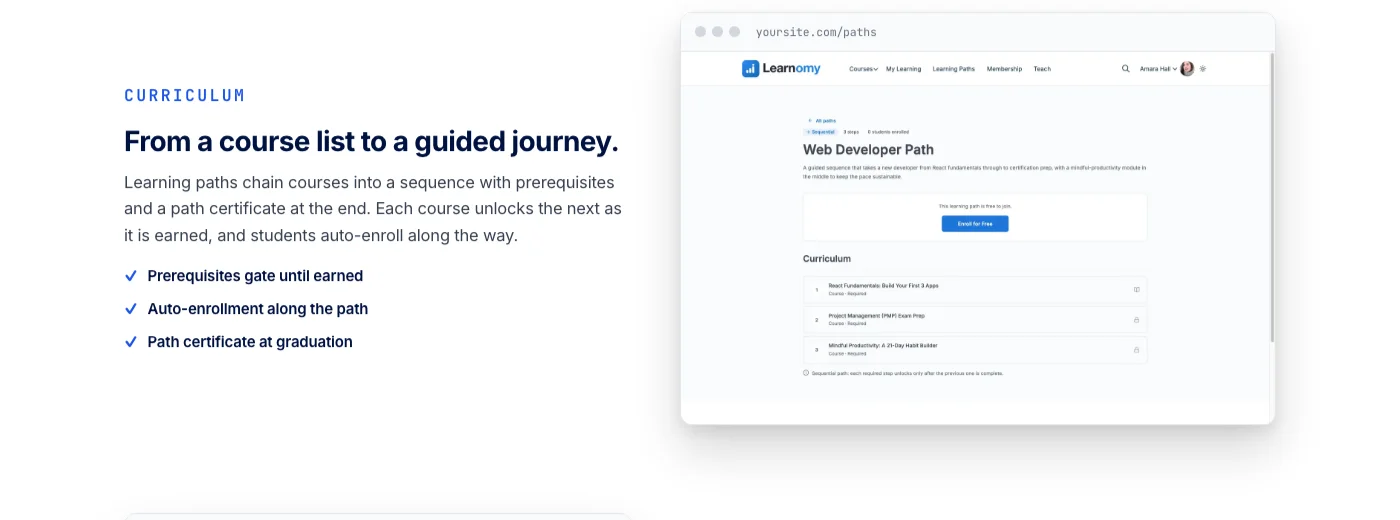
Finishing a course produces a cryptographically signed certificate with a QR code linking to a public verification page, something a client can genuinely put on a LinkedIn profile and a stranger can actually check, rather than a login they’ll forget the password to. That’s the same reason a verifiable certificate ends up selling a coach’s next course or cohort on its own, since a credential people can check travels further than one they just have to believe.
The platform doesn’t stop at the course itself. It grows into a learning community around a coach’s program when there’s a cohort worth connecting, with discussion boards and Q&A sitting next to the lessons instead of client questions disappearing into individual emails. Gamified learning, points, badges, streaks, gives clients moving through a self-paced program a reason to actually finish it instead of abandoning it at lesson three. The zero-fee checkout behind all of this works the same way described in turning expertise into a paid course without losing a cut to platform fees.
For coaches running certification-style programs, a job board for graduates connects people who complete training with real opportunities. Course videos can be protected against casual downloading, and the whole thing runs on a real design layer, so a coach’s course looks like their own brand rather than a template shared with every other course sold on a hosted platform.
Best for: Independent coaches, consultants, and creators launching their first course, or moving an existing program off a hosted SaaS platform that charges a subscription and a cut of every sale.
- Front-end builder so you create and edit courses without opening wp-admin
- Built-in Stripe and PayPal checkout with no platform fee, plus verifiable certificates issued the moment a student passes
- Room to grow into memberships, instructor revenue sharing, and a learning community around your program as the coaching business scales
Ready to add a course to your coaching business?
Learnomy runs lessons, quizzes, and verifiable certificates on a checkout that goes straight to your own Stripe and PayPal accounts, no platform fee taken. Build it once on the same WordPress site already running your coaching packages.
Ready to Set Up Your Coaching Business on WordPress?
If you are ready to sell coaching sessions and packages directly from your WordPress site without duct-taping together six different tools, WP Sell Services is built exactly for this use case. Set up your packages, connect Stripe, and start taking bookings today. Your site should be working for you 24 hours a day, even when you are not.