The 11-Status Order Lifecycle Explained


Most WooCommerce orders live a short, boring life: Pending, Processing, Completed, done. That’s fine for a product that ships in a box. It’s badly insufficient for a service, and understanding real order lifecycle statuses starts with admitting that, because a service order isn’t a single event, it’s a relationship that unfolds over days or weeks, with a buyer who needs to submit requirements, a vendor who needs time to actually do the work, a delivery that might get accepted or might get sent back for changes, and occasionally a disagreement serious enough that someone needs to step in and adjudicate it. Cramming all of that into “Pending / Processing / Complete” doesn’t simplify anything. It just hides information the marketplace actually needs to function, which is exactly why a real order lifecycle needs more than three states to describe what’s actually going on.
Why Three Statuses Break Down the Moment Real Work Enters the Picture
Picture trying to run a service marketplace on a three-status system. An order sits in “Processing” for four days. Is the vendor actively working on it? Waiting on the buyer to submit project details? Finished and waiting for the buyer to review it? Late and nobody’s noticed? A generic “Processing” status can’t answer any of those questions, which means an admin trying to spot a problem has to open every single order individually and read through the messages to figure out what’s actually happening. That doesn’t scale past a handful of orders, and it’s exactly the failure mode a fine-grained lifecycle exists to prevent.
The 11 Order Lifecycle Statuses, In the Order They Actually Happen
WP Sell Services tracks every order through 11 distinct statuses, and each one answers a specific, immediately useful question: what is this order waiting on, right now, and who needs to act.
Pending Payment. Checkout has started but payment hasn’t cleared yet. Nothing happens on either side until it does, and if the buyer doesn’t complete payment within 24 hours, the order cancels automatically rather than sitting in limbo forever.
Pending Requirements. Payment is confirmed and the platform is waiting on the buyer to submit the project details the vendor needs before starting. Automatic reminders go out on day 1, 3, and 5 if nothing’s been submitted, and a configurable requirements timeout decides what happens if the buyer never responds, either the order auto-starts without requirements or it cancels with a refund, depending on how the marketplace is configured.
In Progress. The vendor is actively working, with a delivery deadline calculated from whichever package the buyer purchased. The system reminds the vendor 24 hours before that deadline hits.
Pending Approval. The vendor has submitted a delivery and the buyer now has three choices: accept it and the order completes, request a revision with specific feedback, or open a dispute if something is seriously wrong. If the buyer doesn’t respond within the auto-complete window, three days by default, the order completes automatically and the vendor gets paid regardless.
Revision Requested. The buyer asked for changes, the vendor is now making them and will resubmit a new delivery. How many times an order can cycle through this status depends on the revision count set on that specific service package.
Completed. The order is finished. Commission gets calculated, the vendor’s earnings are recorded on the ledger, and both parties can leave reviews. A completion doesn’t fully close the door, there’s a dispute window afterward, 14 days by default, in case a problem surfaces after the fact.
Cancelled. The order stopped before completion, whether from a payment failure, a requirements timeout, mutual agreement, or an admin decision. If payment had already gone through, a refund processes automatically. Cancelled orders are a dead end, they can’t be reopened.
Disputed. A formal dispute is open. The order pauses entirely while both sides submit evidence and an admin investigates, and it stays paused until the dispute resolves into one of the outcomes below.
On Hold. An admin has manually paused the order, typically for an investigation or a fraud check. Every deadline and automated workflow freezes until the admin either resumes it or cancels it.
Refunded. A dispute resolved with the buyer receiving their full payment back, or a full refund was processed outside the dispute flow entirely.
Partially Refunded. A dispute resolved as a compromise, the buyer gets back a portion of what they paid and the vendor keeps the rest, reflecting work that was partially delivered or fell short of what was promised without being worthless.
The Flow at a Glance, and Why the Branches Matter More Than the Line
The straightforward path looks like a single line: Payment, Requirements, In Progress, Delivery, Approval, Complete. Most orders genuinely follow that line without a hitch. But the entire value of an 11-status system isn’t in describing the happy path, a three-status system could do that fine. It’s in describing the branches: what happens when a buyer goes silent, what happens when a delivery misses the deadline, what happens when someone disagrees seriously enough to need a third party. Those branches are where marketplaces actually lose money and trust when they’re handled badly, and they’re exactly what a coarse status system has no vocabulary to represent.
A Smooth Order, Status by Status
Day 0: buyer places the order, payment confirms, requirements get submitted immediately, status moves to In Progress with a 5-day deadline. Day 4: the vendor gets a reminder, 24 hours left. Day 5: the vendor delivers, status moves to Pending Approval. Day 8: the buyer hasn’t responded, so the order auto-completes on schedule, commission gets recorded, earnings split. Total elapsed statuses: four, none of them requiring manual intervention from anyone.
An Order With a Revision, Status by Status
Day 0: order placed, requirements submitted, work begins, status In Progress. Day 5: first delivery submitted, status Pending Approval. Day 6: buyer requests a revision with specific feedback, status Revision Requested. Day 8: vendor submits the updated delivery, status returns to Pending Approval. Day 9: buyer accepts, status Completed. Six status transitions, still zero admin intervention required, because the revision path is a built-in part of the lifecycle rather than an exception someone has to handle by hand.
The Automatic Workflows Running Underneath Every Status
None of the transitions above happen because a human is watching a dashboard and clicking buttons at the right moment. A set of background tasks does that work continuously. Late order checks run hourly, flagging any order that’s blown past its delivery deadline. Auto-complete runs twice daily, finishing orders where a buyer never responded to a delivery. Deadline reminders go out daily, warning vendors before a delivery is due. Requirement reminders go out daily on the day 1, 3, and 5 schedule for buyers who haven’t submitted their project details yet. Requirement timeout enforcement runs daily too, executing whichever policy, auto-start or cancel, the marketplace has configured for buyers who never respond at all. This is what actually makes an 11-status system operationally sane rather than an overwhelming amount of manual bookkeeping. The statuses only look complex from the outside. From the inside, they’re mostly self-driving, with human attention reserved for the cases that genuinely need judgment, an actual dispute, an order somebody flagged for investigation, a late order that needs a personal nudge.
What Admins Actually Do With All This Detail
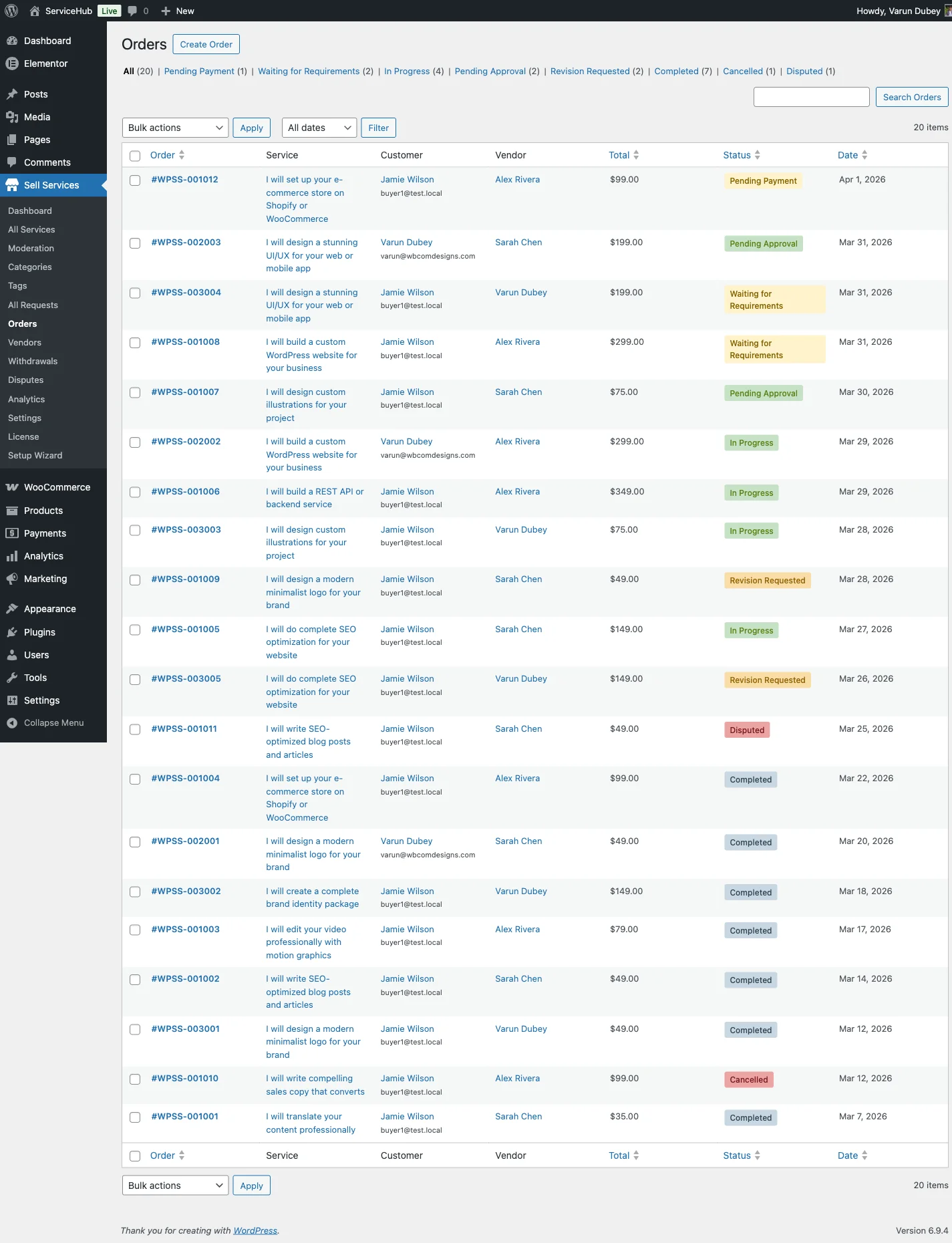
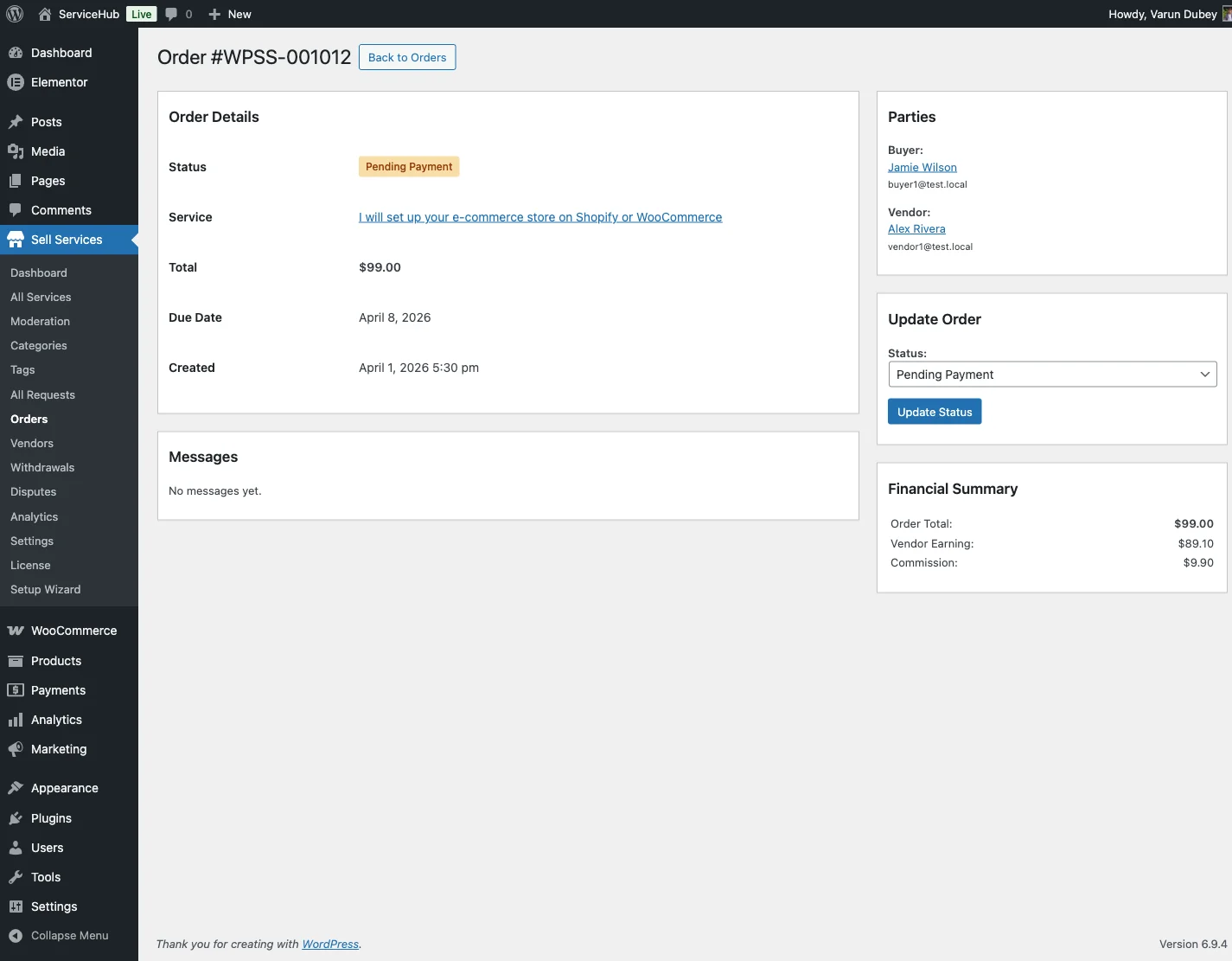
From Sell Services > Orders, an admin sees every order with its current status visible at a glance, filterable and searchable by that status, with full access to order details, the buyer-vendor conversation, and delivery history for any order that needs a closer look. Status doubles as the primary navigation tool for marketplace oversight: jump straight to every order sitting in Disputed to see what needs resolving today, or every order in Pending Requirements to spot buyers who might need a nudge before their timeout kicks in.
That filterability is the practical payoff of granularity. A marketplace running hundreds of orders a month can’t have someone reading every conversation thread to find the ones that need attention. Status does that triage automatically, the marketplace owner just has to know which filter answers which question.
The Settings That Actually Shape How the Lifecycle Behaves
A handful of configuration values determine how forgiving or how strict the whole lifecycle is, and getting them wrong in either direction creates real friction. Auto-Complete Days, three by default, sets how long a buyer has to respond to a delivery before it completes on its own; set it too short and buyers who are simply busy get railroaded into accepting work they haven’t had time to review, set it too long and vendors wait unreasonably for payment on work they’ve already finished. Dispute Window, 14 days by default, controls how long after completion a buyer can still raise a problem; too short and legitimate late-discovered issues have no recourse, too long and genuinely finished business stays reversible indefinitely. Requirements Timeout, seven days by default, and its companion setting Auto-Start on Timeout decide what happens to a buyer who goes quiet before ever submitting the details a vendor needs, either the order proceeds without them or it cancels and refunds. None of these are one-size-fits-all numbers. A marketplace selling 24-hour logo delivery needs tighter windows across the board than one selling month-long consulting engagements, and the right values come from matching the settings to the actual pace of whatever’s being sold, not from leaving the defaults untouched because nobody thought to revisit them.
How This Compares to What a Generic Marketplace Gives You
Most gig marketplaces, including the big ones, expose a version of this lifecycle to sellers but hide most of the underlying mechanics. A seller sees “in progress” or “delivered” and has to trust that reminders are firing, that the auto-complete clock is actually running, that a late order has been flagged somewhere. On a self-hosted marketplace, all of that is visible and, more importantly, adjustable. An owner isn’t just seeing the same eleven labels a buyer or vendor sees, they can see exactly which automated workflow touched an order and when, and they can change the underlying timing rules instead of accepting whatever a platform decided was reasonable for every category of service simultaneously. That visibility compounds as a marketplace grows. A five-order-a-week marketplace can get away with a founder personally remembering which orders need attention. A five-hundred-order-a-week marketplace cannot, and that’s exactly the point where a granular, filterable, largely self-driving status system stops being a nice-to-have and becomes the only realistic way to keep the business running without hiring someone whose entire job is reading through order threads.
What Happens Between Statuses Matters as Much as the Statuses Themselves
It’s tempting to think of the 11 statuses as a checklist, but the interesting behavior lives in the transitions, not the labels. Moving from Pending Approval into Revision Requested isn’t just a status change, it’s a signal that triggers a notification to the vendor, opens the delivery back up for a new submission, and, critically, doesn’t reset the deadline clock that governs Late detection, so a vendor who lets a revision drag on can still show up as running behind. Moving from any active status into Disputed freezes every other automated workflow simultaneously, deadline reminders stop, auto-complete stops, because none of that automation should keep running against an order a human is actively investigating. Understanding those transition-level behaviors is what separates a marketplace owner who’s memorized eleven labels from one who actually understands why an order behaves the way it does at any given moment. The labels are the visible surface. The transition logic underneath them is what actually protects buyers and vendors from the failure modes a simpler system would silently allow.
Manual Orders Use a Simplified Slice of the Same System
When an admin creates an order manually, a phone order, a custom-priced arrangement, a historical record being backfilled, they don’t need to pick from all 11 statuses. The manual order form offers five practical starting points: Pending Payment for an order awaiting payment, Pending Requirements for a paid order where the buyer still needs to submit details, In Progress to skip requirements entirely and let the vendor start immediately, Delivered for an order where work has already been submitted, and Completed for backfilling historical business that’s already finished. Whichever starting status is chosen, the order then rejoins the same full lifecycle and automated workflows as every order created through normal checkout, the simplified entry point doesn’t create a second, parallel system to maintain.
Why This Level of Detail Matters Most for a Focused Marketplace
A general marketplace selling everything from logo design to pet sitting has to run one set of lifecycle settings across wildly different categories of work, which means the defaults end up being a compromise that fits nothing perfectly. A marketplace built around one specific niche doesn’t have that problem, the auto-complete window, dispute timing, and requirements timeout can all be tuned once for the actual pace of that specific category and left alone, because every order flowing through the system is roughly the same shape of work. That’s one more reason the eleven-status lifecycle pairs so well with going narrow rather than broad, precision settings are only worth the effort to tune correctly when they’re serving one coherent type of business instead of a dozen unrelated ones at once. See this piece on building a niche service marketplace for the fuller argument behind why focus beats scale.
Frequently Asked Questions
Why 11 statuses instead of a simpler system like most WooCommerce stores use?
A generic product order has one real transition to track: paid or not, shipped or not. A service order tracks a relationship that unfolds over time, with distinct phases for requirements collection, active work, delivery review, and possible disagreement resolution. Collapsing those into three generic statuses doesn’t make the process simpler, it just removes the information a marketplace owner needs to see what’s actually happening without opening every order individually.
Can an order skip statuses, like going straight from Pending Payment to Completed?
Generally no for checkout-created orders, they move through the lifecycle in sequence, though a service with no requirements at all skips Pending Requirements automatically and goes straight to In Progress. Manually created orders can start at a later status directly, since an admin backfilling a historical order doesn’t need it to replay every earlier stage.
What’s the difference between Refunded and Partially Refunded?
Refunded means the buyer got their full payment back and the vendor received nothing from that order. Partially Refunded means the payment was split, the buyer got back a portion and the vendor kept the rest, typically the outcome when a dispute resolves as a compromise rather than clearly favoring one side.
Does On Hold count as a form of cancellation?
No. On Hold is a temporary pause, usually for an investigation or fraud check, with every deadline and automated workflow frozen until an admin resumes or cancels it. Cancelled is a permanent, final state the order can’t come back from.
What happens if a buyer never submits requirements and never responds to reminders?
The Requirements Timeout setting decides the outcome, seven days by default. Depending on how Auto-Start on Timeout is configured, the order either proceeds to In Progress without the requirements ever being submitted, or it cancels automatically with a refund to the buyer.
Can I change the auto-complete and dispute window timeframes for my specific marketplace?
Yes. Auto-Complete Days, Dispute Window, and Requirements Timeout are all configurable from Settings, and matching them to how fast your specific category of service actually moves, rather than leaving the defaults in place, is worth doing before launch rather than after the first complaint.
Does every order pass through Revision Requested even if the buyer never asks for changes?
No. Revision Requested only enters the picture if the buyer actually requests one. An order can go straight from Pending Approval to Completed without ever touching that status, and most smooth orders do exactly that.
How does this lifecycle relate to the dispute resolution process specifically?
Disputed is one status among the eleven, but it opens onto its own detailed sub-process, evidence submission, admin review, and one of five specific resolution types that map onto the Refunded, Partially Refunded, or Completed statuses. For the full mechanics of how that resolution actually works, this piece on handling revisions and disputes covers it in depth.
Detail That Pays for Itself
Eleven statuses sound like a lot until you’ve watched a three-status marketplace try to answer a simple question, “which orders need my attention today,” and fail. Granularity isn’t complexity for its own sake here, it’s the difference between a marketplace owner who can filter straight to the four orders that actually need a human decision, and one who has to read through every open order to find them. The lifecycle looks intricate from a diagram. In practice, it’s what lets a small team run a marketplace that would otherwise need a much bigger one just to keep track of what’s happening.