How to Sell Services on Your Own Website Instead of Facebook Marketplace


Selling services online has become an essential avenue for freelancers, entrepreneurs, and small businesses to connect with clients and grow their revenue. While platforms like Facebook Marketplace offer a convenient starting point, they have significant limitations. You gain unparalleled flexibility, control, and branding opportunities by focusing on selling services on your own website, powered by tools like WooCommerce and plugins like Woo Sell Services.
This blog explores the pros and cons of selling services on Facebook Marketplace compared to selling services on your website. We’ll also discuss how building a dedicated platform with WooCommerce can transform your service-based business.
Why This Decision Matters More Than It Seems
It’s tempting to treat the choice between Facebook Marketplace and a dedicated website as a minor logistical detail, just another place to post a listing. In practice, the platform you build on shapes almost everything downstream: how much you can charge, how much repeat business you generate, and how much of your growth actually belongs to you versus a platform that can change its algorithm, its fees, or its policies without warning. A business built entirely inside someone else’s platform is, in a real sense, a tenant rather than an owner. The good news is that moving toward ownership doesn’t require abandoning the reach a platform like Facebook offers, it just means making sure that reach eventually funnels back to something you control.
1. Understanding Facebook Marketplace for Selling Services
Facebook Marketplace allows individuals and businesses to list products and services for sale in local or global communities. It’s a convenient way to reach Facebook’s vast user base, but it’s primarily designed for product sales rather than service sales.
Advantages of Selling Services on Facebook Marketplace
Large Audience: Facebook boasts billions of active users, giving you immediate access to a wide audience. You can target specific demographics using Facebook Groups or Marketplace categories.
Ease of Use: Listing a service is straightforward and doesn’t require technical skills. It’s also free to create listings, making it an excellent low-cost entry point.
Local Reach: Facebook Marketplace is ideal for targeting local clients, especially for home services, tutoring, or coaching.
Limitations of Facebook Marketplace for Selling Services
Lack of Customization: Listings are generic and lack branding opportunities. You cannot create a unique user experience.
No Dedicated Service Features: Facebook Marketplace is designed for products, not services. It lacks features like order tracking, milestone management, and detailed descriptions.
Limited Credibility: Buyers may perceive services listed on Facebook Marketplace as less professional than a dedicated website.
Algorithm Dependence: Visibility relies heavily on Facebook’s algorithm, which can limit exposure without warning.
2. Why Selling Services on Your Website is Better
Creating your own website gives you complete control over your branding, client interactions, and service delivery. It also gives you real ownership over sensitive client information instead of leaving it inside a third-party platform you don’t control. Here’s why a dedicated website is the stronger long-term choice.
a. Branding Opportunities
Professional Appearance: A website lets you showcase your services with custom design, logos, and content. This helps you build a consistent brand identity that makes your services stand out and leaves a lasting impression on potential clients.
Custom Domains: Using a domain like “www.yourbusinessname.com” boosts credibility and makes your services easier to find and remember.
b. Service-Specific Features
WooCommerce and Woo Sell Services turn your website into a purpose-built platform for service businesses, offering flexibility that generic marketplaces can’t match. With Woo Sell Services, you get milestone tracking, secure client communication, and automated progress updates built specifically around how service businesses actually work.
Detailed Listings: Unlike Facebook’s generic format, your website lets you write in-depth descriptions, add images or videos, and spell out clear terms up front.
c. Flexibility and Control
Pricing Control: Set your prices without platform-imposed restrictions or fees eating into your margin.
Customization: Use themes, plugins, and custom development to design exactly the experience you want your clients to have.
d. Improved Credibility
Clients generally trust a dedicated website more than a social media listing for professional services. A polished, professional site signals that a business is established and serious about its work, in a way that a listing sitting alongside used furniture and secondhand bicycles simply can’t replicate, regardless of how good the actual service is.
Your website becomes a digital portfolio showcasing testimonials, case studies, and reviews. You can also add social login options to reduce friction during signup, using plugins like Nextend Social Login or Super Socializer, which let visitors log in with an existing Google, Facebook, or other account instead of creating a new password from scratch.
e. SEO and Marketing
With your own website, you can optimize for search engines and build visibility that compounds over months and years, something a Facebook listing simply can’t do. You can also shape the customer journey deliberately, from first visit through to repeat business, in a way that keeps people coming back.
Content marketing, blogs, and email campaigns can drive traffic and conversions directly to your site instead of renting attention on someone else’s platform.
Also Read: 5 Best WooCommerce B2B Plugins
3. Setting Up Your Service Website

Step 1: Choose a Hosting Provider and Domain Name
The first step is choosing reliable hosting and a domain name that reflects your business. Look for hosting that keeps your site fast and secure without you having to babysit server maintenance, and pick a domain that’s easy for clients to remember and trust.
Step 2: Install WordPress
Most hosting providers offer one-click WordPress installation. Once installed, log in to your dashboard and start customizing your site with themes and plugins suited to your services.
Step 3: Install WooCommerce
WooCommerce turns your website into an online store for services. Navigate to Plugins > Add New, search for WooCommerce, install and activate it, then configure your currency, payment gateways, and tax settings.
Step 4: Install Woo Sell Services
Enhance your WooCommerce setup with Woo Sell Services, a plugin built specifically for service sales. It adds order milestones, secure client communication, and progress updates so both you and your clients always know where things stand.
Step 5: Choose a Professional Theme
The right theme shapes how visitors perceive your business before they’ve read a word. Themes like Reign, Astra, or BuddyX are solid choices. Reign and BuddyX in particular add community features on top of the usual theme customization, letting you build engagement alongside your service listings. Make sure whatever theme you pick is optimized for WooCommerce for a clean integration.
Step 6: Create Service Listings
Add your services as WooCommerce products with clear descriptions, pricing, and visuals. With Woo Sell Services, structure each offering around milestones and progress updates so clients always know what to expect next.
Step 7: Set Up Analytics and Basic SEO
Before launching, connect your site to a free analytics tool and confirm your key service pages have unique, descriptive titles and meta descriptions. This is easy to skip in the rush to launch, but it’s what turns your website from a static listing into a platform that keeps generating new visitors months and years down the line, something a Marketplace listing simply can’t offer since it disappears the moment you stop actively promoting it.
4. Features of Woo Sell Services for Service Websites
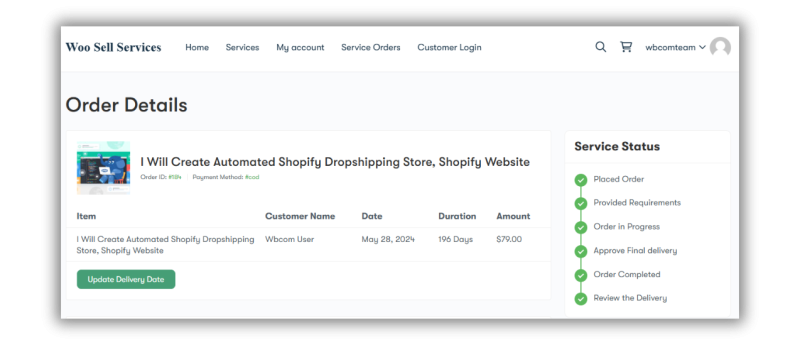
Woo Sell Services integrates seamlessly with WooCommerce and adds the features service-based businesses actually need:
- Order Management: Break services into milestones and keep track of progress and deadlines without losing the thread.
- Client Communication: Built-in messaging for clarifying deliverables and resolving questions, keeping the conversation attached to the order instead of scattered across email.
- Custom Order Status: Define service-specific statuses like “In Progress” or “Under Review” so clients always know exactly where things stand.
- Notifications: Automated emails for order updates and milestone completions, so nobody has to chase status updates manually.
- Review System: Let clients leave feedback directly on your site, building the same kind of social proof a marketplace listing relies on, but under your own brand.
5. Comparing Facebook Marketplace and Your Website
Feature Comparison: Facebook Marketplace vs. Your Website
| Feature | Facebook Marketplace | Your Website |
| Customization | Minimal | Fully customizable |
| Branding | Limited | Complete branding control |
| Service-Specific Features | Absent | Woo Sell Services integration |
| Payment Options | Facebook Pay | Multiple gateways (PayPal, Stripe) |
| SEO | No | Yes |
| Long-Term Growth | Limited | High potential |
6. What This Looks Like in Practice
Here’s a hypothetical example to make the comparison concrete, not a real client case study. Picture two freelance web designers starting out at the same time. One lists services exclusively on Facebook Marketplace, relying on the algorithm to surface her listing to nearby small businesses. The other builds a WooCommerce site with Woo Sell Services, writes a handful of blog posts about common design mistakes small businesses make, and sets up milestone-based service listings with clear pricing tiers.
Six months in, the Marketplace-only designer is still starting from zero with every new client conversation, since nothing about her past work is visible beyond whatever she manually shares. The website-based designer has search traffic trickling in from her blog posts, a portfolio of testimonials building trust automatically, and a milestone system that makes larger, more complex projects easier to sell because clients can see exactly how the engagement will unfold. Neither approach is wrong on day one, but they compound very differently over time.
Which Service Businesses Benefit Most From Owning Their Platform
Not every service business needs a full website from day one, and it’s worth being honest about that. Someone doing a handful of small, one-off local gigs, mowing lawns, quick handyman jobs, might genuinely get more value staying on Marketplace for now, where the low overhead matches the low complexity of the work.
The calculation changes quickly once a few things are true: your average project value climbs past a couple hundred dollars, your work involves multiple stages or deliverables rather than a single quick transaction, or you’re trying to build a recognizable brand rather than just picking up occasional jobs. Consultants, designers, agencies, coaches, and any service involving an ongoing client relationship tend to see the clearest return from owning their own platform, since the milestone tracking, branding, and content marketing all compound specifically around higher-value, longer engagements.
7. Common Mistakes When Making the Switch
Abandoning Facebook Marketplace Entirely, Too Soon
You don’t have to choose one or the other immediately. Many service businesses keep a lightweight Marketplace presence for local discovery while building out their website as the primary, long-term platform. Cutting off an existing lead source before the new one is generating traffic can create an unnecessary revenue gap.
Launching Without Clear Pricing
A common mistake when moving to a dedicated website is under-explaining pricing, assuming clients will just ask. On Facebook, casual messaging makes that feel normal. On a professional website, vague or missing pricing reads as a lack of confidence and pushes potential clients to a competitor with clearer listings.
Skipping the Trust-Building Content
A website with service listings and nothing else misses the biggest advantage over a marketplace: the ability to build ongoing trust through content. Testimonials, case studies, and even a simple FAQ page do more to convert hesitant visitors than the service listing alone.
Neglecting Mobile Visitors
A meaningful share of the traffic that used to land directly on a Facebook Marketplace listing will now discover your website through a link shared on a phone. If your service pages, checkout flow, and messaging system aren’t comfortable to use on a small screen, you’re recreating the exact friction you were trying to escape by leaving the marketplace in the first place.
8. Handling Payments and Trust Once You Own the Platform
One thing Facebook Marketplace handles for you, whether you like its terms or not, is the basic payment mechanism. Once you move to your own website, that responsibility shifts to you, and it’s worth getting right from the start. WooCommerce supports multiple payment gateways, PayPal and Stripe being the most common, which gives clients familiar, trusted checkout options rather than a payment flow tied entirely to a social platform.
Security matters here too. Any payment gateway you connect should support standard encryption and fraud protection out of the box, so you’re not left explaining to a client why their card details went through an unsecured checkout. For service businesses specifically, consider whether you want full payment upfront, a deposit with balance on completion, or milestone-based payments tied to project stages. Woo Sell Services supports structuring orders around milestones, which works especially well for larger projects where a client understandably wants to see progress before releasing the full payment. Being upfront about your payment structure on the service listing itself, rather than leaving it for a private message, builds the same kind of trust a well-known marketplace brand provides automatically.
9. Building an FAQ and Policy Page That Actually Gets Read
A dedicated FAQ page does more heavy lifting than most service businesses give it credit for. It answers the questions that would otherwise take a dozen back-and-forth messages to resolve, refund policy, typical turnaround time, what happens if a client needs revisions, whether rush delivery is available. Each answered question removes a small piece of friction between a visitor and an actual booking.
Pair the FAQ with a short, plain-language policy section covering cancellations and revisions. Clients respect clarity even when the policy itself is strict. What erodes trust isn’t a firm policy, it’s discovering the policy only after a disagreement has already started.
10. Migrating Existing Facebook Marketplace Clients to Your Website
If you already have a following or repeat clients through Facebook Marketplace, the transition to your own site doesn’t have to mean starting from zero. A short, friendly message to existing clients letting them know you now have a dedicated website, with a small incentive for their next booking through the new platform, tends to move a meaningful share of your existing relationships over without much friction.
It also helps to keep a lightweight Marketplace listing that simply links out to your website’s service pages during the transition period, so new discovery through Facebook still funnels people toward the platform you actually control, rather than losing that traffic entirely.
Give this transition realistic time. Clients who’ve bought from you once on Marketplace already trust you; that trust doesn’t evaporate the moment you change platforms, but it does take a booking or two on the new site before the new habit sticks.
Final Thoughts
While Facebook Marketplace offers a quick and easy way to start selling services, it lacks the customization, credibility, and functionality required for long-term growth. Building your website with WordPress, WooCommerce, and Woo Sell Services gives you complete control over your business, letting you create a unique brand identity and provide a seamless client experience.
Investing in your own platform means you’re not just another listing on a crowded marketplace but a professional service provider with a recognizable brand. Start today, and take your service business to the next level with WooCommerce and Woo Sell Services.
None of this means abandoning every other channel that brings clients through the door. Marketplace listings, social media, referrals, they all still have a place. What changes once you own your platform is where that traffic ultimately lands, and what happens to it once it arrives. A visitor who lands on a Facebook listing sees exactly what every other visitor sees. A visitor who lands on your website sees your brand, your story, your proof of past work, and a path built specifically to turn a browser into a booked client.
Interesting Reads:
How to Start Selling Services Online