Best WooCommerce Pre-Order Plugins (Tested & Compared)


When you’re launching a new product or building anticipation for an upcoming release, offering pre-orders on your WooCommerce store is one of the more reliable ways to generate early sales and gauge real customer interest before you’ve committed to full production or a full inventory buy. WooCommerce pre-order plugins give store owners the tools to accept orders ahead of availability, manage stock correctly once the item ships, and control how and when payment gets collected.
This guide walks through the plugins worth considering, what to look for before you commit to one, and how to set pre-orders up in a way that actually protects your cash flow instead of creating a support headache later.

What Are WooCommerce Pre-Order Plugins?
WooCommerce pre-order plugins are extensions that let store owners accept orders for products that aren’t yet available to ship. Customers place their order in advance, and the plugin typically handles payment flexibility (charge immediately, charge on release, or collect a deposit), automatic stock status updates once the item is available, and a customized pre-order button in place of the standard Add to Cart. Done well, pre-ordering is a smooth experience for both the store owner and the customer, not a confusing workaround bolted onto a system that wasn’t built for it.
Why You’d Want This Instead of Just Waiting to Launch
Pre-orders solve a handful of real business problems at once:
- Improved cash flow: collecting payment (in full or as a deposit) before a product ships gives you working capital ahead of your actual fulfillment costs.
- Real demand data: pre-order volume tells you, with actual money behind it, whether a product is worth the production or inventory commitment, rather than guessing from survey responses or social media engagement.
- Momentum before launch: a visible pre-order count creates its own marketing, especially for limited runs or anticipated releases where scarcity is part of the appeal.
- Cleaner inventory and shipping management: a dedicated plugin tracks pre-order quantities separately from live stock, so you’re not manually reconciling two spreadsheets when the product finally arrives.
Key Features Worth Comparing
Before picking a plugin, it helps to know what actually separates a good one from a bare-bones option:
- Payment flexibility: full payment upfront, a partial deposit, or charge-on-release, ideally configurable per product rather than store-wide only.
- Stock and availability management: automatic tracking so you don’t oversell a limited pre-order run.
- Button and messaging customization: the ability to change “Add to Cart” to “Pre-Order Now” (or similar) and clearly communicate the expected ship date on the product page itself.
- Automated notifications: emails that fire when the order is placed and again when the item actually ships or becomes available.
- Release date display: a visible, honest release date on the product page sets expectations and reduces “where’s my order” support tickets.
The Plugins Worth Considering
1. YITH WooCommerce Pre-Order
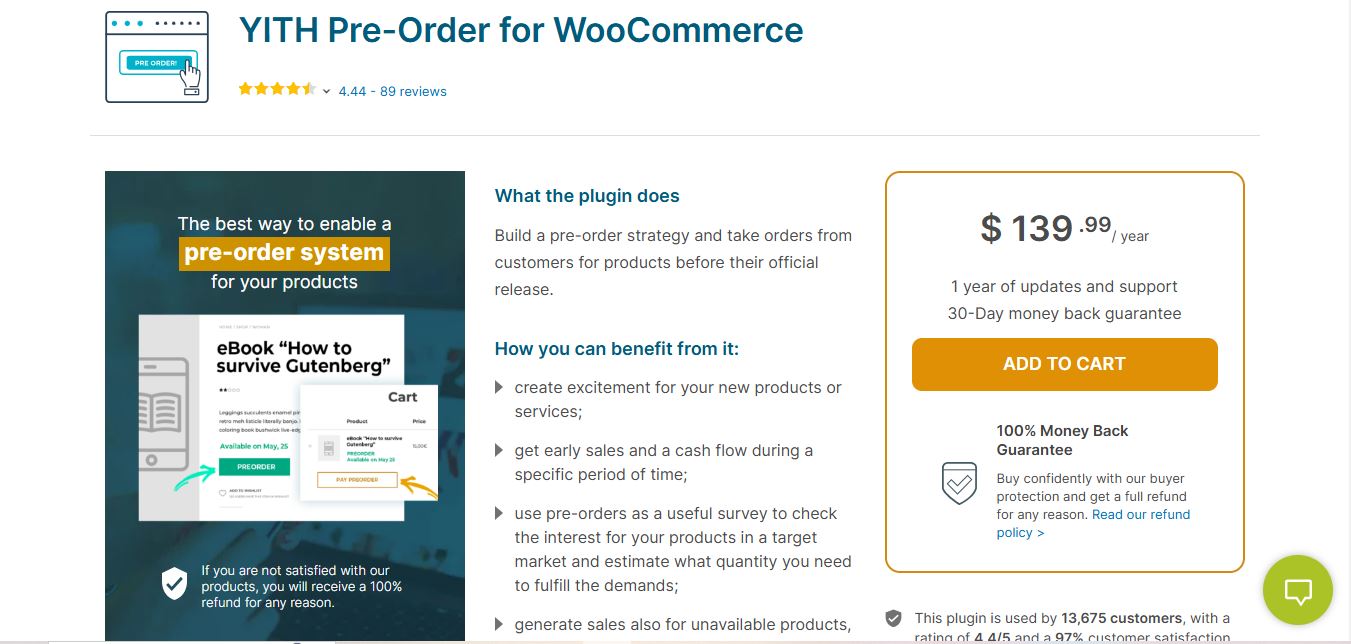
YITH WooCommerce Pre-Order is one of the more mature options in this space, and it gives you real flexibility over the pre-order flow: a configurable pre-order date, multiple payment timing options, and a fully customizable button and messaging.
Key Features: configurable pre-order date, flexible payment timing (full or deferred), customizable button and messaging, order status tracking dedicated to pre-orders.
Pros: intuitive settings, detailed reporting on pre-order volume, responsive support from a well-established plugin vendor.
Cons: the free version is limited; the premium tier is where the payment flexibility and reporting really shine.
Also Read: PrestaShop vs WooCommerce
2. WooCommerce Pre-Orders
The official WooCommerce Pre-Orders extension, sold directly through WooCommerce.com, is the most tightly integrated option since it’s built and maintained by the same team behind WooCommerce core. It supports both simple and variable products and lets you charge upfront or automatically charge the stored payment method on the release date.
Key Features: charge-now or charge-on-release billing, support for variable products, automatic email notifications tied to WooCommerce’s native order status system.
Pros: deep integration with WooCommerce core means fewer compatibility surprises after future WooCommerce updates.
Cons: it’s a paid extension with no free tier, and the interface is more utilitarian than some third-party alternatives.
Why It Stands Out: if you’d rather not gamble on a third-party plugin’s long-term compatibility with WooCommerce updates, going with WooCommerce’s own extension removes a whole category of risk.
3. Pre-Orders for WooCommerce by WP Swings
WP Swings offers a feature-packed pre-order plugin that gives you granular control over the whole workflow, and it’s a genuinely solid choice for stores that want pre-order discounts baked in as an incentive.
Key Features: pre-order availability management, multiple pre-order payment methods, built-in discount options for early buyers, support for both simple and variable products.
Pros: easy-to-use interface, solid customer support, native pre-order discount functionality without needing a separate coupon plugin.
Cons: some of the more advanced automation lives behind the premium version.
Also Read: WooCommerce vs Shopify
4. Deposits & Down Payments for WooCommerce
Deposits & Down Payments for WooCommerce, by WebToffee, lets customers pay a deposit at checkout and settle the remaining balance later, which is a natural fit for pre-orders on higher-priced items where asking for full payment upfront might reduce conversion.
Key Features: flexible deposit percentages or fixed amounts, support for both simple and variable products, integration with WooCommerce’s native order and payment workflow.
Pros: genuinely useful for high-ticket items, straightforward setup, free core version available on WordPress.org.
Cons: it’s a deposits tool first and a pre-order tool second, so it lacks some of the pre-order-specific messaging and release-date display that dedicated pre-order plugins offer out of the box.
Why It Stands Out: if your main goal is spreading payment out rather than managing a release date and stock countdown, this is the more focused tool for the job.
Comparison Table
| Plugin | Best For | Standout Feature | Pricing Model |
|---|---|---|---|
| YITH WooCommerce Pre-Order | Stores wanting flexible, customizable pre-order flows | Detailed reporting and configurable pre-order button | Free core version, premium tier for full features |
| WooCommerce Pre-Orders (official) | Stores that prioritize long-term core compatibility | Native integration with WooCommerce order statuses | Paid extension, no free tier |
| Pre-Orders for WooCommerce (WP Swings) | Stores wanting built-in pre-order discounts | Native early-bird discount support | Free core version, premium add-ons |
| Deposits & Down Payments (WebToffee) | High-ticket items needing partial payment | Flexible deposit percentages and schedules | Free on WordPress.org |

Handling Stock Once the Release Date Arrives
A detail that catches first-time pre-order sellers off guard: the transition from “pre-order” status back to “normal purchase” status needs to happen cleanly, and ideally automatically, once inventory actually lands in your warehouse. Most of the dedicated plugins above handle this by letting you flip the product’s status manually or schedule the transition to a specific date, at which point the pre-order button reverts to a standard Add to Cart and any queued charge-on-release payments process.
Confirm before launch exactly how that transition works in your chosen plugin, and test it on a staging copy of the product if possible. A pre-order that silently stays in “pre-order” mode after stock has actually arrived confuses returning customers who assume they’re still waiting, and it can delay payment collection on charge-on-release orders longer than intended.
The Native Alternative: WooCommerce’s Built-In Backorder Setting
It’s worth mentioning that WooCommerce core already includes a lightweight mechanism that overlaps with pre-orders for some use cases: backorders. Under a product’s Inventory tab, you can set stock to “Allow, but notify customer” or “Allow” outright, which lets customers keep purchasing after quantity hits zero. WooCommerce automatically labels the product “Available on backorder” on the front end.
This isn’t a true pre-order system since it lacks a distinct release date, a customized button, or deposit logic, but for a simple restock situation where you just need to keep selling past zero stock without installing another plugin, it’s a genuinely useful, zero-cost option worth ruling out before you commit to a dedicated plugin.
How to Set Up Pre-Orders Without Creating a Support Nightmare
Whichever plugin you land on, a few practices separate a smooth pre-order launch from a wave of “where’s my order” emails three weeks later.
Display the expected ship date clearly on the product page itself, not buried in the confirmation email. If the date shifts (which happens more often than any store owner wants to admit), proactively email everyone who’s already ordered rather than waiting for them to ask. Set a realistic date with buffer built in; a late pre-order that was expected is a minor annoyance, while an unannounced delay against a confident promise is what generates chargebacks and one-star reviews.
If you’re charging in full at time of order, make sure your payment gateway and accounting treat pre-order revenue correctly, some jurisdictions and accounting standards require you to recognize pre-order payments as deferred revenue rather than immediate income until the product actually ships. Check with your accountant if pre-orders are a meaningful part of your revenue, not just a one-off experiment.
Pre-Orders vs. Backorders vs. Waitlists: Knowing Which One You Actually Need
Store owners often reach for a pre-order plugin when a different tool would actually solve their problem faster. It’s worth being precise about the distinction before you install anything.
A pre-order is for a product that doesn’t exist yet, or hasn’t shipped yet, and you know (or estimate) a release date in advance. Customers are buying something with a promise attached, not something that’s temporarily unavailable. A backorder is for a product that’s normally in stock but has temporarily run out; customers are still buying a known, already-selling item, just with a short delay before it ships. A waitlist or “notify me” system is passive: no money changes hands until the customer comes back and completes a normal purchase once the item is available again.
Mixing these up creates real problems. Running a genuine “coming soon” launch through a plain backorder setting, for instance, gives customers no visible release date and no distinct messaging, which tends to generate confusion and premature refund requests. Conversely, using a full pre-order plugin (with all its deposit logic and release-date countdowns) for a product that’s simply back in stock next Tuesday is over-engineering a five-minute fix.
Setting Up Your First Pre-Order Campaign: A Practical Walkthrough
Once you’ve picked a plugin, the actual setup follows a fairly consistent pattern across most of the options above, even though the exact screens differ.
- Create or edit the product as you normally would in WooCommerce, with a real title, description, and price.
- Enable pre-order mode on that specific product through the plugin’s product-level settings tab, rather than a global store setting, so you can run pre-orders on select items only.
- Set the release date, and build in buffer. If you genuinely believe stock lands in three weeks, quote four.
- Choose your payment timing: full payment now, a deposit now with the balance charged on release, or full charge automatically on the release date. This decision should match your actual cash flow needs, not just whichever option is the default.
- Customize the button and messaging so it’s unmistakably clear this is a pre-order, not a normal in-stock purchase. “Pre-Order, Ships March 15” beats a generic “Buy Now” that gives no indication of the wait.
- Test the full checkout flow yourself, including the confirmation email, before sending any traffic to the product page. A pre-order confirmation email that doesn’t clearly restate the expected ship date is a guaranteed source of support tickets.
Common Mistakes That Turn Pre-Orders Into Support Tickets
The single biggest failure mode is an optimistic release date with no communication plan if it slips. Build a habit of proactive updates into your process from day one, even a short “still on track” email at the halfway point reduces anxious inquiries considerably. Silence is what erodes trust, not the delay itself.
A second common mistake is not testing how the plugin handles mixed carts, a customer buying one pre-order item alongside three in-stock items in the same order. Some plugins split these into separate orders automatically to avoid holding the in-stock items hostage to the pre-order timeline; others don’t, and will delay the entire shipment until the pre-order item is ready. Know which behavior your chosen plugin defaults to, and decide if that matches what you actually want customers to experience.
A third mistake is forgetting to plan for cancellations and refunds specifically for pre-orders. A customer who pre-ordered six weeks ago and changed their mind before the item ever shipped has a different, generally stronger, expectation of an easy refund than someone canceling a same-day in-stock order. Write a specific pre-order refund policy and display it near the pre-order button, not just in your general terms page.
Frequently Asked Questions
Can I run a pre-order and accept full payment without any specialized plugin?
Technically yes, you could list a product as a normal in-stock item with a note in the description about the ship date, but you lose the automatic stock management, the distinct button messaging, and the notification workflow that a dedicated plugin provides. For anything beyond a single small test run, the manual approach creates more manual customer service work than it saves in setup time.
Do pre-order plugins work with subscription or membership products?
Most of the plugins above are built around simple and variable products rather than WooCommerce Subscriptions specifically. If your store combines pre-orders with a subscription model, check the plugin’s documentation for explicit compatibility notes before assuming it works, or test thoroughly on a staging site first.
How do I handle sales tax on pre-order payments collected before the ship date?
This varies by jurisdiction and is genuinely a question for your accountant or tax advisor rather than a plugin setting. Some regions tax the sale at time of payment, others at time of shipment. Get this right before you launch a pre-order campaign at any meaningful scale, since correcting tax treatment after the fact is far more painful than confirming it upfront.
Which Approach Should You Choose?
If you’re running a small shop with straightforward pre-order needs and want to stay close to WooCommerce’s own roadmap, the official WooCommerce Pre-Orders extension or YITH WooCommerce Pre-Order both cover the basics well. If pre-order incentives (an early-bird discount, for instance) are central to your launch strategy, WP Swings’ plugin has that built in. If deposits and partial payments matter more than release-date countdowns, WebToffee’s Deposits & Down Payments plugin is the more focused tool. And if you just need to keep selling past zero stock without any of the marketing trimmings, WooCommerce’s native backorder setting costs nothing and takes five minutes to configure.
Evaluate against your actual catalog and cash flow needs rather than picking whichever plugin has the flashiest feature list. A pre-order system that matches how your business actually operates will save you far more support time than one with features you’ll never turn on.
Marketing a Pre-Order Once It’s Live
The plugin handles the transaction, but the campaign around it is what actually drives volume. Email your existing list before the pre-order page goes fully public if you can, an early-access window for subscribers rewards loyalty and generates the first wave of orders that make the product look credible to everyone who finds it afterward through search or social.
Show a running count of units pre-ordered if your plugin supports it, or if privacy and scale make that awkward, use qualitative language instead (“selling faster than expected”) once it’s genuinely true. Never fabricate urgency, customers increasingly recognize manufactured scarcity, and getting caught in a false “only 3 left” claim does lasting damage to trust that a single successful pre-order campaign can’t offset.
Once the release date arrives and the product actually ships, follow up with everyone who pre-ordered, not just a generic shipping notification, but a short note thanking them for buying in before the product existed for everyone else. That message is also a natural, low-pressure place to ask for a review once the product arrives, since pre-order customers tend to be your most invested audience for exactly that kind of feedback.
Interesting Reads
10 Best WooCommerce Product Addons