How to Automate Seller Payouts on a Marketplace


Ask a marketplace owner what “automating payouts” means and most describe the same fantasy: money simply arrives in vendor accounts, nobody touches a spreadsheet, nobody chases anybody for a bank detail, the whole thing runs itself. That fantasy is mostly achievable, but the path to it runs through something less glamorous than automation software, a REST API deep enough that every part of the payout chain, balances, thresholds, requests, approvals, transfers, can actually talk to the systems that need to know about them. Without that foundation, an attempt to automate seller payouts is just a manual process wearing a nicer word.
The Part Nobody Automates: You Never Actually Need an Integration
Before getting into what automation adds, it’s worth being precise about what’s true without it. A complete marketplace can run, and pay every vendor, without connecting a single payment integration. Go to the withdrawals screen, read each vendor’s owed balance or export the list, pay them however the business already pays people, bank transfer, Wise, PayPal sent by hand, even cash, then mark the payout paid. The ledger records the debit and the balance clears. That’s the zero-integration default in WP Sell Services, and it’s genuinely not a stripped-down placeholder mode, it’s the foundation every other payout method builds on top of. Automated rails are opt-in, never required, and payout timing defaults to owner-triggered on every rail: nothing leaves the account until a human decides it should. That matters more than it sounds like it should, because it means adding automation later is additive, not a migration off some fragile default.
Four Rails to Automate Seller Payouts, One Underlying Ledger
There are four ways money actually moves from a marketplace to a vendor, and they scale in exactly the order most marketplaces grow into them. Manual mark-paid is the always-available, zero-integration default described above. Scheduled auto-withdrawals, included free, is the plugin raising a withdrawal request automatically on a schedule once a vendor crosses a balance threshold, while a human still approves and pays. PayPal mass payouts, a Pro feature, batches every vendor with a PayPal payout email into a single request instead of paying them one at a time. Stripe Connect, also Pro, lets vendors onboard directly to Stripe so the platform fee gets taken at charge time and the remainder settles to the vendor automatically, no manual payout step at all. Every one of those four rails writes to the same wallet ledger, which is the detail that makes mixing them safe. A marketplace can run some vendors on manual mark-paid and others on Stripe Connect simultaneously, switch a vendor from one rail to another, or add a new rail entirely, and balances never go out of sync, because there’s exactly one source of truth for what’s owed regardless of which rail eventually pays it.
Scheduled Auto-Withdrawals: Free, and More Useful Than It Sounds
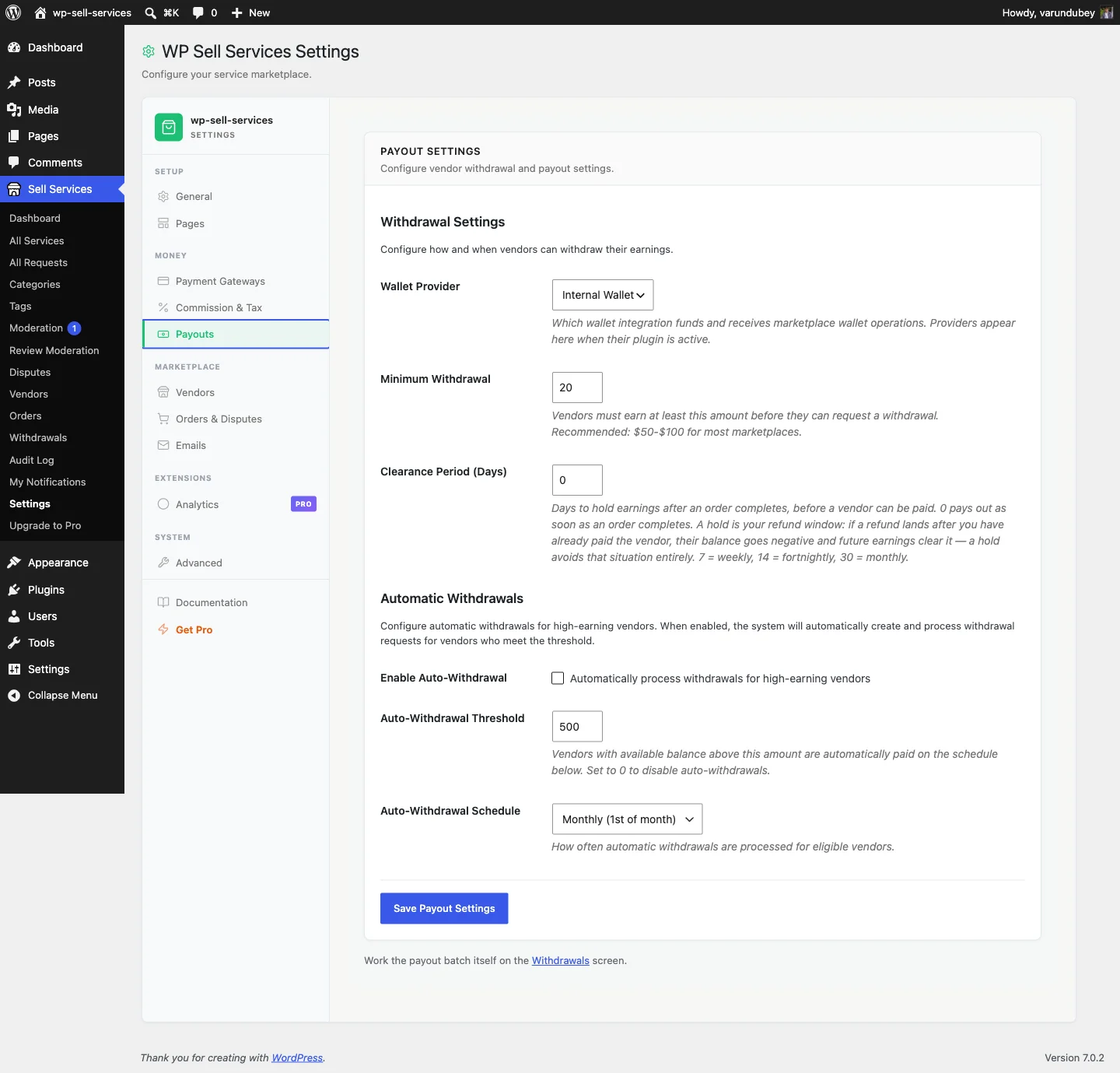
This is the rail most marketplace owners actually want first, and it’s easy to miss that it doesn’t require Pro. Set a threshold, the default is $500, adjustable anywhere from $100 to $10,000 in $50 steps, and a schedule, weekly on Mondays, bi-weekly on the 1st and 15th, or monthly on the 1st. On the scheduled day, the system checks every vendor’s balance, and any vendor sitting at or above the threshold gets a withdrawal request created automatically, flagged with an “Auto” badge so it’s visually distinct from a request a vendor filed manually. Both the vendor and the admin get notified. Vendors who haven’t configured a payout method, a saved PayPal email or bank details, get skipped rather than blocking the run for everyone else, and the system won’t create a duplicate auto-withdrawal for a vendor who already has one pending. Processing runs on WordPress cron in the background, so once it’s configured, nobody has to remember to trigger it.
Why “Automated” Still Means “Admin Reviews It”
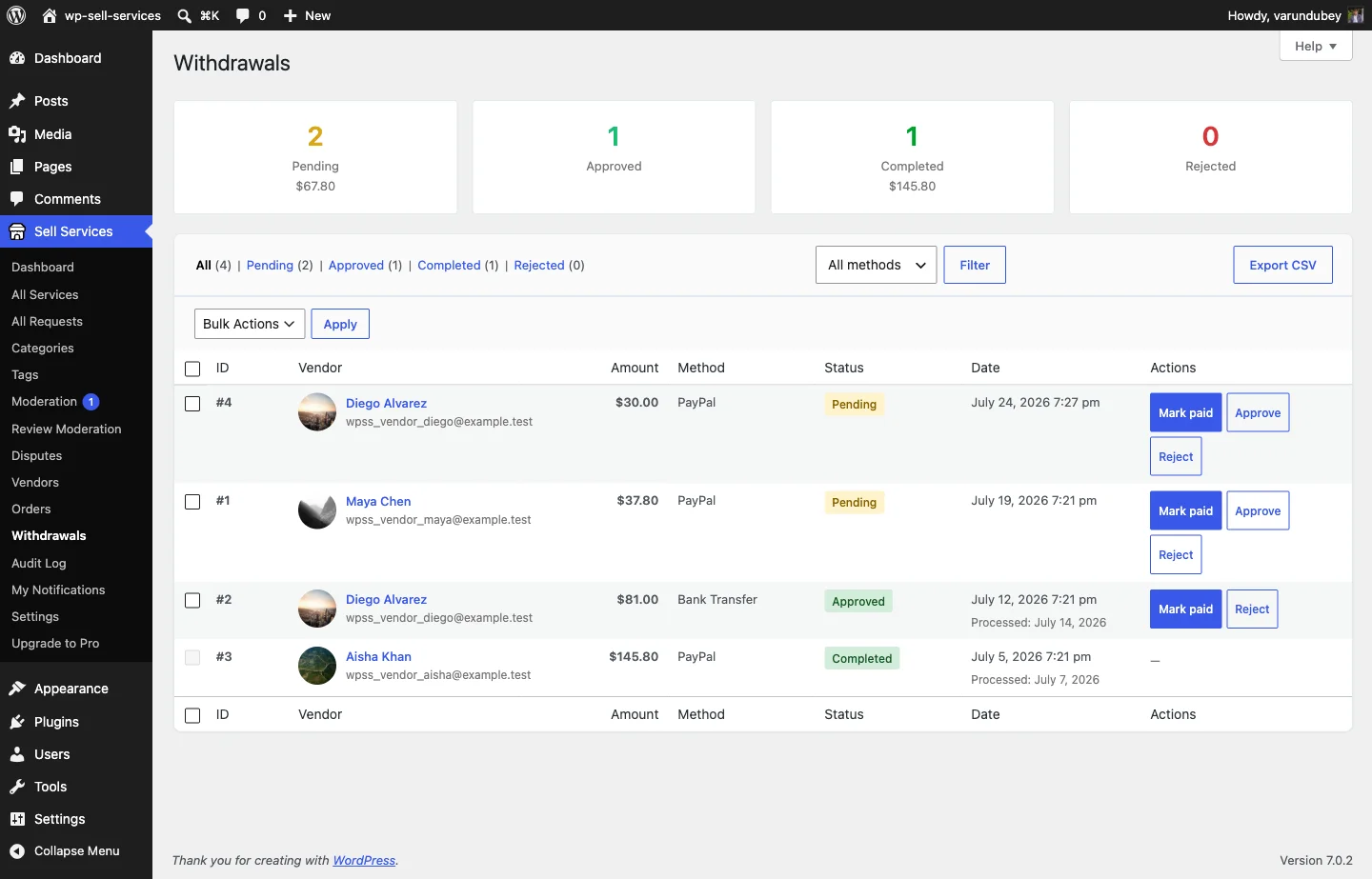
It’s worth being direct about what auto-withdrawals actually remove from an admin’s plate, because it isn’t the whole process. Auto-payouts still need approval and payment processing exactly like manual withdrawals do, the automation is entirely in generating the request, not in moving the money unsupervised. Go to the withdrawals screen, see the new “Auto” badged requests sitting there, review and approve, send the payment through PayPal or bank transfer, then mark it completed. What’s been removed is the tedious part, remembering to check every vendor’s balance and manually filing a request for each one that qualifies, not the judgment part.
For a marketplace with a handful of vendors, that distinction barely matters, manual mark-paid is plenty. For a marketplace with fifty or a hundred active vendors, the difference between “I have to remember to check everyone’s balance every week” and “the system tells me exactly who’s eligible today” is the difference between payouts happening reliably and payouts slipping for weeks because nobody got around to the spreadsheet.
Where Pro Actually Changes the Shape of Payouts
Scheduled auto-withdrawals solve the request problem. They don’t solve the batch-payment problem, an admin approving fifteen individual PayPal transfers by hand is still fifteen manual actions, even if the requests themselves appeared automatically. This is specifically what the two Pro payout rails exist to fix. PayPal mass payouts let an admin select every approved, owed balance and send them all in a single PayPal Payouts batch instead of one transfer at a time. Each payout settles against the wallet ledger individually, so a vendor’s balance clears exactly once even though the whole batch went out together, and a submitted batch can be re-synced against PayPal afterward to reconcile its actual status, so a partial failure inside a batch doesn’t leave the ledger silently disagreeing with what really happened. Stripe Connect goes a step further and removes the batch-approval step entirely. Once a vendor completes Connect onboarding, each qualifying charge computes the platform’s application fee from the commission rules automatically and routes the vendor’s share directly to their connected Stripe account at the moment of the sale. There’s no withdrawal request to approve because there’s no accumulated balance sitting around waiting for a payout run, the money settles per-transaction. Vendors who never bother connecting Stripe aren’t blocked or penalized, their earnings just accrue normally in the standard ledger and they request withdrawals like anyone else.
What a Deep REST API Actually Buys a Marketplace Owner
All four payout rails, and the wallet ledger underneath them, are reachable through WP Sell Services’ REST API, and this is the part that turns “automated payouts” from a feature the plugin happens to have into a system a marketplace owner can actually build around. The API follows WordPress REST standards, lives at /wp-json/wpss/v1/, and covers 21 specialized controllers spanning services, orders, vendors, earnings, seller levels, notifications, and more, adding up to well over 125 individual endpoints once every route on every controller is counted.
For payouts specifically, that depth means a marketplace owner isn’t limited to whatever the admin UI happens to display. Vendor balances, withdrawal history, and payout status are all readable and, where appropriate, actionable through the API, which means a custom dashboard, an accounting system integration, or a Slack notification the moment a vendor crosses the auto-withdrawal threshold are all things a developer can build without touching the plugin’s core code.
Authentication That Actually Fits Automation, Not Just Browser Logins
A REST API that only works for logged-in browser sessions isn’t much use for automation running on a schedule. WP Sell Services supports Application Passwords, WordPress’s own built-in credential system since version 5.6, specifically for this, generate a named application password from a user’s profile once, and any external script or service can authenticate with it going forward, no cookies, no session state, no browser involved. Cookie authentication still exists for same-origin, browser-based requests, and JWT tokens are available in Pro for third-party integrations that prefer that pattern. Sessions created through the plugin’s own app authentication flow carry real expiration, dying 30 days after last use or 90 days after issue, whichever comes first, so an abandoned integration’s credentials don’t stay valid forever, and a compromised token has a real shelf life rather than working indefinitely. A dedicated sessions endpoint lets an admin list and revoke active app sessions individually, which matters if a script is retired or a credential needs to be cut off without touching anything else.
Payload Consistency: The Unsexy Detail That Determines Whether Automation Is Reliable
An API that’s deep but inconsistent is almost worse than a shallow one, because every inconsistency becomes a special case a developer has to code around, permanently. WP Sell Services standardizes a few things across every endpoint that matter enormously once real automation depends on them. Every timestamp, everywhere in the API, is ISO-8601 with an explicit timezone offset, never a bare date that leaves a client guessing what timezone it’s in, a class of bug that used to cause real payout timing errors before it was standardized. Every reference to a person, a vendor on an order, a customer, a message sender, uses the same object shape everywhere, with a deleted flag that distinguishes “this account no longer exists” from “nobody performed this action,” which matters a lot when reconciling historical payout records against vendors who’ve since left the platform.
None of this shows up in a feature list, but it’s exactly the kind of detail that decides whether a marketplace owner’s custom payout dashboard keeps working reliably for years or breaks every few months because some endpoint formatted a date differently than the rest.
What Happens to a Payout When an Order Gets Refunded
Automated payouts only stay trustworthy if they handle the messy case correctly, and the messiest case in any payout system is a refund landing after a vendor has already been paid. A refund reverses the vendor earnings and the platform fee proportionally, to the currency’s precision, refund half an order and half of both the fee and the vendor’s earnings come back. Straightforward enough when the vendor hasn’t been paid out yet, the ledger simply adjusts before money moves. It gets more interesting when the vendor already received that money. In that case the reversal becomes debt that nets against the vendor’s future earnings rather than the platform trying to claw back a payment that’s already left the building. That debt is visible on the vendor’s own earnings dashboard, not a silent deduction they discover later, and it clears itself automatically as new sales come in. No vendor ends up owing money they have no way to see, and no marketplace owner has to manually chase a vendor for a refund-related repayment. This is exactly the kind of edge case that breaks naive payout automation and is worth confirming any system actually handles before trusting it at volume.
Where Seller Levels and Commission Rules Intersect With Payouts
Payout automation doesn’t operate in isolation from the rest of the vendor system, and one connection worth knowing about is how seller levels can affect what a vendor actually nets. WP Sell Services auto-calculates seller levels, New Seller, Rising Seller, Top Rated, and an admin-granted Pro Seller tier, based on completed orders, ratings, response rate, and on-time delivery. On its own that’s a trust and search-ranking signal. Paired with the Pro tiered commission feature, which lets an admin set lower platform fees for higher-performing sellers, it becomes a direct payout lever too, a vendor who’s earned Top Rated status can see a larger share of each sale flow to their balance without the site owner manually adjusting anyone’s rate by hand. That connection matters for planning automation, because the “owed balance” a scheduled auto-withdrawal checks against isn’t a flat percentage across every vendor, it’s whatever that specific vendor’s commission rate actually nets out to. The REST API surfaces both the seller level and the effective commission alongside the earnings figures, so a custom dashboard or report built on top of the API can show not just what a vendor is owed, but why that number is what it is.
Choosing a Payout Setup That Actually Matches Where You Are
Just starting, with a handful of vendors, manual mark-paid is the right call. Nothing to configure, nothing that can misfire, and the overhead of checking a short vendor list by hand once a week is trivial. Growing past the point where remembering everyone’s balance is realistic, but still wanting to personally control when money leaves the account, turn on scheduled auto-withdrawals, it costs nothing and removes the part of the job that was pure tedium anyway. Many vendors, most of them already paid through PayPal, add PayPal mass payouts to collapse a dozen individual transfers into one batch action. High volume, wanting genuinely hands-off settlement where the marketplace never touches an individual payout, Stripe Connect is the rail built for that, at the cost of vendors needing to complete their own Connect onboarding first. These aren’t locked-in choices. Every rail writes to the same ledger, so a marketplace can start manual, add scheduling once volume justifies it, and layer in PayPal mass payouts or Stripe Connect later without orphaning any balance or reconciling anything by hand. The same commission logic that determines what a vendor is owed is set through the pricing tiers on each service, so getting pricing right upstream makes payouts downstream simpler to reason about.
Building on the API: What a Mobile App or Custom Dashboard Actually Needs
The REST API isn’t only useful for payout automation specifically, it’s the same surface a developer would use to build a mobile app, a custom admin dashboard, or an accounting integration for the whole marketplace, and payouts are just one slice of what it exposes. A mobile client authenticates through the app sign-in endpoint, which trades a member’s account password for a token and returns real, enforced expiration alongside it, a fix that matters because earlier versions of the pattern issued tokens that never actually expired, meaning a stolen credential worked forever. That token cannot be used to mint another token, closing off the obvious escalation path where one compromised credential becomes an unlimited supply. For a marketplace owner who isn’t building a mobile app but wants a lighter internal tool, a payout summary emailed weekly, a Slack alert when a vendor crosses the auto-withdrawal threshold, a script that reconciles the wallet ledger against a separate accounting system, the same authenticated endpoints work without any of the mobile-specific session machinery. Pull the earnings and withdrawal data with Application Passwords, run it on a cron job or a lightweight serverless function, and the marketplace has a custom automation layer that didn’t require touching the plugin’s own code at all.
Frequently Asked Questions
Do I need WP Sell Services Pro to automate payout requests?
No. Scheduled auto-withdrawals, the feature that raises withdrawal requests automatically on a schedule once a vendor crosses a threshold, is included in the free plugin. Pro adds the two rails that automate the actual money movement in bulk, PayPal mass payouts and Stripe Connect.
What happens if a vendor hasn’t set up a payout method when an auto-withdrawal is supposed to trigger?
They’re skipped for that run rather than blocking the process for other vendors. The system checks again on the next scheduled run, so a vendor who adds their payout details later gets picked up automatically going forward.
Can I mix payout rails across different vendors on the same marketplace?
Yes. Every rail settles against the same wallet ledger, so one vendor can be on manual mark-paid, another on scheduled auto-withdrawals, and another on Stripe Connect, all simultaneously, without any balance getting out of sync.
How many REST API endpoints does WP Sell Services actually expose?
The API spans 21 specialized controllers covering services, orders, vendors, earnings, seller levels, disputes, and more, which works out to 125-plus individual endpoints once every route across every controller is counted, plus generic WordPress REST endpoints alongside them.
Is Application Passwords authentication secure enough for a production payout automation script?
Yes, when used as intended. It’s WordPress’s own built-in credential system, sessions created through the plugin’s app authentication flow expire automatically, and individual app sessions can be listed and revoked without affecting other integrations, which is the same operational model most production API integrations expect.
Does automating payouts change how commission is calculated?
No. The platform fee and vendor earnings split is calculated once, at payment time, and stored on the order regardless of which payout rail eventually settles it. Automation changes how the money moves, not how the split was determined.
What happens to a payout if a dispute is opened after the vendor was already paid?
If the dispute resolves in the buyer’s favor and a refund is issued, the reversal nets against the vendor’s future earnings rather than requiring the platform to claw back a payment that already left. The debt is visible to the vendor on their earnings dashboard and clears itself as new sales accrue.
Automation That Respects the Money
The honest version of “automated payouts” isn’t a black box that moves money without anyone watching. It’s a REST API deep enough that every balance, threshold, and request is reachable and reliable, wrapped in payout rails that scale from a founder manually paying five vendors to a platform routing thousands of dollars a day through Stripe Connect, with a human decision point built into every single one of them by default. That’s not a limitation. It’s the reason the system is trustworthy enough to actually automate. For a full reference of every controller and endpoint the API exposes beyond the payout-specific ones covered here, this developer-focused REST API guide walks through the complete surface for anyone building a mobile app or deeper custom integration.