


If you run an online store, a global blog, or any business attracting international visitors, one thing is clear: currency matters. Shoppers don’t want to guess prices or calculate conversions manually it’s frustrating and can lead to abandoned carts or lost opportunities. That’s where Currency Converter Plugins come into play.
In today’s digital economy, borderless e-commerce and international freelancing are booming. Customers expect a seamless, localized shopping experience, including the ability to view prices in their preferred currency. Offering accurate and instant currency conversion isn’t just a convenience anymore it’s a necessity for any business aiming to reach a global audience.
Thankfully, WordPress provides a wide range of currency converter tools designed to make this process simple. From real-time exchange rates to customizable currency selectors, these plugins help ensure your international visitors can shop, subscribe, or engage without confusion.

What are Currency Converter Plugins
Currency Converter Plugins are essential for any WordPress site that wants to cater to a global audience. Whether you run an e-commerce store, a subscription service, or a worldwide blog, these plugins allow visitors to view prices and values in their preferred currency in real-time.
By automatically converting currencies based on up-to-date exchange rates, these tools not only improve the user experience but also build trust with international customers, making it easier for them to make purchasing decisions confidently.
With a Currency Converter Plugin, your visitors can instantly check prices in their local currency without leaving your website or manually calculating conversions. This convenience reduces friction, encourages engagement, and can directly boost conversions and customer satisfaction.
What to Look for in the Best Currency Converter Plugins
Before selecting a Currency Converter Plugin, consider the following features to ensure you’re getting a tool that suits your needs:
- Real-time Exchange Rates: Accurate, up-to-date exchange rates are a must. You don’t want your visitors seeing outdated conversions.
- Location Detection: The best plugins automatically detect the visitor’s location and adjust the currency accordingly, saving them the hassle.
- Support for Multiple Currencies: Choose a plugin that supports a broad range of currencies, ideally 100 or more, to cater to a global audience.
- Customization Options: Look for plugins that allow you to style the converter widget to match your website’s design.
- Easy Setup: Installation should be simple, even if you’re not a tech expert. The plugin should integrate seamlessly with your site.
- WooCommerce Compatibility: If you’re running an online store, ensure the plugin works well with WooCommerce for accurate price conversions.
Why Use Currency Converter Plugins
Integrating a Currency Converter Plugin into your WordPress site comes with several benefits, especially for businesses looking to expand their reach globally:
- Global Reach: By showing prices in multiple currencies, you make your website accessible to a broader audience, enhancing your chances of international sales.
- Improved User Experience: No more switching between apps or websites to check conversion rates — visitors will appreciate the convenience of seeing prices in their local currency.
- Higher Conversion Rates: When customers see prices in their preferred currency, they’re more likely to complete a purchase, leading to higher conversion rates.
- Professionalism: Offering currency conversion adds a level of professionalism to your website and builds trust with your international audience.
- Competitive Advantage: As e-commerce continues to grow globally, providing an easy currency switching option can set you apart from competitors who haven’t embraced global currency support.
How to Use Currency Converter Plugins
Setting up a Currency Converter Plugin on your WordPress website is simple. Here’s a step-by-step guide:
- Choose and Install: Pick a plugin that fits your needs and install it from your WordPress dashboard.
- Configure Currency Settings: Choose your default currency and configure additional currencies based on the regions you serve.
- Customize the Display: Most plugins allow you to choose where the currency converter appears (e.g., header, footer, or sidebar) and style it to fit your site’s design.
- Enable Auto-location Detection: Enable geolocation features so the plugin can automatically detect and display the correct currency based on the visitor’s location.
- Test the Plugin: Once installed, test the plugin on your site to ensure the conversion rates are accurate and the design fits with your theme.
- Keep it Updated: Make sure to update the plugin regularly to ensure exchange rates are accurate and the plugin remains secure.
The Best Currency Converter Plugins for WordPress
Now that we’ve covered what to look for, why to use, and how to use a Currency Converter Plugin, let’s explore the best options available for WordPress. These plugins offer reliability, ease of use, and all the essential features you’ll need.
1.YayCurrency – WooCommerce Multi-Currency Switcher

YayCurrency – WooCommerce Multi-Currency Switcher is a simple yet powerful plugin that lets WooCommerce customers switch between multiple currencies effortlessly, improving the shopping experience for international buyers. The plugin uses real-time exchange rates and can automatically adjust currency based on the user’s location. It’s highly flexible, allowing placement in various areas of your site, such as the header, footer, or sidebar. With seamless WooCommerce integration, YayCurrency ensures accurate pricing for both products and shipping fees, making it an essential tool for global stores.
Key Features
- Display multiple currencies with real-time conversion rates
- Automatic currency detection based on visitor location
- Manual currency switcher option for users
- Supports WooCommerce products, variations, and shipping fees
- Customizable switcher placement (header, footer, sidebar, or widget)
- Integration with major payment gateways to maintain accurate checkout totals
- Lightweight, fast, and compatible with WooCommerce HPOS
- Option to set default and backup currencies
Best For
- WooCommerce stores targeting international customers
- Businesses selling globally with variable shipping costs
- E-commerce brands wanting a professional, localized shopping experience
Why It’s Valuable
- Improves customer convenience and confidence
- Reduces cart abandonment for international buyers
- Simplifies multi-currency management for store owners
Also Read: Top 10 WooCommerce Tickets Plugins to Power Your Event Website in 2026
2. YITH Multi Currency Switcher for WooCommerce
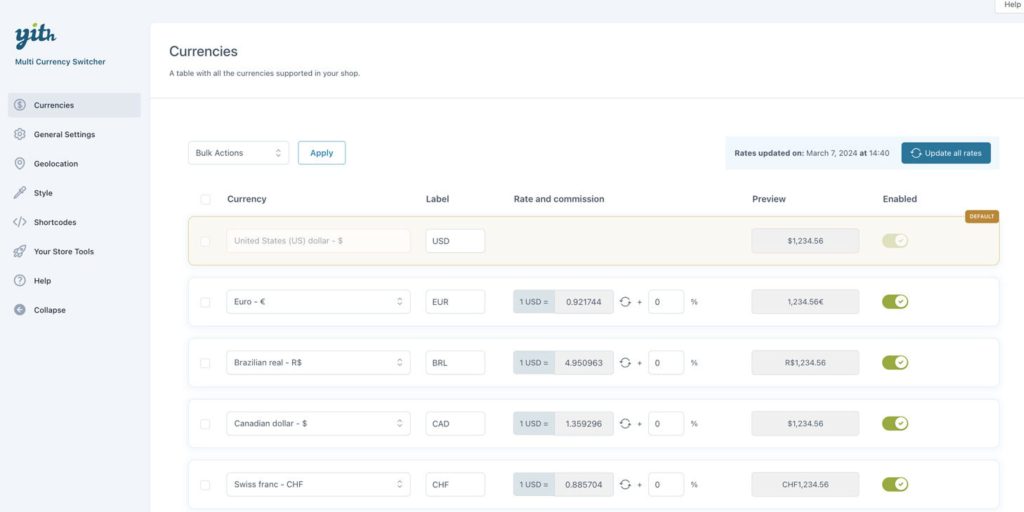
The YITH Multi Currency Switcher for WooCommerce is a robust plugin that provides a seamless multi-currency experience for international shoppers. Customers can switch between currencies either manually or automatically based on their geographical location. With support for multiple exchange rate providers, your prices stay accurate and up-to-date, and you can also configure custom rates when needed. The plugin offers full control over the appearance and placement of the currency switcher, allowing it to fit perfectly in your header, footer, or sidebar.
Key Features
- Manual and automatic currency switching based on user location
- Real-time exchange rates with support for multiple providers
- Option to set custom exchange rates for products
- Customizable switcher appearance and placement (header, footer, sidebar, or widget)
- Supports WooCommerce products, variations, and shipping fees
- Compatible with major payment gateways for accurate checkout totals
- Lightweight and performance friendly
- Compatible with WooCommerce HPOS
Best For
- WooCommerce stores serving international customers
- Businesses requiring precise pricing in multiple currencies
- E-commerce stores aiming for a professional and localized shopping experience
Why It’s Valuable
- Boosts customer confidence and conversion rates
- Simplifies multi-currency management for store owners
- Provides a fully localized shopping experience for global audiences
3. Currency Switcher for WooCommerce

Currency Switcher for WooCommerce is a robust plugin that allows WooCommerce stores to display prices in multiple currencies effortlessly. It offers real-time exchange rates and can automatically switch currencies based on a visitor’s location. Customers also have the option to manually select their preferred currency from a dropdown menu. Its seamless WooCommerce integration ensures accurate product and shipping prices without complicating the shopping experience, making it ideal for stores serving international audiences.
Key Features
- Real-time exchange rate updates for accurate pricing
- Automatic currency detection based on visitor location
- Manual currency selection via a dropdown menu
- Supports WooCommerce products, variations, and shipping fees
- Customizable switcher placement for header, footer, or sidebar
- Integration with major payment gateways to maintain correct checkout totals
Best For
- E-commerce stores targeting international customers
- Businesses wanting automated and manual currency options
- Stores aiming for a simple yet professional multi-currency shopping experience
Why It’s Valuable
- Reduces cart abandonment by eliminating currency confusion
- Enhances customer trust with accurate, real-time pricing
- Simplifies global pricing management for store owners
4. Price Based on Country for WooCommerce

This plugin is perfect for WooCommerce stores that want to implement region specific pricing. It allows you to define different prices for each country or currency, ensuring that customers always see accurate pricing. The plugin automatically detects the visitor’s location and switches the currency and pricing accordingly. This gives store owners complete control over regional pricing strategies, helping deliver a seamless and personalized shopping experience for global customers.
Key Features
- Define custom prices for different countries or currencies
- Automatic price and currency switching based on user location
- Supports WooCommerce products, variations, and shipping fees
- Works with multiple currencies simultaneously
- Customizable display options for currency and price formats
- Integration with major payment gateways to maintain accurate checkout totals
- Compatible with WooCommerce HPOS and modern themes
Best For
- Stores targeting international markets
- Businesses using localized pricing strategies
- E-commerce stores aiming to improve global customer satisfaction
Why It’s Valuable
- Ensures visitors always see accurate, region specific pricing
- Reduces confusion and cart abandonment for international buyers
- Supports global business growth with flexible pricing management
5. CBX Currency Converter

CBX Currency Converter is a straightforward yet highly effective plugin for adding currency conversion to your WordPress and WooCommerce sites. It supports over 170 currencies with real-time exchange rates from reliable sources. The plugin integrates seamlessly with WooCommerce, displaying currency conversions directly on product pages and throughout the shopping experience.
With automatic location detection, CBX adjusts currency based on the visitor’s region, offering a smooth and intuitive experience. The plugin is also fully customizable, allowing you to match the look and feel of the converter to your site’s design. It’s an ideal solution for store owners who want a simple, reliable, and professional currency conversion tool.
Key Features
- Supports 170+ currencies with real-time exchange rates
- Automatic currency switching based on user location
- Manual currency selector option for visitors
- WooCommerce integration for products, variations, and shipping fees
- Customizable display to match your site’s design
- Lightweight, fast, and performance friendly
- Compatible with WooCommerce HPOS and modern WordPress themes
Best For
- WooCommerce stores serving a global audience
- Businesses looking for simple, real-time currency conversion
- Store owners who want an easy to use yet professional solution
Why It’s Valuable
- Enhances the shopping experience for international customers
- Reduces confusion and cart abandonment
- Streamlines global pricing without complicated setups
6. WooCommerce Currency Converter Widget

The WooCommerce Currency Converter Widget is an ideal plugin for store owners who want a simple, effective way to add currency conversion to their WooCommerce site. It provides a compact, customizable widget that can be placed in the sidebar, header, or footer, making it easy for visitors to switch currencies with a single click.
The plugin supports real-time exchange rates from reliable sources and allows you to define a base currency while letting customers convert to other currencies instantly. Lightweight and user-friendly, it’s perfect for enhancing the international shopping experience without complicating your site’s design or performance.
Key Features
- Compact and customizable widget for sidebar, header, or footer
- Real-time exchange rates from reliable sources
- Base currency configuration with easy switching to other currencies
- WooCommerce integration for products, variations, and shipping fees
- Lightweight, fast, and performance friendly
- Enhances international shopping experience
Best For
- WooCommerce stores targeting global customers
- Businesses looking for a simple, no-fuss currency converter
- Store owners who want a lightweight solution without affecting site speed
Why It’s Valuable
- Improves usability for international shoppers
- Reduces confusion and boosts conversion rates
- Provides a seamless, professional shopping experience
7. WooCommerce All-in-one Currency Converter
WooCommerce All-in-One Currency Converter is a user-friendly plugin that makes currency conversion simple and reliable for WooCommerce stores. Supporting over 150 currencies with real-time exchange rate updates, it ensures that international customers always see accurate and up-to-date pricing.
The plugin automatically detects a visitor’s location and adjusts the currency accordingly, while offering customizable display options to match your store’s design. Lightweight and easy to install, it’s perfect for store owners looking to simplify global pricing and provide a professional, seamless shopping experience for customers worldwide.
Key Features
- Supports 150+ currencies with real-time exchange rates
- Automatic currency switching based on customer location
- Manual currency selector option for visitors
- WooCommerce integration for products, variations, and shipping fees
- Customizable design to match your store’s look and feel
- Lightweight, fast, and performance friendly
- Compatible with WooCommerce HPOS and modern themes
Best For
- Stores selling globally with diverse customer locations
- Businesses wanting accurate, automated multi-currency pricing
- E-commerce owners seeking a simple, plug-and-play solution
Why It’s Valuable
- Ensures accurate pricing for international shoppers
- Reduces confusion and increases trust
- Enhances user experience and boosts conversion rates

Wrapping Up
A Currency Converter Plugin can significantly improve your site’s user experience and make international customers feel more comfortable when shopping or browsing. The plugins listed here are all genuine, reliable options for WordPress users, ensuring that you can provide a seamless, global experience for your visitors.
Which Currency Converter Plugin do you think will work best for your site? Let us know in the comments, or get started today with one of these top picks to boost your site’s international reach!
Interesting Reads:
12 Essential Administration Plugins for WooCommerce
WooCommerce Fast & Mass Update Plugins for Bulk Product Updates


