WooCommerce Services Marketplace: Dokan, WCFM or WC Vendors
Building a services marketplace on WooCommerce: what Dokan, WCFM and WC Vendors each cover, what a service order still needs, and the parts to plan.

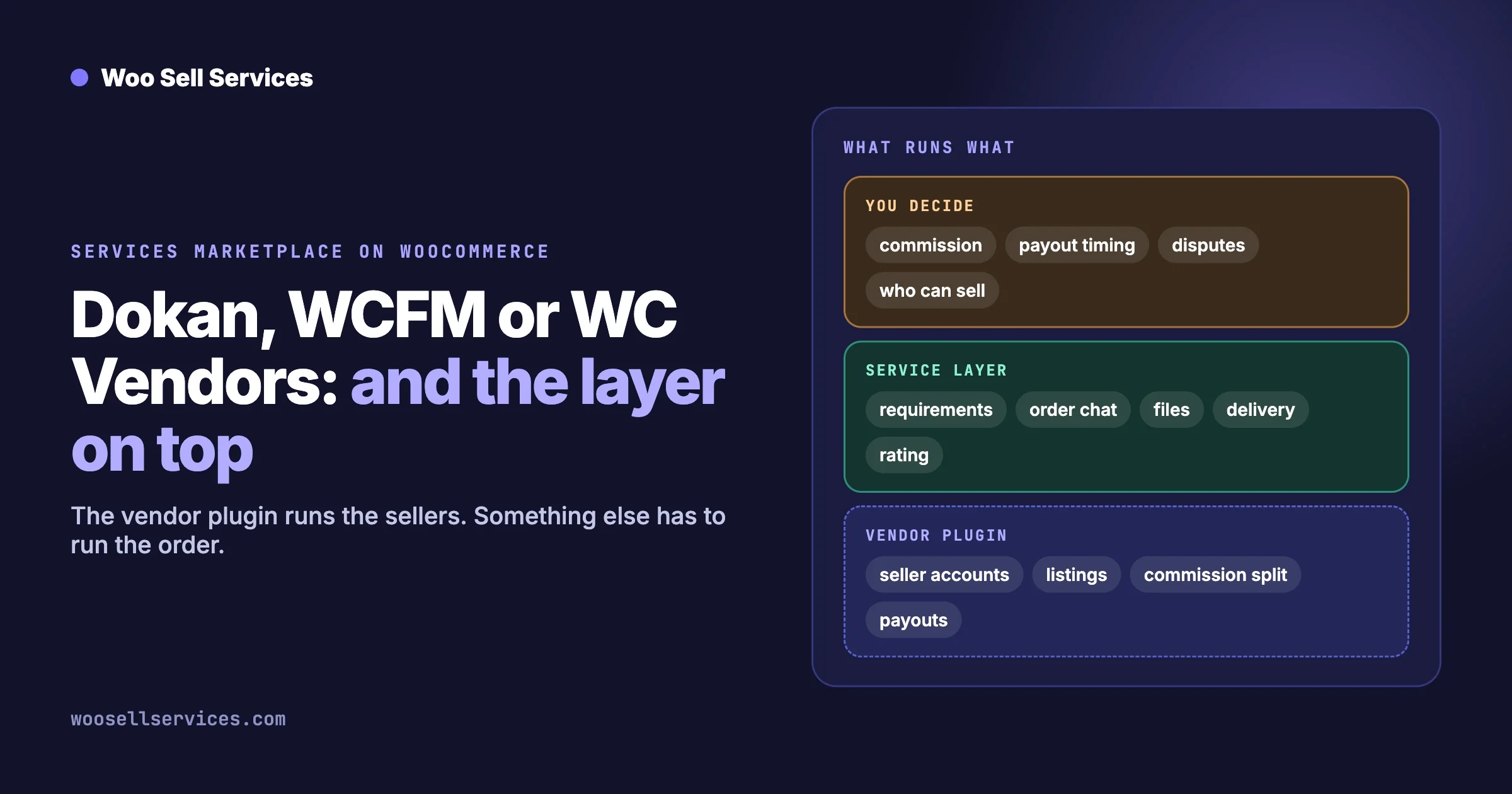
Dokan, WCFM and WC Vendors can each run a services marketplace on WooCommerce, because each one does the same core job: it gives sellers their own accounts, lets them list products, and splits the money between you and them. None of them is built around a service order. What a service needs after payment (a brief from the buyer, a conversation, files, a delivery and a rating per job) comes from a services add-on on top. So choose the vendor plugin for how you want to run sellers and payouts, and plan the service layer separately.
This guide is for someone planning a marketplace where other people sell their time on your site: freelancers, tutors, consultants, tradespeople. It covers what the three plugins have in common, where they differ for service work, and the parts no plugin decides for you. Facts about the three plugins come from their own WordPress.org listings and websites on 12 October 2026.
In this guide:
- What a services marketplace needs that a goods marketplace does not
- What Dokan, WCFM and WC Vendors each bring
- Which one fits a services marketplace?
- Can Dokan sell services with requirements, revisions and delivery dates?
- What a services add-on puts on top
- The parts you still have to plan: commission, payouts, disputes, onboarding
- A build order for the first 30 days
- Questions people ask
Two posts on our sister site go further on neighbouring questions, and we link them instead of repeating them: a general comparison of the three vendor plugins and a full build of a Fiverr-style marketplace on WordPress.
What does a services marketplace need that a goods marketplace does not?
A goods order ends when a parcel arrives. A service order starts when the money arrives. Everything that matters happens after checkout, and that is the part vendor plugins were not designed around.
Stage | Selling goods | Selling a service |
|---|---|---|
Before purchase | Photos, sizes, stock | What is included, how long it takes, examples of past work |
At checkout | Address and shipping | Often nothing extra |
Straight after payment | Pick, pack, send | The buyer answers the seller’s questions so work can begin |
During the order | A tracking number | Messages and files going both ways, and a status both sides can see |
Completion | Delivered by a courier | The seller hands over the work and the buyer accepts it |
Afterwards | A product review | A rating of that seller for that job |
When it goes wrong | Return the item | A dispute about whether the work matched the brief |
How to check a setup before you commit
Whatever plugins you are considering, run one test order as a buyer and one as a seller, and answer five questions.
- After paying, was the buyer asked for what the seller needs to start?
- Is there one place on the order where both sides can write and share files?
- Can the seller hand over the finished work from their own dashboard?
- Does the buyer know what stage the order is at without asking?
- Can the buyer rate that seller when it is done?
If any answer is “by email”, that part of your marketplace will not scale past a few orders a week.
What do Dokan, WCFM and WC Vendors each bring?
All three are free plugins on WordPress.org with paid tiers, and all three turn a WooCommerce store into a multi-seller store. Here is what each listing showed on 12 October 2026.
Dokan | WCFM Marketplace | WC Vendors | |
|---|---|---|---|
Version on WordPress.org | 5.3.0 | 3.8.3 | 2.7.2.2 |
Last updated | 8 October 2026 | 30 August 2026 | 14 September 2026 |
Active installs shown | 30,000+ | 10,000+ | 3,000+ |
Seller dashboard | A frontend dashboard for each seller, with products, orders and withdrawals | Described as a 100 percent frontend vendor dashboard | A basic frontend dashboard in the free version, more in Pro |
Commission | Vendor commissions and product-based commissions | Described as flexible commission structures | A commission rate for sales, and in Pro per vendor or per product |
Payouts | Withdrawal requests, and automatic disbursement the admin can configure | Automated Stripe split pay is listed | Pro lists automatic commission payouts with Stripe |
Bookings | A WooCommerce Booking integration is sold as a module | Listed as compatible with WooCommerce Bookings and Appointments | Pro lists letting vendors sell bookings |
Sources: the WordPress.org pages for Dokan, WCFM Marketplace and WC Vendors. Install counts on WordPress.org are rounded down and only count the free plugin, so read them as a rough guide to how widely each is used, not as a ranking.
What they have in common
- Sellers register and manage their own listings without touching the WordPress admin.
- You set a commission and the plugin works out each seller’s share of an order.
- Sellers get a public store page of their own.
- Appointment-style services are handled by connecting a booking plugin, which is a separate purchase.
A note on bookings versus services
The three plugins talk about “services” mostly in the sense of bookings: a slot in a calendar, like a haircut or a room. That is one kind of service. The other kind is a job with a deliverable, like a logo, a translation or a website fix. A booking plugin covers the first kind well. It does not give you a brief, a conversation or a delivery, which is what the second kind needs. Decide which kind your marketplace sells before you compare anything else.
Which one fits a services marketplace?
All three can do it. Pick on the things that will shape your daily work: how sellers are paid, how much the seller dashboard needs to do, and what you can afford each year.
If this matters most | Look first at | Why |
|---|---|---|
The largest user base and frequent releases | Dokan | The highest install count of the three and the most recent update on the day we checked |
Sellers who must never see the WordPress admin | WCFM or Dokan | Both describe a complete frontend dashboard |
Splitting payment to sellers at the moment of purchase | WCFM, or WC Vendors Pro | Both list Stripe split or automatic payouts. Check which tier includes it |
A small, simple marketplace to begin with | WC Vendors | The free version covers vendor stores and a commission rate, with less to configure |
Appointments and calendar slots | Any of the three plus a booking plugin | All three list a bookings integration |
Three checks to run yourself before you choose, because they decide more than any feature table.
- Price the tier you need, not the free one. Open each pricing page and find the tier that includes payouts the way you want them and any booking integration. Dokan’s pricing page listed its Starter plan at $149 a year on the day we looked, with more modules in higher tiers. Check the other two the same way, and check renewal prices.
- Register as a seller on each demo. Add a listing and find your orders. Your sellers will live in that dashboard, and many of them will not be technical.
- Read the last three months of the support forum. You are looking for how fast questions are answered, not for the absence of bugs.
If you already run one of the three and it works, stay on it. Moving sellers, products and commission history between vendor plugins is a project in itself, and the service layer described below works with all three.
Can Dokan sell services with requirements, revisions and delivery dates?
Not on its own, as far as its published feature list shows. Dokan handles the marketplace side: seller accounts, listings, commissions and payouts. On Dokan’s modules page on 12 October 2026 we found bookings, a delivery time module, request for quotation, live chat and store support. We did not find a form that collects the buyer’s requirements after payment, or a revisions step on an order. Those come from a services add-on working alongside Dokan.
Taking the three parts of the question in turn:
- Requirements. A services add-on asks the buyer the seller’s questions once the order is paid. Woo Sell Services does this, and sellers can save a question set and reuse it on their next service.
- Revisions. We did not find a numbered revisions feature on Dokan’s page, and it is not listed on the Woo Sell Services product page either. In practice a change request is a message in the order conversation, and the seller attaches a new file. State how many rounds are included in the service description, so both sides know.
- Delivery dates. Dokan’s Delivery Time module is described as letting customers choose a delivery time, which is aimed at goods. For service work, Woo Sell Services shows an estimated delivery time on the service, and the delivery date can be updated later from the service page.
The same answer applies to WCFM and WC Vendors. The vendor plugin runs the sellers. The service layer runs the order.
What does a services add-on put on top?
It turns an order into a job that both sides can see. Woo Sell Services is the add-on our team makes, and it works with Dokan, WCFM and WC Vendors. Everything below is from its product page, which showed version 5.8.7 on the day we checked.
Stage of a service order | What the add-on does |
|---|---|
Listing | A service is a normal WooCommerce product with a Service checkbox and an estimated delivery time. It works on simple, variable, grouped and external products |
Who creates it | Vendors create and manage services from the frontend dashboard of the vendor plugin |
After payment | The buyer answers the seller’s requirement questions |
During the order | Chat, shared files and a status tracker live on the order, with notifications to both sides and an email to the vendor on each new order |
Help on a job | A vendor can add a co-author or a support agent to a service or to a single order |
Delivery | The seller attaches the final file and marks the order delivered |
Rating | The buyer rates the work, and the vendor rating syncs to the standard WooCommerce product review |
Repeat work | With WooCommerce Subscriptions, recurring services keep every renewal in one conversation thread |
What it does not do is also worth stating. It does not replace the vendor plugin, set commissions or pay sellers. It does not hold money in escrow or decide disputes. And as noted above, it has no numbered revisions counter. Plan those parts with the next section.
For what to ask buyers in that requirements step, see our client intake form guide, which has question sets for six kinds of service.
What parts do you still have to plan?
Plugins give you switches. These five decisions are yours, and a marketplace that skips them usually finds out during its first argument between a buyer and a seller.
1. Commission
Decide the rate and what it buys. Sellers compare your rate with the big freelance sites, and a lower number only matters if you also bring them buyers. Start with one flat rate. Per-category and per-seller rates can come later, once you know which sellers bring repeat business. Write down whether commission is taken on the full price or after tax and payment fees.
2. Payouts
Choose when sellers are paid: at purchase, on delivery, or some days after delivery. For services, paying at purchase is risky, because the work has not been done yet. A common approach is to release the seller’s share a fixed number of days after the order is marked delivered, so there is time for a complaint. Check that your vendor plugin and payment provider can hold funds that way, and what a withdrawal costs you.
3. Disputes and refunds
Symptom: a buyer says the work is not what they asked for, and the seller says it is. Check: what did the requirements say, and what was delivered? This is why the brief and the conversation need to live on the order, where you can read them. Fix: a written policy that says who decides, in how many days, and what the outcomes can be (a revision, a part refund, a full refund). Prevent: require sellers to state what is included, how many rounds of changes, and the delivery time on every listing.
4. Seller onboarding and quality
- Approve sellers by hand at first. Ask for examples of past work.
- Give each seller a short guide: how to write a listing, how fast to reply, how to deliver.
- Decide what gets a seller paused: late deliveries, low ratings, taking buyers off the site.
- Seed the marketplace with a small number of good sellers before you invite buyers. An empty category is worse than no category.
5. Tax and terms
You are taking payment on behalf of other people, which can change your tax position. The rules differ by country, so talk to an accountant before launch. Publish terms for sellers and for buyers, and a privacy notice covering the messages and files stored on orders. This guide is not legal or tax advice.
What is a sensible build order for the first 30 days?
When | What to do | You are done when |
|---|---|---|
Days 1 to 3 | Pick one niche and one kind of service. Write the commission, payout and dispute rules | The three rules fit on one page |
Days 4 to 7 | On a test site, install WooCommerce, one vendor plugin and the services add-on | A test seller can list a service from the frontend |
Days 8 to 12 | Run a full order as buyer and seller: pay, answer questions, chat, deliver, rate | All five checks from the top of this guide pass |
Days 13 to 18 | Set up payouts with your payment provider in test mode. Run a refund | Money reaches the test seller and a refund comes back out |
Days 19 to 25 | Invite five to ten sellers you have chosen. Help each one publish a listing | Every category you show has at least three services |
Days 26 to 30 | Open to buyers you already know. Watch the first orders closely | Three real orders completed and paid out |
Do not build the full feature list first. A marketplace proves itself with ten completed orders, not with ten modules switched on.
Questions people ask
Do you need the paid version of the vendor plugin?
For a real marketplace, usually yes. The free versions cover seller stores and a commission, and the tools you will want for payouts and seller management tend to be in paid tiers. Check each pricing page for the tier that has what you need.
Can sellers offer both products and services?
Yes. In Woo Sell Services a service is a normal WooCommerce product with a Service checkbox, so a seller’s store can hold both kinds.
Can a seller have a team working on orders?
The Woo Sell Services product page says a vendor can add a co-author or a support agent to a service or to a single order, so a second person sees the conversation and its notifications.
Can you sell appointments as well as project work?
Yes, with a booking plugin beside the vendor plugin. All three vendor plugins list a bookings integration. Use it for calendar slots, and the services add-on for work that has a brief and a deliverable.
Is switching vendor plugins later hard?
It is a project. Seller accounts, product ownership, commission records and store pages are stored differently by each plugin. Pick with care, and do not switch without a clear reason.
How many sellers do you need to launch?
Fewer than you think, if they are good and in one niche. Five to ten sellers with complete listings is enough to open. Buyers judge a marketplace by whether the first thing they look for is there.
Can someone build this for you?
Yes. The plugins get you most of the way, and the remaining part is usually fitting the order steps, payouts and design to how your niche works. Our team builds these, starting with a short discovery call. See the service marketplace development page.
If you are still deciding whether to run a marketplace at all, or to sell your own services from a single store, read Where to Sell Services Online: Marketplace, Tool or Store? first. And to see how a single service order runs from payment to rating, the Woo Sell Services features page walks through it.