Where to Sell Services Online: Marketplace, Tool or Store?
Where to sell services online: what a marketplace, a hosted tool and your own store each cost, who owns the customer, and when to move to your own store.

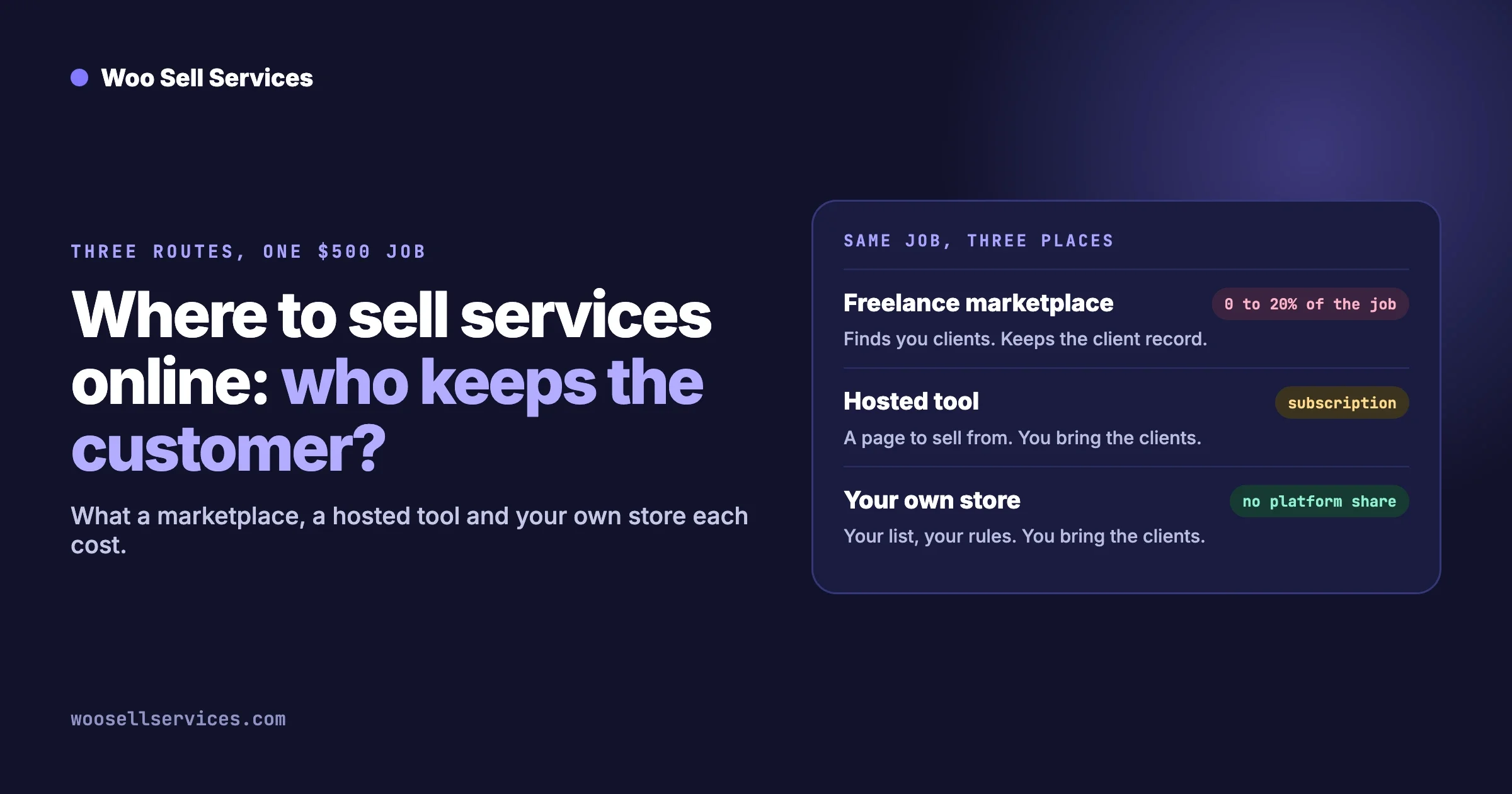
You can sell services online in three places: a freelance marketplace, a hosted tool, or your own store. A marketplace finds you clients and takes a share of every job. A hosted tool takes a monthly fee and gives you a booking or checkout page. Your own store costs the least per sale and gives you the customer list, but you have to bring the visitors. Most people who sell their time start on a marketplace and move repeat clients to their own store once they have enough of them.
This guide is for a freelancer, consultant or small agency deciding where to sell. It compares the three routes on what they cost, who owns the customer and how much work they take to run. Fees for other platforms are quoted from their own pages on 12 October 2026, with links, so check them again before you decide.
In this guide:
- The three routes at a glance
- Route 1: a freelance marketplace
- Route 2: a hosted tool
- Route 3: your own store
- What does each route cost on the same job?
- Who owns the customer?
- When does moving to your own store make sense?
- Running your own marketplace and setting your own commission
- How to move without losing clients
- Questions people ask
What are the three routes, at a glance?
Freelance marketplace | Hosted tool | Your own store | |
|---|---|---|---|
What you get | A profile inside a large site where buyers search for sellers | A booking, checkout or client page on someone else’s software | A website you control, with a checkout and an order page per job |
Where clients come from | The marketplace’s own search and adverts | You bring them | You bring them |
How you pay | A share of each job | A monthly or yearly subscription, sometimes plus a share | Hosting, software licences and card processing |
Who holds the customer record | The marketplace | The tool, though you can usually export it | You |
Who sets the rules | The marketplace: prices shown, reviews, disputes, messaging | The tool’s features are the limit | You |
Setup effort | An afternoon | A day | A few days to a few weeks |
Best when | You have no audience yet | You have clients and want something working this week | You have repeat clients or steady enquiries of your own |
None of the three is wrong. They suit different stages. The mistake is staying on the first one long after the reason for choosing it has gone.
Route 1: what does a freelance marketplace give you, and what does it cost?
It gives you buyers you did not have to find. That is the whole value, and when you are starting it is worth a great deal. You also get a payment system, a dispute process and a review system that buyers already trust.
What the two best-known marketplaces charge sellers
- Upwork. Its Freelancer Service Fee page says the fee “ranges from 0% to 15% per contract”. The worked examples on the same page use 10 percent.
- Fiverr. Fiverr’s own comparison guide describes a flat 20 percent commission on a seller’s earnings. Buyers also pay a service fee on top of the price you set, which is described in Fiverr’s help centre.
Both platforms change their terms from time to time. Read the linked pages on the day you decide, and look for extra costs that are easy to miss: fees to bid for work, paid promotion inside the marketplace, and fees to withdraw your money.
What you give up
- The customer relationship. Messages stay on the platform, and marketplaces usually forbid taking a client off it. Check the terms before you invite a marketplace client to deal with you directly, because breaking them can cost you the account.
- Control of how you are found. A change to the ranking can halve your enquiries overnight, and you will not be told why.
- Your own reviews. Reviews live on your marketplace profile. They do not come with you if you leave.
- The shape of your offer. Packages, delivery times and revision counts must fit the platform’s form.
How to check whether the marketplace is still earning its share
Look at your last twenty jobs and mark each one “new” or “repeat”. A new client found you through the marketplace’s search. A repeat client came back because of your work. The marketplace earned its fee on the first group. On the second group you are paying for an introduction that already happened.
Route 2: what is a hosted tool, and when is it enough?
A hosted tool is software you rent that gives you a page to sell from. There are three common kinds: booking tools for calls and appointments, client portal and invoicing tools for project work, and simple storefront builders for packaged services. You pay a subscription, connect a payment provider and share your link.
We are not naming or pricing individual tools here, because there are many and their plans change often. Whichever one you look at, check these on its own pricing page.
Question | Why it matters |
|---|---|
Is there a fee on each sale as well as the subscription? | Some plans add a percentage on top of card processing |
Does the price rise with clients, bookings or team members? | A cheap first tier can become expensive as you grow |
Can you use your own domain? | A link on someone else’s address is harder to trust and to move |
Can you export clients, orders and messages? | This decides how hard it is to leave |
Can the buyer answer your questions after paying? | Most service work cannot start without a brief |
Where do files and messages for a job live? | If the answer is “your email”, the tool only solves the payment |
When a hosted tool is the right answer
When you sell one or two things, such as a consultation call or a fixed audit, and you want to be taking payments by Friday. It is also right when you have no website and do not want one yet.
When it starts to pinch
When your service has steps. A logo design, a website fix or a monthly care plan needs a brief, a conversation, files going both ways, a delivery and often a second round. If the tool handles the payment and everything else happens in email, you will lose track once you have more than a handful of jobs open.
Route 3: what does selling from your own store involve?
You run a website with a checkout, and each service is a product a client can buy. On WordPress that usually means WooCommerce for the shop, with a services add-on so that an order behaves like a job and not like a parcel.
The add-on our team makes is Woo Sell Services. According to its product page, a service is a normal product with an estimated delivery time. After paying, the buyer answers your requirement questions. Chat, shared files and a status tracker then live on the order, and you attach the final file and mark it delivered, after which the buyer can rate it. The page listed plans from $59 a year for one site on the day we checked.
What you gain
- No share of the sale to a platform. You pay card processing, hosting and your software licences.
- The customer list. Names, emails and order history sit in your own site. You can email past clients when you launch something new.
- Your own rules. Your packages, your delivery times, your refund policy, your reviews.
- Search visits that build up. Pages on your own domain can rank for what you do, and that traffic belongs to you.
What you take on
- Finding clients. Nobody browses your store by accident. This is the real cost of the route, and it is paid in time.
- Upkeep. Updates, backups and the occasional thing that breaks.
- Trust. A marketplace lends you its reputation. On your own site you earn it with clear pricing, a real name, reviews and a refund policy.
- Disputes. There is no platform to referee. Your terms and your payment provider’s process are what you have.
If you are not sure what to put on the shelf, our guide to productized services has twelve examples with what is and is not included in each.
What does each route cost on the same job?
Take one job at $500 and one month with ten of them. The marketplace lines use the rates quoted above. Card processing is left out of every column because you pay something like it on all three routes.
Route | Platform share on a $500 job | On ten jobs in a month | Fixed costs to add yourself |
|---|---|---|---|
Marketplace at 10 percent | $50 | $500 | Any bidding or promotion fees you pay |
Marketplace at 20 percent | $100 | $1,000 | Any promotion fees you pay |
Hosted tool | $0, or the tool’s percentage if its plan has one | The same | The subscription |
Your own store | $0 | $0 | Hosting, a domain, software licences and your time |
Now do it with your own numbers. Write down last month’s income from the marketplace and the fee that was taken. Then write the monthly cost of hosting and licences for a store, and an honest figure for the hours you would spend finding the same clients yourself. If the fee is larger than the store costs plus your time, the sum favours moving. If the marketplace is still sending you most of your new clients, it does not, yet.
For a wider look at what product marketplaces keep, our sister site has a guide: What Marketplaces Keep: Etsy, Fiverr and Gumroad Fees vs Owning Your Store.
Who owns the customer on each route?
This matters more than the fee over time, because a client you can contact again is worth several first jobs.
Question | Marketplace | Hosted tool | Your own store |
|---|---|---|---|
Do you have the client’s email address? | Usually not | Yes | Yes |
Can you email all past clients about a new service? | No | Usually, within the tool’s rules | Yes, with their consent |
Do reviews stay with you if you leave? | No | Rarely | Yes |
Can the platform close your account? | Yes | Yes | Your host can, which is rare, and you can move hosts |
Can you take your order history with you? | Limited | If it has an export | Yes |
A simple test for where you stand today: if the platform you sell on disappeared tomorrow, how many of your last fifty clients could you contact by the end of the week? That number is how much of your business you own.
When does moving to your own store make sense?
When at least two of these are true.
- A third or more of your work is repeat clients. They no longer need the marketplace to find you.
- People already find you elsewhere. Referrals, social posts, a newsletter, a talk you gave.
- Your offer is packaged. A fixed scope at a fixed price is easy to sell from a product page. Open-ended hourly work is harder.
- The yearly fee is a real number. Add up twelve months of platform fees. If it would pay for a store several times over, it is worth an afternoon of planning.
- The platform’s rules cost you sales. You cannot offer a retainer, a bundle or a payment plan the way you would like to.
When to stay where you are
- You are in your first year and nearly every client is new to you.
- You have no time to look after a website and no budget to have it looked after.
- Your buyers are large companies that only hire through a marketplace they have approved.
You do not have to choose one route for everything. Many sellers keep a marketplace profile as a source of new clients and run a store for everyone who comes back or comes directly.
Upwork and Fiverr take a big cut. How do I run my own freelance marketplace and set my own commission?
You build a multi-seller site: a store where other freelancers list services, buyers pay you, and you pass on each seller’s share after keeping a commission you choose. On WordPress that takes three parts: WooCommerce for the checkout, a vendor plugin such as Dokan, WCFM or WC Vendors for seller accounts and commissions, and a services add-on so orders carry a brief, a conversation and a delivery.
Be clear about what you are taking on, because it is a different business from freelancing.
- You become the marketplace. Finding buyers is now your job, for every seller on the site.
- You set the commission, and you earn it. A lower rate than the big platforms only attracts sellers if you also bring them work.
- You handle the money. Paying sellers, refunds, tax and disputes need a written policy before the first order.
- Start narrow. One kind of service for one kind of buyer. General marketplaces need budgets that small teams do not have.
We compare the three vendor plugins for service work, and list the parts you still need to plan, in WooCommerce Services Marketplace: Dokan, WCFM or WC Vendors.
How do you move without losing clients?
Slowly, and without breaking the marketplace’s rules.
- Read the terms first. Know what your marketplace says about contacting clients outside it. Do not invite current marketplace clients to leave if the terms forbid it.
- Build the store before you need it. Two or three packaged services, clear prices, a short page about you, and a refund policy.
- Write your brief questions. Decide what you need to know before you can start each service, and ask it straight after payment. Our client intake form guide has question sets you can copy.
- Place one test order as a buyer. Pay, answer the questions, send a message, deliver a file and leave a rating. Fix whatever felt awkward.
- Send direct enquiries to the store. Anyone who finds you by referral, social media or your own website buys there from day one.
- Collect reviews on your own site. Ask every store client for one. They are the reviews you keep.
- Add something the marketplace cannot offer. A monthly plan is the usual one. We explain how in how to sell a website care plan as a product.
- Review after three months. Compare what each channel earned after its costs. Then decide how much effort the marketplace still deserves.
Questions people ask
Can you sell services online for free?
You can start without paying up front. A marketplace profile costs nothing until you earn, and some hosted tools have a free tier. Nothing is free once you are selling: a marketplace takes a share, a tool charges a subscription or a percentage, and card processing applies everywhere. On your own store the free parts are WordPress and WooCommerce, and the paid parts are hosting, a domain and any add-ons.
What is the best place to sell services online for a beginner?
A marketplace, because it supplies the buyers. Treat the fee as the price of finding your first clients, and start building a way for people to reach you directly from the first month.
Is it against the rules to move clients off a marketplace?
Often, yes, for clients you met there. Each marketplace sets its own terms, and they can include a period during which you must keep working through the platform. Read them. Clients who find you somewhere else are yours to serve wherever you like.
Do you need a developer to sell services from your own store?
Not for a simple setup. Installing WooCommerce and a services add-on and creating a few service products is work a careful non-developer can do. A developer helps when you want custom steps in the order, a design that matches your brand, or a multi-seller marketplace. If that is you, see our custom development page.
Can you use more than one route at once?
Yes, and many sellers should. Keep the marketplace for discovery, and use your store for repeat clients, referrals and anything packaged. Just keep each client on the channel where you met them if the terms require it.
How long before your own store pays for itself?
It depends on how many clients you can send to it. Take the yearly cost of hosting and licences and divide it by the platform fee you would have paid on one typical job. That is the number of direct jobs a year that covers the store. For many sellers it is a small number.
What about selling services inside a community or membership?
That works well when your buyers already gather somewhere you run. The store is the same. The difference is that your visitors come from the community instead of from search.
If your own store is the next step, the Woo Sell Services features page shows how an order runs from payment to delivery, and the pricing page lists the plans.