Invoices for Service Orders in WooCommerce: Deposits, Milestones and PDF Invoices Clients Accept
How to invoice service orders in WooCommerce: what an invoice must show, how three PDF invoice plugins compare, and how deposits, milestones and retainers turn into invoices.

Which invoice setup works for a service order in WooCommerce? For most stores, the free PDF Invoices & Packing Slips for WooCommerce plugin from WP Overnight is enough to produce numbered PDF invoices. Once you take deposits, bill in stages or need to correct a bill, you move to a paid extension, because credit notes and proforma invoices are not in the free versions of the plugins we checked.
That is the short answer. The rest of this guide covers what a service invoice has to say, how the main plugins compare, and how deposits, milestones and retainers each turn into invoices. We checked every plugin figure on 16 November 2026, and we say where we could not confirm something.
One note on who we are. Our team makes Woo Sell Services, an add-on for selling services on WooCommerce. It does not create invoices, and we explain that in its own section below. This is not tax or legal advice. Invoice rules differ by country, so check yours with an accountant or your tax office.
Does WooCommerce create invoices for service orders by itself?
Not as a PDF. WooCommerce sends order emails, and one of them is the customer invoice / order details email. The WooCommerce Deposits documentation says its invoices use that standard email, which you can edit under WooCommerce > Settings > Emails or replace with a template override. So the customer gets an email with the order lines, but no numbered document to file.
The invoice plugin vendors say the same thing in their own words. The WebToffee plugin page says that WooCommerce by default does not let you print invoices, packing slips or labels from the Orders page. The WP Overnight page describes its plugin as adding a PDF or XML invoice to the order emails. A plugin fills the gap, and your task is to pick one that suits work with no parcel attached.
A service order differs from a product order in four ways that matter for paperwork:
- Nothing ships, so a packing slip is dead weight.
- The thing sold is a piece of work, so the description line matters more than a SKU.
- Payment is often split: a deposit now, the balance later, or stages over weeks.
- The date the work was done is not the date the order was placed.
What must an invoice for a service include?
The exact list depends on where you trade. As an example, the UK government page on invoices says an invoice must include a unique identification number, your company name, address and contact details, the name and address of the customer, a clear description of what you are charging for, the date the goods or service were provided (the supply date), the invoice date, the amounts charged, the VAT amount if applicable and the total owed. Sole traders and limited companies have extra lines, and VAT invoices carry more detail than non-VAT ones. Read the source: GOV.UK, Invoices - what they must include.
For the EU, the Your Europe business pages say that a VAT-registered business selling to other businesses normally has to issue a VAT invoice, on paper or electronically, showing your VAT number and the VAT charged. They also say that a service sold to a business in another EU country usually carries no VAT on the invoice, because the buyer accounts for it. See Your Europe, charging and deducting VAT (the page shows a last-checked date of 11 May 2026).
Put those lists next to a service store and three lines need attention:
- The description. “Order #1042” does not tell an accountant what was sold. “Brand identity package, Standard tier, 2 revision rounds” does. Name the service on the product itself, because that name is what lands on the invoice.
- The supply date. For a service delivered over weeks, the order date is not the delivery date. Check whether your plugin lets you show a delivery or completion date, or add one through a custom field.
- The number. It must be unique, and most plugins make it sequential. Decide before launch whether you want one number series for everything or a separate series for credit notes and proformas.
Which PDF invoice plugin fits a service store?
Here are the plugins we checked, with figures read from the wordpress.org plugin directory on 16 November 2026.
Plugin | Version | Active installs | 5-star share of ratings | Last updated | In the free version | Paid extras that matter for services |
|---|---|---|---|---|---|---|
PDF Invoices & Packing Slips for WooCommerce (WP Overnight) | 5.16.6 | 300,000+ | 1,823 of 1,866 (98%) | 22 Oct 2026 | PDF or XML invoice attached to emails, sequential numbers, editable templates, download from My Account, bulk export | Credit notes, proforma invoices and receipts, document creation by order status, cloud upload (Professional) |
WebToffee PDF Invoices, Packing Slips, Delivery Notes & Shipping Labels | 5.0.4 | 50,000+ | 271 of 285 (95%) | 20 Oct 2026 | Invoices and packing slips, custom numbers, UBL/XML invoices, bulk print, My Account download | Credit notes, multiple templates, code-editor customisation (Pro) |
7.1.2 | 6,000+ | 31 of 37 (84%) | 7 Nov 2026 | Manual invoices from the order screen, stored as invoice records, custom numbering, EU VAT number field, date-range reports | Automatic sending, proforma and correction invoices, VIES validation (PRO) |
The directory lists WP Overnight’s plugin as tested up to WordPress 7.1.4 and requiring PHP 7.4. The other two are tested up to the same version.
PDF Invoices & Packing Slips for WooCommerce (WP Overnight)
This is the default choice, and the numbers explain why: the largest install base of the three, and almost all ratings at five stars. The free plugin attaches an invoice to the emails you choose, lets customers download it from My Account, numbers invoices in sequence and offers a basic template you can replace by copying templates into your theme folder.
It also supports e-invoice formats. The description lists UBL 2.1, Peppol BIS 3.0, CII D16B, Factur-X 1.0 and ZUGFeRD 1.0 and 2.0. If you invoice public bodies or large companies in Europe, that matters. If you sell design work to local clients, it will not.
For service stores the paid Professional extension is where the useful parts live. Its page lists PDF credit notes, proforma invoices and receipts, separate numbering for those documents, notification emails at chosen order statuses, bulk export by date range and upload to Dropbox, Google Drive or an SFTP server. We saw it priced from 69 euros for one site, 139 euros for three sites and 279 euros for 25 sites on 16 November 2026.
Cons we found: the free version is built around shipped goods (the packing slip is half the plugin’s name), and creating documents on a status change instead of an email needs the paid extension, as the maintainers say on the forum.
WebToffee PDF Invoices, Packing Slips, Delivery Notes & Shipping Labels
A good fit if you also sell physical goods and want labels and delivery notes in the same tool. For a pure service store, most of its feature list is unused. Credit notes are marked Pro on its plugin page, and so are multiple templates and code-based template editing.
Flexible PDF Invoices for WooCommerce & WordPress
This one works differently. Invoices are records of their own, stored as a custom post type, and you can issue them by hand from the order screen or create them without any WooCommerce order. That suits a freelancer who sometimes bills outside the store. The free version issues invoices manually, and automatic sending is a PRO feature. PRO also adds proforma and correction invoices, according to the plugin page. The smaller install base and the 84 percent five-star share are worth weighing, though 37 ratings is a small sample.
How do you invoice a deposit?
Start with how deposits behave in the store. The WooCommerce Deposits documentation describes this flow, which we checked on 16 November 2026 (extension version 2.4.8):
- You set a deposit per product or store-wide, as a percentage, a fixed amount or a payment plan.
- The first order has the status Pending Deposit Payment until the deposit is paid, then Partially Paid.
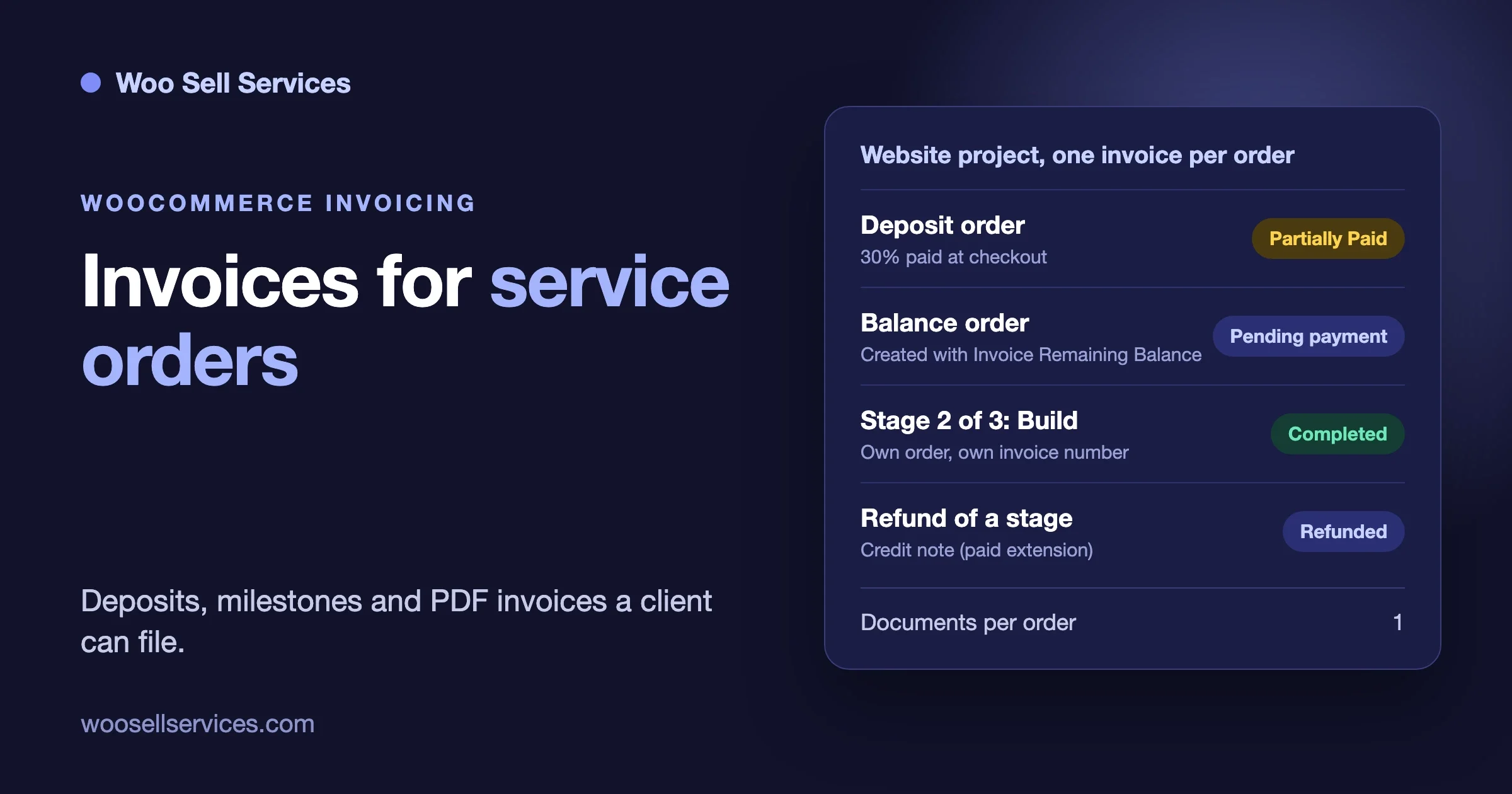
- For a percentage or fixed deposit, an Invoice Remaining Balance button on the order creates a new order for the rest. The customer pays that order online.
- For a payment plan, each future payment gets its own order with the status Scheduled, and the customer receives an invoice when one is due.
- When everything is paid, or marked paid offline, the original order is marked Completed.
Look at what that means for paperwork. A deposit job is not one order. It is a first order plus one or more follow-up orders. Our reading is that an invoice plugin creating a document per order will give you a document per order, so a project with a 30 percent deposit ends with two invoices carrying two numbers. We could not find a statement from the plugin makers on how they treat deposit orders, so test it on a staging site before you sell anything.
Then decide what you want the customer and your accountant to see. There are two common patterns:
Pattern | What the customer gets | Where it fits | Watch for |
|---|---|---|---|
Invoice per payment | One invoice for the deposit, one for the balance | Small projects, simple books | Each invoice must describe what that payment covers, not just “deposit” |
Receipt for the deposit, invoice at the end | A receipt now, the final invoice showing the full price and the deposit already paid | Larger jobs, clients who want one final document | Whether your tax rules treat the deposit as taxable when received. Ask your accountant |
The second pattern needs a plugin that can create receipts or proforma documents. The WP Overnight Professional page lists proforma invoices and receipts. We did not verify how it handles the deposit and balance orders together.
Two more facts from the Deposits documentation affect invoices. First, coupons are split across payments in a set way: on a payment plan the discount is spread across the payments in proportion, while for a fixed deposit the whole discount is deferred to the final invoice. A client who used a coupon will see a final invoice that looks different from the deposit invoice, so write that into your terms. Second, deposits can be refunded, but you refund them by hand from the order.
The Deposits extension is a separate paid product. We read its price as $219 for the one-year plan on 3 November 2026 for our cost breakdown of selling services on WooCommerce, and the product page said manual and automatic recurring payments are not supported in the current version, so card data is not stored.
How do you invoice milestones?
WooCommerce core has no milestone button, and the product pages we read for the service tools do not mention one either. In our guide to fixed price, quote, milestones or retainer we describe the plain approach: sell each stage as its own small product, so each stage has its own order, its own brief and its own delivery.
That approach is friendly to invoicing for one reason. One stage is one order, and one order is one invoice. You get a clean number sequence and a clear description per stage, without relying on a plugin to understand milestones.
The cost is that the customer buys stage two only after approving stage one, so you send them a link or an order-again prompt. Write the stage into the product title so the invoice reads well:
Website project - Stage 2 of 3: Build
Includes: theme setup, 8 templates, checkout styling
Excludes: content writing, photography
Delivered: link to staging site, approval requested
Supply date: date the staging link was sent
If the product description is what prints on the invoice, those five lines tell the client and the accountant what the money bought. Check on staging which product field your template prints: the title, the short description or the full description. Plugins differ here, and we did not verify the default of each.
Numbering needs one decision. The free WP Overnight plugin creates an invoice when it attaches it to an email, and the maintainers say on the forum (28 October 2026) that document numbers exist only after the document has been created. If your accountant wants an invoice number assigned when the stage is marked complete, rather than when the first email goes out, you need the Professional extension to create documents by order status.
How do you invoice retainers and subscriptions?
A monthly care plan or retainer is a recurring order. Our guide to selling retainers with WooCommerce Subscriptions covers the set-up. For invoices, the question is whether each renewal gets its own document. Renewals create new orders in the store, so a plugin that documents orders should document renewals too. We did not test that against any of the three plugins, so run one renewal on staging and look at the number, date and description.
A retainer invoice needs a period on its face: “Website care plan, 1 to 30 November 2026.” Without it the supply date is a guess, and the client cannot match it to the work done. Put the period in the product name or in a field your template prints.
Proforma invoice, receipt, invoice: which one do you send?
Service sellers often send a quote, then a payment link, then a final document. The names get mixed up, so here is how we use them.
- Quote: a price offer. It is not a bill.
- Proforma invoice: a bill-shaped document sent before payment, often so a client can get approval or pay by transfer. The WP Overnight Professional and Flexible Invoices PRO pages both list proforma documents.
- Receipt: proof that a payment arrived. WP Overnight Professional lists receipts.
- Invoice: the tax document, with number, date, supply date and amounts as the rules of your country require.
Whether a proforma counts as a tax document differs by country. Ask before relying on it. If a client asks for an invoice before paying, a WooCommerce order in the Pending payment status plus a plugin that can attach an invoice to the order email is often the simpler route, but check that your plugin allows it. Per the free WP Overnight plugin description, documents attach to the emails you choose, so the choice of email decides the timing.
What about refunds, credit notes and corrections?
Service orders get refunded more than most store owners plan for: a stage is cancelled, a scope shrinks, a client leaves. Our guide to revisions, scope changes and cancellations covers the rules to write down. The invoice side is the document that records the change.
The usual practice in many countries is to leave the original invoice alone and issue a credit note for the refunded amount. Ask your accountant whether your country wants that. On the plugin side:
- WP Overnight lists PDF credit notes for refunds in its Professional extension, with their own numbering option.
- WebToffee marks credit notes as a Pro feature on its plugin page.
- Flexible Invoices lists correction invoices in PRO.
So in all three, the free tier covers invoices and the paid tier covers corrections. If your services see regular refunds, count the paid extension as part of the cost from day one. WooCommerce Deposits adds one more wrinkle: deposits can be refunded, but only manually from the order, so the refund and the credit note are two separate steps.
Where does Woo Sell Services fit?
Woo Sell Services is our product, so read this with that in mind. It turns a WooCommerce product into a service: the buyer pays at the normal checkout, then answers your requirement questions, chats with the seller, receives the file and rates the work, all on the same order. The details are on the features page, and plans start at $59 a year for one site on the pricing page (checked 16 November 2026).
It does not create invoices. Its product page does not mention invoices, deposits or milestones, and we are not going to claim it does any of them. What it gives you for invoicing is indirect: the service name, the brief and the delivery sit on the same WooCommerce order that your invoice plugin documents, so the invoice and the work record share one order number. If you want PDFs, pair it with one of the plugins above. If you want deposits, pair it with WooCommerce Deposits.
The honest con: you still buy and set up a separate invoice plugin, and a separate deposit extension if you want one. Our cost breakdown shows what that adds up to.
Which invoice setup fits which kind of service business?
You sell | Start with | Add when |
|---|---|---|
Fixed-price packages, paid in full | Free WP Overnight plugin with a plain template | You need credit notes or documents on order status |
Large projects with a deposit | Deposits extension plus an invoice plugin; test the two orders | You want receipts or proforma documents |
Staged work, one product per stage | Free plugin; one invoice per stage | Your accountant wants numbers assigned on completion |
Monthly retainers | Subscriptions plus an invoice plugin; test a renewal | You need a period printed on every renewal invoice |
Occasional billing outside the store | Flexible Invoices, which can issue invoices without an order | You want automatic sending (PRO) |
Common mistakes people report
These come from the plugin support forum on wordpress.org. We read the threads on 16 November 2026 and paraphrased them.
- The logo shows in settings but not on the PDF. In a thread from 12 October 2026 the maintainers suggested turning on the Embed images option under PDF Invoices > Advanced > Settings. See the thread.
- PDF creation fails on a small host. A thread from 18 October 2026 about a memory limit problem got the reply to confirm the WP memory limit with the host, since it can only be set from the server. See the thread.
- Bulk PDF generation breaking after an update. A user reported failures in version 5.16.6 on 27 October 2026. The maintainers said they did not plan a fix for version 5, merged one for the upcoming version 6, and asked the user to test a patched build. See the thread. Test every update on staging before a month-end bulk export.
- Expecting numbers on a status change in the free plugin. On 28 October 2026 a user asked to assign invoice numbers on Completed without PDFs. The answer was that the free plugin generates the invoice when it attaches it to an email, and status-based creation needs Professional. See the thread.
- Brief or booking data missing from the invoice. On 16 October 2026 someone asked about WooCommerce Bookings compatibility. The reply said there is no specific integration, but if custom fields are saved to the order they can be printed through a guide on printing custom fields. See the thread. The same idea applies to any service data stored on the order.
- Payment-gateway fees not appearing. On 23 October 2026 a user wanted transaction fees shown on their own copy of the invoice. The reply said that setup is not possible in the free plugin and might be possible with the Customizer in Premium Templates. See the thread.
Notice what is missing from that list: nobody was surprised by the invoice itself. The trouble comes from hosting limits, updates and expecting paid features in the free tier.
What should you test on staging before you sell?
Run one fake order for each way you sell, then read the documents as an accountant would.
- Place a normal fixed-price order. Check the description line, the number, the invoice date and whether a supply date can be shown.
- Place a deposit order and pay the balance. Count the documents, read each number and confirm each description says what the payment covers.
- Apply a coupon to a deposit order. Compare the deposit invoice and the final invoice.
- Refund part of an order. Check what document records it.
- Run a subscription renewal, if you sell retainers. Check the period on the invoice.
- Download the invoice from My Account as the customer. Check that it is the same document you emailed.
- Generate a bulk export for a month. Check it completes on your host.
Keep the results in a short note. When a client disputes a bill in a year, that note and the numbered documents answer most of it.
Frequently asked questions
Do I need a PDF invoice plugin to sell services on WooCommerce?
You need some way to give the customer a numbered invoice. WooCommerce core sends an order email, and the plugin vendors say it does not give you printable invoices in the order admin. A plugin is the usual route.
Is the free WP Overnight plugin enough for services?
For fixed-price orders paid in full, often yes. It gives you sequential numbers, email attachments, My Account downloads and editable templates. Credit notes, proforma invoices, receipts and status-based creation are in the paid Professional extension.
Does a deposit order get two invoices?
The Deposits documentation says the balance is a new order or a scheduled order. A plugin that documents each order should produce one document per order. We did not find this confirmed by the plugin makers, so test it first.
Can I issue an invoice before the customer pays?
Some plugins list proforma invoices for that purpose, and WooCommerce can hold an order in Pending payment. Whether a proforma counts as a tax document depends on your country, so ask your accountant.
What should a service invoice always show?
Using the UK rules as an example: a unique number, your details, the customer’s details, a clear description of what you charge for, the supply date, the invoice date, the amounts, any VAT and the total owed. Check your own country’s list.
Does Woo Sell Services make invoices?
No. It handles the brief, the order chat, the delivery and the rating on the WooCommerce order. You add an invoice plugin next to it.
What we would do first
Install the free WP Overnight plugin on a staging copy, run the seven tests above and write down where the documents fall short of your accountant’s list. If the gaps are credit notes, receipts or numbering on completion, price the Professional extension into the service. If you only sell fixed packages paid in full, you may be done in an afternoon. If you want the brief, the chat and the delivery on the same order as the invoice, see how Woo Sell Services is priced and run it next to your invoice plugin.
Facts about third-party plugins in this guide were read on the vendors’ own pages on 16 November 2026. Prices and versions change, so check the plugin page before you buy.