WooCommerce Subscriptions for Services: Selling Retainers and Recurring Work
How a service business can sell retainers, care plans and recurring work with WooCommerce Subscriptions: what the extension does, a setup plan, and where it stops.


WooCommerce Subscriptions is the official WooCommerce extension for taking payments on a schedule. It was built for boxes, memberships and software, but a service business can use it too. A monthly retainer, a care plan, a weekly social media package and a bookkeeping plan are all “something the customer pays for every month”. This post shows what the extension does, how a service seller can set it up, and where it stops. Facts about the extension come from its own WooCommerce.com product page and documentation index, read on 11 November 2026. The setup advice is ours.
We did not install or test the extension for this post. Where we describe a setup, it is a plan to try on a staging copy of your store, not a tested result.
What is the short answer?
Yes, you can sell retainers and recurring work with WooCommerce Subscriptions. You make a subscription product, set the price and the billing period, and WooCommerce charges the customer on each renewal. The product page lists sign-up fees, free trials, billing date alignment, plan switching, manual renewals, a customer account area, and support for more than 25 payment gateways for automatic renewals.
What it does not do is run the work. It bills. It does not hold a brief, track tasks, store deliverables or cap how many hours a client uses. For a service business, that gap is the real design question, and we spend a good part of this post on it.
What does WooCommerce Subscriptions actually do?
The WooCommerce.com product page for WooCommerce Subscriptions lists these features. We quote its own wording where we can.
- Sign-up fees. You can charge a sign-up fee to cover setup costs. For a service, that maps to an onboarding or audit fee.
- Free trials. Customers can try before they pay. For a service, a trial is a cost to you in time, so use it with care.
- Synchronised renewals. The page says this works through billing date alignment. First payments can be charged in full, on the next billing date or prorated.
- Switching plans. Customers can upgrade, downgrade and cross-grade, with proration rules that you set.
- Manual renewals. Any WooCommerce gateway can be used, and the customer receives an invoice when payment is due.
- Payment gateways. More than 25 are supported for automatic renewals. The page names WooPayments, Stripe, PayPal and PayPal Braintree.
- Customer portal. Subscribers manage plans, details, suspension and cancellation from the My Account area.
- Reports. Sign-ups and retention show in WooCommerce Reports. A Subscriptions Health Check flags renewals that need attention, and Metorik can be connected for deeper analysis.
Version, requirements and reviews on the product page
When we read the page it showed version 9.4.1. It lists PHP 7.4 or higher, WordPress 7.0 or higher (tested with 7.1), and WooCommerce 11.1 or higher (tested with 11.2). The page shows an average rating of 3.9 out of 5 from 143 reviews, with 53 percent giving five stars and 14 percent giving one star. It lists 100K+ active installs. The page does not show a last-updated date. The latest customer review on it was dated 4 November 2026.
That mixed rating is worth a moment. Nearly a fifth of reviewers on the page (18 percent) gave one or two stars. We have not read the reviews closely enough to tell you why, and we will not guess. Read them yourself before you buy, and look for reviews from stores that sell services, not goods.
What does it cost?
The product page lists a one-year plan and a two-year plan, with a 30-day money-back guarantee. Prices on the page appear in your local currency, and when we read it the page showed Indian rupees. For that reason we do not quote a number here. Open the page from your own location to see the price you would pay, and note the date you checked.
Which service businesses should use it?
Use it if your customers pay the same amount on a regular schedule for ongoing work. These are the common fits:
- Care plans and maintenance. A flat monthly fee for updates, backups and checks. We wrote about this model in How to Sell a Website Care Plan as a Product in WooCommerce.
- Content and social packages. A set number of posts or designs each month.
- Retainers. A block of advisory time or support hours, billed monthly.
- Coaching and training. A monthly cohort or session pass.
- Bookkeeping and admin plans. Recurring back-office work for a fixed fee.
It is a weaker fit if each month’s price changes with the work done. A bill that is different every month is closer to invoicing than to a subscription. We cover that case under “Where it stops” below, and in our post on fixed price, quote, milestones or retainer.
How do you set up a retainer as a subscription product?
This is a plan, not a tested recipe. Run it on a staging copy first.
Step 1: Write the plan before you touch the store
Decide what one month of the service includes. Be specific. “Up to 3 hours of changes, weekly backups checked, one plugin update round, one report” is a plan. “Ongoing support” is not. Decide what happens when a client wants more, and put that in writing on the product page.
Step 2: Create the subscription product
In the product editor you choose a subscription product type, set the price and set how often it renews. Add a sign-up fee if you charge for setup or an audit. Skip the free trial for labor-heavy services unless you have a clear limit on what the trial includes.
Step 3: Choose the renewal method
The product page says automatic renewals work with more than 25 gateways, and manual renewals work with any gateway. The documentation index has separate guides called “How the subscription renewal process works” and “How to turn on/off automatic renewals”. Read both before you decide. For most service sellers, automatic card payments are easier on both sides. Manual renewals with an invoice can suit clients who pay by bank transfer or who need a purchase order.
Step 4: Plan the first bill
Billing date alignment lets you charge every client on the same day of the month. The page says first payments can be charged in full, on the next billing date or prorated. Pick the option that matches how you work. If you do onboarding in the first week, a full first charge is simple to explain. If you want a single billing day for easy books, aligned dates help, and you must tell the client how the first month is handled.
Step 5: Collect the brief after payment
A subscription does not ask the customer what they need. Add an intake step after checkout. Our guide to a client intake form has question sets you can copy. Send the form link in the first order email and again on your onboarding day.
Step 6: Decide how the client pauses or cancels
The product page says subscribers can manage plans, suspend and cancel from My Account. Write your own rules for notice and refunds, and show them before checkout. The documentation index also lists guides for subscription statuses, early renewal and resubscribing. Read them to learn what each status means before you promise anything to a client.
Step 7: Test every path on staging
Buy the plan with a test gateway. Let a renewal run. Fail a payment on purpose and see what the customer and you receive. Cancel from the account page. Switch plans. Read the emails the customer gets at each point. The documentation index lists a testing and troubleshooting section, and a failed payment retry guide, which you should read for the exact behavior of your version.
What does a service seller need that Subscriptions does not provide?
This is the heart of the matter. The extension is a billing engine. A service has other needs.
Need | Does Subscriptions cover it? | What to do |
|---|---|---|
Charge on a schedule | Yes, per the product page | Use it |
Collect a brief or intake | Not listed | Add a form after checkout |
Track each month’s work | Not listed | Use a task tool or a service workflow plugin |
Cap hours or requests | Not listed | Write the cap in the plan and track it yourself |
Deliver files or reports | Not listed | Use a delivery method that fits your service |
Revisions and scope changes | Not listed | Write rules and set expectations up front |
Rollover of unused time | Not listed | Decide on a policy and state it |
“Not listed” means the product page did not list it. It does not prove the extension cannot do it. Check with the vendor if one of these is a must for you.
Where does it stop for a service business?
Variable monthly bills
If a client pays for hours used, the amount changes each month. A subscription charges a set amount. You can still use it for a base fee and bill the extra work as a separate order. Or you can skip subscriptions and invoice each month.
Work that has a start and an end
A website build or a one-off audit is a project, not a plan. Sell it as a normal product, a quote or milestone payments. Our post on selling each kind of service on WooCommerce compares those routes.
A client who wants to pay yearly
You can set the billing period for the plan, so a yearly plan is a product choice. Whether to offer one is a business choice: it brings cash in sooner, but you owe a year of service and you must decide on refunds.
Work that must be held until delivery
If you need to hold the payment until the work is delivered, a plain subscription charge does not do that. We cover three ways to do it in WooCommerce hold payment until delivery, the Fiverr way.
What about the rest of your plugin list?
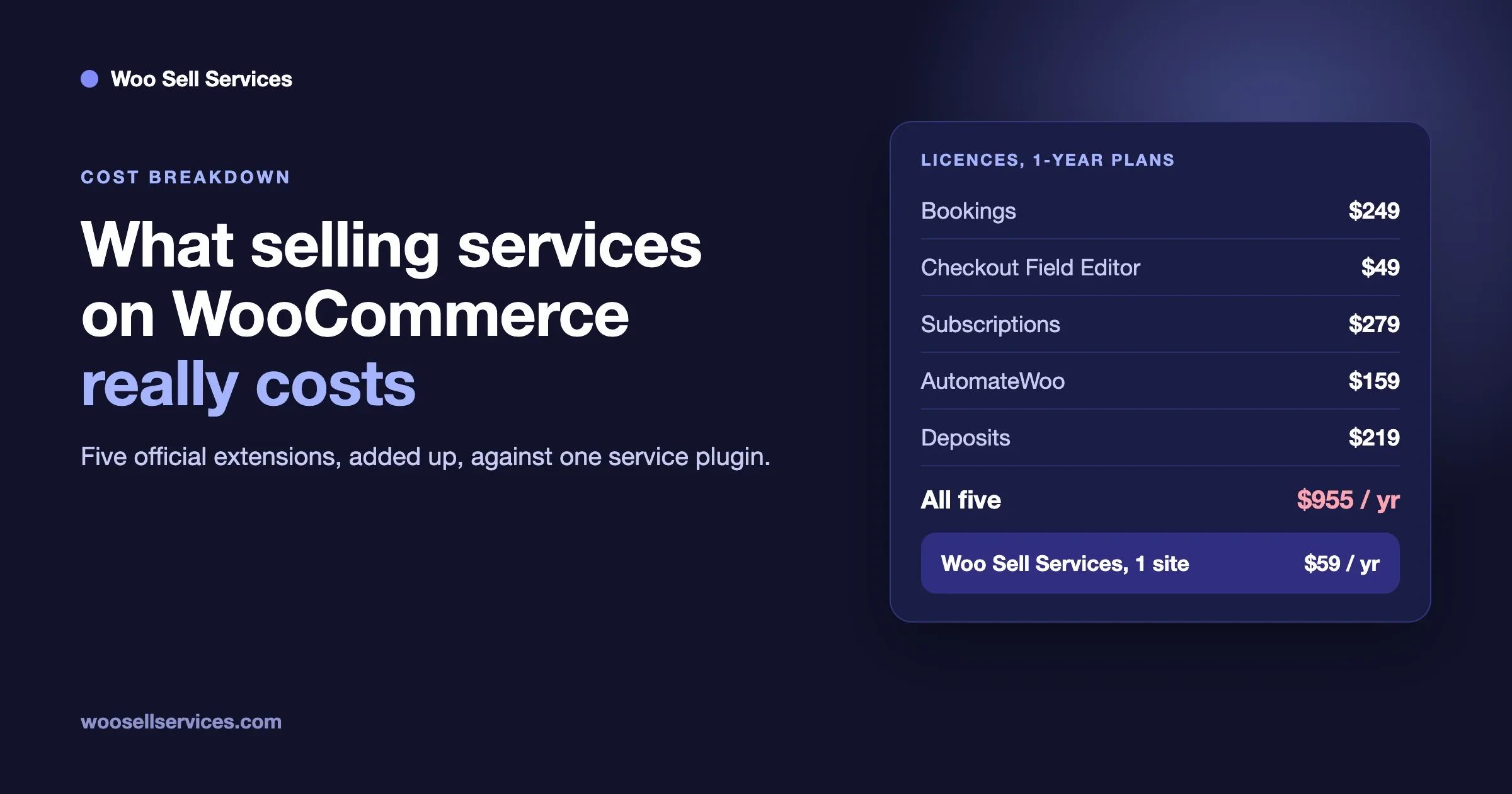
A subscription plugin is one piece of a service store. A typical set also needs a tool for intake, one for delivery, a way to talk to the client, and a way to rate the work. Add them and you can end up with five plugins and five licenses. We worked out one such stack in What Selling Services on WooCommerce Really Costs When You Stitch Five Plugins Together.
Our own product, Woo Sell Services, is made for selling services in WooCommerce. See the features page for what it includes. We say this plainly because we make it. Judge it by that page, and compare it with the others on your own list.
Common problems to expect
These are problems we expect a service seller to hit. They come from how recurring billing works in general, not from a test of this extension.
A card fails and the client does not notice
Cards expire and banks decline payments. The documentation index lists a failed payment retry guide. Read it, then write a short email of your own for the client with a link to update the payment method. Decide how many days you keep working while a payment is late, and put that rule in your terms.
The client wants to skip a month
The product page says subscribers can suspend from My Account. Decide whether your service allows that, and what a pause means for your schedule. If you do not allow it, remove the option from your plan and say so.
The client says the work was not worth it
A subscription makes it easy to leave, which is good for trust. Make it equally easy to see what was done. A short monthly report with the hours, the tasks and the results answers most of these doubts before they turn into cancellations.
The renewal date is the wrong day for your cash flow
Billing date alignment may help here. It puts all clients on the same billing day. Check how first payments are handled so a new client does not get a surprise bill.
You change your price
Plan for this before you have a hundred clients. Decide whether existing clients keep their old price, and for how long. Check the documentation for how a price change on a product affects existing subscriptions, and test it on staging.
A simple way to price a first retainer
We do not invent numbers here, and you should not copy ours. Use this method with your own data.
- List the tasks one client needs each month.
- Estimate the time each takes, using your own logs if you have them.
- Add time for messages, reports and surprises.
- Multiply by your hourly cost, including your own pay.
- Add the license cost of the tools you use for this client, spread over your client count.
- Round to a simple number and set a clear limit on what it covers.
Start with one or two tiers. A third tier can wait until you see what clients ask for.
A worked example: a monthly care plan
Here is how the pieces fit for one common service. The numbers are left out on purpose, because your costs are your own. Treat it as a shape to copy.
- The product. “Care Plan, Standard”, a subscription product that renews monthly.
- The promise, in the product description. Weekly backup checks, one round of plugin and theme updates a month, uptime checks, and up to a set number of small changes. Everything else is quoted separately.
- The sign-up fee. An audit of the site on day one, charged once.
- The intake. After checkout, the client gets a form for site access, a list of key pages, and the person to call in an emergency.
- The monthly rhythm. On a fixed day you run the work, then email a short report. The client can see what was done without asking.
- The exits. The client can cancel from the account page. Your terms say how much notice you need and what happens to work already done.
Notice that only the first, third and sixth items use the subscription extension. The rest are service design. That is the usual shape: the extension handles money, and you handle everything the client actually buys.
Who does what each month?
Recurring billing gives you a steady monthly date. Use it as a work calendar too. On the billing day, the store charges the client. In the days after, you do the work, log it and send the report. A few days before the next billing day, check for clients whose card is about to expire or whose last payment failed, and reach out first. This small rhythm does more for retention than any plugin setting, because the client always sees that something happened for the money they paid.
If more than one person works on your plans, write the rhythm down. Name who runs the work, who sends the report and who answers billing questions. A retainer that depends on one person remembering is a retainer that slips in a busy month.
Should you invoice by hand instead?
For a handful of clients, a monthly invoice from an accounting tool works fine. You do not need a store at all. A subscription store starts to pay off when you have many clients, when you want clients to sign up without talking to you, or when you want the plan to be a product on a page that search engines and AI answers can find.
The cost of a store is the setup, the license and the upkeep. The benefit is that billing runs on its own and clients can manage their plan. Weigh both against your client count and the time you spend on invoices now. If you spend an hour a month on invoices, a license is a bad trade. If you spend two days, it is a good one.
Questions service sellers ask
Can a client pay by bank transfer?
The product page says manual renewals work with any WooCommerce gateway, and the customer gets an invoice when payment is due. That suggests a bank transfer gateway can work for renewals that a person pays by hand. Check the renewal guides and test it before you promise it to a client.
Can I charge a different price for different clients?
You can make different products for different plans. A custom price for one client is a quote. Our post on fixed price, quote, milestones or retainer shows ways to handle that.
Do I need a trial?
Not for most services. A trial means you do work for free, and clients who only want free work are the first to leave. If you want to lower the risk for the buyer, use a short first month at a clear price, or a money-back promise that you state in writing. Read the refund rules for your own country before you publish them.
What if my client is a company that needs an invoice with a tax number?
That is a store and tax setup question, not a subscription question. Check what your invoice and tax tools support, and confirm the rules with your accountant.
How many plans should I sell?
Start with one or two. Every extra plan is something to explain, support and test. Add a plan when three clients in a row ask for the same thing you do not yet offer.
A launch checklist before you sell the first plan
- The plan page states what is included, what is not and what happens when a client needs more.
- Price, billing period and any sign-up fee are shown before checkout.
- Your terms say how to cancel, the notice period and the refund rules.
- You tested a purchase, a renewal, a failed payment, a cancellation and a plan switch on staging.
- The emails the client receives read well and tell them what happens next.
- The intake form is linked from the order email.
- You know where each month’s work is tracked and who sends the monthly report.
- You checked the vendor’s current price and requirements on the day you buy.
What we could not confirm
- We did not install or test WooCommerce Subscriptions, so every setup step above is a plan, not a result.
- We did not read the full renewal, failed payment, status or switching guides. We name them and say what the documentation index says about them.
- We did not read the customer reviews in detail, so we cannot say why some gave low ratings.
- The price depends on your location, and we did not record one.
- The product page shows no last-updated date, so we cannot say how recent version 9.4.1 is.
How can we help?
If you want to sell retainers or recurring work on WooCommerce and would like a setup that handles the service side too, our team can plan it with you and build it. See our WooCommerce customization services and our custom development page, or contact us with a short note about what you sell and how you bill today.
Sources
- WooCommerce Subscriptions, WooCommerce.com product page, read 11 November 2026.
- WooCommerce Subscriptions documentation, WooCommerce.com, read 11 November 2026.