Fiverr-Style Gig Packages on Your Own Site: Basic, Standard and Premium Tiers on Wix, Squarespace, Shopify and WooCommerce
Build Fiverr-style Basic, Standard and Premium packages on Wix, Squarespace, Shopify or WooCommerce: how each handles tiers, the brief, delivery and revisions, with dated prices.

You can copy a Fiverr gig on your own website with a product that has three versions, Basic, Standard and Premium, a way to ask the buyer questions after they pay, and a place to hand over the work. WooCommerce, Shopify, Squarespace and Wix can all do the first part with product variants. They differ on the other three: what happens after payment, where the work is delivered, and how revisions are counted. We read each vendor’s own help and pricing pages on 3 November 2026, and this guide shows what each one gives you and what you will fill in with extra tools or your own process.
- Tiers are easy everywhere. Wix, Squarespace, Shopify and WooCommerce all sell one product in several versions, each with its own price.
- The brief is the first gap. Squarespace and Wix collect answers before payment. Shopify can too, with line item properties. Of the four, only WooCommerce with a services plugin gave us a ready-made brief after payment, which is how Fiverr does it.
- Delivery and revisions are the second gap. In the help pages we read, none of the three hosted builders describes a delivery step with a file hand-off and a revision count.
- Cost shape differs. The hosted builders charge a monthly plan, from $29 a month on the entry plans we checked. WooCommerce itself has no platform fee, and our own add-on starts at $59 a year for one site.
- Who it suits. Hosted builders fit someone who wants to be selling this week. WooCommerce fits someone who wants the order to behave like a job.
What is a Fiverr gig package, exactly?
On Fiverr, a seller can offer up to three packages on one gig: Basic, Standard and Premium. According to Fiverr’s help page on creating and managing Gig packages, each package carries a delivery time in days, a number of revisions and a price. The seller describes what each one includes. A buyer picks one, pays, and then answers the seller’s requirement questions so work can start.
That is the whole pattern, and it is simple. Strip off the marketplace and you are left with four jobs your own site has to do:
- Tiers. Three versions of the same job, each with a price, a delivery time and a revision allowance.
- Brief. Questions the buyer answers so you can start.
- Delivery. A place to hand over files and mark the job done.
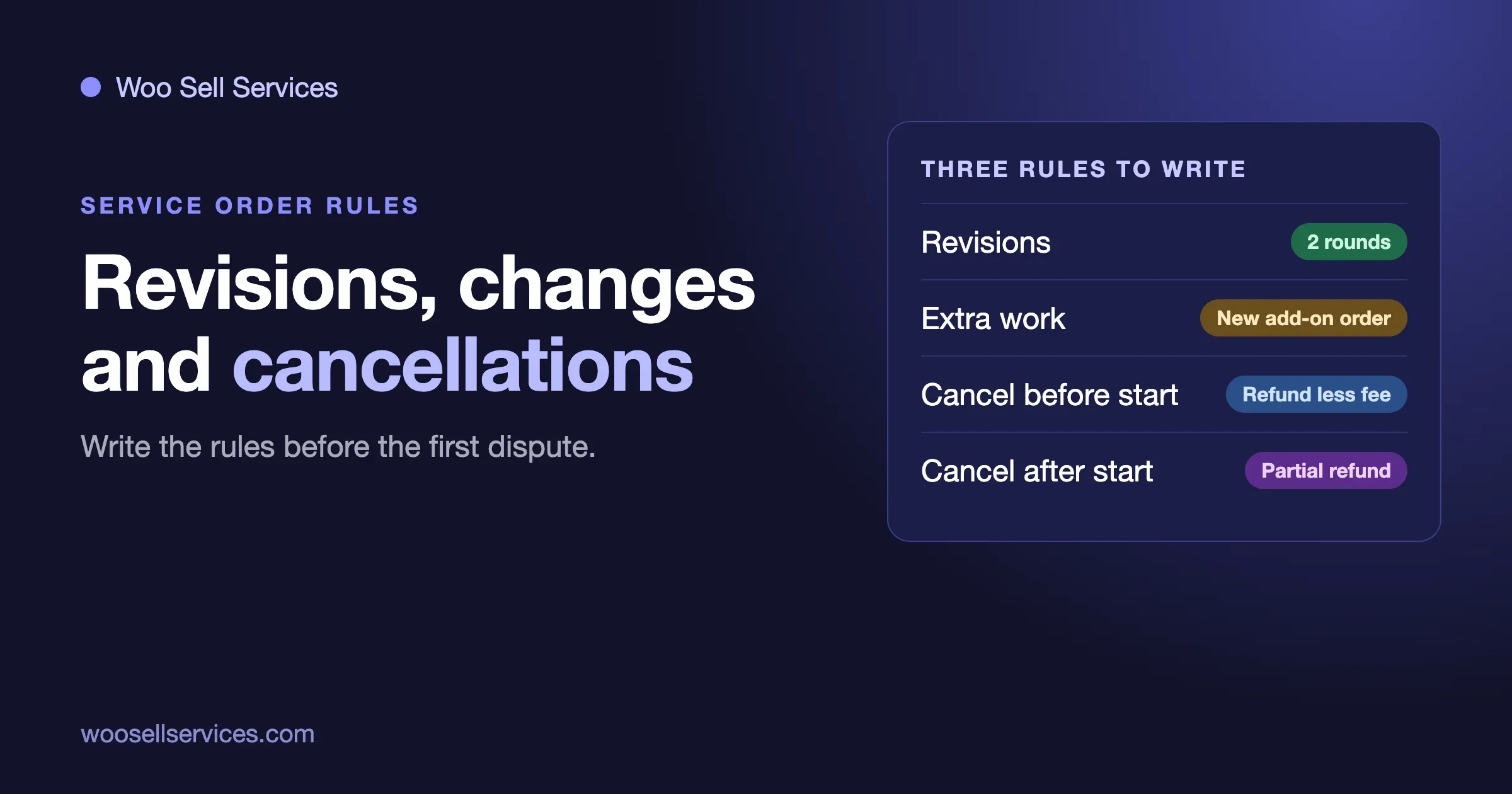
- Revisions. A rule for how many rounds each tier includes and what happens after that.
The rest of this guide scores each platform against those four jobs. We make a WooCommerce plugin for services, Woo Sell Services, so you should know where we stand. We keep our own claims to what is on our product page, and we say where the other platforms do well.
Two earlier guides on this site cover neighbouring ground. Where to Sell Services Online compares marketplaces, hosted tools and your own store on cost and ownership. WooCommerce Hold Payment Until Delivery, the Fiverr Way covers when the money moves. This one stays on the package checkout itself.
How do the four platforms compare on the four jobs?
This table is our reading of each vendor’s own documentation on 3 November 2026. A blank or “not described” means we did not find the feature in the pages we read, not that it cannot be built with an app or custom work.
Job | Wix | Squarespace | Shopify | WooCommerce |
|---|---|---|---|---|
Three priced tiers | Product options and variants | Service products with variants, each with its own price | Product variants | Variable product, one variation per tier |
Variant limits | 6 options, 100 choices per option, 1,000 variants | Not stated on the page we read | Up to 3 options and 2,048 variants | Not capped on the pages we read; three tiers need only one attribute |
Brief before payment | Text-box modifiers on the product page, up to 10 | Add to cart form per product, or a custom checkout form for the whole order | Line item properties, which need theme work or an app | Possible with a form or fields plugin |
Brief after payment | Not described | Not described | Thank-you page extensions exist for developers | Yes, with Woo Sell Services |
Delivery step | Not described | Not described on the service product page | Not described | Yes, with Woo Sell Services: final file attached, marked delivered |
Revision count | Written in the tier text | Written in the tier text | Written in the tier text | Written in the tier text |
Order-level chat and files | Not described | Not described | Not described | Yes, with Woo Sell Services |
Look at the last row of each block. Every platform lets you sell three versions. The difference is how much of the job after payment lives inside the order, and that is what the next four sections walk through.
Can you build gig packages on Wix?
Yes, for the tiers and for collecting information before payment. Wix is a good fit if you already have a Wix site and want a package page up quickly.
How tiers work on Wix
Wix Stores uses product options and variants. A Wix limits page says each product can have up to 6 options, each option up to 100 choices, and up to 1,000 variants per product. For gig packages you need one option, called Package, with three choices. Write what each tier includes in the product description, and put the delivery time and the number of revisions in the choice names or the description so the buyer sees them before paying.
How the brief works on Wix
Wix calls its custom fields modifiers. According to Wix help pages, a modifier can be a text box where the customer types their own text, you can make it required, set a character limit, and add up to 10 on a product. That lets you ask three or four brief questions on the product page, for example the name of the business and the link to the current website. The answers arrive with the order.
The catch: these questions come before payment, and they are short text boxes. A buyer who has not paid yet may skip them or type one word. We did not find a Wix feature that asks a longer set of questions after the order is paid.
Delivery and revisions on Wix
The pages we read describe selling products and take payments, not a delivery hand-off. In practice, most sellers deliver by email or a shared folder link and track revisions by hand. That works for a handful of orders a month. It starts to strain when several jobs are open at once.
What Wix costs
Wix’s own premium plans article lists Core at $29 a month and Business at $39 a month when billed annually, in US dollars, and says Core and above unlock online payments. We could not confirm a per-sale transaction fee from the Wix pages we read, so check the current plan page before you pick.
Can you build gig packages on Squarespace?
Yes, and Squarespace has the most direct fit of the three hosted builders because it has a product type called a service product.
How tiers work on Squarespace
Squarespace’s service products help page describes them as in-person classes and events, or other services you offer. They are not shipped, so customers do not enter a shipping address. You can add variants, and each variant can have its own image, SKU, price and sale price. Buyers can pay once or subscribe, and you can offer payment plans, though a product cannot have both a payment plan and a subscription.
For gig packages, create one service product called, say, Logo Design, and add a Package option with Basic, Standard and Premium variants at three prices. The page we read did not state limits on options or variants, so check the editor if you plan anything larger than three tiers.
How the brief works on Squarespace
You have two choices, and both come before payment. An Add to cart form belongs to one product and collects details when the customer adds it to their cart. A custom checkout form applies to the whole order. Squarespace’s help says answers appear beneath the order summary in the Orders panel, in the order notification emails, and in the orders CSV export. The checkout form is for gathering information for an entire order, so for a question that is about one service, use the Add to cart form.
The Add to cart form is a neat way to ask the brief questions: a file link, brand colours, a deadline. But it still runs before the buyer pays, and we did not find a Squarespace feature for a longer questionnaire after payment.
Delivery and revisions on Squarespace
The service products page says that after purchase there is no shipping, and describes automated campaigns for reminders and follow-ups. It does not describe a delivery step or a revision count. For timed sessions, such as a one-hour consultation, Squarespace points to Acuity appointments, which is a separate scheduling product. A gig package that ends with a file does not need a calendar, so most sellers deliver by email and use the tier text to state the revision limit.
What Squarespace costs
Squarespace’s transaction fee page lists a commerce transaction fee of 2% on the Basic plan and 0% on Core, Plus and Advanced. Squarespace Payments charges 2.9% plus $0.30 on standard US cards on Basic and Core. A US search result of Squarespace’s pricing page showed Basic at $19 a month billed annually and $25 monthly, and Core at $29 annually and $39 monthly. When we loaded the pricing page directly it showed rupees, so treat those dollar figures as a search-result reading and confirm them on your own screen.
Can you build gig packages on Shopify?
Yes for the tiers, and Shopify gives developers the most room for the brief. Without a developer or an app, the buyer experience stays basic.
How tiers work on Shopify
Shopify products have variants. According to Shopify’s announcement and its help centre, a product can have up to 2,048 variants and up to three options. One option called Package with three values is far inside the limit. Each variant has its own price, and you describe the tiers in the product description. A digital or service product on Shopify is still sold through the same checkout as a physical one.
How the brief works on Shopify
Shopify’s developer docs describe line item properties: key and value pairs that a shopper can add on the product form, which then travel with the order and show in the Shopify admin. A theme edit or an app adds the input field. There are also checkout UI extensions that can appear on the thank-you page, one documented use being a short feedback form after the order summary. We did not find a ready-made, no-code, post-payment questionnaire in Shopify’s own documentation, so this part usually means an app from the Shopify App Store or custom work. Read each app’s listing for what it stores and what it costs.
Delivery and revisions on Shopify
Shopify’s order flow is built around fulfilling goods. For a service you can mark an order fulfilled, but we did not find chat, a shared file area or a revision counter in the pages we read. Sellers who do this at volume add apps or a separate client portal.
What Shopify costs
Shopify’s pricing page, as shown in a US search result, listed Basic at $29 a month billed yearly and $39 monthly, Grow at $79 and $105, and Advanced at $299 and $399. It lists a third-party payment fee, charged when you do not use Shopify Payments, of 2% on Basic, 1% on Grow and 0.6% on Advanced. Our own direct load of the page showed rupees, so we used the US search reading for dollars. Trial offers change, so read the page on the day.
Can you build gig packages on WooCommerce?
Yes, and this is the route where the order itself can behave like a Fiverr order. It is also the route that takes the most setup, because WooCommerce is software you host rather than a service you rent.
How tiers work on WooCommerce
A WooCommerce variable product with one attribute, Package, and one variation per tier gives you three prices, three descriptions, and a cart that shows the tier chosen. Our start-to-finish guide walks through the clicks. WooCommerce’s own product page describes the platform as having no monthly platform fees, with extensions and hosting paid separately.
How the brief, delivery and chat work with Woo Sell Services
Woo Sell Services is our add-on for WooCommerce. According to its product page (version 5.8.8, updated 21 October 2026), the order flow runs like this:
- The service is a normal product in your catalog, with an estimated delivery time. A Service checkbox sits in the product data panel and works on simple, variable, grouped and external products, so the tiers are ordinary variations.
- After the buyer pays, they answer your requirement questions. You can save a question set and reuse it on your next service.
- Chat, shared files and a status tracker live on the order, with notifications to both sides and an email to the seller on each new order.
- The seller attaches the final file and marks the order delivered. Ratings follow, and the vendor rating syncs to the standard WooCommerce product review.
That covers the brief after payment, the delivery and the conversation. It matches the Fiverr order pattern, and it all sits inside the WooCommerce order a buyer already sees in their account.
What it does not do, according to the product page: it does not count revisions for you, and it does not hold or release money on delivery. Revision rules stay in the tier text and in your terms, which our guide on revisions, scope changes and cancellations covers. How to hold a payment until delivery is a separate topic, covered in the guide linked above.
What WooCommerce costs
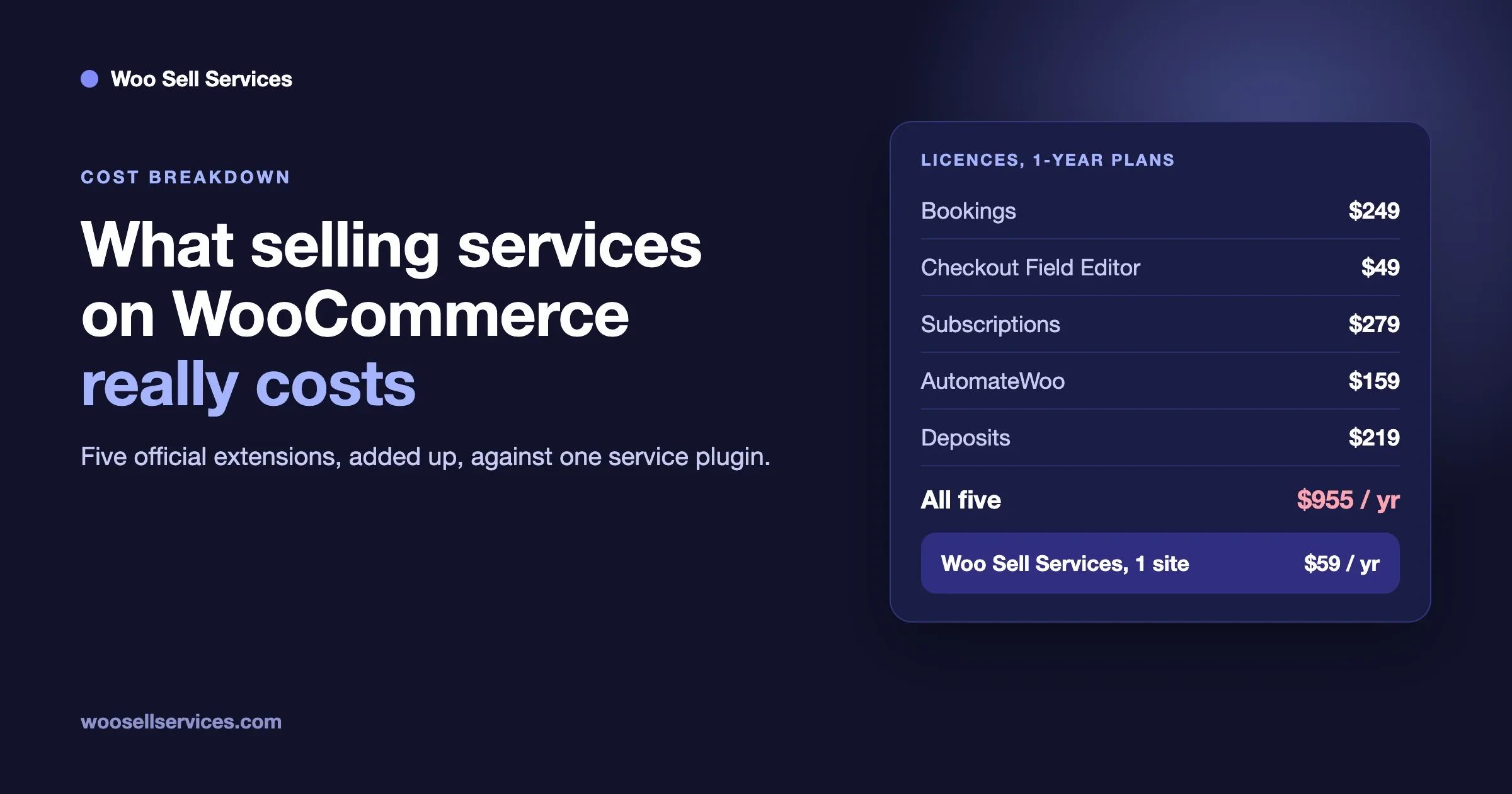
WooCommerce itself costs nothing to download, and you pay for hosting, a domain and payment processing. Woo Sell Services lists Personal at $59 a year for one site or $199 once, Professional at $129 a year for five sites or $299 once, and Agency at $299 a year for unlimited sites or $499 once. Every plan has the full feature list; the tier only sets the site count. Renewals after the first year are billed at 30 percent of the base price, according to our own product page. There is a 30-day money-back guarantee.
What does each platform cost for a year?
Prices below are the lowest plan on each platform that accepts payments, using the figures above. We leave out payment processing, because every route has some, and hosting for WooCommerce, which varies by provider.
Platform | Entry plan we checked | Per month, billed annually | Per year | Notes |
|---|---|---|---|---|
Wix | Core | $29 | $348 | Core and above accept online payments |
Squarespace | Core | $29 | $348 | 0% commerce transaction fee on Core; Basic at $19 has a 2% fee |
Shopify | Basic | $29 | $348 | 2% third-party payment fee if you do not use Shopify Payments |
WooCommerce with Woo Sell Services | Personal | Not monthly | $59 plus hosting | First year; renewals at 30% of base price. Hosting and domain extra |
Two things to read into this. First, the three hosted builders cost about the same at entry level, so pick on features and on how you want to deliver. Second, the WooCommerce figure looks smaller, but you add hosting and your own set-up time, so it is not a like-for-like saving. Our cost guide shows the full yearly cost of several WooCommerce set-ups, including the official extensions people stitch together.
Which platform should you pick?
Pick on the work you do, not on the logo.
- You sell something that is quick and well scoped, such as a logo, a short audit or a proofreading job, you already have a Squarespace or Wix site, and you can live with a short brief before payment. Use the platform you have, build the tiers as variants, and deliver by email.
- You already run a Shopify store and add a service line next to products. Build the tiers as variants and plan for an app or a developer for the brief.
- Your work has steps: a brief, a conversation, files going both ways, a delivery and often a second round. WooCommerce with a services plugin keeps all of that on one order page. This is also the route if you want to own your customer list and avoid a monthly platform plan.
- You want other sellers on the site, with commissions. That is a marketplace, which none of the three hosted builders is made for. See our guide to services marketplaces on WooCommerce.
None of this makes the hosted builders wrong. If a one-page store and an email address are all your service needs, a hosted builder gets you selling faster than WooCommerce.
How do you write tiers that buyers can compare?
A package page fails when the three versions are hard to tell apart. Fiverr’s fields give you a pattern that works on any platform. Fill in the same four lines for every tier, in the same order:
Line | Basic | Standard | Premium |
|---|---|---|---|
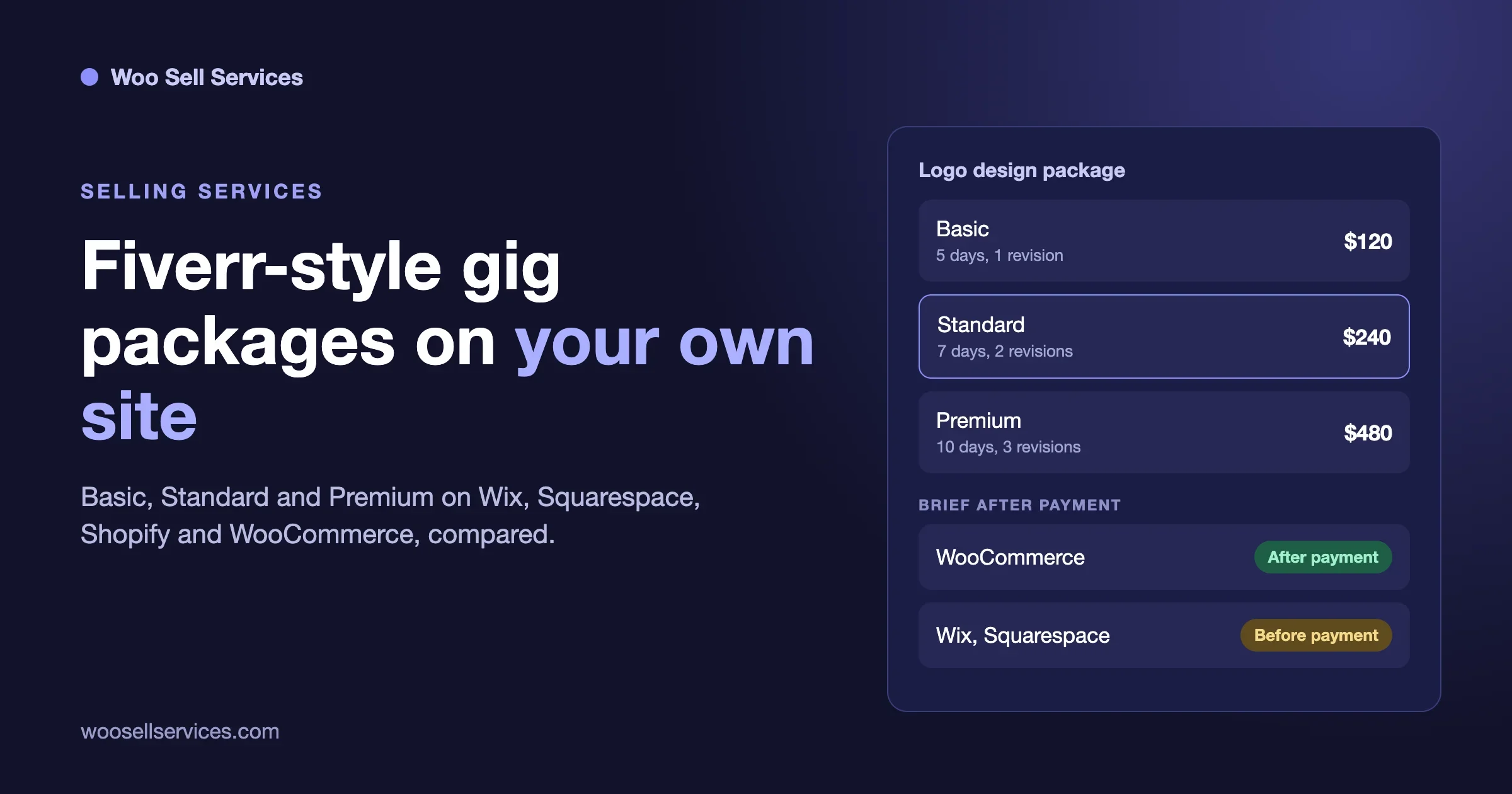
What you get | One logo concept | Three concepts and a one-page style sheet | Five concepts, style sheet and social images |
Delivery | 5 days | 7 days | 10 days |
Revisions included | 1 round | 2 rounds | 3 rounds |
Price | $120 | $240 | $480 |
The numbers are an example, not a recommendation. What matters is that the lines match from tier to tier, so the buyer compares like with like. A few rules help:
- Name what is not included. One sentence under the table prevents most scope arguments later.
- Keep price steps sensible. A community post on Fiverr warns against a huge gap between tiers; a $20 Basic next to a $2,000 Premium confuses buyers.
- Make Standard the one you want to sell. Most buyers pick the middle.
- Put the revision count where the buyer sees it before paying, and repeat it in your confirmation email.
How do you test your checkout before you take real orders?
Whatever platform you choose, place one test order as a stranger would. It takes ten minutes and catches most problems.
- Open the product page on your phone. Can you tell the three tiers apart without scrolling back and forth?
- Pick Standard, answer the brief questions that come before payment, and pay with a test card or a low-value real order you refund.
- Check what the buyer sees next. Is it clear what happens now, and when to expect delivery?
- Check what you see. Do the tier, the answers and the buyer’s contact details all arrive in one place?
- Deliver a file. Where does it go, and does the buyer get a message?
- Ask for a revision. Who counts it?
If step three or five takes you to email, you have found where your set-up leans on you doing manual work. That is fine at five orders a month and costly at fifty.
Frequently asked questions
How do I offer Basic, Standard and Premium packages on my own website?
Create one product with a Package option and three variants, one per tier, each with its own price and description. Wix, Squarespace, Shopify and WooCommerce all support this. Then decide how you will collect the brief, deliver the work and count revisions, because those parts differ by platform.
Can I ask the buyer questions after they pay?
On WooCommerce with Woo Sell Services, yes: the buyer answers your requirement questions straight after payment. On Wix and Squarespace the questions we found sit on the product page or at checkout, before payment. On Shopify it usually means line item properties, an app or developer work.
Does Squarespace have a product type for services?
Yes. Squarespace has service products, which are not shipped and can have variants with their own prices, an Add to cart form, subscriptions and payment plans. For timed sessions it points to Acuity appointments.
How many variants can one product have on each platform?
Wix lists up to 6 options, 100 choices per option and 1,000 variants per product. Shopify lists up to 3 options and 2,048 variants. We did not find a stated cap on the Squarespace page we read. Three tiers use a tiny fraction of any of these limits.
How do I handle revisions without a revision counter?
Write the number of included rounds into each tier, say what counts as a round, and say what happens after the last one. Repeat that in your order confirmation. Our revisions guide has wording you can copy.
Which is cheapest, Wix, Squarespace, Shopify or WooCommerce?
The entry plans we checked on Wix, Squarespace and Shopify are all about $29 a month billed annually. WooCommerce has no platform fee, but you pay for hosting, a domain and any add-ons, and Woo Sell Services starts at $59 a year. The cheapest option depends on how much of the set-up you do yourself.
Do these platforms hold the buyer’s money until delivery like Fiverr?
Not by themselves. Fiverr holds payment until delivery as a marketplace. On your own site you control when a payment is captured, which depends on your payment provider. Our guide to holding payment until delivery on WooCommerce covers the options.
Is it worth leaving Fiverr for my own site?
Often, once you have repeat clients. A marketplace brings buyers; your own site brings the customer list and lets you set the rules. Where to Sell Services Online sets out how to decide.
If WooCommerce is your route, the Woo Sell Services page has the live demo and the plans, and our pricing page lists every tier. If you want a store built around your own packages, our team can help through the custom development page.