What Selling Services on WooCommerce Really Costs When You Stitch Five Plugins Together
Five official WooCommerce extensions for services total $955 a year in licences. See what each does, what is still missing, and four set-ups with their real yearly cost.

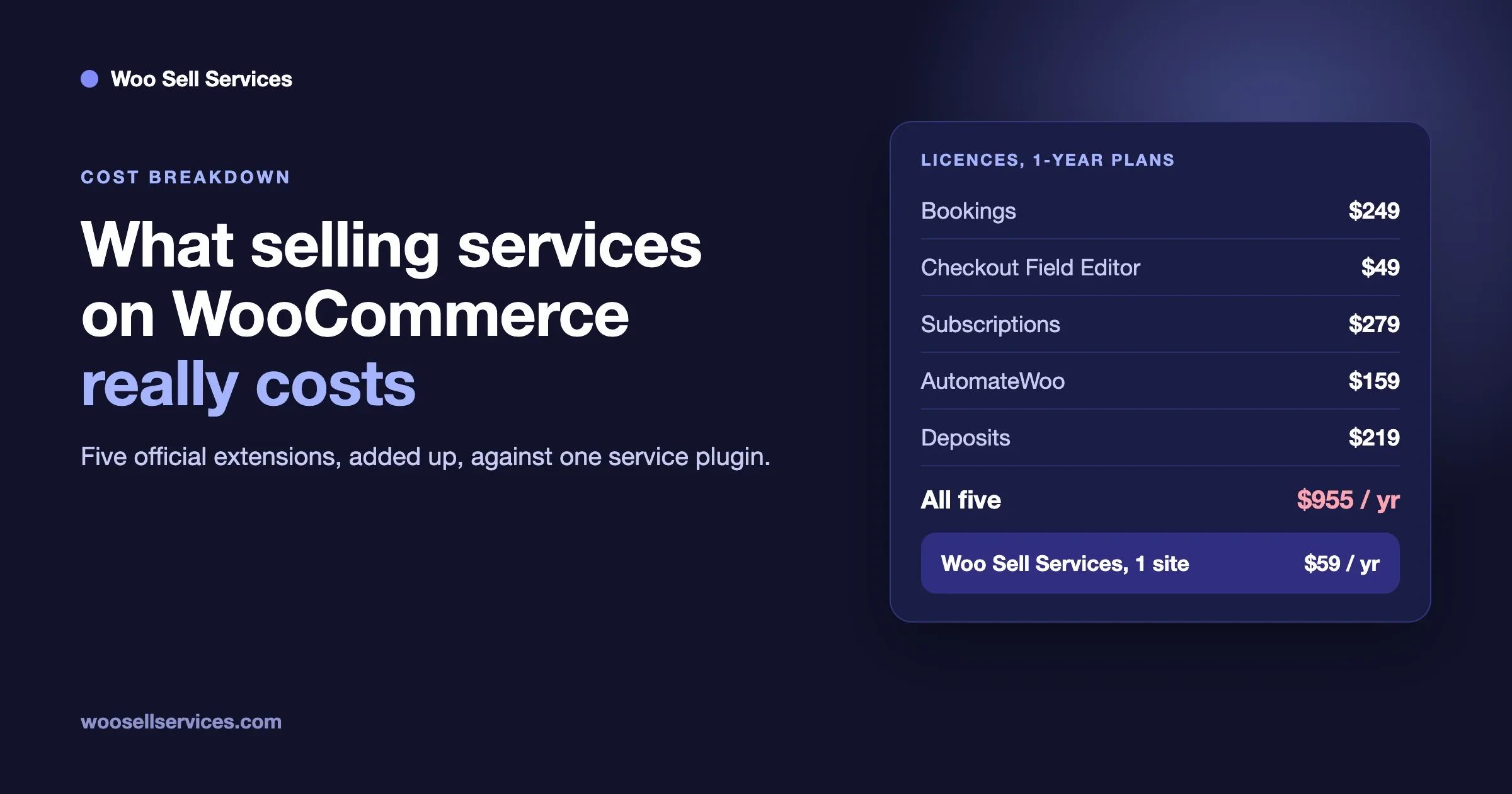
Selling services on WooCommerce with the official extensions costs $955 a year in licences for the five most often recommended ones, and it still does not give you a client chat, a delivery step or a review. That total is Bookings ($249), Checkout Field Editor ($49), Subscriptions ($279), AutomateWoo ($159) and Deposits ($219), each on its one-year plan, read on woocommerce.com on 3 November 2026. One service plugin, Woo Sell Services, costs $59 a year for one site and covers the brief, the order chat, the file handover and the review. It does not replace Bookings, Subscriptions or Deposits, so the honest answer depends on what you actually sell.
This guide adds up the real prices, shows what each of the five extensions does for a service business, names the gaps that are left, and lays out four common set-ups with their yearly cost. We make Woo Sell Services, so we are not neutral. We have kept every third-party number to what woocommerce.com shows, and we say plainly where the official extensions are the right tool.
- Five WooCommerce extensions on their one-year plans total $955 a year in licences. On two-year plans, the total is $1,528.00.
- Each of the five solves one job: time slots, extra checkout fields, recurring billing, automated emails, or deposits. None of their product pages describes a client chat on the order, a delivery step or a review.
- Woo Sell Services is $59 a year for one site, or $199 once for a lifetime licence. It adds the part after payment: the brief, the order chat, shared files, a status tracker, final delivery and a review.
- Woo Sell Services does not book calendar slots, take deposits or run marketing automation. If you need those, you still need the matching extension.
- The cheapest set-up is the one that matches how you sell. A fixed-price service with a brief needs far less than an appointment business with deposits.
What does it really cost to sell services on WooCommerce?
WooCommerce itself is free, and it was built for products. A service has a different shape. The customer pays, then you need to learn what they want, agree a date, talk to them while you work, send the finished files and ask for a review. Out of the box, WooCommerce stops at “order complete”.
The usual advice, and the answer you get from most AI assistants when you ask how to sell consulting or design on WooCommerce, is to add extensions one at a time. A booking plugin for slots, a form plugin for questions, a subscription plugin for retainers, an automation plugin for follow-ups, and a deposit plugin for big jobs. Each one is a good product. The cost problem is what happens when you buy all five.
The five licences, added up
These are the prices on woocommerce.com in US dollars on 3 November 2026. Woo shows prices by your location, so you may see a different currency. Every extension is sold as a one-year plan or a two-year plan.
Extension | What it is for | 1-year plan | 2-year plan (20% off) | Version read |
|---|---|---|---|---|
WooCommerce Bookings | Appointments, reservations and classes with bookable slots | $249 | $398.40 | 3.13.0 |
Checkout Field Editor | Add, remove or edit fields on the checkout | $49 | $78.40 | 1.7.28 |
WooCommerce Subscriptions | Weekly, monthly or yearly recurring billing | $279 | $446.40 | 9.3.0 |
AutomateWoo | Workflows made of triggers, rules and actions, such as follow-up emails | $159 | $254.40 | 6.9.4 |
WooCommerce Deposits | Deposits and payment plans | $219 | $350.40 | 2.4.8 |
All five | $955 | $1,528.00 |
One thing we could not confirm from the product pages is what each extension costs at renewal. Woo shows the plan price, not a renewal price, so we have not guessed at one. Check your cart before you buy.
The cost the price tags do not show
Licences are the visible part. The rest is harder to put a number on, so we will not invent one. It is still real.
- Five sets of settings. Each extension has its own screens, its own vocabulary and its own way of attaching to a product.
- Five release schedules. The product pages list different minimum versions. Bookings, Subscriptions and AutomateWoo each ask for WordPress 7.0, Deposits asks for WordPress 6.9, and the WooCommerce minimums range from 3.4 for Checkout Field Editor to 11.1 for Bookings and AutomateWoo. A store has to keep all five compatible at the same time.
- Five places to ask for help. When a checkout breaks, you first work out which of the five is the cause.
- Your time. Gluing five products to one service is a project in its own right.
What does each of the five actually do for a service business?
Be fair to each one. They are the official extensions, and each does its own job well. The question is how much of a service sale each one covers.
WooCommerce Bookings: for services sold by the slot
Bookings lets customers pick a date or a time slot for an appointment, a reservation, a rental or a class. Its page lists fixed slots or flexible ranges, group and individual pricing, resources such as staff, rooms or equipment with their own availability, and Google Calendar sync. If you sell a one-hour consultation or a fitting that happens at a set time, this is the right tool and nothing else on this list replaces it. It does not carry the brief, the files or the delivery after the booking is made.
Checkout Field Editor: for questions at the checkout
Checkout Field Editor adds, removes and edits the fields on the WooCommerce checkout. For a service, that means you can ask for a website address or a project name while the customer pays. It is the cheapest of the five at $49 a year. The limit is the place: questions on the checkout page are answered before the buyer has committed, and long briefs make a checkout longer. It does not give you anywhere to continue the conversation once the order exists.
WooCommerce Subscriptions: for retainers and care plans
Subscriptions charges customers weekly, monthly or yearly and works with over 25 payment gateways, according to its page. For a monthly retainer or a website care plan it is the standard answer. At $279 a year it is also the most expensive of the five. It handles the billing, not the work: each renewal is a new order, and nothing in its description joins those orders into one conversation.
AutomateWoo: for follow-up and lifecycle emails
AutomateWoo builds workflows from triggers, rules and actions. Its own example is “only trigger the workflow for orders with a total above $100”. Actions include sending an email or changing an order status, and SMS needs a paid Twilio account. For services it can send a reminder when a brief has not arrived or a thank-you after delivery. Its page describes it as best for post-purchase and lifecycle marketing. It is a marketing tool and does not run the service itself.
WooCommerce Deposits: for large jobs paid in stages
Deposits lets customers pay a deposit or follow a payment plan for the products you choose, with variable percentages and intervals. For a large project it takes the pressure off a single big payment. The page notes that manual and automatic recurring payments are not supported in the current version. It is a payment tool, so the delivery side stays empty.
What is still missing after all five?
This is the part that surprises people. After you have bought all five, a customer can book a slot, answer extra checkout questions, pay a deposit, subscribe and receive an automated email. Then the order exists, and the work starts. Where does the customer send the files you asked for? Where do you reply? Where do you hand over the finished work, and where do they say it is good?
We read the product pages for all five. None of them describes a chat on the order, shared files between buyer and seller, a delivery step with a final file, or a review of the seller. Those are not faults. They are simply outside what those extensions are for. In practice the work then moves to email, and the order in WooCommerce stays at “processing” until someone marks it complete by hand.
That is the gap a service plugin fills.
What does Woo Sell Services cover?
Woo Sell Services is our addon for WooCommerce. Everything below comes from its product page, version 5.8.8, updated October 2026.
- It adds a Service checkbox to the Product data panel, beside Virtual and Downloadable. It works on simple, variable, grouped and external products.
- The service is a normal product in your catalog with an estimated delivery time, paid for at the checkout you already run.
- You attach requirement questions to the service. The buyer answers them after payment, so work starts when the brief is on the record. Question sets can be saved and reused on the next service.
- Chat, shared files and a status tracker sit on the order, with notifications to both sides and an email to the vendor on each new order.
- The seller attaches the final file and marks it delivered. The buyer then rates the vendor, and that rating syncs to the standard WooCommerce product review.
- The delivery date can be changed later from the service page.
- With WooCommerce Subscriptions active, a service can be sold as a recurring plan, with every renewal kept in one conversation thread.
- For marketplaces, it works with Dokan, WCFM and WC Vendors, and a vendor can add a co-author or a support agent to a service or a single order.
It does not list calendar slots, deposits, checkout field editing or marketing automation. If you need slots or deposits, you still need Bookings or Deposits. What it takes off the list is the middle of the work: the brief, the thread and the handover.
What it costs
From the same page: Personal covers 1 site at $59 a year or $199 once for a lifetime licence. Professional covers 5 sites at $129 a year or $299 lifetime. Agency covers unlimited sites at $299 a year or $499 lifetime. Every plan has the full feature list, and the tier only sets the number of sites. Every renewal after the first year is billed at 30 percent of the base price, so the Personal annual plan renews at $17.70. There is a 30-day money-back guarantee.
Four common set-ups and what each costs a year
Here is the arithmetic for the kinds of service we see most. These use one-year prices from woocommerce.com and the Personal plan for Woo Sell Services. They are licence totals only.
What you sell | What you need | Licences, first year |
|---|---|---|
A fixed-price service with a brief, such as a logo, an audit or a migration | Woo Sell Services | $59 |
The same, plus a monthly retainer or care plan | Woo Sell Services and Subscriptions | $338 |
The same fixed-price service with a deposit on larger jobs | Woo Sell Services and Deposits | $278 |
Appointments by the slot, such as consulting calls or fittings | Bookings. Add Woo Sell Services if you want the brief and the thread | $249, or $308 with Woo Sell Services |
Everything above, with automated follow-ups and extra checkout fields | All five, plus Woo Sell Services for the delivery side | $1,014 |
The last row is worth reading twice. Buying all five and adding a service plugin on top is the most expensive way to sell a service, and most small shops never need it. Most freelancers who sell a fixed-price service need the first row.
Which route should you choose?
It comes down to one question: how does your customer buy?
- They buy a defined piece of work and send you information. A service plugin is the shortest path. The brief, the thread and the handover are the whole job, and a $59 licence covers them.
- They pick a time with you. Bookings is the right tool. Pay for it, and add a service plugin only if you also need a place to continue the work.
- They pay every month. Subscriptions is the billing engine for that. Woo Sell Services works with it and keeps each renewal in one thread, so you can use both.
- They pay in stages. Deposits is the payment tool. Again, pair it with whatever runs the work.
- You want marketing flows after every sale. AutomateWoo is built for it. It is not required for selling a service.
If you are weighing where to sell at all, our guide on where to sell services online compares a marketplace, a hosted tool and your own store. If you already know it is WooCommerce, how to sell services with WooCommerce, start to finish walks the set-up, and fixed price, quote, milestones or retainer helps you pick the pricing shape. For a recurring offer in particular, see how to sell a website care plan as a product in WooCommerce.
A fair comparison: five extensions or one service plugin
Five official extensions | Woo Sell Services | |
|---|---|---|
Licences, first year | $955 | $59 (Personal, 1 site) |
Calendar slots and resources | Yes, with Bookings | Not listed |
Recurring billing | Yes, with Subscriptions | Works with Subscriptions |
Deposits and payment plans | Yes, with Deposits | Not listed |
Automated emails and SMS | Yes, with AutomateWoo | Order notifications and a vendor email on each new order |
Questions for the buyer | At checkout, with Checkout Field Editor | After payment, as saved question sets |
Chat and files on the order | Not described on the product pages | Yes |
Final delivery and review | Not described on the product pages | Yes, rating syncs to the WooCommerce review |
Vendors and marketplaces | Not their purpose | Works with Dokan, WCFM and WC Vendors |
Vendors you deal with | Woo is the vendor of all five | One vendor, Wbcom Designs |
What one order looks like, with and without a service plugin
Picture a brand identity package at a fixed price. This is an illustration, not a customer story. It shows where the five extensions stop and where a service plugin starts.
With the extensions alone
The customer adds the package to the cart. If you installed Checkout Field Editor, they type a company name and a website address while paying. If you installed Deposits, they pay part now and the rest later. WooCommerce sends the standard order email and the order sits at “processing”. Everything else happens in your inbox. You ask for logos and brand colours by email. The customer replies with attachments, sometimes in three separate messages. You send drafts by email or a file sharing link. When you finish, you mark the order complete by hand, and the customer has no place on the order to say how it went.
Nothing is broken here. It works, and many shops run this way for years. The cost is attention. Every service order is a small email project, and the order in WooCommerce does not tell you where the work is.
With a service plugin
The customer buys the package at your normal checkout. Straight after payment, the order shows your saved question set: the company name, the style they like, the files to upload. The estimated delivery date sits on the order. You reply inside the order thread and attach drafts there, and both sides get a notification. When you are done, you attach the final file and mark it delivered. The customer rates the work, and the rating appears as a review on the product page.
The difference is not the number of features. It is that the order itself tells both of you where things stand. That is what a service plugin is for, and none of the five extensions was built to do it.
Do you need both?
Sometimes, yes. A studio that sells monthly design retainers with a deposit on large projects may well want Subscriptions and Deposits next to a service plugin. They solve different problems: how the customer pays, and how the work is run. The mistake is buying five payment, form and marketing tools and expecting them to run the work.
A plain way to test it before you spend
You do not need to guess. Take your best-selling service and walk it through as a customer.
- Write down every step from “I want this” to “I received it and I am happy”.
- Next to each step, write which tool handles it today. Be honest about the steps that happen in email.
- Circle the steps that happen outside WooCommerce. Those are where customers wait and where you lose track.
- Price only the tools that fix a circled step. Skip the rest.
Most shops find two or three circles, not five. That is how a $955 shopping list becomes a $59 or $338 decision.
Frequently asked questions
What is the best way to sell services like consulting or design on my own WooCommerce site?
Match the tool to how the customer buys. For a fixed-price piece of work with a brief and a handover, a service plugin such as Woo Sell Services covers the whole order for $59 a year. For appointments by the slot, WooCommerce Bookings is the right tool. For monthly retainers, add WooCommerce Subscriptions. You do not need all five popular extensions to start.
How much do the official WooCommerce extensions for services cost?
On woocommerce.com on 3 November 2026, the one-year plans are Bookings $249, Checkout Field Editor $49, Subscriptions $279, AutomateWoo $159 and Deposits $219, which is $955 for all five. The two-year plans come to $1,528.00 for all five after a 20 percent discount on each.
Do I need WooCommerce Bookings to sell consulting?
Only if customers pick a time slot from a calendar. If you sell a defined piece of work, such as an audit or a design package, with a delivery date instead of an appointment, you do not need a booking calendar.
Does Woo Sell Services replace WooCommerce Subscriptions?
No. It works with Subscriptions. When Subscriptions is active, a service can be sold on a recurring plan and every renewal order is kept in one conversation thread. The billing itself is handled by Subscriptions.
Does Woo Sell Services take deposits or book calendar slots?
Not according to its product page, which lists neither. Use WooCommerce Deposits or Bookings alongside it if you need those.
How much does Woo Sell Services cost?
Personal, for 1 site, is $59 a year or $199 once. Professional, for 5 sites, is $129 a year or $299 once. Agency, for unlimited sites, is $299 a year or $499 once. All plans include every feature, and renewals after the first year are 30 percent of the base price.
Where do clients send files and messages with the five extensions alone?
The product pages do not describe a place on the order for this. Most shops end up using email, which keeps the conversation outside the WooCommerce order. A service plugin puts the thread, the files and the delivery on the order itself.
Can I try Woo Sell Services first?
Yes. The product page links to a live demo, and every plan has a 30-day money-back guarantee.
Where to go next
If you sell a defined piece of work and want the brief, the thread and the handover on the WooCommerce order, see the Woo Sell Services product page for the live demo and plans, or compare the tiers on our pricing page. If you would like help building a larger service store, our custom development page explains how a project starts. Prices for third-party products were read on woocommerce.com on 3 November 2026 and can change, so check each page before you buy.